Desert Online General Trading LLC
Dubai, United Arab Emirates
Desert Online General Trading LLC
Dubai, United Arab Emirates


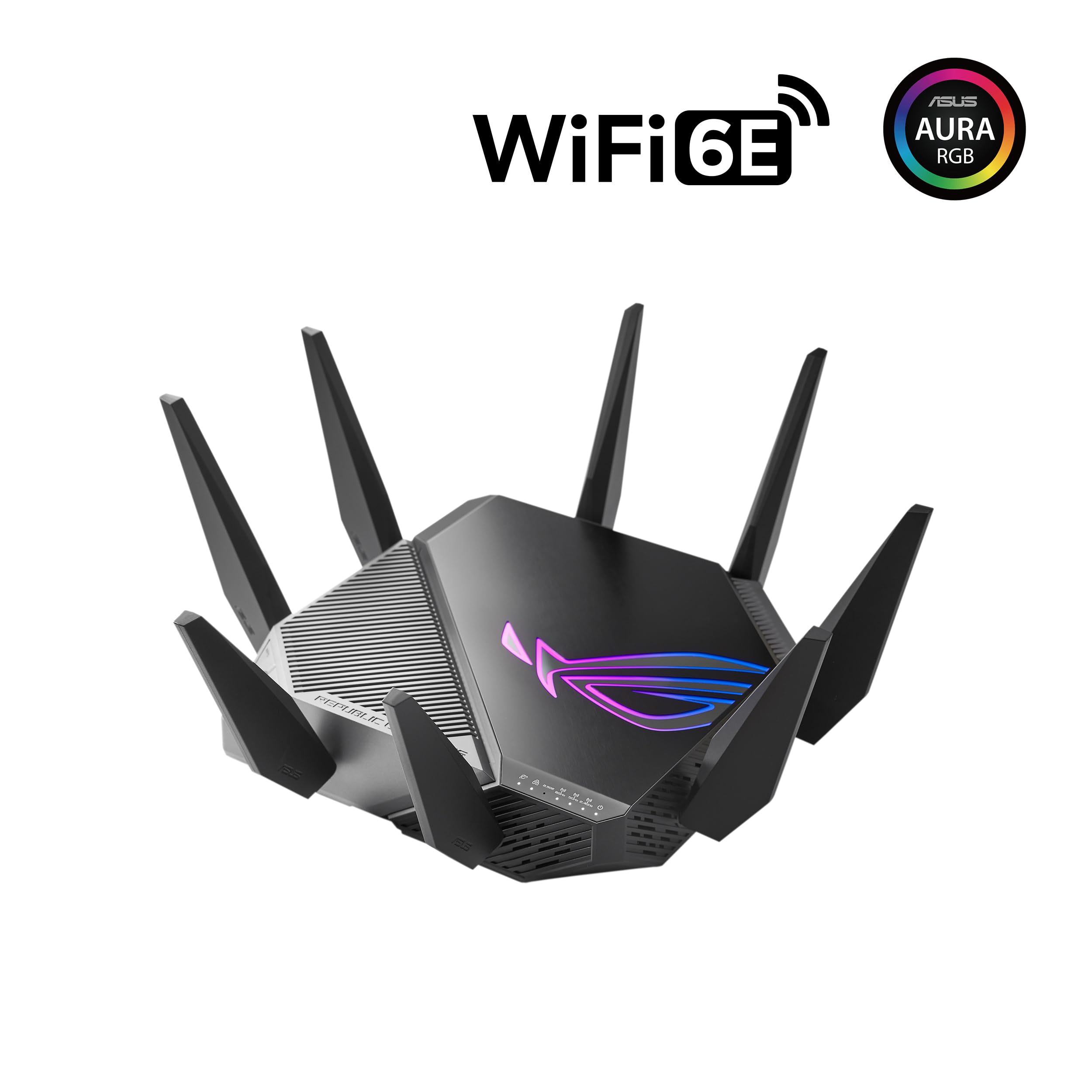


🎮 Dominate your digital domain with the ultimate WiFi 6E gaming router!
The ROG Rapture GT-AXE11000 is a tri-band WiFi 6E router delivering up to 11000 Mbps speeds with a dedicated 6GHz band, a 2.5G LAN/WAN port for prioritized traffic, and triple-level game acceleration. Equipped with a quad-core CPU, advanced cooling, and AiMesh compatibility, it offers subscription-free network security and VPN Fusion for a seamless, secure, and ultra-fast gaming and streaming experience.
| Number of Ports | 8 |
| Control Method | App |
| Data Transfer Rate | 11000 Megabits Per Second |
| LAN Port Bandwidth | 2500 Mbps |
| Voltage | 100240 Volts |
| Number of Antennas | 4 |
| Is Electric | Yes |
| Recommended Uses For Product | Gaming |
| Connectivity Technology | Ethernet |
| AntennaType | Fixed |
| Security Protocol | WPS |
| Additional Features | WPS |
| Frequency Band Class | Tri-Band |
| Wireless Compability | 802.11ax |
| Compatible Devices | Personal Computer |
| Frequency | 6 GHz |
| Item Dimensions L x W x H | 12.9"L x 12.9"W x 7.1"H |
| Item Weight | 3.9 Pounds |
| Color | BLACK |
V**T
Great Router- Noticeable Improvement in Gaming!
After using this router for a few months, I'm impressed on how well it improved my online experience!I noticed while gaming I was getting a lot lower ping in different servers which helped remove a lot of lag stutters and random ping spikes. The router is great with it's fast speeds in both the 2.4GHZ and 5GHZ bands!Although it does include the 6GHZ band, I don't take advantage of it due to it's limited range, which happens to be for all 6GHZ bands in routers, which is not a big deal for me as the 5GHZ band was more than enough.Setup was very simple, it only took a few minutes, I do enjoy how I could customize multiple GHZ connections which I wasn't able to do with my default router from Spectrum.I do enjoy how this has many features in the app such as parental control, which is usually needed with a subscription for other routers such as netgear.Although there are some reviews talking about dropped connections, I haven't once experienced this issue or any for that matter, not sure if it was their user error or potentionally they were trying to connect to the 6GHZ band from far away.
T**A
Well worth the price!
I recently purchased the ASUS wireless router, and it has significantly improved my home network experience. The setup was straightforward, with clear instructions that made installation hassle-free. The router offers strong, consistent signal coverage throughout my home, even reaching areas that were previously dead zones.The dual-band feature efficiently handles multiple devices, providing fast speeds for streaming, gaming, and video calls without lag. Its sleek design fits well into my home office setup, and the intuitive app makes monitoring network activity simple.While it's slightly pricier than some models, the performance and reliability justify the cost. Overall, I highly recommend the ASUS wireless router for anyone seeking robust, high-speed internet connectivity.
J**N
Device not what I expected
I am a tech savy person and have been in the computer industry working with PC interfaces for over 25 years. I have never seen such a disappointing piece of hardware (Asus router GT-AXE11000), and tech support was unhelpful when calling in for help two times and spending hours on phone with no help. Tried one chat session with ASUS to no avail also. They had me put in a ticket and said I had to wait 4 days to escalate to level 2 tech support. I complained and said I just spent over $400 dollars on the device and need it to work now, and they just said there was nothing that could be done and I had to wait two business days, which included two non-business weekend days, so 4 days in total. I used the device for two more days to try and work out the issues but they just persisted and was frustrating. I returned the device and left the reason as no tech support, device does not work.Problem #1 - I cannot change wifi channels on a network and make them hold. WHen I change say the 2.4 network from auto moving to channel 11, the interface has no save button, and when you go back and then in again, it is in Auto again and network channel never changes. I only get a warning message about I am now changing wifi network, but nothing ever happen when I say ok. Tried answering cancer also to same outcome. The wifi channel moves automatically and this is not desired. NO ANSWER KNOWN by ASUS.Problem #2 - I cannot adjust wifi power on unit. NO ANSWER KNOWN.Problem #3 - Guest network keeps disappearing even when I check off unlimited use instead of hours of use in web interface GUI and also actual wifi band. NO ANSWER KNOWN by ASUS.Problem #4 - I cannot see clients that are offline on the web interface GUI (there is not even a place for them) / But I can see offline clients on Android Phone app. Why? TECH SUPPORT HAD ME OVER AN HOUR TRYING THINGS THAT I ALREADY TRIED. NO ANSWER KNOWN by ASUS.Problem #5 - The web interface GUI, when I click on wifi settings or guest network left hand side tabs, I lose internet in the house and the GUI interface gives a full-screen irrelevant warning. Then the wifi comes back on in a few minutes and the GUI page re-opens. Why? NO ANSWER KNOWN by ASUS TECH SUPPORT.Problem #6 - The web interface GUI is very quirky and not stable to use. Very quirky and slow-moving. NO ANSWER KNOWN by ASUS TECH SUPPORT.Problem #7 - Is there a way I can lock down the network from anyone else joining with credentials unless I allow them to? NO ANSWER KNOWN by ASUS TECH SUPPORT.Found the below links searching online. Seems ASUS or another business is supporting an alternative firmware for Asus router GT-AXE11000 due to possible issues. Totally unsure why this would necessary if ASUS has their own tech support. From the problem list above I cannot only imagine why possible solutions are needed. I spent many hours trying to make this device work as it had good performance and looked quality built, but it is not able to work reliably nor be adjusted via app and direct web based GUI.What is this: Seeing it online as an alternative firmware. NO ANSWER KNOWN by ASUS TECH SUPPORT.https://www.asuswrt-merlin.net/Forumshttps://www.snbforums.com/forums/asuswrt-merlin.42/
J**Y
Great coverage
Amazing router straight forward setup for the account creation it’s a little confusing for first time for anyone who’s dealing with the account sign in but never made a account the user is admin and the password is admin first time setup took me a minute to realize after that setup is great the app helps a lot too it has bunch of features are all really useful I created 3 different networks for the bands they separate easily signal strength is great I was getting 300mbs on the floor on top of me before this router after setup over 900mbs coverage is great and stability is really nice overall great purchase
T**S
Could have been good....
Honestly it would be a great router but it has one major issue! The 2.4 ghz network seems to drop out at a very short distance for some reason.. Every test I tried came out with the same results. 5ghz worked great but the 2.4 was horrible! My 7 year old router 2.4ghz network could reach farther and not drop connection at all while this one constantly dropped. I tried updating the router but nothing helped.
P**A
Great for Gamers
It’s very fast and everything you expect from this router. I returned it though. I underestimated how large this thing really is and I had ordered the Asus ZenWiFi ET8 at the same time and I received it sooner. Compared to the ET8 in my application, the ET8 was a better fit in my home and situation. The range of the WIFI 6E from this unit was not as strong as I wanted so I opted to return it. If I was a gamer it’d be a different.
Trustpilot
5 days ago
2 weeks ago