Desert Online General Trading LLC
Dubai, United Arab Emirates
Desert Online General Trading LLC
Dubai, United Arab Emirates


🚀 Unlock your digital freedom with the ultimate dual-connector flash drive!
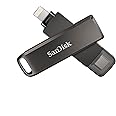
The SanDisk 128GB iXpand Flash Drive Luxe combines a premium all-metal design with dual Lightning and USB-C connectors, enabling seamless file transfers between iPhones, iPads, Macs, and USB-C Android devices. With fast 90 MB/s read speeds, automatic photo and video backup via the iXpand Drive app, and robust password protection across multiple platforms, it’s the perfect portable storage solution for content creators and professionals on the go.


| Read Speed | 90 Megabytes Per Second |
| Connectivity Technology | USB |
| Color | Gray |
| Model Name | iXpand Flash Drive Luxe |
| Flash Memory Type | CompactFlash |
| Manufacturer | Western Digital Technologies, Inc. |
| Hardware Connectivity Technology | Lightning, USB Type C |
| UPC | 619659181956 |
| Global Trade Identification Number | 00619659181956 |
| Item model number | SDIX70N-128G-GN6NE |
| Hardware Platform | Mac, PC |
| Item Weight | 0.16 ounces |
| Product Dimensions | 1.97 x 0.61 x 0.34 inches |
| Item Dimensions LxWxH | 1.97 x 0.61 x 0.34 inches |
| Language | English, English, English, English |
| ASIN | B08JCX96NC |
| Is Discontinued By Manufacturer | No |
| Date First Available | November 1, 2020 |
A**.
A fantastic accessory for your Pad - But Sandisk could have explained it's usage a little better.
I owned the older version of this Sandisk 256 GB iExpand drive that I used for my ancient old iPad from 2016. I upgraded to the 2022 iPad last year and since the new iPad uses USB-C instead of the old lightning port I had to get this one, the iExpand Luxe model.This one is very nice that it has lightning and USB-C connectors. Also, by using a USB-C to A adaptor you can plug it into your home PC. The construction is very nice high-quality metal, it feels nice and sturdy.Now for the usage clarification, The old Sandisk iExpand drive used the Sandisk iExpand app. Even the packaging on this item says to download the iExpand app to use the drive. I plugged the drive in and proceeded to download the app. I noticed that the drive wasn't recognized by the ipad as in the old one that would automatically launch the iExpand app.I formatted the drive, did a hard off cycle on the ipad, re-downloaded the app and still, the drive didn't show. I was thinking that I had a bad one. I reached out to Sandisk/Western Digital via email and explained the situation and everything I had tried doing to solve the problem.A week later, yes, it took that long, I heard back from a rep telling me that this iExpand Luxe was not compatible with the Sandisk iExpand app and I should use the Apple files app in my ipad. I did so and the iExpand Luxe does show up and then you can transfer files to and from. So just a word to inform users of the old iExpand drive that this new Luxe model works differently. Even though the packaging tells you to download the app the app is incompatible with this drive. And when you go to the files app, this iExpand Luxe drive will show as "untitled" as shown on the picture.
M**W
Works Great But….
….there are things you need to do to to get the bang for your buck. Thankfully I read reviews otherwise I would have returned this thinking it didn’t work. So here goes:1) The iXpand Drive app is being retired 4/25 and will be replaced by SanDisk’s MemoryZone app. You’ll need to download both first.2) Use a lightening device to update the drive otherwise the drive won’t recognize your USB-C iPhone/tablet device3) Open the app, plug in the drive and magic happens. Follow the set-up prompts.4) Do not let your phone/tablet sleep or the data transfer will stop5) Use the eject feature when using the Memory ZoneOnce I figured out all of the above, using the drive itself is easy peasy. You can rename, delete, and organize your photos. Duplicates are no problem as you can opt keep or override them. Toggling between your device and the drive helps ensure you keep what you want on your phone. Open the app and plug the drive into your device and it will automatically backup new pictures. Once your pictures are on the drive, delete the pictures you don’t want on your phone to free up space. Don’t wait for the 30 day grace period for them to delete. Then check the Cloud to see how much storage you have on your device. Oops! Took a pic off your phone that you need? You can transfer it from the drive back onto your phone.Note: the drive will store music and videos but I don’t see a claim that it will store notes, files or folders.Personally, I use it to backup for my pictures and free up Cloud storage. It’s a small but mighty flash drive with a sleek, metal design. And I’m satisfied.
A**O
Best Flash Drive Storage!
I’ve read the reviews before purchasing. Some say they lose all their photos or files which made me had 2nd thoughts of buying but I brought it because I wanted to try it and I love it!. My photos and files are still there. The download is fast. The app only crashed on me once but it was only because I selected too many photos/videos. I did batch to batch download (300 photos/videos each batch) download at a time and it works well. It took me 1-2 hrs for all downloads as I have a lot of photos/videos. Some of the photos/video won’t open on HP/computer as it’s a certain file depends on the files as (HMCI/JPC ets.) but i found a solution. I just had to download a “convert photo” app onto my laptop, convert the photo/videos that won’t work/open on my laptop and it works!. I love the flash drive. It gives me more storage on my iPhone. I will for sure be purchasing another one in the future!.
Trustpilot
1 month ago
1 month ago