
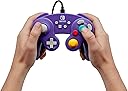
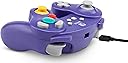


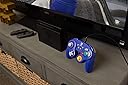

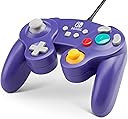

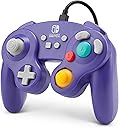
PowerA Wired Officially Licensed GameCube Style Controller/Super Smash Bros. Purple
Product ID: 91330659
🎮Classic GameCube design
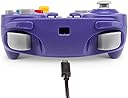
🔌10ft detachable USB cable
🕹️Octagonal gated analog sticks
🎯 Smash with style and precision — the ultimate GameCube controller for pros and nostalgia lovers alike!
The PowerA Wired Officially Licensed GameCube Style Controller in Super Smash Bros. Purple combines the beloved classic GameCube design with modern Nintendo Switch compatibility. Featuring octagonal gated analog sticks, a larger D-pad, additional shoulder and system buttons, and a detachable 10ft USB cable, it offers precise control and convenience for competitive and casual gamers. Perfect for multiplayer battles, this wired controller delivers authentic feel and durability, making it a must-have for Smash Bros. enthusiasts seeking nostalgia with a pro edge.

| ASIN | B07GXJV9NM |
| Batteries | 2 AA batteries required. |
| Customer reviews | 3.5 3.5 out of 5 stars (2,007) |
| Guaranteed software updates until | unknown |
| Item model number | 1507847-01 |
| Language | Italian |
| Product Dimensions | 14.22 x 6.86 x 17.02 cm; 190.51 g |
| Rated | Ages 3 & Over |
| Release date | 1 Dec. 2018 |
L**S
exactly what I needed
I love that they made these! it's much more affordable to get one of these controllers, especially for multiplayer games on the one switch console. THey are also quite a bit more sturdy than the switch joycon controllers so I'd imagine it would also be great for kids. I feels just slightly cheaper and lighter than the old original gamecube controllers but works just the same. Definitely worth it!
T**E
Buy an official Nintendo controller, trust me smash players.
Before starting the review if you don’t want to fully read this I have attached a video of small clips showing all of the problems with the controller that does not appear to be broken I’d suggest buying the real deal instead of this alternative controller. This controller has only lasted me a single month. At first it seems like the perfect deal, a GameCube controller with an extra ZL button and other pro controller buttons, great! Except the problems first started when I was playing super smash brothers. The controller seemingly became unresponsive whenever playing super smash brothers. At first it was like any other controller but suddenly it just stopped working properly for no apparent reasoning when it is UNDAMAGED. Not only did the controls it used not match my ingame controller setup, but it also had buttons become completely unresponsive: - My A button didn’t work only when playing matches within the game even though I can literally use the menu -Stick jump setups didn’t work because it didn’t recognize up on the left control stick as a jump even though the left control stick was perfectly fine (how you navigate the menu after all) - L and R which is set to grabs suddenly decided to turn into shielding Keep in mind this is with any controller mapping you decide to choose when playing smash even when you don’t pick these set options (the A not working when playing games is one of the biggest worrying issues) - The + button doesn’t work on character select screen but works quite literally anywhere else. This wasn’t the end of problems I’ve faced with this controller. After not using it for smash for three days due to how a seemingly unbroken controller just decides to stop working only when playing games on the system (why buy a controller only for using menus....?) it faced a worse issue, DIRECTIONAL DRIFT. Not only did this controller get directional drift OUT OF NOWHERE after I tried to recalibrate the controller and failed (because it’s control sticks can’t even be recalibrated) but it’s drift is worse than my own joycons which I have owned for three years. It suddenly started to constantly drift to the left out of nowhere. But get this..... THE DRIFT IS ONLY ON THE HOME MENU. It doesn’t drift inside of games such as super smash brothers, only on the Nintendo switch home menu. Truly this is a terrible controller. You can’t navigate the switch’s built in home menu due to drift and you can’t play games because it purposely makes itself unresponsive when playing them. Trust me when I say just buy the official product, it doesn’t matter if Nintendo allow these people to sell these licensed. BUY A REAL GAMECUBE CONTROLLER OR PRO CONTROLLER. Again I will provide a video of clips showing how the controller is completely bugged and is seemingly unbroken and broken at the same time.
J**S
Mixed bag honestly
Works fine for about a month then the inputs start to slowly go down hill. Left stick drifts alot and can have negative effect when playing games like Super Smash bros. It's fien for most other games in my experience but for a controller designed for that one specific game it's very disappointing how quickly it becomes defective.
C**R
Erroneous stick inputs after a few months
The digital triggers and extra bumper are a nice feature, but the control stick started producing erroneous inputs not long after purchase. Specifically, it will randomly trigger Up inputs to the point where even navigating menus becomes difficult.
R**S
Get this if you want a decent controller for smash.
Fantastic GameCube like controller, best one on the market besides the official original controller. Triggers have the correct travel, buttons feel right and has home and capture buttons. A great option if your looking for a GameCube controller with pro controller buttons.
S**F
Totally worth it
Totally worth it. Much easier to handle than the joy cons and no fear of any batteries dieing as it is wired.
R**R
Only buy if you are not fussy about when playing
(Liked colour) But that does it for the good the yellow C Stick drifting and the buttons work if they are in the mood.
A**I
This controller is practically unusable.
I wanted to wait a while before writing this review. I wanted to give the controller a shot. The first month or so was quite good; I was able to play Smash and a number of other games I have using it and it was very responsive. I was so impressed that I bought another one for my girlfriend. Then the C-stick began tilting upwards. I thought this was some fluke and tried restarting the system, unplugging and replugging the controller itself, went to the Switch's settings to recalibrate the controller (as of this writing you cannot recalibrate these controllers through the Switch). Then within another month of buying the second controller the same thing happened to that one! The controllers are literally unusable as it will put in inputs you do not want. It's the first time I ever bought anything from this company and I was initially pleased to see a full-on recreation of a controller I loved using when I was a teenager. But this recreation is a pile of junk. Please save your money and buy a full-fledged Nintendo first-party product instead - at least you'll get a manufacturer's guarantee of return within a year if a Nintendo controller goes buggy.
R**E
broke on the second time playing
yeah it started to drift on the second time is used it, it's a risk to buy it but you can always send it back. the controller it self is very nice the cable is fairly long. if it didn't broke on the second day I would gave it a 5 star the buttons are good the feel everything. But then mine broke so yeah
M**H
Perfect condition
This was a gift for a friend that is a retro game collector. He loved it and really enjoyed the item.
C**N
Best controller for Smash Ultimate
Build quality is honestly very good, and you wont be disappointed if you are seaching for a more ergonomic controller than the pros.
C**7
Article conforme à la description. Bon rapport-qualité-prix.
Article conforme à la description. Bon rapport-qualité-prix.
W**B
Fantastic
Fantastic, my son loves it.
Trustpilot
3 weeks ago
1 week ago