
DOWNLOAD THE APP


Customer Support

Desert Online General Trading LLC
Warehouse # 7, 4th Street, Umm Ramool, Dubai, 30183, Dubai
Desert Online General Trading LLC
Warehouse # 7, 4th Street, Umm Ramool, Dubai, 30183, Dubai
DOWNLOAD THE APP
Customer Support
Desert Online General Trading LLC
Warehouse # 7, 4th Street, Umm Ramool, Dubai, 30183, Dubai
Desert Online General Trading LLC
Warehouse # 7, 4th Street, Umm Ramool, Dubai, 30183, Dubai


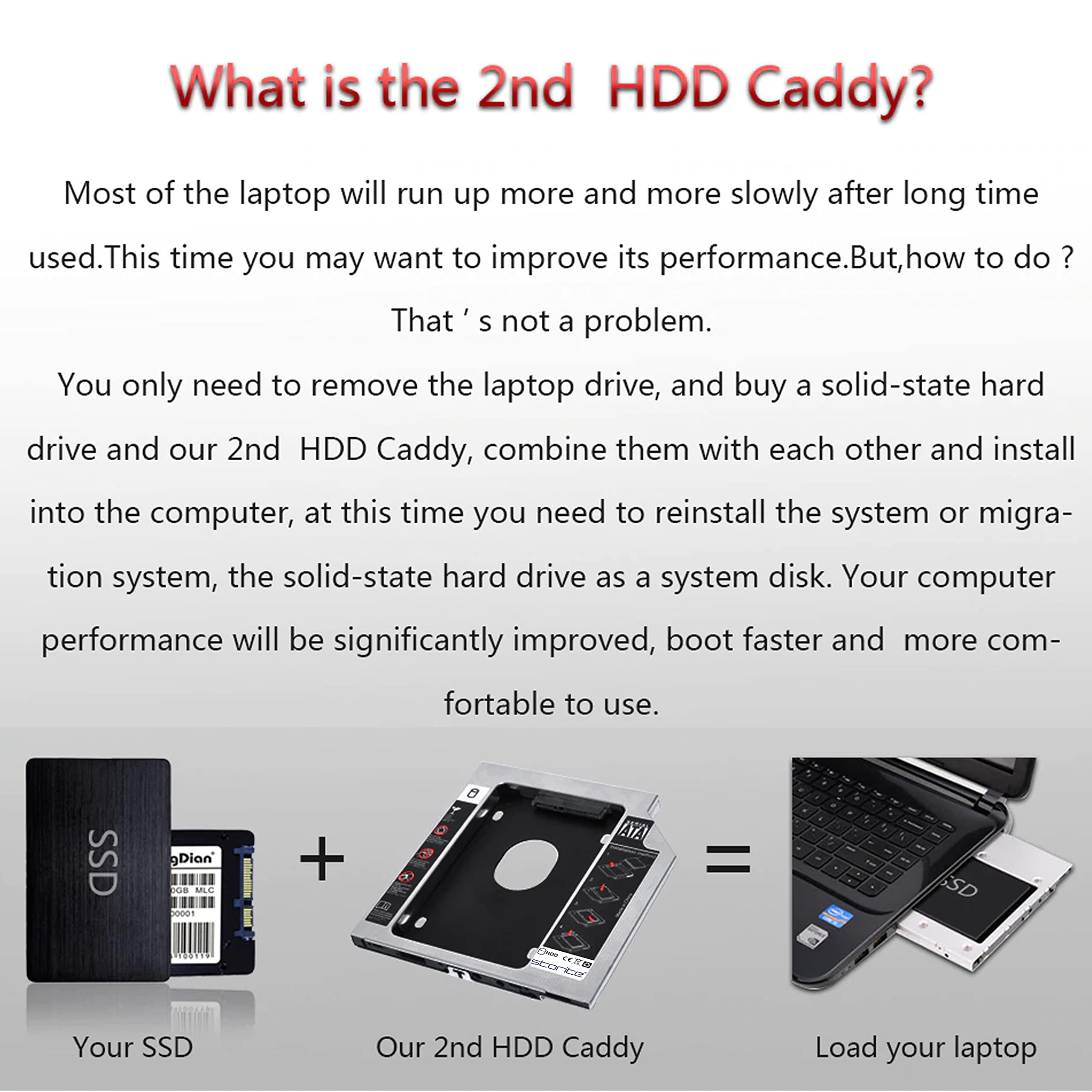
💼 Upgrade your laptop storage game—because your data deserves the VIP treatment.
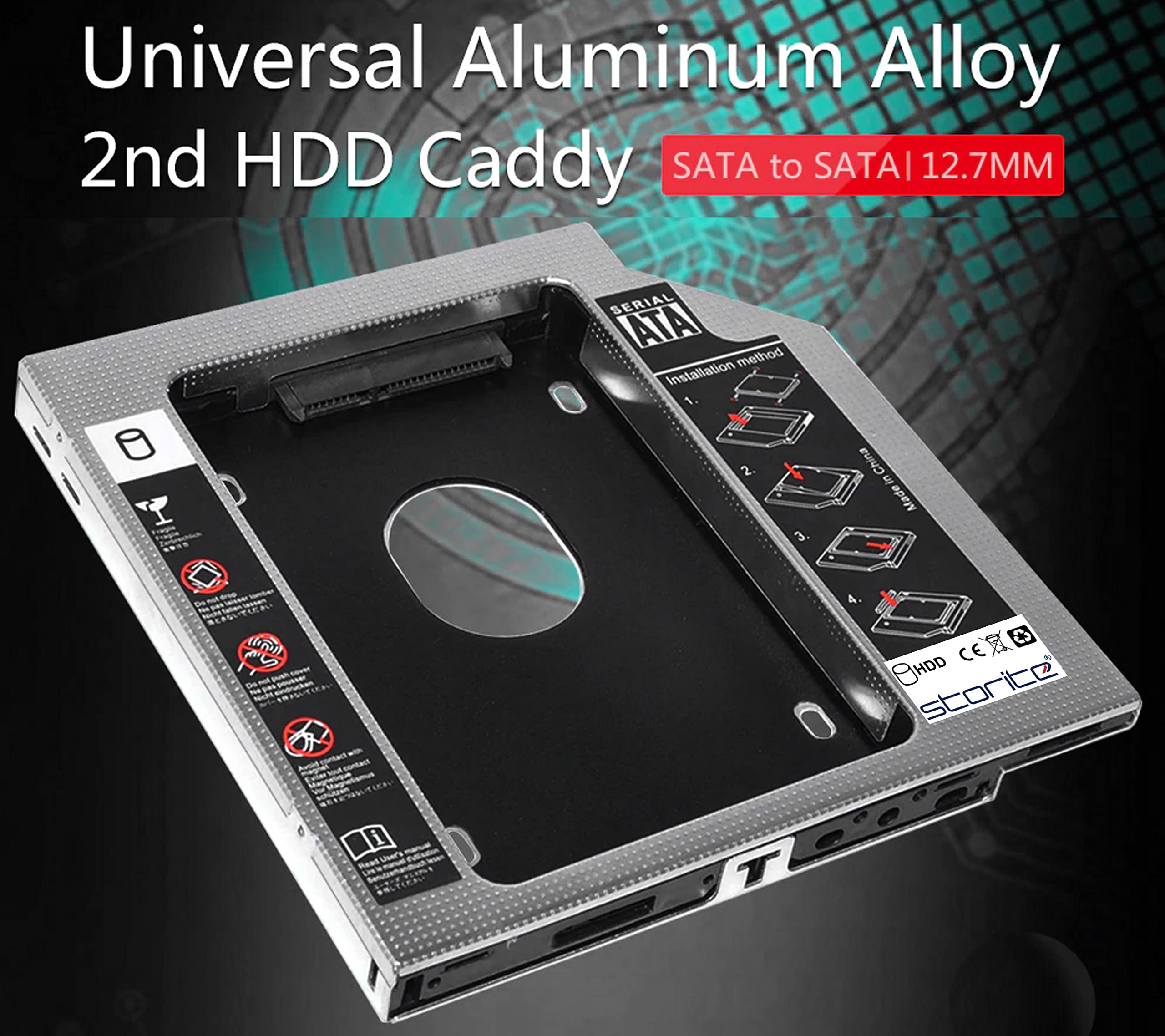
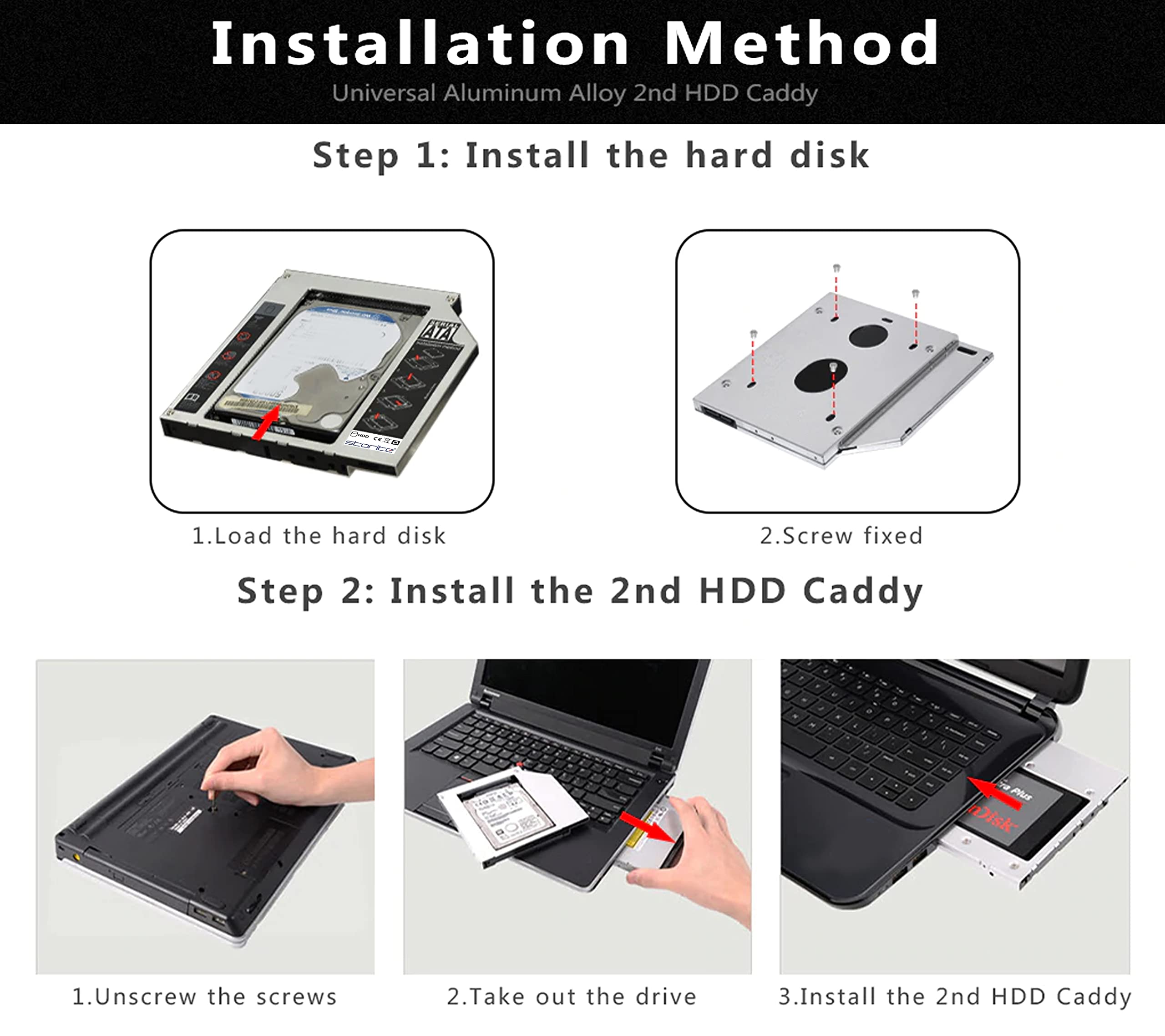
The Storite SATA 2nd 2.5'' Hard Drive Caddy is a sleek, aluminium 12.7mm universal adapter that fits into your laptop’s CD/DVD bay, enabling you to add a 2.5-inch SATA HDD or SSD. It offers fast 150 MB/s data transfer speeds with a plug-and-play design requiring no additional cables or software, perfect for professionals seeking effortless storage expansion and reliable backup solutions.


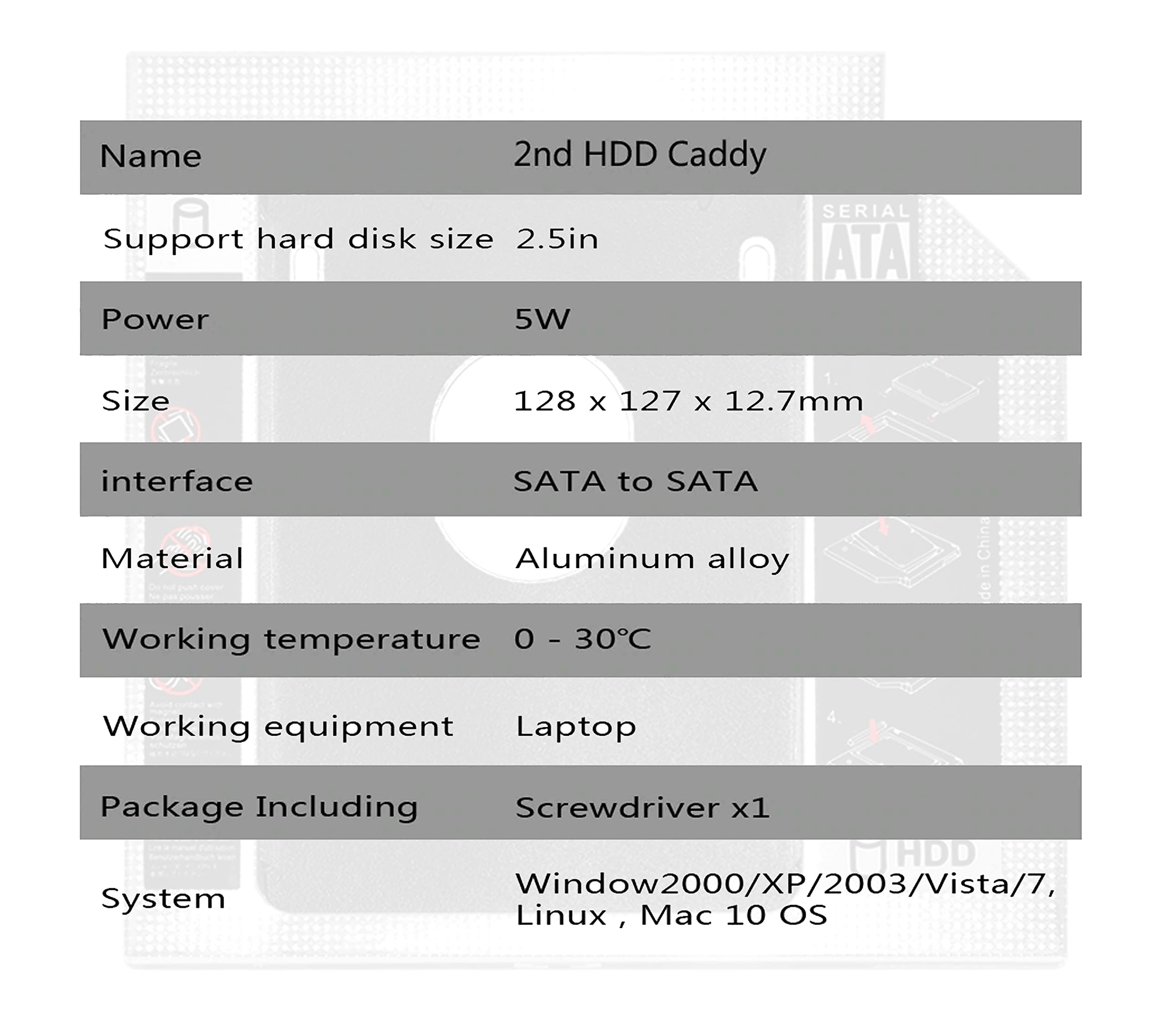
| Material | Aluminium |
| Item Weight | 0.2 Grams |
| Compatible Devices | Laptop |
| Hard Disk Form Factor | 2.5 Inches |
| Max Number of Supported Devices | 1 |
| Data Transfer Rate | 150 Megabytes Per Second |
| Connectivity Technology | SATA |
| Manufacturer | NISUN INC., B-201, Greenfield 4 Plus, Opp. Fortune Greens, Bhayli Road, Vasna Bhayli, Vadodara, Gujarat, 391410, SaiTech IT NISUN INC |
| Form Factor | 2.5 inches |
| Item Height | 12.7 Centimeters |
| Item Width | 9 Centimeters |
| Product Dimensions | 12.8 x 9 x 12.7 cm; 0.2 g |
| Item model number | 2nd bay SATA 12.7MM |
| Are Batteries Included | No |
| Included Components | SATA 2nd 2.5'' Hard Drive Caddy |
| Manufacturer | SaiTech IT NISUN INC |
| Item Weight | 0.2 g |
S**A
Good Quality Product
Working fantabulously. No issues or concerns. I am holding seagate 1TB HDD. Due to slow boot speeds and sluggish performance of windows on HDD, I swapped this with Samsung 870 EVO 500GB SSD which is super fast. So I ordered this caddy to hold my 1TB HDD in the place of dvd drive which I can use for storage. I had an issue where HDD is showing up in Bios and its not showing up under drives in windows device manager nor unable to see in file explorer. After googling for sometime, I ran "mdsched" - Windows Memory Diagnostic Tool by typing in windows search, this will restart the machine and run the process. Post this able to happily access the 1TB HDD via new caddy.
A**L
Caddy for ssd
Product is fine... little breakage was there. Plz work on packaging
M**G
Working good.
The fit and size is okay. The screws are too small for the given screwdriver. But you could use a blade or a knife edge as well. Other than that there is no drop in transfer speed when the hdd was mounted on the motherboard.
A**I
Not great, does the work
#1 Quality is not that great. Screws have been forced pushed into the caddy which are tilted at insertion, as if someone has hammered them into the caddy body, and can't be unscrewed.#2 missing mounting component which is used to hold caddy in place after insertion into CD ROM unit. I had to use old CD ROM's parts for this to work.
B**
Ok
Ok
S**D
Useful Investment: works great with Asus N55SF
I replaced my 750GB HDD with a 120GB SSD. The non-functional BD-Combo Drive on my laptop gave way to the 750GB HDD using the caddy. This is a wise investment - keeping in mind the obscurity of Optical Disks these days, and the limited real estate afforded in a laptop.It has been a week since I have been using it, and it's working just as promised. As mentioned by other users, it may not be possible to boot using the caddy drive, as I found out as well.Pros:Works as promisedDecent Build - Removable front-plate and LED lightIncluded Screws and Screw Driver Head meant an easy installationCons:The screw placement on one of the sides makes it difficult to tighten themCould not get the HDD to align exactly straight in the slotThe blue light is always on (and does not blink with HDD activity)Packaging could have been something more than a single-layer bubble wrap
N**U
Satisfied
It's fine and well fit my hdd and small screw driver also provided.But the body was not looking strong.If we press it hardly it may get bend.But it's fine for laptop.You can Buy it 👍
S**A
Works perfect with Dell Studio 1555
I have installed this caddy in my Dell Studio 1555 and it is giving me great performance. This caddy is superb option for those who want to retain their old hard disk in their laptop and want to install SSD for operating system. I purchased a 120GB SSD to boost up my laptop's performance but due to my tight budget the SSD memory was too low. I got this caddy and installed the old hard drive into the DVD slot, as my DVD Rom already stopped working years ago, and now the memory problem is also solved. Till now I am happy with the performance. The attached speed test was done over the 320 GB 5400 RPM Seagate HDD attached to this caddy, the speed is almost the same when I was using it in the primary slot.
Trustpilot
5 days ago
1 month ago