
DOWNLOAD THE APP


Customer Services
Copyright © 2025 Desertcart Holdings Limited
DOWNLOAD THE APP
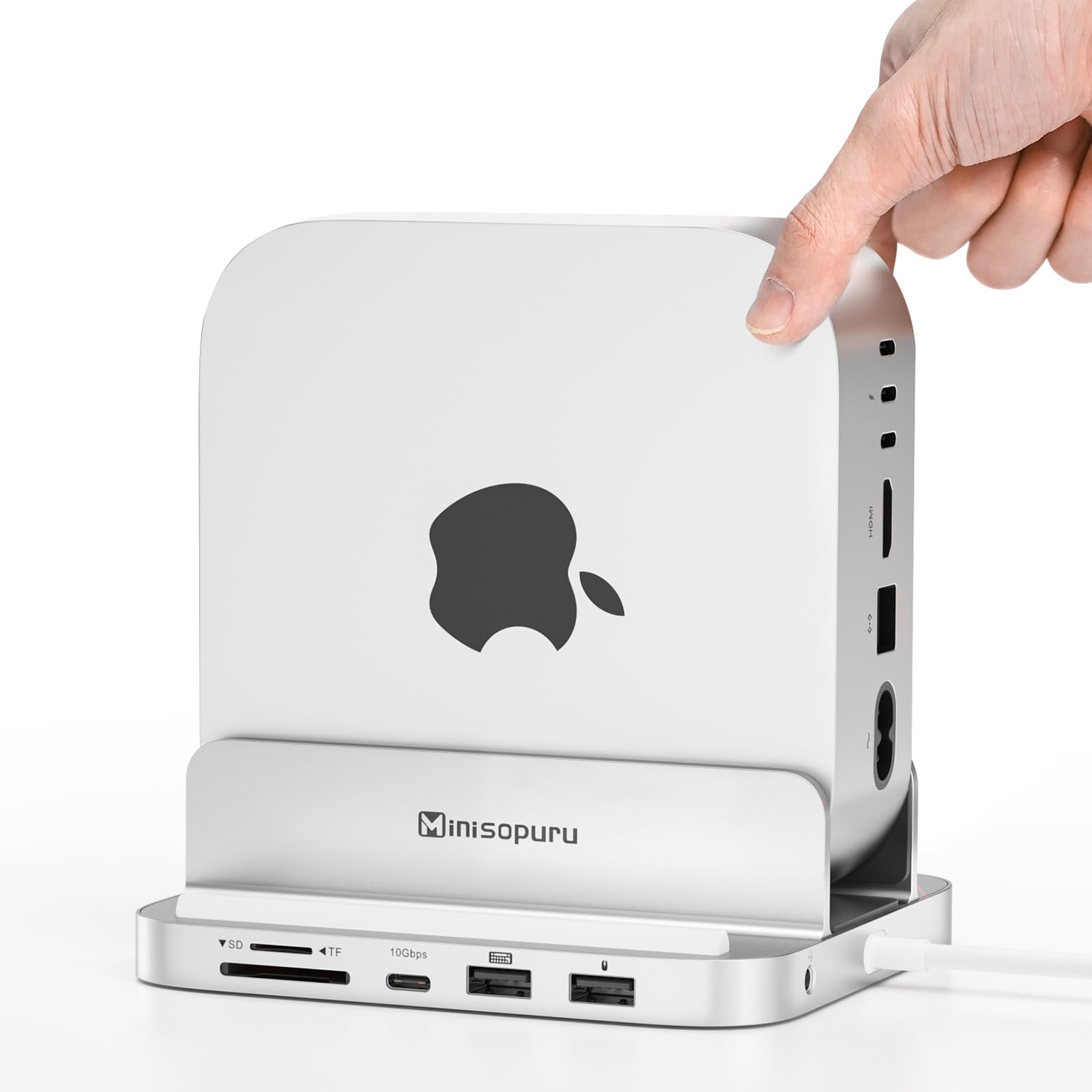


🚀 Elevate your Mac mini M4 game with speed, style, and seamless expansion!
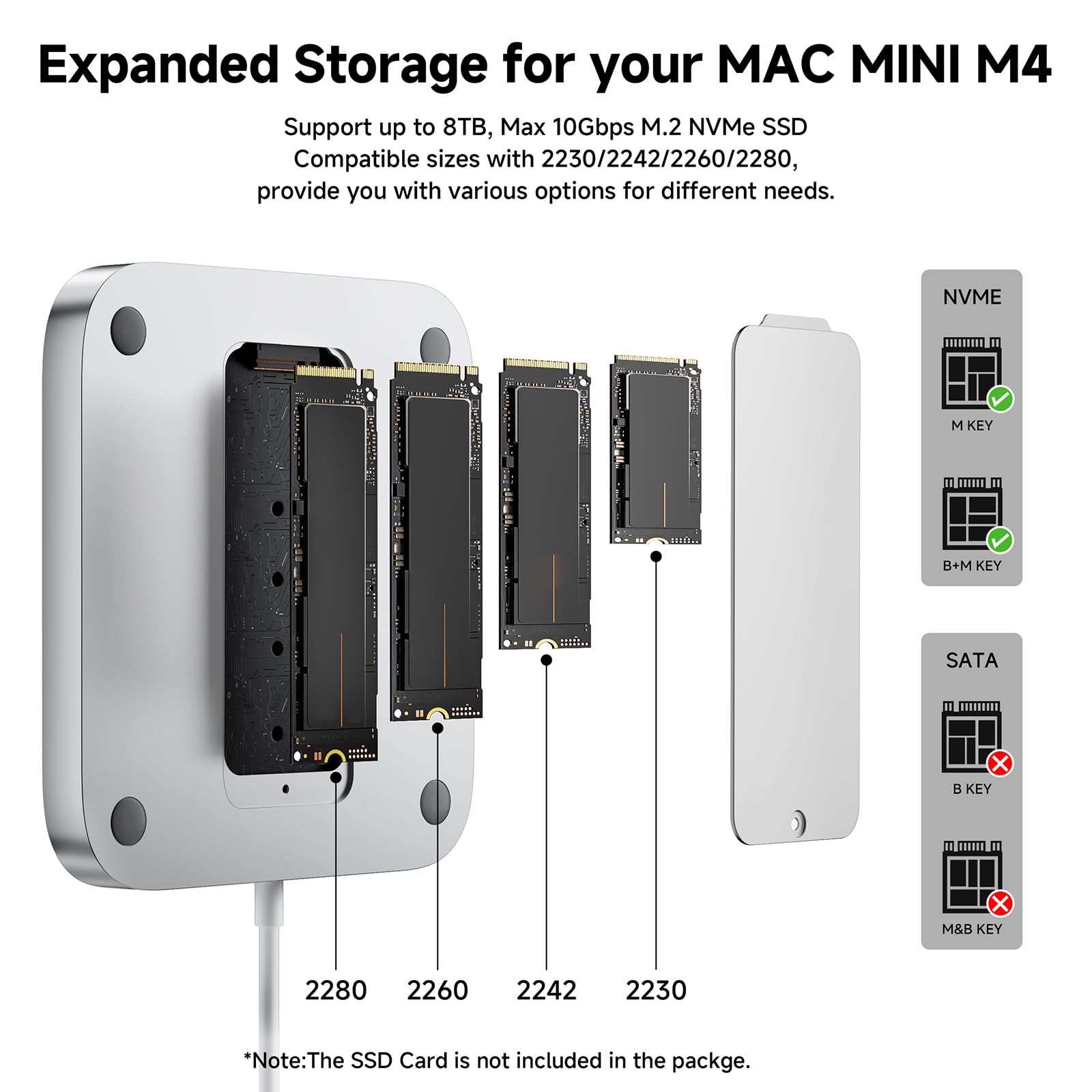
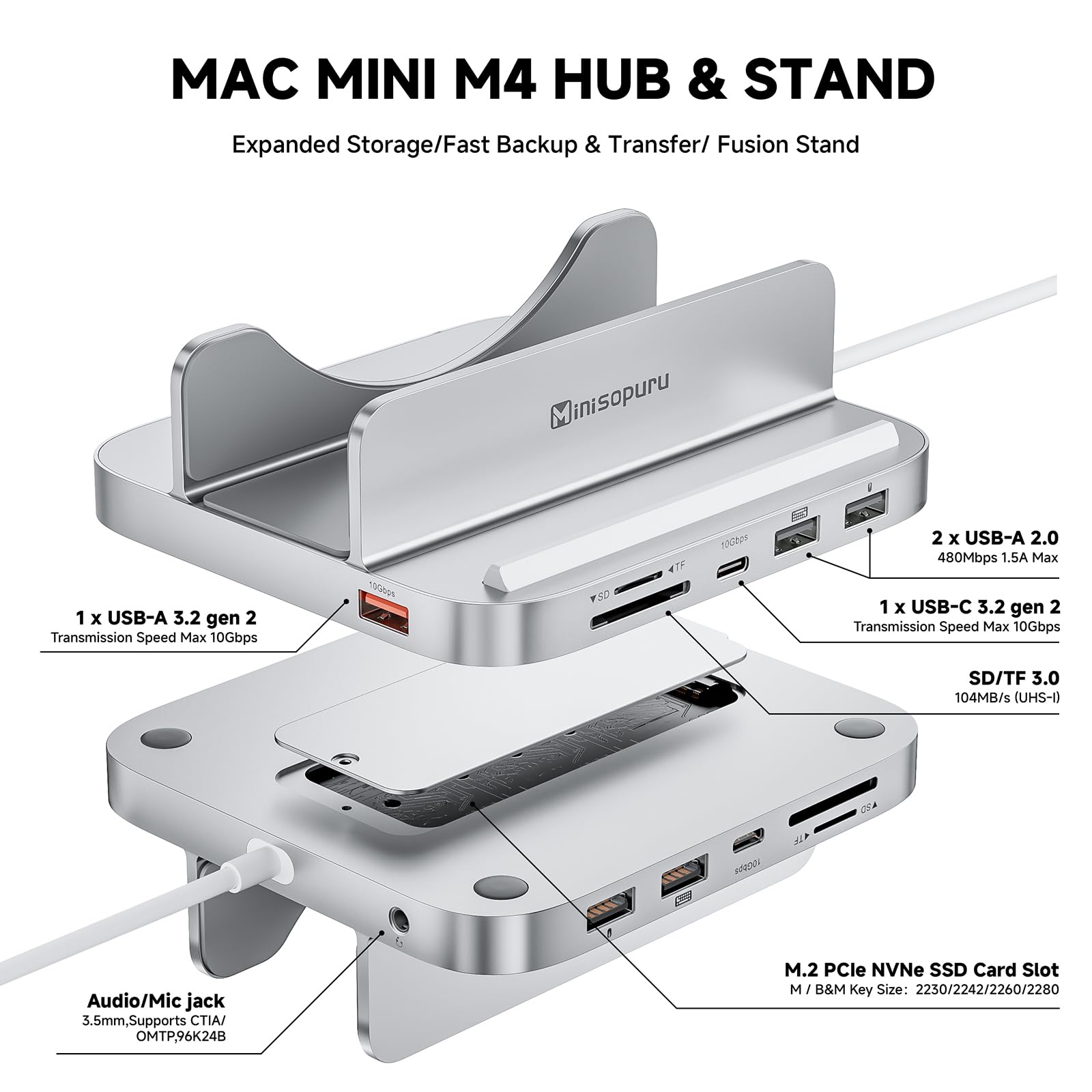
The Minisopuru MINI218B PRO is a premium 8-in-1 dock and stand designed exclusively for the 2024 Mac mini M4 and M4 Pro. It supports up to 4TB M.2 PCIe NVMe SSDs with 10Gbps transfer speeds, features multiple USB ports, SD/TF card readers, and an audio jack. Its vertical design enhances heat dissipation while providing a secure, scratch-resistant base. Ideal for professionals seeking fast storage expansion and versatile connectivity in a sleek, all-in-one solution.


| ASIN | B0DTHG5Q98 |
| Amazon Bestseller | #17,734 in Computers ( See Top 100 in Computers ) #361 in USB Hubs |
| Batteries Included | No |
| Batteries Required | No |
| Brand | minisopuru |
| Color Name | Silver |
| Compatible Devices | 2024 Mac mini M4, Mac mini M4 PRO |
| Customer Reviews | 4.5 4.5 out of 5 stars (202) |
| Date First Available | January 25, 2025 |
| Manufacturer | Minisopuru |
| Product Dimensions | 12.95 x 11.94 x 5.84 cm; 420 g |
| Size | 8 in 1 Mac Mini M4 Dock |
| Special Features | Fast data transfer |
| Total Usb Ports | 4 |
A**ー
ちょうどいいサイズ 立てるので放熱にも良さそう 映像もスムーズに再生されます
く**う
内容物は、本体、+ドライバー、サーマルパッド、予備の+ネジ×2、予備のゴム製留め具×1、12か国語取説(EN,DE,ES,FR,PL,JP,KO,簡中,繁中,IT,PT,RU)です。 M.2 NVMe SSDはいつも外付けで使っているのですが、ドック内に内蔵出来るのは素晴らしく良いですね。 また、SD/TFスロットも使いやすくてありがたいです。 USBポートは、キーボードとマウスの絵柄のあるポートをそれらの用途で使っています。 最初、電源はパススルー(本機を通してPCに給電)かと思ったのですが、あくまでも給電はPCに対して行い、本機は単にPCのUSB-Cポートに接続するだけ(つまりバスパワー)の様です。 その仕様からだと思いますが、Q&Aに以下の記述がありました。 Q:ハブはApple USB SuperDriveをサポートできますか? A:いいえ。動作するのに十分な電力を供給できません。 アルミ製という事もあり、放熱性能は素晴らしく良い感じです。 また手前にあるスマホ置きも重宝して使っています。 3.5mmジャックはヘッドセット対応ですので、会議で活用しています。 オススメさせて頂きます。
T**U
M4 mac mini のドックです。 既に同様の製品で M4 mac mini を上にスタックするタイプの製品を使用しておりそれとの比較となりますが、製品としてはどちらも USB 接続で 10Gbps 帯域のなかで HDMI 出力と M.2 SSD を使用しますが、帯域としては特に大きな差分は無くベンチマーク的にもシーケンシャル R/W で 1GB/s 出ており体感上も差はありません。 やはり差分は縦置きにする事による物理的な使い勝手で、自分の環境では設置スペース的に縦型だと使いづらいケースが多く感じました。ただし収まり自体は M4 mac mini 本体の底面部がキレイに収まる構造になっており、M4 mac mini の唯一と言って良いマイナス要素である電源ボタンの押しづらさは露出することになるので改善されることは間違いありません。 ですので、ご自身の設置レイアウト上縦置きがスッキリする場合は本製品を選択するのは十分にアリだと思いますし、自分のように横置きの方が収まりが良いといった場合は☆ひとつ減らすといったかたちになってしまうかなと思います。
A**A
縦置き設計で放熱性が向上し、デスク上もスッキリ整理できる点は良いと思います。 USB-CやUSB-A、HDMI、SD/TFカードスロットなど多彩なポートが揃っており、外付けSSDやカードのデータ転送が非常に快適です。 M.2 SSDも搭載可能で、ストレージ拡張が簡単にできるのも便利です。 アルミ製で質感が高く、本体との一体感もあり見た目もスマートです。 ただ、エッジ部分がやや鋭い箇所があるため、設置や持ち運び時はケガに注意したほうが良いです。 作業効率や拡張性を重視する方にはおすすめのドック&スタンドです。
A**ー
Mac mini M4を立てられるスタンド、立てることで熱対策になりますしデスク周りもスッキリしました。 質感も同じ、ケーブルもアルミニウム製になっていてデザイン面もいい感じです。 縦、奥行共にぴったりハマりました。 SDカードリーダ搭載で作業効率も格段にアップ、すごく便利です。 USBハブを毎度取り付ける手間がなくなったこと、デスク周りがスッキリとして注文してよかったです。
A**ー
Minisopuru iExpandMate MINI218B MAX Mac mini M4 ドック&スタンド Mac miniM4を活用できるドッグスタンドになります USBを豊富につなげるため非常に重宝します 縦置きにして放熱性も期待できます カードリーダーがほんと便利写真のデータやりとりに使えます
F**R
Mac mini M4を立てて置けるCハブです。 すっぽり収まるので、デスク上で安定はします。 ソフトな感じで収まります。 HDMIは4K60Hzなので最低限のラインはクリアしています。 気になるのはエッジで、全体的にもう少しR面取りしてくれていれば良かったなと思います。 外観としてはとてもマッチしますが、特に縦置きや一体化の必要性を感じないなら、もっと選択肢はあるかと思います。
サ**メ
▼良い点 ・縦置きによる冷却効果あり。底面の通気が確保され、CPU/GPUの温度が確実に下がる。 ・M.2 SSDやUSB-C接続SSDが高速で安定動作。 ・HDMIポートからFHD 60Hz出力中でも、外付けSSDの速度が落ちず帯域に余裕あり。 ・SDカードリーダー(SDXC 64GB, exFAT)も実測100MBps以上でるのでとても快適。 ・3.5mmオーディオジャックがマイク付きイヤホン対応で、ビデオ会議などでも便利。 ▼気になる点 ・スタンドとしては優秀だが、内部清掃頻度は上げた方が良さそう(埃が溜まりやすくなる可能性)。 ・M.2 SSDにアクセスランプがなく、動作状況が分かりづらいのが惜しいかなと。 ・エッジ部分にやや鋭い箇所があるので、設置や持ち運び時は注意が必要。 ▼まとめ 確実な効果を実感できる頼れるドック。縦置きで見た目もスッキリ、拡張性も十分です。
J**.
Excelente
J**G
Seems like a very solid piece of kit addition. 2 SD card slots, very useful that the mac sits on its side, so makes turning on and off easy. And the right amount of ports –––– Having a weird issue where if the mac goes to sleep, sometimes the keyboard does not work, so cannot type in my password. Tried unplugging the keyboard, this does not work, so have to reboot, which is a pain. Not sure who's to blame here though... Mac or the housing unit.
M**N
Muy práctico y funcional... Ya que realmente si hacen falta más conectores. Me encanta que fija muy bien la Mac Mini y mejora el acceso al botón de encendido / apagado. La conexión a la tarjeta de memoria quedó genial.
K**N
We RV snowbird each year for 3 months in southern Arizona. This year brought my Mac mini along and a portable screen. Our motorhome is on the small side and the screen and mini must fit the small table. Placing it vertically helps plus provides easy access to on/off. I also added a 2 GB drive in this dock and it works great, was easy to install and requires no extra space. Lots of capability in a small package.
A**N
TLDR/ I Recommend: It’s a Functional and Versatile Accessory for the 2024 Apple Mac Mini A few months ago, after doing a lot of research I settled on a 2024 Mac Mini. Plenty of Amazon and YouTube reviews steered me towards a side-mounted docking station instead of a horizontally oriented pedestal style bases. I chose the Minisopuru iExpandMate MINI218B PRO for the following reasons: - Improved WiFi and Bluetooth antenna position. - Internal SSD - Better ventilation - Additional ports - Price WiFI/Bluetooth: Several Mac Mini users observed improved WiFi and Bluetooth connectivity just by placing the unit on its side and fully exposing the bottom plate where antennas are located. This makes perfect sense from an RF (radio frequency) perspective, and a few reviewers reported some horizontally mounted docks severely interfere or even block reception. SSD: While there are other more expensive options out there that support faster a SSD, but I prefer to use high speed Acasis external enclosures which I can move between devices. In this dock, I’m using a WD_Black SN770 1 TB NVMe for a Time Machine backup, and the 10Gbps speed is perfectly fine for that. Ventilation: With the Mac Mini oriented on its side it’s easier for natural ventilation to occur, allowing hot air to rise through the top vents and cool air to be drawn in from the bottom vents. From a practical standpoint, however, Apple silicon devices run much cooler than Intel and AMD based devices, so excess heat hasn’t been a big problem for most of my work. Even if the fan kicks on, there’s nothing to restrict air flow (e.g., desk surface or docking base). Additional Ports: I hadn’t really considered the additional ports for my particular use case, After all the Mac Mini has more than enough, or so I thought. I realized the 10 Gbps USB-A port worked perfectly for an external 2-bay 3.5” SATA Sabrent hard disk enclosure that hosts 3 TB of spindle storage, perfect for long-term storage. I still have a handful of older USB-A devices which will also benefit from the additional ports, such dongles, webcams, etc. Price: With a ~$80 price tag after promotional and coupon discounts, this makes the Minisopuru iExpandMate MINI218B PRO a practical, functional, and versatile accessory for the new 2024 Apple Mac Mini. Overall, this is a good and affordable accessory to compliment the new 2024 Mac Mini form factor.
Trustpilot
2 months ago
1 month ago