Some deliveries may take a little longer than usual due to regional shipping conditions.

DOWNLOAD THE APP


Customer Services
Copyright © 2025 Desertcart Holdings Limited
DOWNLOAD THE APP








🎯 Dominate every match with precision and speed — the pro’s choice is here!
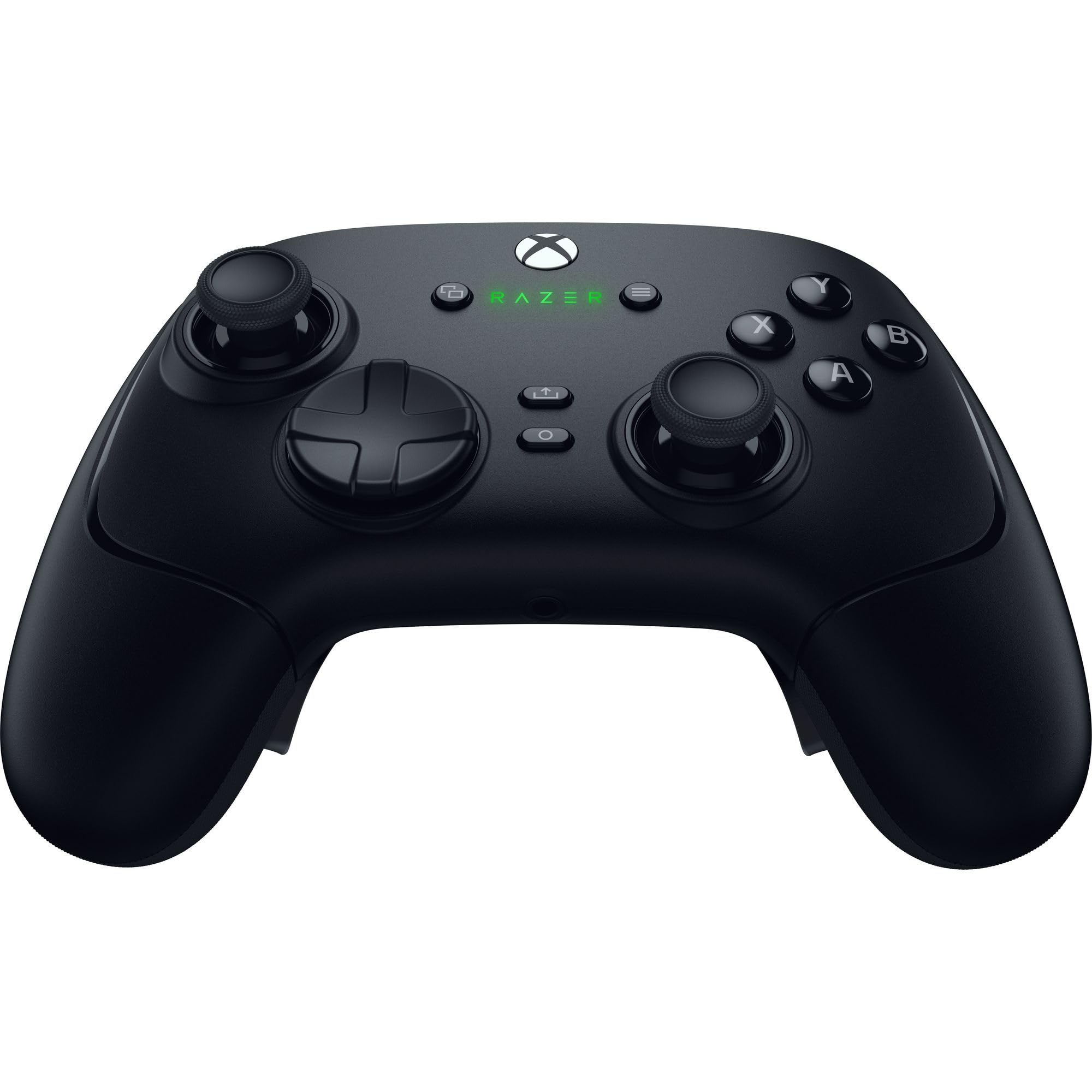
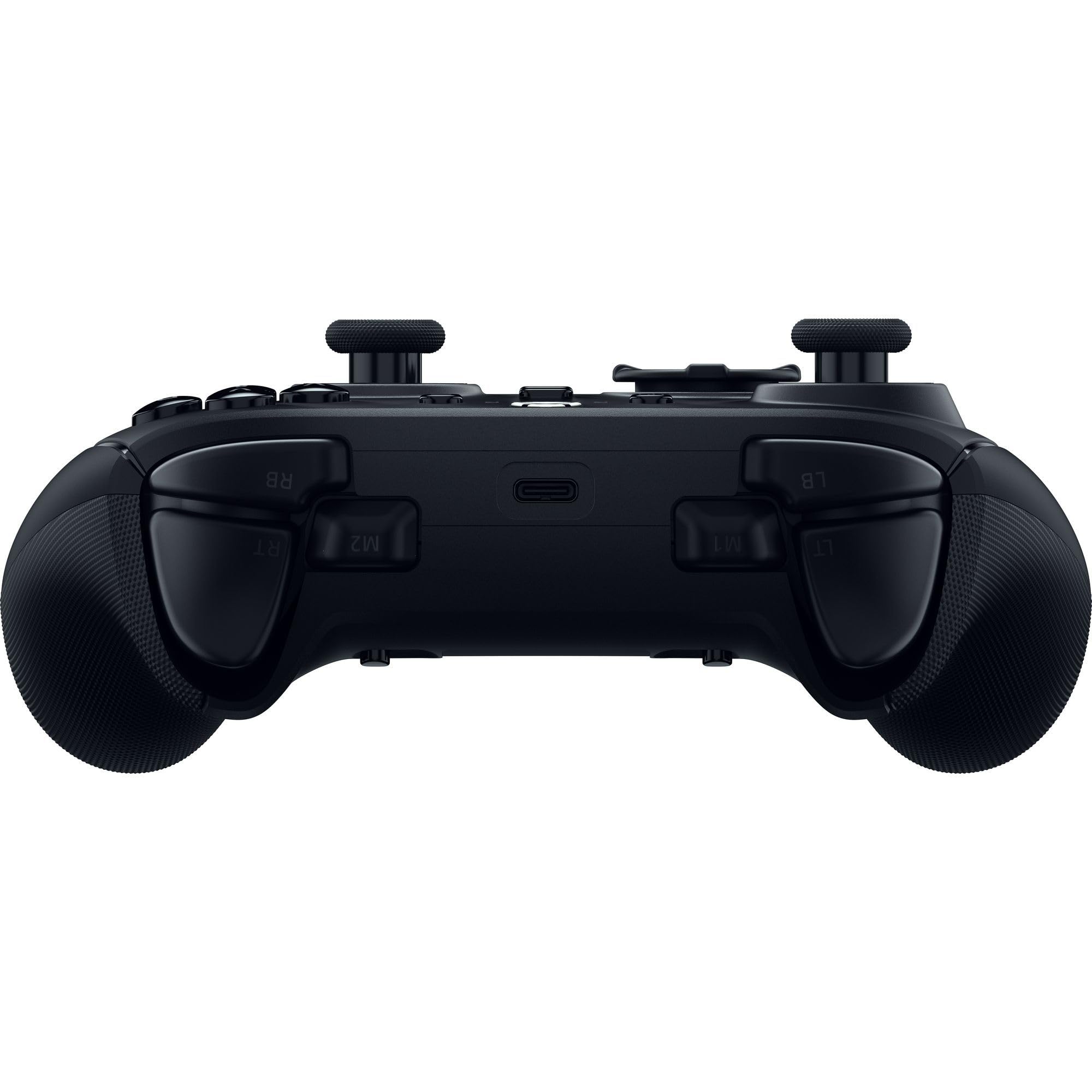
The Razer Wolverine V3 Pro is a wireless esports controller designed for Xbox and PC, featuring ultra-low latency HyperSpeed Wireless, anti-drift Hall Effect thumbsticks, and Mecha-Tactile action buttons for lightning-fast inputs. It offers advanced haptic feedback, customizable controls via the Razer app, and comes tournament-ready with a carrying case and accessories. Engineered for competitive gamers seeking precision, durability, and immersive gameplay.





| ASIN | B0D7W5L9YY |
| Are Batteries Included | Yes |
| Batteries | 1 Lithium Ion batteries required. (included) |
| Best Sellers Rank | 451 in PC & Video Games ( See Top 100 in PC & Video Games ) 5 in Xbox Accessories 2,958 in Climate Pledge Friendly: Shop All |
| Brand | Razer |
| Colour | Black |
| Customer Reviews | 3.9 3.9 out of 5 stars (4,011) |
| Date First Available | 28 Aug. 2024 |
| Delivery information | We cannot deliver certain products outside mainland UK ( Details ). We will only be able to confirm if this product can be delivered to your chosen address when you enter your delivery address at checkout. |
| Guaranteed software updates until | unknown |
| Hardware Platform | Desktop, xbox |
| Item Weight | 418 g |
| Item model number | RZ06-05200100-R3M1 |
| Lithium Battery Energy Content | 8.17 Watt Hours |
| Lithium Battery Packaging | Batteries contained in equipment |
| Manufacturer | Wolverine V3 Pro |
| Number Of Lithium Ion Cells | 1 |
| Power Source | Battery Powered |
| Product Dimensions | 15.7 x 10.5 x 0.1 cm; 418 g |
| Series | Wolverine V3 Pro |
W**S
Best Controller ive purchased!! Don't sleep on this!!
So I thought id write a review as there seems to be alot of outdated reviews. If your thinking of getting this controller for xbox I can confirm you can update it through Razers software on xbox (at least on the new consoles. Im on series x but imagine you can on series s to) it actually feels decent to. The 4 back buttons take some getting used to but that will come naturally from using it. The face buttons all feel rigid and strong unlike other controllers. The wire supplied seems decent now to. I havent had disconnection issues with. It does take like 10-15 seconds for the Razer app to realise its connected on xbox so bare that in mind. The mouse click buttons feel amazing for FPS games. Haven't really mapped em for any other games yet but im sure I will as I play a variety of games. I imagine it will be very good for racing games and MMOs aswell. The Hall Effect sticks are stiff but honestly I like it. Any other controller ive had develops stick drift fast and this just feels like thats not going to happen. I also like the additional 2 bumpers which you can map aswell. Overall a great controller and glad I purchased it. Always been on the fence about pro controllers but feel like this was the ideal purchase for me. Its also a bigger controller which I really like having bigger hands.
M**T
Great controller, very sensitive buttons.
This is a review in the wolverine v3 pro wireless controller. This controller was bought after the elite 2 I had suffered from stick drift within 30 days of purchase. It is much better than the elite 2 for stick accuracy. The triggers and buttons have a nice click to them like a mouse click. I do find I’m having to move my little finger and ring fingers out of the way of the rear buttons so I don’t press them accidentally as they are quite sensitive to button presses, gives my hand a little cramp, but overall this is a minor point as you can just disable the button programming to press nothing when you aren’t using them and have your hands back in the natural position over the back buttons. Batter holds up pretty well, not quite as long as the elite 2’s but enough for a good couple of gaming sessions. Was easy to set up with the razor app, this is where you can see the controllers battery life, the battery doesn’t show properly like a standard Xbox controller as the controller uses a dongle and it gets a permanent charging reading off the dongle. The weight is lighter than the elite 2 and doesn’t feel quite as premium but it’s doesn’t feel as cheap as a standard Xbox controller.
R**S
Low quality/Poorly made
While the controller itself is great it comes with a serious issue of constantly disconnecting while using it. I've tried numerous different USB cables, all the different USB ports on both my console and PC but regardless of what I do it just constantly powers off mid game making it completely unreliable and basically unusable for anything competitive which is the main reason I got it in the first place. After looking around online I can see this is a known and long standing issue with Razer products and I theorize it's due to poorly made USB ports on the controller itself, pretty disappointing purchase overall, would definitely recommend avoiding this and saving your money as I wish I had.
L**E
Hold it
First time I’ve written a review. So bare with me. There is a lot to like about this controller, the quality, the weight, materials and the tactile switch feedback, it is very premium. I have had the original Wolverine Tournament edition since 2019, its holding up better than most “pro” controllers do, but was excited to try the V3. First impressions are great, i have larger hands, so felt nice immediately, until i tried to use it in any scenario where i was trying to make multiple inputs per second. For me personally, the controller shape/design is for great for larger hands, but the ergonomics are pretty terrible. Firstly, the Thumbsticks are very similar to the original xbox controller with the convex your thumb sits into leaving your thumb closer to the controller and stretched away from its natural position. I personally prefer domed sticks, but there is no option to change on these controllers, pair this with the very high stick tension, it makes thumbwork actually much harder than it needs to be, it may be super precise, but after 1hr+ use playing some Pub SND, and I knew about it. This thumbstick set up is really suited to smaller hands. Around the back of the controller, there are now 4 programmable paddles, vs the 2 I was used to, again, excited to try and use them, however the paddle design suffers the same fate as the thumbstick design, they are too close together, kept hitting 2 paddles when I only wanted 1, tried a few workarounds, programmed both paddles on the left to A and both on the right to B, still awkward and as you crouch, you’ll hit the other paddle programmed to the same button again and go prone. Just fiddly, tried only programming 1 paddle each side, but because you cannot remove the unused paddle, you will still regularly hit it when you mean to hit the programmed one, just all in all, fiddly. Software suite is clever, a nice app native to xbox for doing your profiles and making fine tweaks, for console gamers, there are settings in here that i’ve never seen before, including double deadzone protection, all very smart. Small glitch on setup where the controller will not let you connect to this app until it completes a firmware update. This update it says has to be done on a windows machine, crazy as it may sound, I don’t have a laptop or PC, pretty much the reason I bought an Xbox Series X, I already have a tablet and that handles most of what 95% of us do day to day. There is a workaround online that works so you can update via Xbox, Razer support are aware, but a disappointing issue on an otherwise premium product. Might not make sense to give a 4/5 rating here, but there is a lot to like about this controller. Even the 3m USB C cable bundled with it is quality, for someone with smaller hands or didn’t have 7 odd years muscle memory into a different controller, they will love this, the price is right for what you get. I like to buy premium(ish) accessories, so i don’t buy often, as a result i try and do lots of research, hopefully this will help others, Great controller, just hold one or try one before you buy, make sure it’s for you.
C**Y
Ich habe bereits ein Razer Sabertooth (leider an Kabelbruch gestorben) und ein Razer Wildcat (funktioniert nach wie vor). Da ich einfach mal was neues wollte und vor allem etwas mit mehr Buttons und besseren Sticks, habe ich ein paar aktuelle Optionen durchprobiert. 1. Versuch - Thrustmaster ESwap X Pro Die austauschbaren Sticks sind eine super Idee - für manche Games, wie z.B. Diablo 4 kann es sogar Sinn machen das D-Pad auf die rechte Seite zu packen. Leider lässt sich aber dann nicht mehr einstellen welcher Stick auf der linken Seite, welche Achse übernimmt. Trotzdem lässt sich das Gamepad so ganz gut nutzen. Negativpunkte sind allerdings ordentlicher Stickdrift bei beiden Sticks und die Buttons auf der Rückseite sind ergonomisch kaum zu gebrauchen. Zu nah beieinander und zu weit in der Mitte. In dieser Mischung ist es weder für große noch für kleine Hände zu gebrauchen. Nettes Konzept - Umsetzung suboptimal. 2. Versuch - das Razer Wolverine V2 Chroma Das Gamepad, was ich am Ende behalten habe. Liegt ergonomisch gut in meinen (relativ großen) Händen und meine Mittel- und Ringfinder fallen praktisch automatisch auf die Tasten an der Rückseite. Das D-Pad hat im Gegensatz zum Wolverine Ultimate ebenfalls Microswitches und fühlt sich damit hervorragend an und ist sehr akkurat. Die anderen Buttons fühlen sich ebenfalls sehr gut an - etwas mehr Widerstand beim Klicken als beim Wolverine Ultimate oder bei meinem Wildcat aber immer noch ein sehr eindeutiger und angenehmer Druckpunkt - Geschmackssache aber per se kein Vor oder Nachteil. Die Sticks sind in meinen Augen allerdings ein echtes Highlight. Absolut Null Stickdrift, auch jetzt nach 3 Wochen fast täglicher Nutzung - besser als jeder andere Razer Controller und die meisten anderen Gamepads auf dem Markt. Super nice! Die austauschbaren Sticks machen auch keine Probleme und sind eine gute Ergänzung, die ich auch nutze. Der einzige Nachteil ist, dass man nun die Profile nur in der Software editieren oder wechseln kann. Als PC gamer stört mich das weniger, ist aber bestimmt potentiell nervig für Konsoleros. Am PC wird das Gamepad übrigens anders als bei allen Vorgängermodellen immer zu 100% beim Neustart oder einstecken erkannt. 3. Versuch - Razer Wolverine Ultimate Ein gutes Gamepad, keine Frage, und wenn man einen guten Deal kriegt, auch sein Geld wert. Allerdings hat er minimalen Stickdrift ab Werk - nichts weltbewegendes aber halt nicht so gut wie beim V2 Chroma - die Sticks bieten auch insgesamt weniger Widerstand und sind damit alles in allem etwas weniger akkurat. Bei diesem Modell lassen sich die Tasten auch am Gamepad programmieren - ein klarer Pluspunkt. Leider hat es aber auch wie die anderen Vorgängermodelle das Problem, dass es nicht immer zu 100% erkannt wird, wenn man den Rechner neu startet oder das Pad neu anstöpselt. Manchmal braucht es da ein/zwei mal ein und Ausstöpseln. Die Buttons auf der Rückseite funktionieren, fühlen sich aber so an als wären sie etwas enger übereinander und das macht die Ergonomie für mich geringfügig schlechter. Beide austauschbaren D-Pads sind interessant, aber keines davon ist so gut wie das eine vom V2 Chroma und die switches darunter fühlen sich eher matschig an. Insgesamt also auch ein super Pad, aber die Vorteile V2 Chroma überwiegen für mich ganz klar. Also, insgesamt ist das Razer Wolverine V2 Chroma für mich der Gewinner was Qualität und Ergonomie angeht. Die Sticks sind die mit Abstand besten, das D-Pad ist besser als die beiden austauschbaren vom Ultimate und die Ergonomie passt nahezu perfekt für meine Hände. Habe in diversen Reviews gehört, dass sich das Plastik weniger wertig anfühlen würde, aber ich bin wohl zu abgestumpft, um sowas zu merken - mir ist kein Unterschied in der Wertigkeit zum Ultimate aufgefallen - für mich fühlen sich beide gleichwertig an. Wer also ein High-End Pro Controller sucht, dem würde ich empfehlen das Razer Wolverine V2 Chroma mal auszutesten.
S**.
I had the Razer Wolverine Tournament Edition, that was good. Bought this Razer Wolverine V2 Chroma. Good as always. No stick drift out of the box. Make sure you download the Razer software from Microsoft store and update the controller. My settings - Top two buttons A(left), Y(right), Bottom two buttons LS(left), RS(right), Middle two buttons X(left), B(right). I use the tall stick at right and round stick at left. This controller is specially for Hardcore shooting Game(s). Careful the stick is super sensitive. My dead zone setting in razer software is 2. You'll receive a long USB C cable with the controller. It's a wired controller no Bluetooth. In Xbox Elite series 1 or 2 or any other pro controller you'll not get the top two buttons. This is Razer exclusive. Enjoy :).
A**S
Better than the normal xbox controller but wired. Good buy.
A**S
perfeito até agora , muito confortável , muito preciso, Anti Drift, botões extras e remapeaveis, muita qualidade , recomendo .
B**Y
Best quality ever, very strong
Trustpilot
1 week ago
3 weeks ago