We remain fully operational. Our teams are working around the clock to ensure your deliveries continue safely.

DOWNLOAD THE APP


Customer Services
Copyright © 2025 Desertcart Holdings Limited
DOWNLOAD THE APP


🚀 Elevate Your Stream Game with the Swiss Army Knife of Video Encoding!
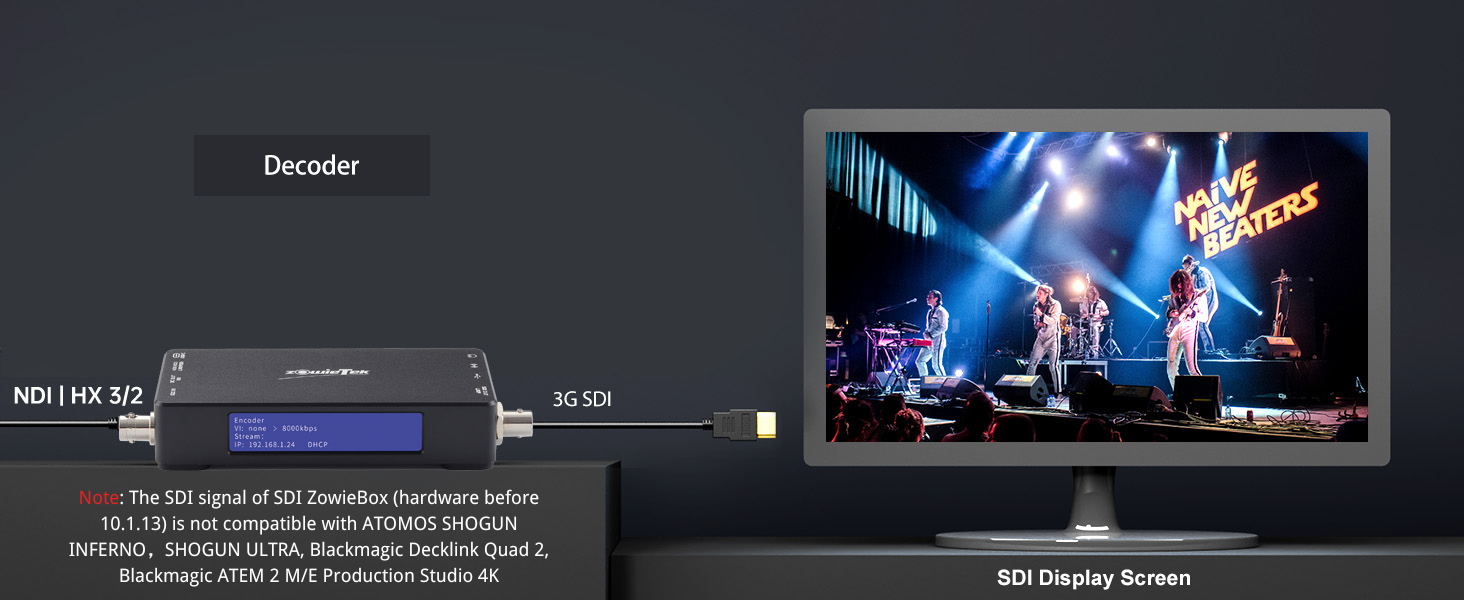
The Zowietek ZowieBox is a compact, aluminum-encased 3G SDI to NDI HX3 certified video encoder/decoder that supports multi-protocol streaming (UVC, SRT, RTMP, RTSP) and standalone live streaming powered via PoE or USB-C. It enables seamless integration of diverse video sources into professional NDI workflows, offers remote control via ZowieUI and OBS integration, and supports SDI extension over LAN, making it an indispensable tool for modern broadcast and live production setups.




| ASIN | B0D7ZWPDXQ |
| Best Sellers Rank | #54 in Video Converters |
| Brand | zowietek |
| Customer Reviews | 4.1 4.1 out of 5 stars (292) |
| Date First Available | June 25, 2024 |
| Interface Type | SDI |
| Item Weight | 6 ounces |
| Item model number | 30661-102 |
| Manufacturer | Zowietek |
| Material | Aluminum |
| Mounting Type | Tripod Mount |
| Number of Channels | 1 |
| Number of Pins | 45 |
| Product Dimensions | 4.84 x 2.68 x 0.87 inches |
| UPC | 617395411719 |
T**B
Great, With Quirks
This product was basically my first step into the complicated world of NDI, and I'm happy overall. This thing is a Swiss Army knife - it does just about everything, but not perfectly. BUT having a great quality 1080p real-time livestream of our camera feed, as long as you have a network connection to one of our campus network switches (which in turn powers the device with POE), is a game changer. Has no trouble displaying on 4K TVs and audio passthrough via HDMI works great. Makes for a super clean setup. Two gripes. This device has issues with frame rate conversions which might be solved in a future firmware update. For example, we run everything at 59.94 which the zowiebox detects as 60.00 (or at least that's the highest fps option in video settings, and no 59.94 option). Within a couple minutes there is a SEVERE delay to the audio channel. This effect appears to be caused by the Zowiebox "speeding up" the video channel to convert it from 59.94 to 60, but does not speed up the audio channel simultaneously, so for every second the audio gets behind the video channel by 0.06 seconds. So after 16.66 seconds the audio becomes 1 whole second behind the video, and after a minute it's approximately 3 seconds behind. The two options to solve this are to convert our video infrastructure to 60 (headache) instead of 59.94 which removes the conversion the Zowiebox is performing, or force the Zowiebox in video settings to 30fps. Somehow this fixed the audio issues and now everything is real-time. I've also had issues getting Multicast NDI to work properly which might be user error, but I've tinkered with this for many many hours. I have dreams of using our SDI-Zowiebox as our "transmitter" with a small army of HDMI-Zowieboxes as receivers for hallway TVs, classrooms and overflow rooms, and I'll need multicast with this. I'll have to tinker with this some more. Overall highly recommend. As I said, Swiss army pieces of hardware.
P**R
LEGEN (wait for it)
These ROCK. I have two. I would like eight more. I have successfully configured these in so many awesome ways. Each of mine are currently setup to broadcast their input as an NDI source over the network, regardless of what else the box is doing. Even when I set them up to receive a camera's NDI signal and output that signal over HDMI to a switcher, each Zowiebox itself is also available over the network as an NDI source ... which IS convenient, because I can then remotely confirm that the appropriate box is receiving the correct signal, before enabling the HDMI output which itself can also be independently disabled/enabled. I have tested an OBSBOT Tail Air w/ NDI license » both WiFi and Wired w/ official adapter » my network » Zowiebox connected via ethernet » NDI source as input » HDMI output to ATEM switcher. + a StreamDeck to control the cameras PTZ functions. Oh yeah and you can't use an ATEM switcher's 1st HDMI port, oddly enough. ALL the other HDMI ports are fine, but literally just the first HDMI port is limited to something like YUV color mode? If I recall correctly? Anyways. 1st input will be green and wonky, you can't park there. SRT Server is working great! I really didn't want to buy more $100 NDI licenses for my last 2 Tail Air cameras and THIS HAS DONE THE TRICK! H.265 encoding SRT mode on the OBSBOT Tail Air using Listener mode * make sure to add the Stream ID.* It is probably: pusher/live/av + add the IP address of the Tail Air in the Zowiebox SRT settings, setting it up in Caller mode. BOOM SRT server is now working with HDMI output to my ATEM switcher. Have also successfully configured RTSP/RTMP mode between these same devices. Since starting this testing, I've had these cameras and Zowieboxes running nonstop for several days inside my house. Not sure how they'll hold up elsewhere, but so far nothing has shutdown or frozen. Highly recommend. DARY
D**S
Very nice NDI encoder/transmitter
I'm using this item connected to a Sony ZV1 camera for the purpose of transmitting video over NDI wirelessly to OBS studio then to Twitch stream. The product works well and provides a lot of control over video and audio quality. It is a fairly economical way to do so, considering you typically have to pay $99 just for an NDI license for each product you use, and that fee is included in the $150 price. The quality is good, and I'm hoping in the future they will support even faster transmission rates at higher resolutions over wireless NDI. NDI requires a lot of bandwidth, so a strong wifi is required. I'm only taking one star off, because I feel like the transmitter could be stronger, especially considering the antenna is inside a metal box, which isn't a great location for an antenna. It makes the unit streamline, which is nice, but reduces effectiveness a bit. I think they should consider adding an external antenna port, which would help improve the distance covered. The only other negative was the unit seems to be a bit sensitive to swapping wifi network. I was on one wifi, then switched to another, and when I did this, the unit started acting very erratic. I was getting choppy video and couldn't figure out why. I had to do a factory reset to fix the issue. Also, I run a pretty mobile setup, and it didn't seem to like being handed off from one wifi access point to another. It would lock up during the handoff and I would have to restart the system. Pretty good technical support, other than having to wait a day since I think the support team, for me, is overseas and on a different time zone. Overall a good product, and I'd recommend, but I could see them making a few tweaks to improve even further.
C**N
Hittils är den riktigt bra. Håller den i flra år är jag riktigt nöjd. Hittils har jag bara låtit dom stå på i några timmar utan problem. Hoppas det funkar bra i fortsättningen också 😊
A**E
Very satisfied with the purchase. It takes over the streaming from the computer/laptop, which becomes free to be used during streaming. Connected to a live on Youtube, controled via mobile phone, no issues.
C**.
Le manuel explique les bases. Une fois sur l'interface web, il faut aller dans decodeur > uvc et activer la webcam. La page sera en erreur si la combinaison de paramètres est incorrect. Il faut donc savoir quelle combinaison la webcam autorise. Pour savoir ça, on branche la webcam au PC et on regarde les choix qui fonctionnent dans ses paramètres. Le boitier met du temps a démarrer, environ 20 à 30 secondes. Ça fait long quand on attend pour voir si ça fonctionne mais ce n'est pas dérangeant vu qu'on ne passe pas som temps à alumer et éteindre. Toutes les infos de base sont claires si on sait avec quoi on est en train de travailler. 5 étoiles car c'est intuitif.
U**E
Der Encoder funktioniert besser als erwartet (vergleichen kann ich mit einem eigenen Prototypen, dem Kiloview und TP Link, die alle ein Vielfaches kosten und nicht so viel leisten). Allerdings ist die WLAN Verbindung als Access Point oder Client nur zur Konfiguration geeignet. Der NDI Stream der ZowieBox wird, warum auch immer, nur über die LAN Schnittstelle ausgegeben. Ist aber auch kein Problem, an den LAN Port einen mobilen Router anzuhängen. Der NDI-HX Stream wird ohne Probleme von OBS unter MacOS erkannt, ebenso unter Windows, nur leider nicht unter Ubuntu, obwohl dort OBS 27 + libndi 4.5.1 + obs-ndi 4.9.1 andere NDI Streams anzeigen kann. Die USB C Schnittstelle braucht 5V/ ca 10 (max 25) Watt, die Stromversorgung über Powerbank oder PoE ist damit möglich und läuft stabil. Strom Versorgung eines weiteren Gerätes ist allerdings etwas mickrig und reichte bei mir nicht um zB eine DSLR auch beim Fokussieren mit Strom zu versorgen. Auch als Decoder funktioniert die Box ohne Probleme. Allerdings erkennt sie dabei nicht full NDI, sondern nur NDI-HX. Kann also schwierig werden, wenn der Zuspieler nur full NDI produziert. Nachtrag 7.3.2024: Die neueste Firmware kann nun auch den NDI Stream über WLAN ausgeben, das war mein einziges Manko. Das Tally Light funktioniert einwandfrei, Geräuschentwicklung ist gering, läuft stabil auch im Dauertest, damit 5 von 5 Sternen. Nachtrag 6.4.2025: Ziemlich bald kam noch eine weitere Zowiebox für eine weitere Kamera dazu. Es gibt regelmässige Firmware Updates, einen aktiven Email Support und seit letzter Woche geht nun auch noch der UVC Signal Import, dh man kann auch DJI Kameras o.ä. anschliessen.
A**A
Il prodotto fa veramente tante e cose e ancora non ho esplorato tutte le funzioni, per adesso l'ho usato come decodificatore sia srtp sia ndi, nel primo caso tramite un dji pocket 2 e ha funzionato bene nel secondo tramite iphone e app ndi per avere una camera senza fili aggiuntiva, ovviamente il secondo molto più fluido... l'ho testato sia tramite wifi interno sia tramite lan in entrambi i casi non ha dato problemi e ha offerto una buona copertura; per il prezzo che ha senza dubbio consigliato penso il più abbordabile e completo della sua categoria, non supporta flusso NDI non compresso ma per me non è fondamentale
Trustpilot
2 weeks ago
3 weeks ago