
🎧 Digitize your nostalgia—because your memories deserve to be timeless!
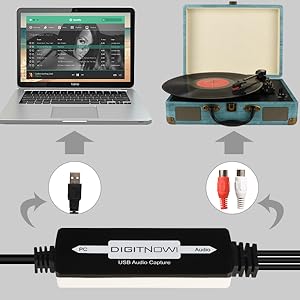
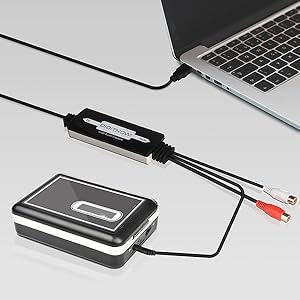
This USB Audio Capture Card Grabber converts analog audio from vinyl records and cassette tapes into digital MP3 or WAV files. Compatible with both Mac and Windows systems, it features plug-and-play USB connectivity, includes professional-grade Audacity software, and supports multiple audio inputs (3.5mm and RCA). Lightweight and portable, it’s the perfect tool for preserving and modernizing your vintage audio collection with ease.
| ASIN | B079CBGDST |
| Batteries | 1 CR2032 batteries required. |
| Best Sellers Rank | #15 in Internal TV Tuner & Video Capture Cards #2,377 in MP3 & MP4 Player Accessories |
| Customer Reviews | 4.2 4.2 out of 5 stars (1,094) |
| Date First Available | December 19, 2017 |
| Is Discontinued By Manufacturer | No |
| Item Weight | 2.56 ounces |
| Item model number | BR605 |
| Manufacturer | DIGITNOW |
| Product Dimensions | 2.01 x 6.5 x 5.6 inches |
C**H
Good and it works.
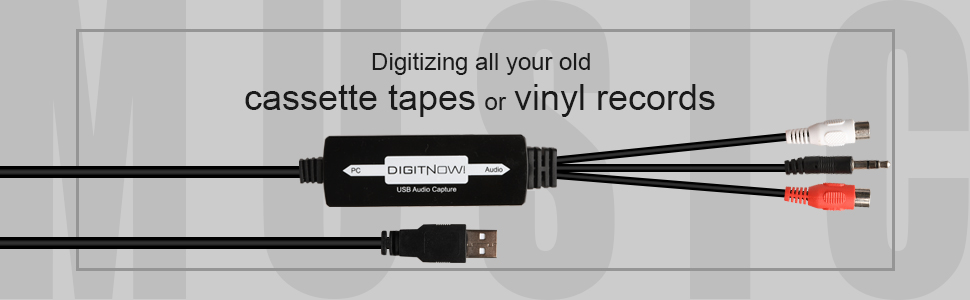
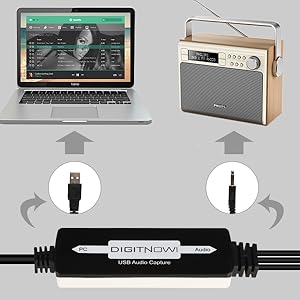
Received yesterday as listed. In the box is the Audio to USB converter, audio accessories (3.5mm female to female audio connector and 3.5mm female to 2 RCA male audio connector), software on small CD (3") and printed instruction manual with contact information (Email and phone numbers). The audio end cable is about 5" long and has the standard red and white RCA audio and a 3.5mm male audio jack. The PC end cable is about 30" long with a USB A port (1.0 or 1.1). The converter itself is about 3" long, 1" wide and 1/2" thick. It is true PNP on Windows 11 Pro. I plugged the USB end into a front USB 2.0 port on my desktop, and it immediately shows up as "USB microphone" in device manager (It has a built in LED power light). I put the small 3" CD in my DVD R/RW drive and just follow the instructions (Make sure to pick Windows or MAC OS in Audacity folder). If you do not have an optical drive, you can go to "Audacityteam.org" for a free download. The included manual, though not necessarily in the best English, is very helpful and fairly straightforward. I had no need for the included audio accessories, but nice to have depending on someone else's particular set up (Will need separate 3.5mm audio cable). I put it to the test with an old turntable and vinyl LP record and the 3 songs I picked worked fine and played as MP3 on my computer. I am planning to transfer some songs from old 33 vinyl records (Eventually burn them to CD's) before I get rid of all my vinyl albums and turntable to declutter my space. I was planning to do the same with old cassettes, but my ancient full size Studio Fisher tape deck kicked the bucket, and I threw it in the trash with all my 40 years+ old cassette collections (Not sure if they still work and didn't feel like buying a cheap small battery-operated handheld cassette player). So yes, this little gadget actually works and no issue on initial use. Good first impression and recommend. Thank you.
A**R
Works well with WavePad by NCH Software.
It's well-suited for transferring recordings from cassettes to a computer. The software that came with the device didn't work very well, but I used WavePad from NCH Software instead.
N**Y
Great product, bad instructional manual
Once I got this working, it works very well. Good sound quality and easy to use (but I have some experience with other recording software which was helpful). The only problem I have with this product is that the instruction manual is not very detailed, and there are a bunch of functions I still don't know what they do. Also, I kept getting an error message: "Error while opening sound device. Please check the input device settings . . .." It was most frustrating, and the instruction manual had nothing about it. I had to Google for the solution and I found that in the "privacy" settings on my laptop, access to the microphone inputs was restricted for most apps. Once I removed those restrictions, this started working, and it has been very useful in transferring live recordings I have on cassette tapes to mp3 format. I have Windows 11.
D**R
Works Just as Advertised
Worked great, just as advertised. Plug & play. I have already been using Audacity for years, so it was even easier for me than for most. I digitized some very rare analog recordings thus saving them from oblivion. Money well spent
K**S
Nice adapter
Got this to preserve old cassette tapes and save them onto my laptop. It works great.
T**C
First One Junk, Second One Worked
The first one of these I ordered never worked. I wasted a couple of hours tinkering with settings on my PC and Audacity, trying different settngs, connections, etc. with no success. My Win11 PC never properly recognized it as a USB audio input device and what little audio it would pick up on occasion was garbled beyond recognition. I finally gave up in frustation and returned it to Amazon for replacement. The replacement unit arrived a couple of days later in a shipment damaged box but seems to work OK after a couple of test recordings. My PC recognized it right away after plugging it in the USB port and while I did need to make some changes to internal settings it was up and running pretty quick. I'm only giving this item 3 stars due to the wasted time and hassle with the first one, which makes me question build quailty and long term durability.
J**J
SUPER EASY to use... even with zero installation of software!
Once you know how this little device works, there's really no need to install the included software, unless you don't already have something on your computer that will work fine with it. I'm very accustomed to AUDACITY software on my Linux box, which is where I'm using this device. I see that Audacity is also available for other OS's... or, can be installed from that included in the box. At core, the software supports this cable being used as a direct audio feed OUTBOUND from a tape device (or other audio source, if desired)... into which you plug in this CABLE, and then plug the other end into the PC, where its INBOUND digital signal is captured by the software package. The main thing that can cause some headaches with this process of digital conversion, is if your cable's US B connection doesn't show up in the software. That's usually a result of opening the software before the cable is in place. Or sometimes, there are multiple SOURCE devices, and you've got the wrong one selected as INPUT. BTW, one thing I personally find useful when using this digitizer with 3.5mm audio plug is an audio splitter with dual outputs and volume controls such as: [https://www.amazon.com/gp/product/B06VXZSBZ2] With this, I can plug in an earplug to monitor what the digitizer is hearing, esp in cases where my software has a different OUTPUT channel. It also allows me to more finely tune the input level from the digitizer, with a separate volume controller than the one I have on the earpiece. This little splitter/vol control is of course totally optional, and extra and isn't required to do the recording. All in all, I find this device a SUPER useful tool in my audio toolbelt! Very handy!
Trustpilot
1 week ago
4 days ago



