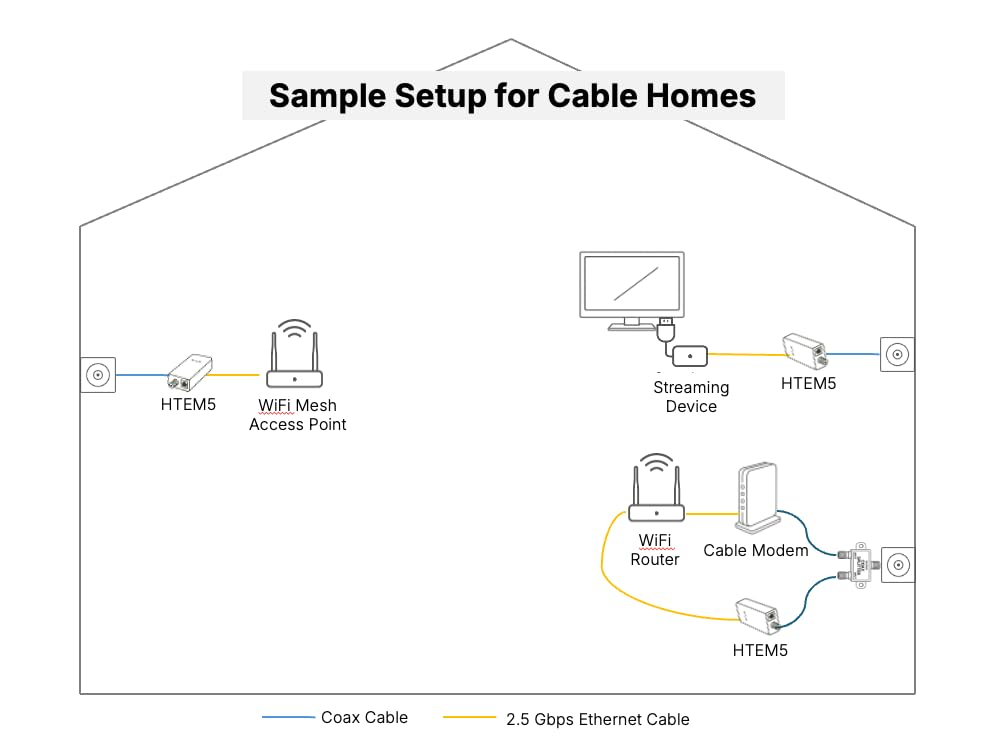


🚀 Upgrade your home network to multi-gig speeds without new wires—because buffering is so last decade!
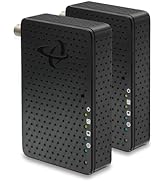
The Hitron HTEM5 MoCA 2.5 Adapter Kit converts existing coaxial cable outlets into ultra-fast 2.5Gbps Ethernet connections, providing a reliable wired backhaul for mesh WiFi, streaming, and gaming. Designed for cable TV wired homes, this plug-and-play kit includes two adapters, coax and Ethernet cables, and power adapters, enabling seamless multi-gigabit networking without running new cables or complex setup.




| ASIN | B0C47MJT83 |
| Best Sellers Rank | #64 in Audio & Video Connectors & Adapters |
| Customer Reviews | 4.4 4.4 out of 5 stars (310) |
| Date First Available | January 27, 2021 |
| Item Weight | 3.88 ounces |
| Manufacturer | Hitron |
| Product Dimensions | 4.33 x 2.76 x 1 inches |
G**G
Excellent Product works well over 1 Gbps
I recently signed up for AT&T's Fiber Network, which offers speeds of up to 1 Gbps. The actual speed provided to the fiber gateway is quite generous at 1.25 Gbps. My Office is on the second floor and about 35 feet and several walls away from the gateway. I tried several Wi-Fi 6E and Wi-Fi 7 solutions to boost or extend the signal, but I never achieved more than about 700 or 800 Mbps, and the connection speed fluctuated. I just installed this MoCA adapter kit, reusing a coax line that runs into the office (total coax length is about 50 feet), and I am now seeing the full 1.25 Gbps on my computer, and the bitrate is consistent and stable (there is also an additional 25-foot Ethernet cable). I highly recommend this product. The installation was easy, and the result makes it worthwhile.
M**H
Perfect for running internet to another building
I bought this to connect my Home network to my garage. For anyone who has a coaxial run to another building, such as your garage, this is the perfect product for you. In a closed loop system, I was able to connect one Hitron unit at the coaxial end that resided in my basement. The coaxial cable then runs to a conduit buried about 2 feet underground and runs about 100-125 feet to the garage. I then connected the second Hitron unit to the end in the garage. I ran ethernet from the second hitron unit to a TP-Link Omada WiFi 7 Wireless Access Point | BE5000. Inside the house, I ran an ethernet cord from my basement Hitron unit to the living room network switch connected to my router. The best way to run ethernet for cheap is to determine distance and purchase pre-made patch cables. Unless you have a network closet with a patch panel of course. Most people don't go to these extremes at home, however. I then used the user manual of the TP-Link to determine its IP Address, logged into the web portal of its IP and setup my Wi-Fi SSIDs and passwords to match those within the house determined by my router. I have a Firewalla purple router with two Firewalla Access Points. Unfortunately, while they work better with the Firewalla App, they are costly. The TP-Link AP is a cheap alternative to Firewalla's AP's and works just fine. I get perfect signal in my garage with full speeds as expected.
D**U
Reliable and Easy to Use
The Hitron HTEM5 has been fantastic for my needs. Setup was quick and straightforward, and it’s been very reliable with stable performance. I've had it for 6 months so far. The design is compact and user-friendly, and it consistently delivers the speed and connectivity I need. If you’re looking for a solid, hassle-free device that just works, this one is a great choice.
S**A
Excellent wired backhaul for my mesh wifi
The MoCA 2.5 adapter kit (2-pack) has been working perfectly for 6 months, without any dropouts or issues. Painless setup (just had to plug connect each of them to their own cable outlet), and I am getting at least 500 Mbps (the speed of my Internet connection). This provided wired backhaul for my Google Wifi (1st gen) mesh network and breathed new life into it by speding it up dramatically, from 200 Mbps to ~500 Mbps. Worthy investment!
K**K
Works as Advertised So Far
I moved my office setup to my unfinished basement where I have no ethernet cable feed from the Xfinity router upstairs on the first floor. I can get a pretty good wireless connection, but I have too many devices that I want/need to have a fast stable network connection. My main Xfinity cable connection comes into the basement and then splits to the rest of the house. Thus, I heard about and researched MoCA 2.5. The set of devices arrived packaged neatly and in good shape. If you've done your research on how to setup a MoCA network, then the connection of the devices will be pretty straight forward. I purchased new coaxial splitters rated for use of MoCA to ensure that the network to work properly. Also, you will need a MoCA PoE filter device, sold separately, on to the main cable TV/internet cable that comes in from the outside from your cable company. This needs to be added BEFORE the first split in the house. This prevents your network signals from leaking to the outside via the coax network. Once setup, my MoCA devices and network switch all indicated that my network was running at 2.5Gb/s. I was happy. The only bad thing that I encountered was the lack of instructions on that you may need to make changes on your router. There were no indications on the small "Get Stared" card included in the box. Upon initial setup, connecting the MoCA knocked out the wireless and wired Xfinity network. After about 45 minutes of Googling, I finally read that the Xfinity router has a setting for MoCA in its advanced settings which is not easy to get into. The MoCA setting was already "Enabled" but the things were still not working. More Googling. Eventually I read that with some MoCA devices if the router's MoCA setting is enabled, the network may not work because the MoCA devices could be trying to push Its own signal and would conflict with the router's setting. I changed the Xfinity router's MoCA setting to "Disable" and the entire network ran smoothly. It would have saved me a lot of time and headache if the instructions included some information about this. Otherwise, I am very pleased that I have a wired ethernet network in my basement via the existing coax cable network in the house.
D**N
The perfect solution to get you native ethernet speeds without running wires!
I've loved using this product and as a tech guy it's fixed a crucial problem. I rent a nice place but as a tech guy and homelab enthusiast it makes me frustrated that I have to use Wifi all the time. No more! I discovered an old coax port behind my desk and on a whim bought this and I'm so delighted I did. I have full 2.5GBps internet in my office upstairs to all of my devices and the speed is near identical. I've had no drop-outs and honestly I'm not sure I can tell a difference vs ethernet. The value is great saving potentially hundreds or even a thousand on getting dedicated CAT wiring installed. If you're like me and you're trying to maximize your internet without making yourself insane running cabling then this is a great alternative especially if you rent as so many apartments and townhouses have coax ports everwhere you can use! Just plug and play the install couldn't be easier!
Y**.
This unit arrived on time and worked correctly and was easy to commission....
J**E
Technically these work but I'm getting less than 100Mbps so it's slower than the wifi 6 that I've already got. The main problem though is that I ordered them from Amazon.de (Germany) and they came from the USA. They were supplied with American plugs which are no use to me and I had to pay import duty from the USA. That is not why I use Amazon.de! When I've paid for delivery I expect them delivered and I expect European plugs.
Trustpilot
3 days ago
1 month ago



