
🎧 Own the room with flawless sound — because your meetings deserve more than just 'good enough'.
The EMEET Conference Speakerphone M0 Plus is a professional-grade Bluetooth and USB-C speakerphone featuring 4 AI microphones for 360° voice pickup and advanced noise reduction. Designed for up to 8 participants, it supports daisy chaining to expand coverage for 16 people. Compatible with all major conferencing platforms, it offers plug-and-play ease, crystal-clear full duplex audio, and up to 10 hours of battery life, making it ideal for modern hybrid workspaces and on-the-go professionals.


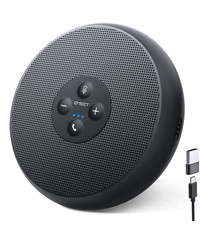
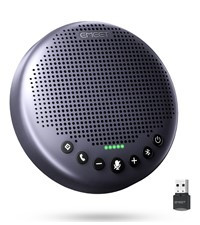


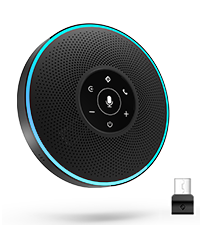
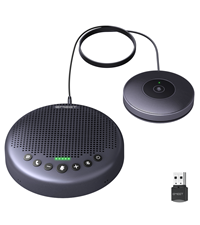


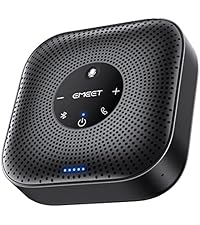

| ASIN | B0BVZLS5GZ |
| Additional Features | Built In Microphone, USB Port |
| Age Range Description | Adult |
| Antenna Location | Workspace & Home Office, Huddle Room, Medium Room, Work From Anywhere |
| Audio Driver Type | Dynamic Driver |
| Audio Output Mode | Surround |
| Battery Average Life | 10 Hours |
| Battery Capacity | 2600 Milliamp Hours |
| Best Sellers Rank | #1,802 in Office Products ( See Top 100 in Office Products ) #1 in Telephone Audio Conferencing Products |
| Bluetooth Range | 10 Meters |
| Brand | EMEET |
| Built-In Media | conference speaker |
| Color | Black |
| Compatible Devices | Laptop, Smartphone, Tablet |
| Connectivity Protocol | Bluetooth |
| Connectivity Technology | Bluetooth, Dongle, USB |
| Control Method | Voice |
| Controller Type | Button |
| Customer Package Type | FFP |
| Customer Reviews | 4.4 out of 5 stars 3,565 Reviews |
| Enclosure Material | Plastic |
| Frequency Response | 20000 Hz |
| Input Voltage | 5 Volts |
| Is Waterproof | FALSE |
| Item Dimensions D x W x H | 1.6"D x 4.6"W x 4.6"H |
| Item Height | 4.6 inches |
| Item Weight | 0.26 Kilograms |
| MP3 player | No |
| Manufacturer | Shenzhen eMeet technology Co.,Ltd. |
| Maximum Range | 10 Meters |
| Model Name | M0 PLUS |
| Model Number | M0 PLUS |
| Mounting Type | Tabletop Mount |
| Number Of Circuits | 1 |
| Number of Audio Channels | 1.0 |
| Number of Batteries | 1 Lithium Polymer batteries required. (included) |
| Number of Items | 1 |
| Number of Microphones | 4 |
| Number of Power Levels | 1 |
| Power Source | Battery Powered |
| Series Number | 1 |
| Signal-to-Noise Ratio | 60 dB |
| Speaker Maximum Output Power | 5 Watts |
| Speaker Size | 1.57 Inches |
| Speaker Type | Tweeter |
| Specific Uses For Product | Meetings Conferences |
| Subwoofer Connectivity Technology | Wireless |
| Total USB 2.0 Ports | 1 |
| Tweeter Diameter | 1 Inches |
| Unit Count | 1 Count |
| Warranty Description | 2 YEARS WARRANTY |
| Warranty Type | Limited |
| Water Resistance Level | Waterproof |
| Wireless Technology | Bluetooth |
P**P
Works flawlessly
Great product. What used to be an insufferable meeting experience, thanks to utterly sub standard speakers and mics on the laptops, has become enjoyable. At least as far as meetings can be enjoyable. Good audio quality, good microphone, good volume. I use it regularly for MS Teams and Zoom conference calls in rooms with no AV equipment or phone. I even use it at my desk because it’s convenient and the audio is so good. I use the included usb-c cable rather than Bluetooth, and it’s an instantaneous connection and zero configuration. Highly recommended.
D**N
Strong Early Performance, Solid Feature Execution
I just got the device a few hours ago, but I put it through some deliberate testing and here is my initial impression: The 360° Voice Pickup works well. Voices are captured clearly from or all around the device, without needing to speak directly into it. Noise reduction is also effective. I tested this by playing a loud thunderstorm on a separate Bluetooth speaker in the same room during a call, and the person on the other end could not hear the background noise at all, while my voice remained clear. The plug and Play functionality works as expected and setup was straightforward. Bluetooth pairing with my phone was quick and stable. And the speaker volume was loud enough to be clearly heard without distortion. The claim is that it can run for 10 hours and I haven't had time to test this yet, however, the compatibility has been good so far, including successful use on my Linux computer. So, based on early use, this device delivers on its basic features and has performed reliably for calls and speakerphone use so far. I'll update again if anything negative happens, but my first impression is very positive.
K**O
Excellent value for a quality product.
Excellent value on a quality product. Using now for about one month with no issues. Connections are stable and audio quality is really good. I have tested it in challenging noise conditions like a very loud stereo and tv in the background and others report good voice clarity on the other end. Volume is more than adequate. I am not using this everyday so still unable to comment a whole lot on battery life but it does seem adequate. You can also use it while it is connected via USB and charging so the battery life may not be as critical. If I am to be critical it would be on the status LEDs which I find to be too small and therefore somewhat obscure depending on your distance or angle from the unit. This is critical when for example during a meeting, you cannot easily determine whether MUTE is on or not. The 'J' Brand has much larger status LEDs so much easier to determine if on MUTE or not. Overall a good product and I would recommend them.
E**K
Works great, but not with docking station
FIX FOR DOCKING STATION USE BELOW First off, it was hard to gauge the size of this device based on other user photos. Xbox Series controller next to it for reference. I was tired of using my work provided headset(Logitech H570e) because wires are annoying and I work from home, so closed audio communication isn’t needed. I was also browsing stuff like the Jabra2 line but too costly. I have the EMEET sitting at the end of my desk and people can hear me just fine. The microphone quality is comparable to the headset. Both leagues better than the laptop microphone. The speaker is plenty loud and others cannot hear themselves when i’m talking to them on Teams, or Jabber. The product itself works great overall. Plug and play use when the usb cable is directly connected to my laptop. However, I ran into issues when I plugged the EMEET into my Dell WD19S docking station. I plug everything into it, so that way all I have to plug into my laptop is the usb-c cable. When listening to audio from a youtube video, the speaker works fine. When you try to run something that requires the speaker and microphone to both be in use(teams, jabber) the speaker will continually disconnect and reconnect over and over while also trying to find a usable audio source such as the laptop speakers, making it impossible to communicate. The microphone will work, so others can hear you, but you can’t hear them due to the speaker connection issue. I tried updating the drivers on my laptop and docking station, I tried going into advanced audio settings and not allowing other audio sources to connect, I set the EMEET as priority, I googled forums from other people experiencing issues with their docking stations and similar devices, I downloaded the EMEET software provided on their website, nothing worked. IT with my company worked on it for 30 min as well with no luck. I called EMEET’s support team and with no troubleshooting, they told me it’s likely the docking station at fault but ehhhhh I don’t know about that, chief. I did not want to plug the EMEET into my laptop just for it to work. I also did not want to run strictly bluetooth as i’d have to recharge it. That defeats the purpose of why I got this(cables, handsfree, tidy, etc) THE FIX: As stated before, when the EMEET is plugged into the docking station and i’m making a call, the microphone is the only thing that works correctly. To get the speaker to work, I paired the EMEET to my laptop via bluetooth. Since the EMEET is also still plugged into the docking station, it will show two speaker sources and two microphone sources. On windows, go to system, sound, output. It should show two sources from EMEET. One labeled Speaker, One labeled headset. The one labeled headset is your bluetooth connection. The one labeled Speaker is your wired connection. Click on the Speaker source, under general, audio, select “don’t allow”. This will make it to where the Speakers bluetooth connection is your output source, and the microphone wired connection is your input source. Unit is still hardwired in so you don’t have to charge it, and it resolves the connectivity issues with the docking station. Would be 5 stars if docking station compatibility were there.
B**C
Great Audio Quality!
This little speaker is fantastic, and I genuinely mean that! I purchased it because our meetings constantly suffered from low volume, muddy audio, or microphones that simply couldn’t pick up the whole room. The moment I plugged this in, the difference was unmistakable. There are four discreetly embedded microphones around the edges, which are paired with a central speaker that delivers clear, strong audio in all directions. Setup couldn’t be easier: simply connect it to your computer with the included USB cable and it’s instantly recognized. It also supports Bluetooth, which makes it just as useful with a laptop or phone. The clarity on both ends of the call was immediately noticeable. People online could hear us effortlessly, and everyone in the room was impressed by how well we could hear remote participants. It genuinely solved both of the audio problems we’ve been dealing with. Plus the voices sounded conversationally natural. It also comes with a slim protective travel case and a USB cable, making it easy to carry between rooms. Bottom line is that this speakerphone performs exactly as advertised, the price is spot-on, and the impact was immediate. If you need a reliable conference speaker for group calls, this is an excellent choice. It's honestly worth the cost,which in my opinion, is quite reasonable.
J**.
Overall, for the price, this is a solid, reliable conference speaker
I bought the EMEET Conference Speakerphone M0 Plus for my small team’s weekly meetings, and after a month of use, I’m pretty happy with the purchase. We’re a hybrid group, with some in the office and some remote, so clear audio is a must. This speakerphone has made a noticeable difference. Setup was a breeze. I connected it to my laptop via USB-C, but I’ve also used Bluetooth with my phone for quick calls. Both connections are stable, and switching between them is straightforward. The real standout is the 360° voice pickup. We usually have 5-6 people around the table, and everyone’s voice comes through clearly, even if they’re not sitting right next to the device. The AI noise reduction is effective, it filters out background chatter and the occasional HVAC hum, which used to be a problem with our old mic. One feature I didn’t expect to use but ended up loving is the daisy chain option. We had a larger meeting last week and borrowed a second M0 Plus, linking them was simple, and it really did expand the coverage without any drop in sound quality. A couple of minor things: the touch controls are a bit sensitive, so it’s easy to accidentally mute or adjust the volume if you brush against them. Also, while it claims to work with all major conferencing software, I had to tweak some settings in Zoom to get the best sound.
S**L
Perfect portable speakerphone
Its small and compact. As someone who travels weekly, it is easy to set up and use with remarkable audio and sound. I even sat an airport gate with several peers and conducted a Team's conference call and the background noise wasn't an issue. I would say this speakerphone is on par with the older Polycom phones from the 2000's.
N**L
Best Sound & Reliablity for Not High $
We've tried other low cost speakers for our business and conference room and this is br far the best, most reliable. Great sound quality, ability to be louder then others we've tried, true plug and play. Very good quality and value for not a lot of $. We now have several of these in our offices.
Trustpilot
1 week ago
2 weeks ago



