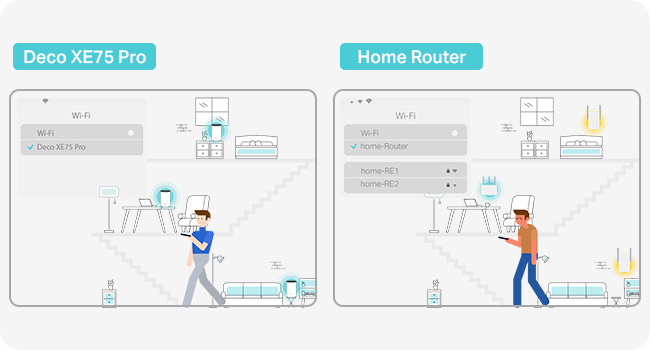
🚀 Elevate your home network to pro-level speed and coverage—because buffering is so last decade.
The TP-Link Deco XE75 Pro (3-pack) is a cutting-edge Wi-Fi 6E mesh system delivering tri-band speeds up to 5400 Mbps and coverage up to 7200 ft². Featuring a 2.5 Gbps wired port and AI-driven mesh technology, it ensures seamless connectivity for up to 200 devices. With advanced security via TP-Link HomeShield and easy setup, it’s designed for modern homes craving fast, reliable, and secure internet.


| ASIN | B0BF5GK7TD |
| Are Batteries Included | No |
| Best Sellers Rank | 2,022 in Computers & Accessories ( See Top 100 in Computers & Accessories ) 8 in Whole Home & Mesh Wi-Fi Systems |
| Brand | TP-Link |
| Colour | white |
| Customer Reviews | 4.3 4.3 out of 5 stars (6,621) |
| Date First Available | 13 Sept. 2022 |
| Guaranteed software updates until | unknown |
| Item Weight | 2.65 kg |
| Item model number | DECO XE75 PRO(3-PACK) |
| Manufacturer | TP-Link |
| Operating System | TP-Link OS |
| Product Dimensions | 10.5 x 10.5 x 16.9 cm; 2.65 kg |
| Series | DECO XE75 PRO |
| Voltage | 5 Volts (DC) |
| Wireless Type | 802.11ax |
K**R
Wi-Fi is ok
WiFi was ok, but I wasn't able to connect switches to the satellite nodes as it wouldn't detect them. It was also running an older version of the firmware but was not possible to update to the latest version via the phone app.
A**S
WiFi 6E and 2.5g port at this price...
Upgraded from TPLink Deco X20 (which were also brilliant) Setup was easy, although the app doesn't contain a 'flow' for upgrading from a previous Deco system, theres simple instructions on the website. Took about 10-15 mins to replace all 3. App is intuitive, and walks you through set up with no issues. Defaults to use 6ghz for Backhaul only, so you'll need to change this if you want 6E on your devices, and then it creates another network. Coverage is amazing, 4 bed house with solid walls, and have no issues at all, and even covers the garden. If you've got 2.5g wired ethernet, the multi gig port is a welcome addition, and for the price uplift Vs non-pro option, it's giving you a little future proofing . Download / upload speeds are brilliant, and latency is decent too. I use these in AP mode, so some of the features aren't available (but I don't need them anyway! ) Web interface is awful, really locked down, so any admin has to be done on the app, which is fine .... But means you are limited to using your phone / tablet. Mesh over 6ghz Backhaul is stable, and moving between APs is seemless. Moving between 6ghz and 5 isn't - but that's more to do with the device connected being 'sticky' 6e doesn't have the same coverage so I find my phone connects to 5ghz as I get home, and then doesn't want to switch over when I get through the door. There's the option for guest network, and an IoT network, but there's no VLANs so if that's what you need, maybe look at TP Link Omada which is the prosumer range. All in all, for the price, a great bit of kit, and zero issues!
P**C
Unleash Lightning-Fast WiFi Across Your Home!
I've been a long-time user of the TP-Link Deco system, and the Deco XE75 Pro has solidified my trust in their products. It offers an outstanding balance between performance and price, making it a perfect upgrade for anyone seeking improved network performance without breaking the bank. Why I Upgraded I chose this model to enhance my internal backhaul speeds, especially for data movement to my home NAS. While I considered the newer 7G systems, this option provided a significant performance boost at a fraction of the cost. It also saved me from the hassle and expense of installing Ethernet cabling throughout my home—a win for both my budget and convenience. Performance and Coverage The improvement in speed and reliability has been remarkable. The mesh system effortlessly covers my 12+ room house, ensuring no dead spots and consistently strong connections. Internal data transfer speeds are incredibly fast, making tasks like NAS backups a breeze. The system integrates seamlessly with my existing Deco devices, creating a unified and efficient network. App and Features The TP-Link app is straightforward and functional, handling essential tasks like setup and device management with ease. However, it could benefit from more advanced controls, such as manually assigning devices to specific nodes. While this lack of customization can be mildly frustrating, it doesn’t overshadow the product’s overall reliability and bulletproof performance. Verdict The TP-Link Deco XE75 Pro delivers excellent coverage, fast internal speeds, and reliable operation, all at a price that feels more than fair. If you're looking to upgrade your home network without venturing into the premium price bracket, this is a fantastic choice. Despite some app limitations, the product excels where it matters most, making it a worthy investment for any connected household. Rating: 5/5
N**N
Great and easy to set up
Works well in a Victorian 3 bed semi (approx 110 sqm over 3 floors). I used this kit to replace the disappointing wifi signal from a fritzbox 7530AX, provided by an ISP. Like many UK households, the entry point for the cable is in the corner of the living room. The main unit is connected by to the router by a 10m cat 7 ethernet cable. The other two are positioned in the dining room (through a brick supporting wall) and in the basement. The deco system is in Access Point mode. The isp router handles lan connections, digital voice, and the incoming signal from the ont. Set-up is quite easy using the deco app. Signal strength is great throughout the house. My gaming PC in the basement is connected by cable to the deco unit in the basement and achieves full 500/500 speed. On wifi 6e the PC achieves slightly less and fluctuates more (naturally). I have about 40 devices connected, almost half of which are smart lights, alexa devices and a dishwasher. They all perform very well with no drop outs or random disconnections. I have set connection preferences for some devices so that they only connect to the deco unit in the same room. Front bedroom signal is medium, but still able to get 400/200 on an iPad 11. I have a TP-Link RE350 extender which covers to the bottom of the (100ft) garden and can achieve 100/100 on a good day from the end of the garden. The only issues I’ve had so far is that the power cables are way too short to be useful, but I bought cable extenders so I could place them higher. Sometimes some devices will connect or stay connected to a sub-optimal deco unit, but I think this is more an issue with the devices themselves. Overall these are easy to set up and work well.
ي**ي
ممتاز
H**Y
De l’excellent matériel, un très bon débit et une très bonne couverture et surtout alimentable en Ethernet
M**M
Es galt bei mir eine 280 m2 Altbauwohnung mit dicken Ziegelmauern und Zwischenwänden und langgestreckter Konfiguration verlässlich mit WLAN zu versorgen, wobei der Telefonanschluss, an dem der Internet-Router hängt noch dazu ungünstig in einer Ecke positioniert ist. D.H. die Grundkonfiguration ist problematisch. Noch dazu sollen gleichzeitig ca. 2 PC's, 3 Tablets und 4 Phones und einige ioT Geräte versorgt werden, wobei zu "Stoßzeiten" auch 3 streams (Youtube, AmazonTV) gleichzeitig erfolgen. Basis-speed am router ist 40-60 Mbit/s down, 15Mbit/s up. Eine anspruchsvolle Ausgangsbasis. Das DECO M5 meistert diese Problematik mehr als zufriedenstellend. Ich hatte zunächst das Netgear ORBI mesh-system mit 2 Geräte (1 Basis, 1 Satellit), das mich jedoch überhaupt nicht zufrieden stellte. Auch wenn die Spezifikationen dieses Systems theoretisch besser sind als das Deco (ORBI hat triband mit dezitiertem 5Ghz backhaul-channel zwischen den Geräten): es kam ständig zu Verbindungsabbrüchen und Apple-clients wurden eine Zeit lang (dies hat sich nach einem firmwareupdate gebessert, ist jedoch nicht völlig verschwunden) regelmäßig häufig disconnected. Danach ASUS lyra: schon viel besser als ORBI, ebenfalls triband mit dezitiertem backhaul-channel, die Verbindung war stabil. Dieses System hat sehr gute und für echte Profis geeignete Konfigurationsmöglichkeiten via PC, die Weboberfläche via PC ist für Laien eher "überwältigend" und in der usability nicht ideal. Die app war auch nicht so benutzerfreundlich und schlecht übersetzt. Gelegentliche disconnects der Satelliten kam vor (ca. 1x monatlich), war jedoch durch Neustart lösbar. Bei mehreren streams gleichzeitig hie und da (selten) etwas "bockige" Verbindung. Weitergegebene Geschwindigkeit am "Ende" des Netzwerkes zwischen 20 Mbit/s down und 5-8 Mbit/s up, also gut. Die LYRA Satelliten selbst sind jedoch eher groß und "klobig", in meinen Augen ziemlich hässlich und werden vor allem *sehr* warm! (ich habe wirklich Angst, dass die Oberflächen, auf denen die Geräte stehen durch die Hitze leiden). Das frohe LED-Farbenspiel auf der fast gesamten Oberseite der LYRA Geräte ist aber einfach "zuviel" und ist ohne Bedienungsanleitung nicht intuitiv zu erfassen..."was will mir das Gerät jetzt sagen"?? Diese Beleuchtung ist groß und sehr hell, zwar via software abschaltbar, jedoch imo ziemlich hässlich. LYRAs Äußeres wirkt auch nicht wirklich hochwertig. LYRA hat jedoch einen eingebauten Online-"Viren"-Schutz (wie Deco, ORBI hat das nicht) von "trend-micro". Hier sollen infizierte Geräte und unsichere Websites geblockt werden. Diese Funktion hat bei mir ein paar mal "angesprochen", aber vermutlich "nur" weben eines Werbenetzwerkes (Gerät lud Werbung von einem server im Hintergrund nach). Die Einrichtung war bei ORBI etwas leichter und Bedienungsfreundlicher als bei LYRA, jedoch in beiden Fällen kein Problem. Nun zum TPlink Deco M5: Zunächst ist es ein wirklich schickes System, die Geräte (Satelliten) sind relativ klein, weiß und rund und optisch ansprechend, fast "edel". ORBI mit seinen hohen "Vasen" ist wirklich riesig und muss als optisches Element in die Aufstellungsumgebung integriert werden (d.H. man sieht die Geräte immer). LYRA mit seinen sehr großen Plastikschüsseln ist optisch nicht so bestimmend wie ORBI allerdings auch nicht wirklich "versteckbar" oder "hochwertig" aussehend. Vom Design und der Möglichkeit der *unaufdringlichen* Integrierung in eine Wohnumgebung ist das Deco haushoher Sieger. ORBI besteht grundsätzlich im Set aus 2 Geräten, d.H. hat nur einen "Satelliten"; gilt es - wie in meinem Fall - problematischere Grundrisse zu bedienen, ist ein Satellit zu weinig. LYRA hat gesamt 3 Geräte, d.H. 2 für vom router entfernte Positionen (bei allen Systemen muss ein Gerät ("Base") mit Netzwerkkabel mit dem Router verbunden sein und wird daher in den meisten Fällen nahe beim Router stehen). Bei allen 3 Systemen gibt es LAN-Anschlüsse an den Satelliten, beim ORBI 4, bei LYRA und Deco jeweils 2 (bei der "Base" ist jeweils einer von der Leitung zum router (WAN) belegt) LYRA und Deco bieten mit ihren insgesamt 3 Geräten daher mehr Möglichkeiten, in unterschiedlichen Plätzen der Wohnung verkabelte Geräte (NAS,Spielkonsolen, FireTV... etc.) anzubinden. Was mich am Deco jedoch begeistert hat, was die einfache Einrichtung mittels der App. Manche mag es stören, jedoch ist bei Deco *keine* Administration per PC (Webinterface) möglich sondern NUR mit der App. LYRA an erster Stelle und danach ORBI bieten für Profiuser viel mehr Konfigurationsmöglichkeiten, an die Einfachheit und usability von DECO M5 für "Standardfälle" kommen sie jedoch nicht heran. Die Einrichtung und Bedienung von Deco ist wirklich einfach. Obwohl Deco "nur" ein Dualband-System ohne dezitierten Backhaul-channel ist, daher rein nach den Daten ORBI und LYRA unterlegen sein sollte, ist bei mir kein Geschwindigkeitsnachteil erkennbar, im Gegenteil, es ist "gefühlt" einen Tick schneller als die anderen beiden Systeme. Auch bei connect mehrerer Geräte und gleichzeitiger streams gehen 20-40 MBit/s down und 5-10 MBit/s up problemlos in der ganzen Wohnung "durch". Deco kann - im Gegensatz zu LYRA - nicht nur ("QoS") einzelne Arten von Diensten (Gaming, Surfen, Download, Stream...) priorisieren, sondern auch einzelne Geräte. Das bringt echt merklichen speed für ein priorisiertes Gerät. LYRA und Deco haben ein parental-control system (Kindersicherung), das konnte ich noch nicht testen, beim Deco sieht es jedoch leicht konfigurierbar aus. Fazit: Deco ist das schickste (am besten designte) mesh-system der drei Kandidaten, fast "Apple-like", im täglichen Gebrauch trotz theoretisch etwas "schlechterer" Technik *nicht* langsamer sondern "gefühlt" etwas schneller. Mit eingebautem Viren- und Malwareschutz sticht es aus der Menge heraus (nur das LYRA bietet Gleichwertiges). Wer sich nicht am fehlenden Webinterface (Administration über PC) und der "Zwangsregistrierung" (online account bei tplink wird zwingend benötigt) stößt und keine tiefgehenden Poweruser-Konfigurationsmöglichkeiten benötigt, bekommt die einfachste Steuerung/Konfiguration der 3 Kandidaten per schöner App. Klare Empfehlung, sofern bei sehr guter Leistung auch Bedienungsfreundlichkeit und Optik nicht zurückstehen sollen. (Ergänzung: die Datenraten sind tatsächlich mit speedtest gemessene down/uploadraten in Netz, die Verbindungsraten sind natürlich wesentlich höher, im gleichen Raum wie ein Satellit sind es die max. 876 Mbit/s sonst 250 MBit/s und höher. )
V**R
Disappointed to see they deprecated WireGuard for VPN config, apprarently for all their products. OpenVPN is absolute trash unfortunately (the only one available). Their help centre articles still show all the guides on how to set it up… this was fairly recent from what I can tell. Ridiculous
C**N
This product has done a good job on getting rid of the dead spots in my flat and it is very easy to set up.
Trustpilot
4 days ago
3 weeks ago