
🚀 Power Your Network Like a Pro — Stay Connected, Stay Ahead!
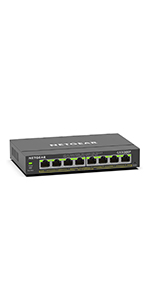
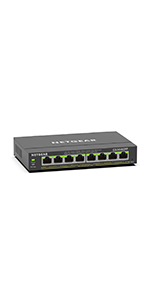
The NETGEAR GS308EP is an 8-port PoE+ Gigabit Ethernet switch delivering up to 62W total power, ideal for powering and connecting VoIP phones, IP cameras, and wireless access points. Featuring easy-to-use Smart Managed Essentials software, it offers basic yet powerful network management capabilities. Its compact form factor supports both desktop and wall mounting, backed by a 3-year limited warranty, making it a reliable and versatile choice for professional and home network setups.





| ASIN | B08MBFLMDC |
| Best Sellers Rank | #7 in Computer Networking Switches |
| Brand | NETGEAR |
| Built-In Media | 8-port Gigabit Ethernet PoE+ Smart Managed Plus Switch (GS308EP), 2V, 0. |
| Case Material Type | Plastic |
| Color | Black |
| Compatible Devices | Computers, IP cameras, VoIP phones, network devices |
| Customer Reviews | 4.7 out of 5 stars 1,957 Reviews |
| Data Transfer Rate | 16 Gigabits Per Second |
| Interface | RJ45 |
| Item Dimensions L x W x H | 10.2"L x 10.2"W x 2.2"H |
| Item Height | 1.1 inches |
| Item Weight | 1.1 Kilograms |
| Manufacturer | NETGEAR |
| Maximum Power | 62 Watts |
| Number of Layers | 1 |
| Number of Ports | 8 |
| Platform | Not Machine Specific |
| Product Dimensions | 10.2"L x 10.2"W x 2.2"H |
| Switch Type | PoE Managed Desktop/Wall Mount |
| UPC | 606449153026 |
| Unit Count | 1 Count |
| Upper Temperature Rating | 123 Degrees Fahrenheit |
| Voltage | 2 Volts |
| Warranty Description | 5 year limited |
T**G
Awesome product with easy installation
Works flawlessly. Super easy install with plug and play (and forget it) installation. Speeds are more than adequate for networked POE security cameras.
B**N
Cute Little Baby Switch
I run a Home-Lab that includes 2 of these little PoE switches. Working in an Enterprise IT environment, I would often forget that these smaller residential/hobby switches exist, but gosh to I love them. Not only are they cute, but they provide that enterprise level functionality with PoE. This means it could be used to wire up a PoE security camera system, handling both your network connection and power in one cable! Minus the countless other applications of PoE, this switch provides ample value for what you're paying. The build quality even on a switch this small is great! Feels heavy and sturdy but could honestly be held up by a number of command strips (Please... don't do that though!!!). I haven't noticed any problems with my unit getting too hot or needing anything special to operate as intended. All 8 ports work as expected and the throughput is, in fact, Gigabit as advertised. So no problems there. If you are looking for something consolidated but powerful, this could be for you!
M**7
Excellent Switch for Both RJ45 and Optical Connections
Excellent reliable ethernet switch purchased for the ability of optical connection. Switch has worked as expected with no issues. I haven't used the PoE function, but they can be turned off via the web UI. I use both the RJ45 and the optical connection for music streaming. This has been very reliable since installed.
P**R
Works great and easy to use
Worked great to power my Unifi wireless access point. Used it to not only connect that device, but also to connect my wired home network to my router. Have it connected inside my networking box in my utility room. Nothing to setup. Just plug in the devices. There are specific ports to use for powered devices, but the instructions state that. This is one device where you want to read the instructions in my opinion.
T**R
Best priced managed PoE switch on the market!
I have bought a few of these for use on our campus and I can say that they are basically a steal for what you get. Not they don't have their issues. Here are my pros and cons: Pros- Price- Bar none this is the cheapest managed PoE switch I have been able to find. At $7.50 a port its basically unbeatable. Most commercial switches I have had quoted come out to about $30 a port. Yes greater functionality at that price, but not worth it if you don't need them. Power- It actually has a decent power budget. 62W over 8 ports which averages out to about 7.75W per port. This is plenty to run low power applications such as security cameras. You can still run things such as wireless access points, but don't expect to fully populate the switch with them. (Edit) If you are in need of a greater power supply per port, the GS316EPP has an astounding budget of 231Watts which works out to about 16W per port. Should be enough to power just about anything but the most power hungry PoE devices. Management- The fact that its actually manageable at this price. The features available are not spectacular by any means, but you probably are not buying this if you need in depth QOS settings. You can fully manage both the power and VLANs on it which is more than sufficient for basic networking. It does have a free management software that you can use, thought it does have some serious limitations. GUI- The web GUI is pretty straight forward with the home screen providing most of the basic device settings at a glance. Switching tab aside, settings are clear and concise. They also have helpful descriptions for those less familiar with networking terminology. Bandwidth- All 8 ports are gigabit capable and the switch does allow port aggregation allowing for a greater outbound bandwidth from the switch if you have a few high volume devices plugged into it. Cons: Management- As previously stated, this certainly isn't a state-of-the-art device. QOS settings are limited to bandwidth controls and only the most basic of Multicast settings are available. The free "central" management software also has a major limitation. It only works if the switches are in the same network as the computer/server hosting the management software. If your computer is in 192.168 and your switch is in 172.16, it will never find it. This isn't an issue if you are operating a flat network or have a management VLAN. GUI- Overall the GUI is great, but the VLAN management is very annoying to work with. For starters, the VLAN modes are not particularly well described, so figuring out which one does what you need is a matter of trial and error. The Advanced VLAN Management is particularly painful to work with, though it does offer the greatest flexibility in settings. This is primarily due to the interdependence of the PVID table and the VLAN port assignments. To change the PVID setting on a port, you must have the VLAN you are changing it to assigned. Or if you want to remove an assigned VLAN, but its the PVID, you must first remove change the PVID before you can remove it. These are on completely separate pages requiring navigation between the two when tweaking the settings. If you are going to be changing these frequently, be prepared to spend a lot of extra time doing so. Though less irritating, having to click edit on each individual VLAN to manage its assignment to ports is unnecessary and could have easily been on the main VLAN management page. CLI- Or lack thereof. For those of you who much prefer Putty to a web browser, that simply isn't an option. (Edit) Mac Table- Zero access to what is one of the most useful features in switching. Figuring out what is plugged into what port without it is basically just unplug the cable and see what goes down. Not great great for high availability devices and end users. TLDR: Best bang for buck for a managed PoE switch that you can find. Great if you need something just above plug-n-play. Just expect a configurable feature set comparable to the price.
R**R
Telecom builder’s first choice. Best switch for the money
I love these switches. I have used these in several telecom builds over the years and this is my go to switch. They are easy to setup and program if needed. The quality and reliability are outstanding. As a general rule I always buy a second one in case of a failure, however I haven’t had to use them yet. They provide great speed and stable power.
Y**U
Works
Works perfectly for what I need.
R**.
NETGEAR is build with TRUST in mind
I read many, many reviews here on Amazon and the web about sending power through RJ45 to BNC cameras ( I don't have IP cameras yet ), so I started with the NETGEAR 8 Port PoE Gigabit Ethernet Easy Smart Managed Essentials Switch (GS308EP) - with 8 x PoE+ @ 62W ( ASIN B08MBFLMDC ) since I only have 4 cameras and 1 camera is PTZ ( when I get IP cameras I am already set to manage the power, QoS, VLAN, etc with the switch ). I purchased 5 pairs Passive PoE Injector and PoE Splitter Kit with 5.5x2.1 mm DC Connector RJ45 Power Over Ethernet. I have a NETGEAR GS308 5 port switch which will provide communication to the GS308EP switch so I can access the admin page. With all that and reading the reviews, unfortunately I could not get it to work. No power being sent to the cameras and the question of WHY. I continued researching the WHY until I found from NETGEAR that in order for the GS308EP switch to communicate and be able to manage the power to the cameras the splitters had to be 802.3af/at compliant, if not the baluns WILL NOT work, and that I needed ACTIVE baluns, NOT passive like the first 5 pairs I purchased. I did find and watched a video "How to Install AHD CCTV Cameras using POE switch as Power Source" that helped me understand about the active baluns. I then purchased a 4-Pack Active PoE to 2.1mm DC - IEEE 802.3af/at compliant. I could not be more happier when I received the ACTIVE baluns and connected them cause everything was set, I was just waiting on the ACTIVE baluns. The ACTIVE baluns are the ones that worked for me with the setup mentioned above and I hope it helps other people out there that have basic knowledge, because there is no single page on the internet that provides you a solution, you have to dig and read many, many pages to do trial and error until it works. I love Netgear products and still have ( of course not connected ) a Netgear Internet Gateway Router with a built-in 4-port 10/100 Mbps Ethernet switch model RT314. Netgear is build with TRUST in mind. Thanks
Trustpilot
2 months ago
1 month ago



