Desert Online General Trading LLC
Dubai, United Arab Emirates
Desert Online General Trading LLC
Dubai, United Arab Emirates


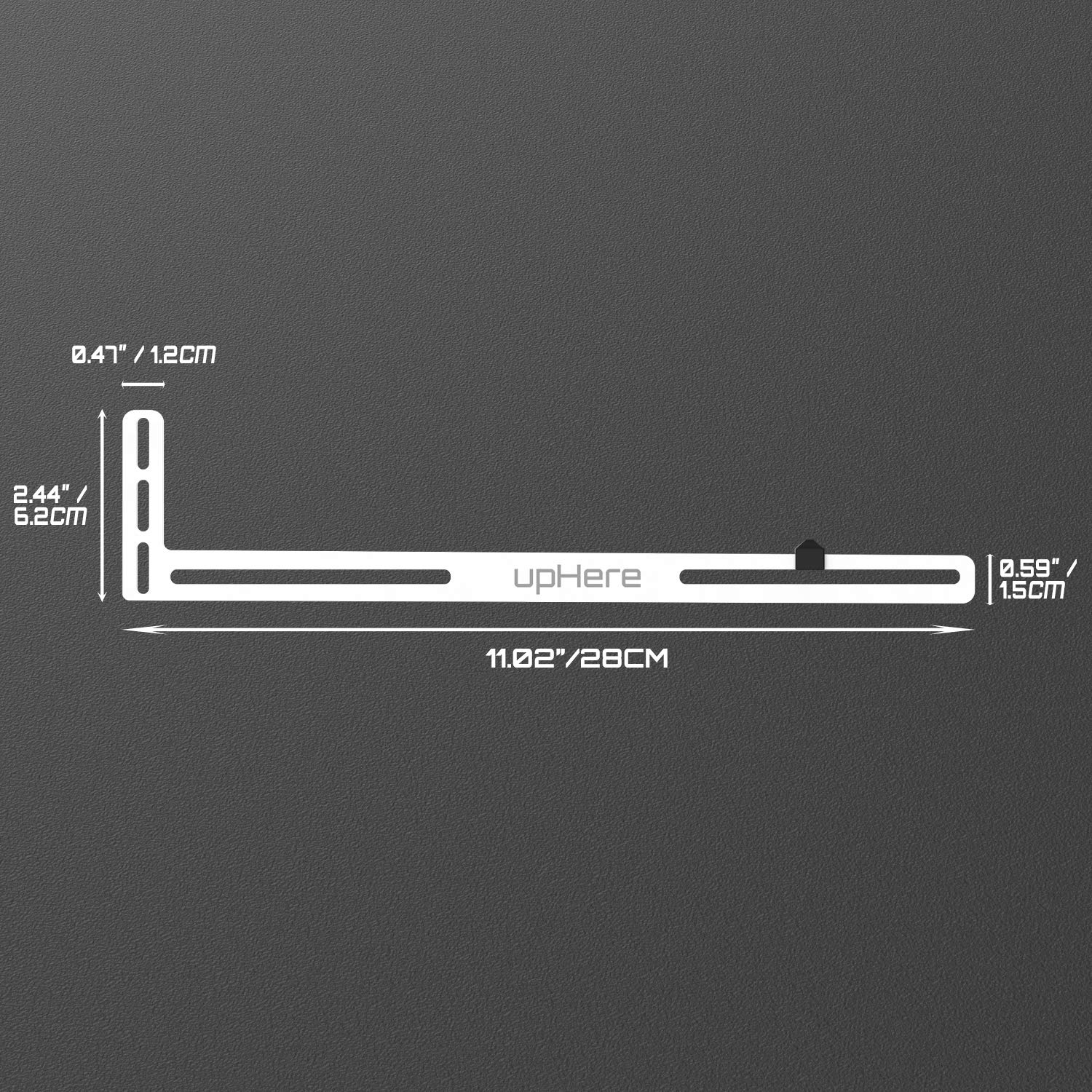


🖥️ Elevate your GPU game—support that’s as sleek as your build!
The upHere GL04 GPU Brace Support is a compact, anodized aerospace aluminum bracket designed to prevent graphics card sag on almost all motherboards and cases. Compatible with single and dual slot GPUs, it features a precise, three-step manufacturing process and comes with a full installation kit for easy setup.


| Mounting Type | Mount |
| Manufacturer | upHere |
| Chipset Brand | AMD |
| Item model number | GL04 01-USA |
| Item Weight | 2.92 ounces |
| Package Dimensions | 11.3 x 2.68 x 0.87 inches |
| ASIN | B08L5Z7FMY |
| Date First Available | October 14, 2020 |
R**.
Great little GPU anti-sag brace.
Does what it is supposed to do and at a good price. The description in the product page shows an "UP HERE" logo and thankfully, mine came with a discrete logo.
C**N
Works as it should
I ordered 2 of these, 1 white and 1 black. does a good job supporting longer gpus, and has 2 different adjustable slide pieces
J**N
No lettering if you turn it upside down
I was hesitant to use this because I don’t care for logos, but nothing in the market I’ve seen that didn’t have them. Was incredibly happy to see that on the other side there is just white paint, so I was able to turn it upside down in my King95 case. My only issue now are the screws are black and throws off the color scheme of silver screws in the case. I get it, though. Screws cost money, but I would hope in the future they will provide white arms with silver screws
T**R
Works, but your results may vary
I originally got this with my new build in July 2020 to support an EVGA 2080 Super XC. When I swapped it with for an MSI 3090 Gaming X Trio last month, I knew straight away I'd need to support that monster card with either the upHere bracket or the one that MSI provided with the card. Well, the one from MSI had its own set of issues-- took up way more space than the upHere, if not installed correctly it would directly touch the housing of the card and either scratch it or vibrate against it during fan operation, and it really just seemed poorly done.The upHere wasn't much better, but finally got it to work as shown. Unlike the 2080 Super I had, the MSI 3090 has little or not flat surfaces on the fan shroud, and where I would normally use the shorter rubber adapter (pictured) it wasn't supporting the 3090 along the edge of the card as well as I liked. I tried the taller rubber adapter and it gave plenty of height but the weight alone of the 3090 and lack of flat surfaces caused the adapter to bend itself over and not properly support the card. So I put the short adapter back on and kept messing around with it until I found a somewhat precarious flat spot on the edge of the shroud for the 3rd fan. As you can see in the photos, it keeps the card level and seems to be staying in place without any concerns.It almost requires a third hand from a helper to install: one hand to tighten the screws, another to hold up and prop the upHere bracket itself while tightening said screws, and a third hand to hold up the very end of the graphics card to keep it level and not inadvertently push down your bracket and your hand holding the bracket while trying to tighten it all! With all that said, it's still a 5-stars from me because aesthetically I just couldn't bring myself to put a vertical support in the case, especially in that O11D-XL.
A**R
just ok
The rubber spacers it comes with aren't great. Was hard to find a spot that wasn't blocking fans on my gpu
B**R
Simple and works
Simple design that works. The brand on the side is an eye sore, but it's easy to fix with a bit of paint or black marker. The white lettering is also reflective. That's the only and monumentally biggest con to this thing. Even in a case without LEDs, the branding is still quite apparent.The brace includes 4 screws just short of 1/2-inch in length. They are much longer than you need. Standard PCI expansion screws are roughly 1/4-inch. They were just enough to go through the brace, through the PCI component, and screw into the case. The threads were barely holding. So it's probably best to use the included screws.The standoffs that work along side the brace are foam. Installation is common sense. Install the GPU, screw in it's top screw, place foam standoffs, then align the brace beneath the GPU. Insert screw through brace, GPU, and into case. The GPU should rest on the standoffs of the brace. Ensure the standoffs are on the GPU's outer shell and not interfering with any of the GPU's fans. Tighten screws as necessary, then close case and test.Total installation took me less than 3-minutes. It is advised you power off your computer.My reason for purchasing this brace was because my GPU was starting to droop ever so slightly. This droop caused the fan to be quite loud when the GPU was under load. After installing the brace, the GPU is back to being whisper silent.
S**E
Works well
Great for the price. Sturdy and simple to install. This had no good contact point on my large gpu and I was able to bend it slightly and mount it as needed.
K**Z
Difficult... Stressful... Not secure
I purchased this back in 2022 when GPU sag started really becoming a mainstream thing. Thought this would be an easy way of curbing that issue with my (at the time) new RTX 3080. It did not work out great, since cards are not flat and usually have textured designs and curves for the gamers, it doesn't sit flat against the card and the rubber bump can tend to slip or rock, something you don't want to be concerned with while gaming is something lodging into your GPU because it rattled away into the fan blades.
Trustpilot
1 day ago
2 months ago
1 month ago
2 weeks ago