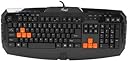
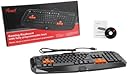
⌨️ Elevate your game with precision and style — don’t just play, dominate!
The Rosewill RIKB-11003 Gaming Keyboard features fully programmable soft-touch keys and dedicated gaming software, combining comfort, customization, and a sleek design to enhance your gaming performance and setup aesthetics.
| Brand | Rosewill |
| Item model number | RIKB-11003 |
| Item Weight | 2.05 pounds |
| Product Dimensions | 19.7 x 9.5 x 1.1 inches |
| Item Dimensions LxWxH | 19.7 x 9.5 x 1.1 inches |
| Color | Black |
| Manufacturer | Rosewill |
| ASIN | B0076O7W04 |
| Is Discontinued By Manufacturer | No |
| Date First Available | February 7, 2012 |
P**E
Cheap keyboard gives you a cheap experience
This keyboard was a big letdown. First and foremost, the keys need to be pressed all the way down for them to register, so for a gaming scenario, where you might press keys rapidly or in quick succession, the keyboard fails completely. This is a more annoying problem with the Shift key since most people (like me) use their pinky finger on that key and it's difficult to press the Shift key hard enough for it to register with your pinky finger. When playing any regular FPS where the Shift key is used for sprinting, my character would constantly switch between running and sprinting unless I made a deliberate effort to press the Shift key hard.It also has some key rollover, but only on the QWASDR and arrow keys, nowhere else. So the Z key will not register while you're using the WASD keys for movement. This already invalidates this keyboard as a gaming keyboard since most games will use a few more keys that those with the rollover feature in this keyboard. For most people, this is not a problem, but to me, it degrades the meaning of "gaming keyboard" if this feature is not fully implemented on at least most keys.I can't recommend this keyboard for regular typing either since the fact that you have to press the key all the way down tends to either strain your fingers having to apply more force into every keystroke, or it simply results in the keystroke not registering, which might infuriate you after a while.Finally, there is one last big problem that nobody addressed. This keyboard does not work well with Windows' ALT Codes. The problem seems to be that the key press for the ALT key is let go after about half a second even if you're still holding it, which means that you have about half a second to input the entire ALT Code (like ALT+164 to get the ñ symbol). If you're a person who relies on those ALT Codes to write special characters or symbols in other languages, this keyboard is completely unusable.In summary, you're better off buying any regular old keyboard over this one if all you want is any input device, since they're likelier to be cheaper and won't have the ALT Codes problem, but you'll at least be able to make use of this keyboard for some regular typing. If you're looking for a gaming keyboard, look elsewhere. The some-key rollover it has is not enough for even the most common types of games and the low sensitivity will only result in unregistered key presses.
I**K
Decent Price, Cool Concept, but "Mushy" keys
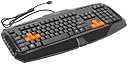
This keyboard is not a bad option if you are looking for a relatively cheap keyboard to game with. I love the additional buttons on the sides for adjusting volumne on the side without having to stop/pause/alt tab.That being said, my only real complaint about he keyboard so far is that the keys are "mushy" for lack of a better term. Meaning that you really have to hit the keys farther down in order for it to register. For the most part, this is not a big deal since it is something you can get used to, but the problem that arises from this is when playing an FPS where Shift = Sprint. I am currently replaying HL2 and when trying to sprint I commonly strafe to the left since I am accidentally hitting the A key when trying to hold down shift. This is because you have to push the shift key all the way down and the WASD keys are slightly raised.Also, the blue light on the keyboard is fairly bright, so I had to put duct tape over it in order to prevent it from being an issue while sleepingFor the most part this is a relatively minor complaint. So if you are looking for a cheap gaming keyboard, you could definitely do worse. If you have alittle extra money to spend, I would look at some higher end alternatives though.SUMMARYPros: Cheap, Additional short cut buttons, Rubberized WASD and arrow keys, Works Well so farCons: "Mushy" keys
G**T
I can't believe this keyboard is so great!!! (updated)
Okay, so i bought this going out on a limb, because i got this new desk and I had a laptop. so when i was playing games had my left hand on the top "tier" of the desk and my mouse was on the bottom. i needed a keyboard, and i really liked this one. im typing with it now and ill update this after a week or so of use.Pro (that i can see now): nice and quiet and a different feel than im used to (chiclet style keyboard)-decent software for decent keymapping-very big enter key... (see cons)-customizable key caps-macro keys towards the sides- THE PRICE!!!!!!!!!!!Okay some here are some cons, be open this is my first day getting this and obviously i have to get used to it- very very small backspace key, right by the enter so i find myself hitting enter a lot, but if you're a pure gamer than thats no problem- it is non mechanical but it has great feed back on the keys-nice keys at the ttop for power and sleeep and wake and bunches of other stuff...the logo at the bootom is a bit strange.PLEASE note i am a bad typer so any mistakes in this review should not be counted against the keyboard*Beyond this point is my updateso ive been using this for a while now, and ive learned to live with the quirks. the keyboard is nice and ive became accustomed to its differerences. so one thing i always see is that the shift key requires A LOT of pressure and force to actuate it. other keys are fine.
Trustpilot
1 month ago
3 weeks ago