Desert Online General Trading LLC
Dubai, United Arab Emirates
Desert Online General Trading LLC
Dubai, United Arab Emirates
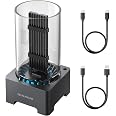
![ineo M.2 NVMe (PCIe) SSD Enclosure Built-in Cooling Fan and Write Protection Switch [C2605-NVMe]](https://m.media-amazon.com/images/I/610CCwqYKUL.jpg)


🚀 Elevate Your Storage Game!
The ineoM.2 NVMe SSD Enclosure is designed for high-performance data transfer with a blazing 10Gbps speed, featuring a write-protection switch for enhanced security and a built-in cooling fan to maintain optimal performance. Compatible with various M.2 NVMe SSD sizes, this sleek enclosure is perfect for professionals on the go.


| Enclosure Material | Aluminum, Acrylonitrile Butadiene Styrene (ABS) |
| Color | Silver or Gray |
| Maximum Number of Supported Devices | 1 |
| Hardware Platform | Windows |
| Compatible Devices | Laptop |
| Hardware Interface | USB |
| Data Transfer Rate | 1E+10 Bits Per Second |
| Item Weight | 0.28 Kilograms |
R**I
Astonishing FEATURES and QUALITY for an amazing price!
So... If you're like me, rather a GEEK, the idea of NON-moving storage is very apealing. The fit-n-form of M.2 "sticks" has been something I've been experimenting with, toying with, etc. And yes, you can do SSD ( Solid State Drives ), and I do. But, it seems strange that M.2 sticks are not more often used for this. That's why I've been tinkering with enclosures for these, which; can allow them to work seriously.Enter the INEO M.2 SSD Enclosure. This device case/enclosure is VERY in-expensive, and; the team who created it - CLEARLY - had the end user in mind. It comes in a VERY NICE BOX. It comes with A MAGNETIC SCREWDRIVER ( and MAGNETIC SCREWS to match ... ); Being rather ... SENIOR ... I hate the micro print, but; the INSTRUCTIONS are clear -- IF -- you pause a bit, look at the pictures, and follow the simple "1", "2", "3" steps.It has a CARRY CASE for the thing. It has a COOLING FAN -- something I wanted because folks, if you're really doing a LOT with an M.2, it will get HOT - I mean REALLY HOT!. This M2 case takes care of it for you. The fan is WHISPER QUIET. It has a LIGHT which makes it CLEAR if it is working correctly. It has a blinky light that flashes when it is reading and writing.And for ME... It is BIG ENOUGH that I can spot it across the room! LOLOLOLOL!It works VERY, VERY WELL. For you who, like me, use Windows 10/11 -- you will need to use Computer Management -> Storage Management -- to FORMAT IT for the first use on a new M.2 Stick. But after that, "plug-n-play" is QUICK and RELIABLE.I give this a HUGE THUMBS UP and a HEARTY THANK YOU to the team who created this thing!;O)
C**D
Great Price and Build Quality
Greeat build quality plus it comes with everything you need a small screwdriver and a thermal pad and a small bag to carry it. The fan never comes on the metal heatsink seems to cool it with no problems. I used mine for a ps5, the only problem i had was it wasn’t formatting it but i used my ps pro to format the drive then it worked fine(ps5’s fault). I need to make a video showing how fast it transfers games from ps5 internal ssd to external its even faster than I could imagine. The drive I used a highly recommend a silicon power nvme ssd with 3400 read 3000 write Ive owned 3 or 4 silicon power ssd’s and have had zero issues. Now some cons are the lighting you can’t turn it off and the cord is really short. I tried to use a longer cord i had and i think this is the reason i had problems trying to format it first on the ps5 but im not sure. For $35 it’s hard to find a better enclosure sadly it’s unavailable right now hopefully it comes back in stock. I wish I would’ve tried it on my pc first to benchmark the drive but i got it for ps4 games and for that it’s great.
D**L
Excellent construction but with very tiny fasteners
The enclosure is made out of anodized aluminum and is hefty. The hexagonal design keeps it from rolling around. The light band on the fan end cycles through3 soft colors. There is a read/write activity light on the end where the cable plugs in. The light band would have made for a much more visible indicator of I/O activity. This would all be 5-star stuff up to this point.However, the assembly process could be much better. The case is in 2 pieces which are held together by very tiny (eye-glass-size) screws. A small screwdriver is provided in the box. These scews feed into what appears to be a nylon band. Nylon is tough stuff, but I would think aluminum might be a better choice or forego the screws altogether and come up with some kind of snap-on mechanism.There is one more screw to deal with internally. The M.2 drive is pushed into the connector. Make sure that it is all the way in. My first attempt allowed the unit to be recognized as a USB drive with 1 TB capacity but all I/O operations resulted in a "Fatal Hardware Error...". The kit comes with another small screw and tiny nut. You must feed then nut in from the underside through interface board, then through the M.2 board and then thread on a tiny nut. You do all of this while holding tension on the M.2 drive to keep it parallel with the I/O board. In addition, the nut is under an overhang created by the fan enclosure.Two suggestions for improved design immediately come to mind. Embed a threaded insert into the I/O board so that no nut is required. ALL motherboards have this feature, so there must be a way to do this. Secondly, extend the size of the assembly slight so that there is straight down access to the screw from above the M.2 mounting hole.My unit is plugged into a 10 yr. old USB 3 port and is providing solid 30 MB/sec transfer rates. When the last file is transferred, the transfer shuts down immediately unlike some USB drives which make you wait and wait for buffers to empty out (or whatever it's doing). I've backed up almost 300 MB of pictures, videos and document files --- all without a single glitch. The case became slightly warm to the touch at one point. The computer fan noise is much louder than the fan on this enclosure -- so I can't tell how much it is running (if at all).It was my hope to buy 1 or 2 additional M.2 drives and swap them in and out for future data and O/S transfers; however, the tiny hardware makes this a tedious process prone to losing screws. If your use case is to insert 1 M.2 drive and never remove it, then this product is highly recommended for its rugged design and excellent cooling.
C**O
Excellent product
Usb 3.1 but the velocity is fast and good refrigeration
C**F
Solid nvme housing for portable use
Keeps my nvme nice and cool.I use mine to store and process fits files from astro cameras. Heavy IO and my speeds remain steady due to the excellent cooling from this unit.Highly recommended
A**Z
LED's failed in Two Days
This unit looks cool, (although it is a bit on the large side), and it comes with all of the necessary parts. Assembling an SSD into it took a few minutes. Initially, everything lit up, and data transfer was reasonable, but after only a day or two several of the LED's have failed, and some are now flickering. This causes me to question the overall quality of the other components in this item. I have worked in electronics for forty five years, and this was the quickest I have seen LED's quit, (and I've seen a lot). So far the rest of the unit seems to function normally, but it is a bit disappointing to have the most visual feature fail so soon.
Trustpilot
3 days ago
2 months ago
2 weeks ago
2 weeks ago
![ineo M.2 NVMe (PCIe) SSD Enclosure Built-in Cooling Fan and Write Protection Switch [C2605-NVMe]](https://images-na.ssl-images-amazon.com/images/I/610CCwqYKUL._AC_UL116_SR116,116_.jpg)