Desert Online General Trading LLC
Dubai, United Arab Emirates
Desert Online General Trading LLC
Dubai, United Arab Emirates


⏳ Automate Your Life, One Outlet at a Time!
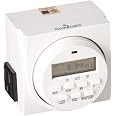
The Autopilot Dual Outlet 7-Day Grounded Digital Programmable Timer allows you to control two devices simultaneously with up to 8 customizable on/off cycles per day. With a robust capacity of 15A and 1725W, this UL-listed timer is designed for safety and efficiency, making it an essential tool for modern living.
D**T
Nice 7 day 8-on, 8-off events any day or days timer
Edit July 16, 2013: It stopped working about 3 months ago. The LCD display and button responses all appear normal but the unit does not pass AC current. The LED that indicates the On condition does not shine. I opened it up, saw no irregularities, put it back together. Ultimately I tossed it and bought the GE 15154 Random On/Off 7-Day Digital Timer here on Amazon, which was only $10.18 and has 20 on/off cycles compared to only 8 for this one. My usage is such that the extra cycles are a big bonus. I am so far pleased with the GE, but my experience tells me that longevity is the issue with these timers.- - - -I've only had it an hour but I'm already pleased. I have two Intermatic timers, the DT1 and the DT7, which is similar to this Hydrofarm. I outgrew the DT1, and DT7 fulfilled my needs but the buttons have gotten unresponsive to the point where it's a knock-down-drag-out fight to reprogram it or adjust anything at all, this after having it for maybe 10 years. This Hydrofarm seems to work great. Hopefully, the buttons will remain responsive.You can set up a schedule with up to 8 separate On events and 8 separate Off events. Each single event can be for all days of the week, any one day of the week, Monday through Friday, Saturday and Sunday, all days but Sunday, Monday Wednesday Friday, Tuesday Thursday Saturday, Monday Tuesday Wednesday, Tuesday Friday Saturday. There's a random mode you can toggle to get from 2 up to 32 minutes of "random" variation.You can override the settings. For instance, suppose right at this moment the timer when according to the schedule would be Off (meaning no power is supplied to the device plugged into it) and you decide you want it On. There's a button marked ON/AUTO/OFF. The LCD display as you keep pressing that button goes like this: On, Auto, Off, Auto, On, Auto, Off, Auto, On, etc. Thus, if I want it On right now although the programmed schedule has it normally off at this time, I press the ON/AUTO/OFF button and after seeing On in the display I press it one more time so Auto will appear in the display and it will be On and remain On until one of the scheduled events turns it Off, being the schedule taking control again. With my Intermatic DT7 due to the unresponsiveness of the buttons if I wanted to override the schedule I used to have to unplug my device from the timer and plug it into a regular outlet for the time being (if I wanted it On, or leave it unplugged if I wanted it off) and then remember to plug it back into the timer to get back on schedule. Problem solved with my new Hydromatic.I was concerned when I found out that it has a rechargable battery in it that is not replaceable. The Intermatics each use a single AA alkaline battery, obviously replaceable, to retain settings when you remove the timer from AC power. I contacted Hydrofarm and asked about the installed battery and they contacted the vendor and replied to me by email that the internal battery is NiMH. A review here states that the battery is soldered in. It might be replaceable, I don't know, I haven't removed the 4 screws and looked inside. However, maybe the installed battery will remain good enough for many years, as long as you don't remove the timer from AC power for too long. It shouldn't need much energy to retain information and run for just a few minutes when unplugged.It comes in a hard plastic bubble pack, but that was a pleasant surprise. I didn't have to use a knife or a scissors to remove it and risk cutting my hands with either a blade or the sharp edge of cut hard plastic. The timer, etc. popped right out with a slight twist. I wish this were more commonly done.It can deliver a lot of power (15 amps) and the price is quite reasonable. I looked all over for 7 day timers and this one won out easily.I scanned and used OCR software on the printed instructions (couldn't find them online), did a bit of editing to make it more clear and saved as a text file. Here is my improved version:- - - -DIGITAL GROUNDED 7-DAY TIMER1. Press the reset button. (Do this if you want to erase all settings)The reset button is the small round white recessed button on the rightside of the timer face. Use a pointed object to reach it in order toerase all previous programming.2. Set the clock.HOUR: Press the clock button and simultaneously press the HOUR buttonuntil you arrive at the correct hour. (Be aware of AM and PM hours.)MIN: Again pressing the CLOCK button, simultaneously press the MINbutton until you arrive at the correct minute.WEEK: Press the clock button and simultaneously press the WEEK buttonuntil you arrive at the current day of the week.3. Program your settings.Each event is numbered and has a time to come on and a time to go off.You can set 1, 2, or up to n different events using the PROG (program)button. The PROG display will start at 1 ON. As you keep pressing thebutton, the display will cycle through all the events: 1 ON, 1 OFF; 2ON, 2 OFF; 3 ON, etc.. up to 8 OFF. For each event you must set WEEK,HOUR, and MIN. First select which days of the week this particular eventwill function (WEEK button.) As you press the button, it will cyclethrough all the possibilities which include: MoTuWeThFrSaSu (everyday ofthe week); Mo, Tu, We, Th, Fr, Sa, Su (each individual day of the week);MoTuWeThFr (only week days); SaSu (only weekends); MoTuWeThFrSa; MoWeFr;TuThSa; MoTuWe; or ThFrSa. After selecting the desired day(s) your eventwill function, select the timing for the event to come on or go offusing the HOUR and MIN buttons. (Be aware of AM and PM hours.)4. Set to automatic.Use the ON/OFF/AUTO button to set to automatic. The button cyclesthrough ON, AUTO, OFF, AUTO, ON, AUTO, OFF, AUTO, ON, etc. as you keeppushing it. If, according to the schedule you have programmed, it issupposed to be off at that time of day (and day of the week), you cycleit through to AUTO after cycling past OFF. If, according to the scheduleyou have programmed, it is supposed to be on at that time of day, youcycle it through to AUTO after cycling past ON. If you are using thetimer for subtle equipment like C02 and you want to test your programmedschedule, you can try plugging in something more obvious like a light ora fan so that you can see the changes more easily.NOTE: Daylight Savings mode -- IF you press HOUR and MIN at the sametime you will get Daylight Savings mode which will delay your settingsby one hour automatically. This will be shown as a clock symbol over theblack dot in the right lower corner of the display. Press HOUR and MINsimultaneously to remove the Daylight Savings mode. Random mode -- If youpress WEEK and MIN simultaneously, the display will show a O above theclock symbol which will flash when functioning. This is random mode. Theon and off timing will be delayed by 2 up to 32 minutes randomly. Thissetting is probably not useful for gardening purposes. One use of thissetting is for lights, to fool would-be burglars when you are not home.Again press WEEK and MIN simultaneously to remove this mode.Edit 1: I've had it 60 days now and I'm using almost all of the on/off events and it has been working perfectly.Edit 2: I can't tell you how aggravating it was trying to reprogram or adjust the time on the Intermatic D7 (mentioned near the beginning of this review) once the buttons became almost totally unresponsive. Lest this Hydrofarm timer suffer the same fate, I've decided to not orient it in such a way that dust can settle into the buttons' crevices (easily managed, because the timer is plugged into a short extension cord), and in addition I have taped a piece of Saran Wrap to the front face. I can see through that and press buttons fine. These tactics will hopefully prevent most dust and dirt from reaching and penetrating the face of the device and will significantly extend its useful life.Edit 3: One nice feature that's lacking is a backlight for the LCD such as I have with my universal remote control. That remote's LCD lights up for a few seconds when a specific button is pushed, allowing me to read the LCD even in the dark. When I want the timer set on Auto (necessary for the programmed settings to kick in at the appointed times, i.e. on or off), I need to reach for a flashlight and illuminate the screen to make sure that Auto is displayed. It's a minor inconvenience. The timer continues to work well after nearly two years of use.
A**E
PRODUCT INFORMATION HAS BEEN DRAMATICALLY IMPROVED!
I ordered this timer after reading of many people's woes in programming it, but encouraged by the helpful instructions provided by one user. The product arrived with a concise and understandable sheet of instructions in English and French. I can't vouch for the French, but the English made it easy. Easier, in fact than it looked in the already-posted instructions. The process is not simple, because the TIMER is not simple! It can program up to 8 on/off cycles per day. Each of those 8 cycles can be set to work every day, or only one day a week, only weekdays, only weekends, only M/W/F, only T/T/S, or every day but Sunday! The timer can be set to/from daylight savings time with the simultaneous push of two buttons. It can start each cycle exactly as programmed, or it can be in "random" mode with the on/off times shifted randomly up to 30 minutes to help fool burglars. A very impressive machine!If all you need is a simple timer, you might be better served by another product. If your needs are more complex or you just like clever gadgets, this one should please you.Warning: it's not tiny. It extends 3.25 inches off the surface of the wall, so may be inconvenient behind a desk or dresser. It fits into the top slot of a standard grounded duplex outlet and leaves the bottom slot clear for another plug. It has two grounded outlets, one on each side. (Suggestion to manufacturer: I'd gladly give up one of those outlets if you could slim it down by an inch.)I can't report on longevity yet, but I'm going to take the chance and buy a few more.
D**N
3-prong grounded easy to program timer is exactly what i wanted and got
this timer was for us to turn on a large 4-bulb grow light for our patio plants that we bring in for the winter from our patio. In the past, we had a manual dial and anytime it was touched slightly it would turn and mess up the time which got annoying.this light was easy to program -- patience required to read the instruction and follow them. It has a battery installed so i was able to program it without plugging it in. Since we keep the plants in our bedroom (we love them so much) we wanted the lights to turn on later on the weekends than weekday, so programming multiple on/off times was great. They have a M-F setting and a SAT/SUN setting so i only had to do 2 programs instead of 7 which I was worried about. It also has an easy way to change it for daylight savings.TIP: if you program it during daylight savings, you'll want to set it for the "real" time (1 hour earlier) and then press the daylight savings button combo (press 2 buttons simultaneously) to adjust it to the real time. In a month, when i take off daylight savings setting, it will automatically fall back an hour. This was the ONE confusing thing having to realize i needed to set the time actually an hour behind the real time and then activate daylight savings to get the real time, but now I know it is all set. I wish the instructions had mentioned this.Reviews I read on other timers talked about being really hard to program, which i why i got this one and I am very happy. ALSO, it has TWO outlets on it so it doubles as a multiplug if you have more than one item to plug into it and it is 3-PRONG which many are not.I just got it today, so I actually don't know if it will turn the lights on in the morning, but I'll update if there are any problems. No update = no problems.
Trustpilot
1 month ago
3 days ago