

Desert Online General Trading LLC
Dubai, United Arab Emirates
Desert Online General Trading LLC
Dubai, United Arab Emirates


🎶 Master your mix like a pro—control every detail with Behringer!
The Behringer Universal DAW Remote Control is a sleek, portable MIDI controller designed for professional music producers and live performers. Featuring 9 fully automated motorized faders, 8 dynamic LCD Scribble Strips, and Ethernet RTP MIDI connectivity, it seamlessly integrates with major DAWs like Ableton Live, Pro Tools, and FL Studio. Its robust USB and Ethernet interfaces future-proof your setup, making it an essential tool for precise, hands-on control in any creative environment.
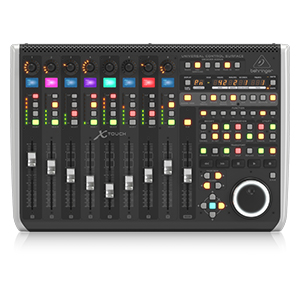


| Style | Control |
| Color | Black |
| Platform | iOS, Mac |
| Human Interface Input | Touchscreen |
| Instrument | Keyboard |
| Control Method | Touch |
| Noise Control | None |
| Total USB 2.0 Ports | 2 |
| Mixer Channel Quantity | 9 |
| Supported Software | Ableton Live, Avid Pro Tools, FL Studio |
| Connector Type | USB |
| Hardware Connectivity | USB |
| Control Type | functionality control |
| Connectivity Technology | USB |
| Additional Features | Portable |
| Item Weight | 11.95 Pounds |
| Item Dimensions D x W x H | 21.9"D x 14.9"W x 6.5"H |
G**Y
Buy it now
Buy it, you won’t regret it. Do your homework with your DAW of choice and see what “MCU” support is built in. It handle Mackie and HUI protocols. Your DAW determines how functional this unit or any other control surface incorporates into “Your Daw”. In Logic you can even use it with the plugins, watch videos to understand this. Doing a mix was sooo easy with 8 faders instead of the mouse, adjust levels and pan just like on a real console, with logic, you can use knobs to set parameters on plugins instead of the mouse, able to turn more than one knob at a time, turn a knob mover a fader at the same time ( never happen with a mouse).I use LUNA it ran right out of the box.When used with Logic, you can control plugins by either the fader or knobs. I was able to control UAD plugins, waves plugins and I suspect any others plugins. Small learning curve. But it is so nice to twist a knob, even two at a time, say a la2a you can turn both knobs at same time and dial in quickly.
S**R
Works great!
This is an excellent addition to our sound system and makes controlling it much easier.
B**E
If you run Logic Pro, YOU NEED THIS.
I wasn't sure I really needed a mixer/controller, because I'm pretty good with a trackpad, but within a week it became indispensable. It really DOES make it easier to mix when you've got automated faders in front of you. It's perfect for Logic Pro right out of the box. I have a few small gripes - the faders do chatter a little bit when they're automated to slowly fade out, but that sound doesn't impact your recording. I wish I could lock the scribble strips to ONLY display the track name. But mostly this product is amazing for the price. I really love it.
M**H
Such a cool machine!
I love using this thing with my DAW. I'm using Cakewalk Sonar and there is an issue that the buttons on the right-hand side do not match their function. The simplest workaround is to google up one of many forum posts around the world where people have created custom paper overlays to put over the buttons so that their functions match their indicated function.The motorized faders make a little bit of noise, but not too bad. The build quality feels solid. The "touch select' function is neat but I ended up disabling it because a lot of times I'm touching multiple faders at one time and I didn't like the way the selected track would jump around.Finally an affordable, well-designed, useful control surface with motorized faders for Sonar!
A**.
BEHRINGER (XTOUCH) Has Made Music Production Fun Again
I produce music as a hobby and use Cubase on Windows 10 as my Audio Editor. Having physical buttons and slides to control the software has dramatically improved my workflow when compared to just trying to control everything with a mouse and keyboard. It also helps that XTOUCH looks good and I love the fact that the sliders are motorized. It's not cheap but definitely worth the money.
D**N
Connects to X32 rack
I had trouble with this out of the box, it wouldn’t connect to my X32 rack. It was pretty frustrating because the different guides on YouTube made it seem so easy. I had to update the firmware (which was hard to figure out how to do) but once I did, it worked great!
C**S
Yes it's Behringer, Yes it works great
This thing is heavy. Does not feel plastic or cheap. The faders respond well and have good resolution. You do need to know how to set it up properly so the DAW will receive and transmit back to this. Also some DAWs require a second virtual connection (Ableton) to handle transport controls. This, like the X32, has been around a while and continues to sell because it works well. I have the X32 rack also and they pair wonderfully.
M**.
Great for controlling my XR18 and my X32 Rack.
I love how this thing connects using 1 ethernet cable. I can leave the rack out of the way and just have my console where I needed. Controlling the EQ and plugins take a little practice, but once you get the hang of it, its easy enough. I tend to still run the App on my pc to view the racks, but I leave the view on full mixer. Then I can even watch those values move on each channel as I dial in the plugins and EQ with the XTouch by hand.
Trustpilot
2 weeks ago
2 weeks ago
![Dust Cover and Protector for BEHRINGER X-TOUCH Universal Audio Control Surface by DigitalDeckCovers [Black, Water-Resistant, Anti-Static]](https://images-na.ssl-images-amazon.com/images/I/615qVNDcm6L._AC_UL116_SR116,116_.jpg)