We remain fully operational. Our teams are working around the clock to ensure your deliveries continue safely.

DOWNLOAD THE APP


Customer Services
Copyright © 2025 Desertcart Holdings Limited
DOWNLOAD THE APP
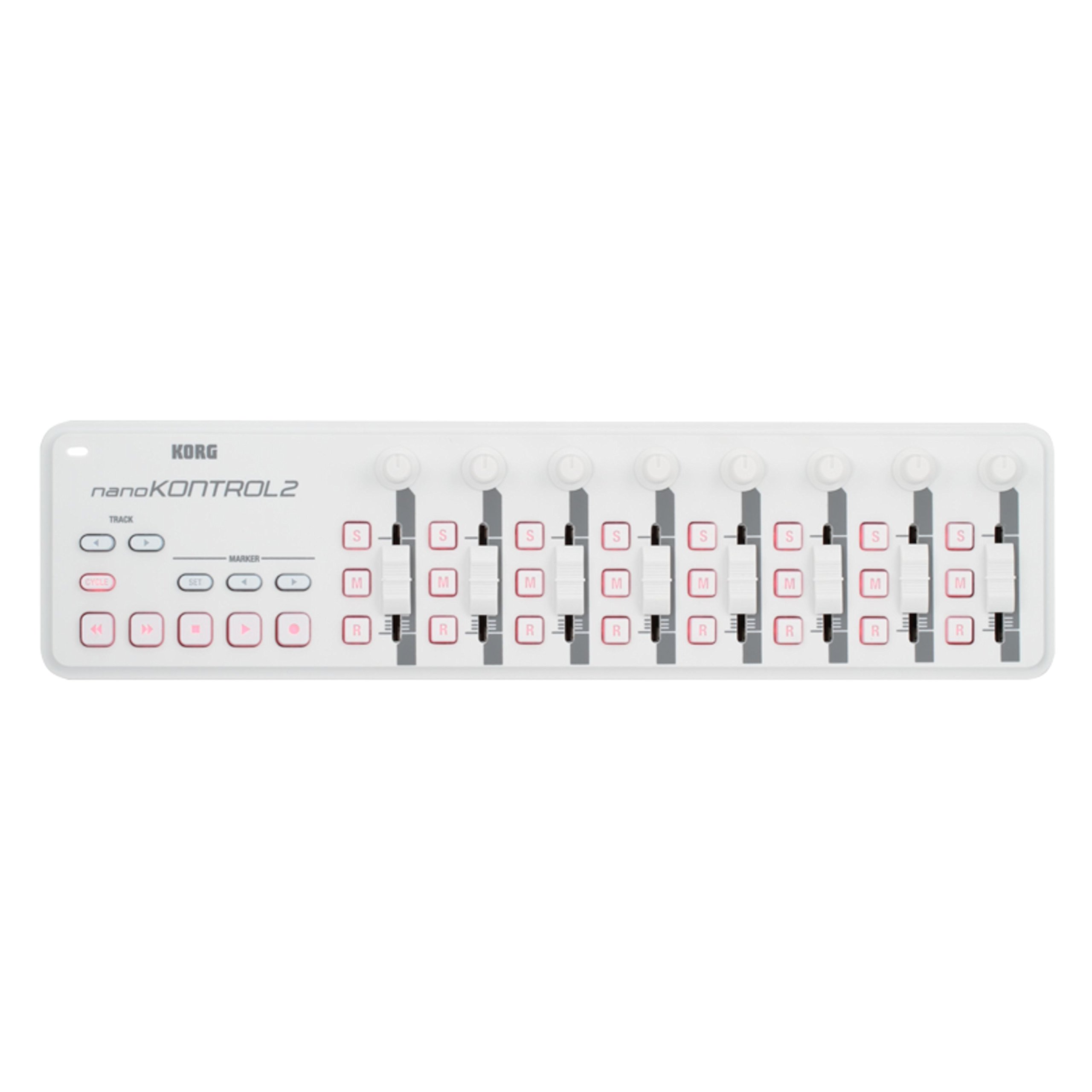
🎹 Elevate your studio game with the ultimate compact MIDI command center!
The KORG nanoKONTROL2WH is a compact, USB-powered MIDI controller featuring eight fully assignable channels with knobs, faders, and switches, plus dedicated transport and marker controls. Designed for seamless integration with major DAWs and iOS devices, it offers plug-and-play simplicity and customizable control via KORG's free software, making it an essential tool for millennial professionals seeking portable, efficient music production.


| ASIN | B004M8UZ3S |
| Additional Features | Compact |
| Best Sellers Rank | #14,875 in Musical Instruments ( See Top 100 in Musical Instruments ) #66 in Computer Recording MIDI Controllers |
| Brand | KORG |
| Brand Name | KORG |
| Color | White |
| Compatible Devices | Computers (Laptops, PCs), some tables and smartphones with USB port |
| Connectivity Technology | USB |
| Connector Type | USB |
| Control Method | Touch |
| Control Type | Keyboard Controller |
| Customer Reviews | 4.4 out of 5 stars 1,080 Reviews |
| Global Trade Identification Number | 04959112081079 |
| Hardware Interface | USB |
| Hardware Platform | PC/Mac/iOS |
| Human Interface Input | Buttons |
| Included Components | USB Cable |
| Instrument | Multiple instruments / Digital audio workstation |
| Instrument Key | Any |
| Item Type Name | Midi Controller |
| Item Weight | 15.52 ounces |
| Keyboard Description | Ergonomic |
| Manufacturer | Korg USA Inc. |
| Material Type | Stainless Steel |
| Mixer Channel Quantity | 8 |
| Model Name | NANOKON2WH |
| Model Number | NANOKON2WH |
| Model Year | 2018 |
| Noise Control | None |
| Number of Keys | 1 |
| Platform | Mac |
| Product Style | Slim-Line USB Controller |
| Size | talla única |
| Special Feature | Compact |
| Supported Software | Primary DAW Soft |
| Total USB Ports | 1 |
| UPC | 989898857593 |
| Unit Count | 1.0 Count |
| Warranty Description | 1 year manufacturer. |
S**E
Unleash Your Creativity with the Korg nanoKEY2 MIDI Controller
As a musician and producer, finding the right tools to bring my ideas to life is essential, and the Korg nanoKEY2 MIDI Controller has quickly become a staple in my setup. Sporting a sleek white design and compact form factor, this 25-key MIDI controller packs a punch in terms of functionality and versatility. Here's why it's earned a permanent place in my creative arsenal. First and foremost, let's talk about portability. The nanoKEY2's slim and lightweight design makes it the perfect companion for musicians on the go. Whether I'm working in the studio, jamming with friends, or composing on the road, this controller slips easily into my bag, allowing me to take my music wherever inspiration strikes. Plus, the USB bus power means I can plug it into my laptop or tablet and start making music without the need for an external power source. Despite its compact size, the nanoKEY2 doesn't skimp on features. The 25 velocity-sensitive keys provide a responsive and expressive playing experience, allowing me to capture every nuance of my performance with precision. Plus, the Octave Shift buttons give me instant access to a full range of musical pitches, making it easy to play melodies, chords, and basslines across multiple octaves. But where the nanoKEY2 truly shines is in its versatility. With a range of assignable controls, including knobs, buttons, and a touch-sensitive XY pad, it offers endless possibilities for creative expression and experimentation. Whether I'm tweaking synth parameters, triggering samples, or adding effects to my tracks, the intuitive layout and customizable settings make it easy to tailor the controller to my workflow and musical style. Setup is a breeze, thanks to the plug-and-play compatibility with a wide range of music production software. Whether you're using Ableton Live, Logic Pro, Pro Tools, or any other DAW, the nanoKEY2 integrates seamlessly, allowing you to start making music right out of the box. Plus, with native support for Mac, PC, and iOS devices, you can use it with all your favorite software and devices without any hassle. In conclusion, the Korg nanoKEY2 MIDI Controller is a powerful and versatile tool that's perfect for musicians, producers, and anyone looking to unleash their creativity. With its portable design, responsive keys, assignable controls, and plug-and-play compatibility, it's a must-have accessory for anyone serious about making music. Highly recommended for beginners and seasoned professionals alike!
E**O
More use than just music production...
I use my Korg NanoKontrol2 for more than just music production. I am able to use it when mixing in FL Studio, Serato DJ to macro FX and toggle samples and have found use as a stream deck to toggle scenes and trigger sound alerts when streaming through OBS. I did have a problem with a driver and Windows registry that needed a little adjusting but got it up and running with help from watching a YouTube video on how to correct the problem. Korg really made a great product with many uses beyond music production. And if you look elsewhere to find this item you will see Amazon is the place to shop!
M**R
Not supported on BIG SUR but there's a work arround. Better to use directly true USB.
I hope musicians read this article before buying this device. This device is not supported on Big Sur. Nobody who's writting reviews know this because it's was not on the korg site till recently. They are working on updates even for Monterey version so it's going to take some patience before we can use it. Wait and check the site before buying. The device itself works ok. You can use it any how but have to go and set it up as generic remote controller in your studiosetup in Cubase 11 pro. After that you have to use the learn function and go true each midi program number to see and set it up. It's easy but it takes some time to get it running but it's worth it. there's no latency in the faders or knobs so if you have this issue there's something going wrong. For people who bought this to use with logig X and Garageband they have made a driver for this. You just have to search the site a little bit. If you mess up use these function to factory reset: Press <,stop and scene buttons when turning on to usb. You have to wait at least a couple of minutes and don't turn the device off. You can reset with scene and cycle botton to when turning on. It's like a lite reset. when the buttons your holding flashes let them go. There's a driver that works for the nanokontrolstudio I don't know were I got it today 3 Nov 2021. It's called advKorgUSBMIDIDriver.plugin. with this plugin the Korg nanokontrolstudio works perfectly. when your done and the Mac 2018 see it you must hold down scene and marker buttons at start up and the Korg goes in cubase mode. In studio setup choose the Mackie control in the top of the same screen choose nanokontrolstudio control both midi in and out press ok and your done. Mine works now without any problems all function work only the individual rec arm button does not work but I think I can set it in the Korg editor what I have not used because it doesn't communicate with the device. Hope this will help a lot. 10-11-2021 I have reset correctly now and all funcions work perfectly. I'm using it with Cubase pro 11 and have no problems. To put it in Cubase mode hold the scene and <marker button it lights all scene buttoms up. Let it go and be sure in the studiosetup the midi in and out is set to your nanokontrole and your set to mackie control and that's it. There is a driver for Garageband and one for Logic X so it should work now in those DAW to. Go to Korgswebsite to download them.
P**O
Analog simplicity
Because I use a DAW that doesn't recognize the automatic configuration, I had to do it manually button by button, but once I did this, the operation was glorious! I felt like a real sound operator again. Having the REC button and analog faders back is incomparable, it speeded up my recording process a lot, everything was excellent.
D**N
There is a fix for Cubase issues.
IF YOU'RE USING CUBASE AND IT KEEPS RESETTING, DO NOT RETURN IT. These device is not defective, Steinberg's engineers are. There is a fix. You need to go into the midi device manager and disable the scripts for the NanoKontrol2. This is a Steinberg/Cubase issue and not a Korg issue. The device works just fine. When you disable the scripts, the NanoKontrol2 goes back to working like a normal MIDI controller. If you google how to disable midi controller scripts, you'll find the solution easily. I don't think Amazon will let me post a link.
U**I
Better than nothing, but still just a toy
I use Cubase Elements 8.0 as my DAW, and before purchasing the nanoKontrol, I used only a mouse to control mixing and MIDI controller functions. Setting up the nanoK was actually very straightforward; based on things I'd seen in other reviews here and on forums I was expecting it to be a hassle, but the instructions included with the device worked perfectly. At least, the instructions work for controlling AUDIO tracks this way. Controlling MIDI functions may take additional experimentation and research. There are only 8 tracks of sliders/knobs on the device, but buttons let you easily jump from controlling tracks 1-8 on Cubase to controlling tracks 9-16, etc. One issue I ran into is that, while it is very possible to use the nanoK to control MIDI data like modulation, expression, or any other CC data you want, you can't easily do this when the device is configured to control audio tracks. You need to unplug it, plug back in while holding certain buttons down, and then it's configured more like a MIDI CC controller. Even then you will probably need to do additional tweaking in your DAW. In any case, using the nanoK's sliders and knobs to control volume and pan functions is SO, SO preferable to using a mouse. For that alone, if you've been suffering with a mouse for years like I have, is worth the price of this item. That being said, the build quality is very cheap. The rubbery buttons can sometimes stick down at the corners, so you have to pry them up again. The sliders (obviously not motorized at this price point) have too much "play" in directions other than up/down (they hold firm on that axis at least). The slider grips are kind of loose and wiggly. The knobs are more sturdy, but still made of light plastic. It works fine and probably won't break right away or anything, but still feels like a cheap toy, ultimately. One other sore point, in Cubase, at least, the volume slider changes track volume in the software at increments of 0.2db. This is sufficient as a starting point, but I found myself manually adjusting things further after taking some passes with the nanoK. I find that sometimes smaller changes, even of 0.1db or less can matter a lot -- it's not that this is a large change in itself, but when there are effects on a track and it's in a mix interacting with other tracks, there can be certain thresholds where the track sounds audibly different from, say, -5.6db to -5.55db. For that reason, I wish the nanoK worked at a finer resolution. The pan knob seems to work in the smallest possible increment (ie you can use the knob to pan from L34 to L35). I didn't end up using the play/record/mute/solo buttons on the nanoK very much; for whatever reason I still found it more efficient to use the mouse. But I DID use the rewind button a lot, which was faster than using my mouse or keyboard shortcuts. So, to summarize, if you can't afford a more serious mix controller but you're sick and tired of using a mouse for everything, this is an acceptable option that will ease a lot of that burden. Even so, you get what you pay for, and it does feel too much like a lightweight, cheap toy. But for me, it's a lot better than nothing, for now.
S**R
Great little controller
Simple to install and easy to use, with a rugged design. Universally configurable for many software brands and types. Can be USB or battery powered + Bluetooth. For PC or Mac.
A**R
Works with Auria Pro on Ipad Pro with powered hub
Korg nanoKONTROL Studio Mainly purchased this to use on the ipad pro and specifically with auria pro. I have no use for this anywhere else because I have a hardware production setup and don't use computers at all for music production. Apparently the Korg needs a bit more power than the usb3 dongle with the lightning port can provide. I had a pickle of a time trying to get the korg to be recognized. it powered up a few times (I would disconnect to plug it to the editor then plug it back to the dongle) but then it just would not power up anymore. Got a powered hub and now the korg turns on each and every time, so it seems the new apple usb3 dongle with usb port and lighting port does not provide enough current for both the ipad pro and the korg. and I use the 29w mac power brick with the usb to c lightning cable (1meter). As mentioned, the korg Kontrol Studio works with Auria Pro in PRO TOOLS mode. You can set this mode with a combination button press when you power up the Korg, so the editor is not needed unless you want to change some parameters for your unique setup. In my experience using this with Auria Pro: faders work mute/solo/record work. those buttons also light up when they are activated. "Select" was not working. i am not sure what it could be used for in auria pro pan knobs work transport (<< ,>>) buttons work. you can cycle through 8 channels of tracks with the "TRACK" buttons (< , > ) eg. 1-8 , 9-16, etc. there is no visual feedback from the korg or on screen to show which 8 tracks the korg is controlling. you just have to keep count how many times you press those "TRACK" buttons. I mean you could press a mute or move a fader, etc to see a visual cue that way. the jog wheel works the same way the ffw/rew buttons do. if you move it one click to the right, the timeline scrolls continuous, same in reverse. if you click the jog wheel forward 2 or more times it jumps to the end, and jumps to the top if you do this counterclockwise. i prefer to have the jog wheel "jog" the timeline when you are rotating the wheel and STOP when you let it go, but i have yet to find a setting in the korg editor that will allow this to work. This is most likely how the software is implemented (Auria) and not the korg or its editor. this product is small, lightweight and works well out of the box. Recommend it.
Trustpilot
2 weeks ago
2 days ago