🚀 Small desktop, big impact — power your hustle anywhere!
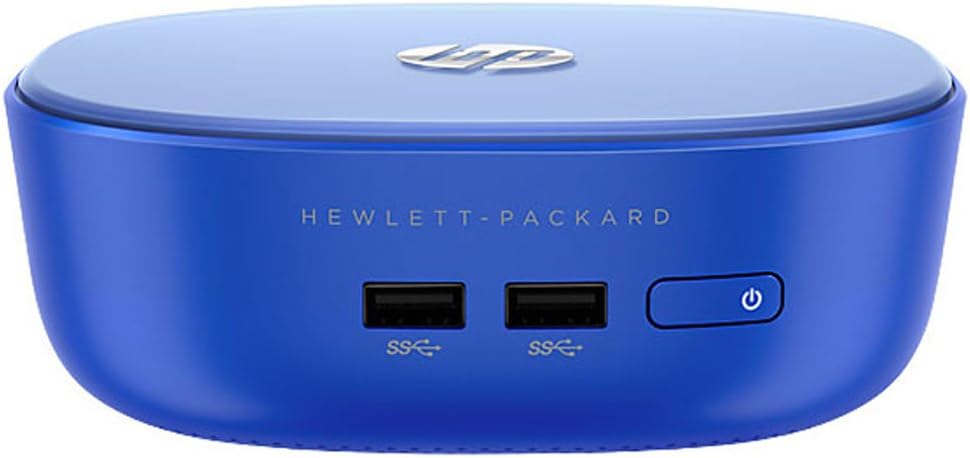
The HP Stream 200-010 Mini Desktop is a compact, lightweight PC featuring a 1.47 GHz dual-core Intel Celeron 2957U processor, 2GB DDR3 RAM, and a speedy 32GB SSD. Running Windows 8.1 with Bing, it includes essential peripherals and offers four USB 3.0 ports plus wireless connectivity, making it an ideal entry-level desktop for professionals seeking portability and efficiency.


| Standing screen display size | 5 Inches |
| Processor | 1.47 GHz Celeron_2957U |
| RAM | 2 GB DDR3 |
| Memory Speed | 1600 MHz |
| Hard Drive | 32 GB SSD |
| Graphics Coprocessor | Intel Integrated HD |
| Chipset Brand | Intel |
| Card Description | Integrated |
| Wireless Type | 802.11bgn |
| Number of USB 3.0 Ports | 4 |
| Brand | HP |
| Item model number | K5G59AA#ABA |
| Hardware Platform | Unknown |
| Operating System | Windows 8 |
| Item Weight | 1.43 pounds |
| Product Dimensions | 5.73 x 5.7 x 2.06 inches |
| Item Dimensions LxWxH | 5.73 x 5.7 x 2.06 inches |
| Processor Brand | Intel |
| Number of Processors | 2 |
| Computer Memory Type | DDR3 SDRAM |
| Flash Memory Size | 32 |
| Audio-out Ports (#) | 1 |
| Batteries | 1 AA batteries required. |
C**R
Good Mini PC and Upgrade Tips
I like this mini pc very much. For internet browsing, email, light word-processing and easy upgrading it pretty much hits a home run. However, if you start to add too much software you'll find that the included ssd is too small and needs to be upgraded. Even though you may have to upgrade the hardware for your needs, keep in mind that this pc is really up to date with all the latest tech hardware and the price is still a bargain; it still winds up being cheaper than a mac mini.I had a spare 27 inch samsung monitor just sitting in my home office and decided to get the HP Stream so that when family or friends came over they could use the pc without having to get on my computer. I decided to beef up the HP Stream just in case I decide to turn it into an htpc media center sometime in the future.These are the following upgrades so far:1) Amazon - Crucial 8GB Kit CT2KIT51264BF160B - $60.002) Amazon - ZTC 128GB Armor 42mm M.2 NGFF 6G SSD Solid State Drive. Model ZTC-SM201-128G - $56.003) Amazon - 7260NGW Intel® Dual Band Wireless-AC 7260 802.11ac, Dual Band, 2x2 Wi-Fi + Bluetooth 4.0 - $21.00Notes on the hardware upgrades:1) Installing the upgrades is really simple: unscrew 3 screws on bottom (under rubber padding), unscrew 4 screws on the 2.5 hard drive frame and then install new hardware.2) The new wifi card is really not needed if you can connect using the ethernet cable thru the RJ45 port on the back of the HP Stream.Notes on the software upgrades:In order to transfer the software on the old ssd drive to the new ZTC ssd drive I spent many hours looking for a simple solution and discovered a new problem with the HP Stream. The problem with the HP stream is booting directly to usb flash or usb hard drives. From my understanding the HP Stream uses a combination of UEFI / Bios booting which incorporates new protocols for mounting legacy devices.Additional Hardware:1) Standard USB 3.0 flash drive - anything over 1 GB (you can also try USB 2.0)2) Amazon - ZTC Thunder Enclosure NGFF M.2 SSD to USB 3.0 Adapter - 23.00You should keep in mind that the M.2 SSD is a new hard drive standard that is becoming more common in compact computers and if you plan on upgrading these machines in the future then this adapter is an investment in the future and is not a waste of money or an additional cost to the HP Stream. This is always a problem when moving to new tech!!!Additional Software:1) EaseUS Disk Copy Home Edition v2.3.1 - Free - search on internet; the EaseUS download link may not work2) Aomei Tech Co. Partition Assistant Standard - Free - search on internet for company websiteSteps for the software upgrades:0) On the HP Stream don't try to do a 'Windows Update', in my case there was so little hard disk space available that Windows was skipping the updates and I hadn't noticed.1) Insert new ssd into ZTC ssd adapter2) Insert USB flash drive and insert ZTC SSD adapter into HP Stream3) In Windows download and run EaseUS Disk Copy - follow instructions and you will be prompted to create boot usb flash drive.4) Reboot pcSteps to Boot Legacy Devices:5) At reboot (don't wait) keep hitting "esc" key until you get text Startup Menu - hit 'F10' key for BIOS Setup menu6) In BIOS Setup menu go to 'Security', then go to 'Secure Boot Config..' , hit 'enter' then hit 'F10' to accept7) In the Secure Boot Config, use down arrow to move cursor to 'Secure Boot' and then use right arrow to disable8) Then use the up arrow to move cursor to 'Legacy Support' and use right arrow to enable, hit 'F10' key to accept9) Go to 'File' and save config and exit, the HP Stream will reboot10) ***Warning*** If the usb flash drive does not load then reboot, keep hitting 'esc' till you see startup menu and hit 'F9' Boot Device Options. Move cursor down to 'Legacy Boot Sources' and then move cursor to usb flash drive and then hit 'enter'. If HP Stream still does boot to usb flash, be sure to check usb flash device.Steps to Clone SSD Drive:11) When EaseUS Disk Copy loads follow instructions and copy your hard drive to new SSD, when finished shut down HP Stream12) Unplug all usb devices. Switch out the ssd drives and reboot HP Stream. Windows should now boot from new ssd driveSteps to Re-Size Windows Partition13) In Windows install Oamei Partition Assistant (OPA) and run program14) In OPA do the following (do not change sequence): a) move Images partition to end of drive b) re-size windows partition to use all available free space and then c) apply changes.15) OPA will reboot the pc and apply the changes16) Boot into Windows and do 'Windows Update'17) You are done!Closing Notes:The above is what worked for me and the whole process should not take more than a hour; this assumes you take your time. As an after thought you might be able to do the whole process with just the OPA software but be careful, I have read on the internet that not all cloneing software works for ssd drives.
K**N
Great Computer for the Price
After my 2009 Sony Vaio Desktop decided that it didn't want to work anymore and retired itself without giving notice, I finally decided to upgrade my computer. I got the HP Stream based on several factors - 1) I didn't need a workhorse computer at home, and really wanted a small unit to do some word processing, emails, watch videos, and possibly photo editing on. 2) I wanted a small footprint computer so it wouldn't take up too much space. 3) I wanted to hook up the computer to a HDTV so I wouldn't have to purchase a new monitor. 4) I didn't want to spend a lot on the computer.The HP Stream 200 fit the bill perfectly - and it surpassed all expectations I had of it. The unit is very compact - larger than a Roku, but smaller than most sandwich box tupperwares. It comes with a wire keyboard and mouse, although I admit I didn't try it out at all. I did put in a wireless keyboard and mouse combo and found that it worked fantastically with the Stream, and I was able to sync everything up seamlessly. I also plugged the Stream into my TV utilizing an HDMI cable. For whatever reasons, the sound coming from the TV would come in and fade out - I later discovered this was common with HDMI/laptop hookups, so I plugged in some speakers into the stream using the audio input on the back. Not sure if a higher quality HDMI cable would make a difference, but because I plugged it into a speaker, it's not a big issue to me. Picture quality is not effected at all.Because the Stream comes with only 2GB of RAM, I upgraded it with two 4 GB cards. Upgrading this computer is amazingly simply. There are three screws on the bottom to remove, and then you're in. The top of the unit lifts off very easily, and should you want to upgrade the RAM or put in a larger SSD, all the internal workings are easily accessed using a Phillips screwdriver. There are multiple videos on how to upgrade this computer available online - even a notice computer user should be able to upgrade the HP Stream without help.The computer itself runs very smoothly and silently. I've been able to run multiple programs at once without crashing, the initial setup was simple and user friendly enough for my kids to set up, and the start up/shut down is fast. The one issue that I have with the Stream is that it seems to have difficultly recognizing my external hard drive in some of the USB ports. Initially I plugged in my HD into the front USB port, and the Stream couldn't recognize it. I then plugged the HD into the upper back port and it recognized it. When plugged in the lower back port, it sometimes recognizes it, sometimes not. This is a little frustrating because at times I would have to play "musical USB ports" to get items connected. Similarly I had to do that with my iPhone when setting up iTunes. I'm not sure if I got a bum unit, or if it's something with my HD or other peripherals, but it can get annoying. I've since left the HD plugged into the upper back port and the keyboard/mouse plugged in the front, and it's had no issues.Another cool thing to mention about the Stream has two desktop views you can alternate by moving your mouse into the upper left corner of the screen. You can either view your desktop as a normal windows based desktop, or you can view it in the Microsoft Tablet Layout (with the multiple colored boxes on a black background). Along with the Cloud storage, this is a really user friendly computer that will appeal to both new and veteran window based computer users alike.
Trustpilot
3 days ago
1 month ago