
DOWNLOAD THE APP


Customer Services
Copyright © 2025 Desertcart Holdings Limited
DOWNLOAD THE APP

🚀 Upgrade your laptop’s brainpower—because slow is so last decade!
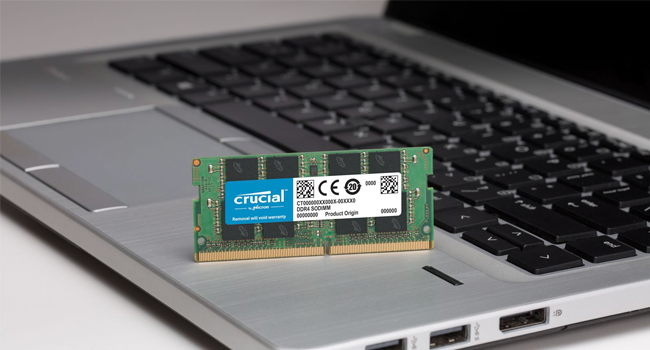
The Crucial 16GB Kit (2x8GB) DDR3 PC3-12800 SODIMM offers a reliable, dual-channel memory upgrade running at 1600 MT/s with CL11 latency. Designed for broad compatibility with DDR3 laptops and Chromeboxes, it supports dual voltage (1.35V/1.5V) for energy-efficient performance. This kit delivers a significant boost in multitasking and responsiveness, making it an ideal, cost-effective upgrade for professionals seeking to extend the life and speed of their existing systems.







| ASIN | B007B5S52C |
| Best Sellers Rank | #76 in Computer Memory |
| Brand | Crucial |
| Color | Multicolor |
| Computer Memory Type | DDR3 SDRAM |
| Customer Reviews | 4.8 4.8 out of 5 stars (13,270) |
| Date First Available | February 20, 2012 |
| Is Discontinued By Manufacturer | No |
| Item Dimensions LxWxH | 1.18 x 0.38 x 2.66 inches |
| Item Weight | 0.64 ounces |
| Item model number | CT2KIT102464BF160B |
| Manufacturer | Crucial Technology |
| Memory Speed | 1600 MHz |
| Number of Processors | 1 |
| Product Dimensions | 1.18 x 0.38 x 2.66 inches |
| RAM | 16 GB SDRAM^SODIMM |
| Series | CT2KIT102464BF160B |
| Voltage | 1.35 Volts |
A**R
Great upgrade for Lenovo Y410P, HP Chromebox. CT2K8G3S160BM/CT2C8G3S160BM and CT2KIT102464BF160B/CT2CP102464BF160B are identical
I purchased the Crucial CT2K8G3S160BM 2x8GB to increase the memory in my Lenovo Y410P laptop from 8-GB to 16-GB. My Y410P has two memory slots, and one slot was already occupied by a factory-installed Samsung M471B1G73QH0-YK0 8-GB memory card. I probably could have just added another 8-GB card. But to avoid any possible memory glitches, I prefer not to mix-and-match memory cards of different types. The existing Samsung memory was PC3L/DDR3L, with the 'L' signifying that it is low-voltage 1.35V memory, whereas the standard PC3/DDR3 memory uses a higher voltage of 1.50V. You should not combine memory of different voltages or use memory with incorrect voltage since your laptop may not even boot up. To further maximize compatibility with my laptop, since it came equipped with CL11 1600-MHz memory, I likewise wanted to stick with CL11 CAS Latency speed, instead of going for memory with a faster (lower) CL rating. Some CL9 memory cards have faster specifications, but I really think that most people will not notice 2-nanoseconds of extra latency. So I ordered this CL11 1600-MHz memory because I wanted to exactly match the specifications of my laptop's original 8-GB memory card to ensure compatibility since using mismatched memory can cause system instability. And this memory has been working flawlessly in my laptop! In real-world applications benchmarks, there is barely any difference between using CL11 memory and using some fancier CL9 memory, and the unnoticeable speed difference is not worth paying extra money for more-expensive models of CL9 or faster memory. With most applications, if you compare CL7, CL9, and CL11 application benchmarks, the differences mostly amount to 2% to 4% differences in benchmark timings. Along with the CL listing, another important memory performance indicator is bandwidth, and this Crucial memory's DDR3 1600MHz has a very good maximum bandwidth of 12800MB/s. But what does this mean in real-world performance terms? Relatively little. As long as you have enough memory to hold the applications that you are running without paging, RAM speed is only very rarely a performance bottleneck. Even with quad-core CPUs, the bottleneck is more likely still going to be the CPU . The reason for this is that the CPU's branch prediction algorithms are so accurate that, in the vast majority of circumstances, the data is already in the cache when the CPU needs it. So direct calls to RAM are quite rare. The branch predictor is like the CPU's personal assistant; it guesses what piece of information the boss needs next and makes sure it is already on his desk by the time he needs it. Occasionally, the assistant will get it wrong and the boss will have to forage around and find the information himself. In CPU terms, "foraging around" means retrieving the information from RAM, or (worst case scenario) disk, while if it is "on the boss' desk", that is equivalent to it being in the CPU's cache. And if your computer is equipped with an SSD using Intel's "Smart Response Technology" or if your computer uses SSDs instead of hard disks, it may retrieve the data from the speedy SSD instead of reading from a slower hard disk. So the days are long-gone when purchasing high-end expensive RAM actually makes a tangible difference to your computer's performance. As long as it meets the basic specifications that your chipset requires, there is not much to be gained by paying more. Some performance gains are possible from buying better RAM, but these days, most tests tend to show that such performance gains are minimal... far, far lower than you will get from adding more RAM (not necessarily faster RAM, just *more* RAM) or a faster CPU. This was not always the case. When the Pentium IV first came out thirteen years ago, it used a new type of RAM that had, at the time, very high bandwidth, but also very high latency. AMD's Athlon used traditional RAM with lower bandwidth and lower latency. Some types of applications (e.g. video and audio conversion) were very sensitive to bandwidth, but less sensitive to latency. These types of applications showed significant performance gains with the Pentium IV. Other applications (typically games and office applications) were more sensitive to latency and favored the Athlon. Overall, this Crucial memory is a great buy! Don't overspend on memory just because a brand or model of memory touts better specifications. If you are a hardcore computer gamer with a $4000 gaming laptop, you may opt for faster high-end memory to complement your top-of-the-line CPU and graphics. But most people should focus far more on how compatible that memory's specifications are for your system because the differences between CL ratings are negligible if you are considering CL rating differences of 2 or 3, while using memory that is not correctly matched or compatible with your computer can cause a variety of problems. After I removed the original Samsung 8-GB memory from my Y410P laptop and added these two Crucial SODIMM cards, I reran the Windows Experience Index benchmark and got the same WEI "Memory operations per second" score of 8.1 that I had with the Samsung memory. The WEI "Processor: Calculations per second" also remained unchanged at 8.1. This was not surprising considering that both the original Samsung memory and this Crucial memory have the same specifications. I also purchased a single 8GB card of this same Crucial memory to upgrade my HP Chromebox, which comes equipped with only 2GB in its single memory slot. There is a lot of misleading information on the Internet stating the maximum memory that you can use in the HP Chromebox is 4GB. But that is incorrect since the HP Chromebox can fully use 8GB of memory. After I upgraded my HP Chromebox, the Memory Monitor app on its Chrome OS displayed the memory capacity as 7.9GB. 2GB of memory is sufficient for a Chromebook/Chromebox if you are just browsing with a few tabs open. But if you want to open up lots of tabs and run lots of apps, or if you plan to install Linux or Windows on your Chromebook/Chromebox, then adding more memory will help with performance. Note that Crucial has two identical 16-GB 2x8GB kits with identical specifications, with each memory product having two different part numbers: CT2K8G3S160BM/CT2C8G3S160BM Crucial 16GB Kit (8GBx2) DDR3 1600 MHz (PC3-12800) CL11 SODIMM 204-Pin 1.35V/1.5V Mac Memory CT2K8G3S160BM , and CT2KIT102464BF160B/CT2CP102464BF160B Crucial 16GB Kit (8GBx2) DDR3 1600 MT/s (PC3-12800) CL11 SODIMM 204-Pin 1.35V/1.5V Notebook Memory CT2KIT102464BF160B . CT2K8G3S160BM/CT2C8G3S160BM and CT2KIT102464BF160B/CT2CP102464BF160B are exactly the same memory cards, with the only difference being that the CT2K8G3S160BM/CT2C8G3S160BM product is packaged for Macs with the words "Mac Compatible" on the package. But all four of these part numbers are totally interchangeable because they contain identical memory cards. So if you determine that this is the right memory for your computer, just get whichever of these four Crucial part numbers is cheapest :-) I purchased the CT2K8G3S160BM/CT2C8G3S160BM on Amazon because it was $30 cheaper than the CT2KIT102464BF160B/CT2CP102464BF160B product listing at the time (of course, prices can vary each day). Both of these products are dual-voltage and can work in either 1.35V PC3L/DDR3L or 1.50V PC3/DDR3 memory slots. Both products are Mac-compatible, but they are also not Mac-specific or PC-specific, and they work equally well with PCs, Macs, and Chromebook/Chromebox. [...]. If you have questions, please ask.
D**V
Boost Your Aging Laptop's Performance
The Crucial 16GB Kit (2x8GB) DDR3 Laptop Memory has been a game-changer for my laptop's performance. This memory kit is designed to enhance speed and multitasking capabilities, making it a five-star addition to any laptop. Boosted Performance: One of the standout features of this memory kit is its ability to boost your laptop's performance. It provides faster data transfer and improved multitasking capabilities. Ample Capacity: With a total capacity of 16GB, this kit offers ample memory to handle demanding tasks and run multiple applications simultaneously. Easy Installation: Installing this memory kit is straightforward, even for those without extensive technical knowledge. It's a user-friendly upgrade. Reliable Brand: Crucial is a reputable brand known for producing high-quality and dependable memory products. Improved Efficiency: This memory kit improves the overall efficiency and responsiveness of your laptop, making it feel like a new machine. In conclusion, the Crucial 16GB Kit DDR3 Laptop Memory is a five-star memory upgrade for laptops. With boosted performance, ample capacity, easy installation, a reliable brand, and improved efficiency, it offers a significant improvement in your laptop's capabilities. Whether you're working, gaming, or handling resource-intensive tasks, this memory kit ensures that your laptop performs at its best. I wholeheartedly recommend it to anyone in need of a memory upgrade for their laptop.
J**N
2012 MacBook Pro Compatible
I slapped these guys in my 2012 13" MacBook Pro to max out its memory and speed it up a bit with an SSD upgrade as well. Did you know Apple used to make user upgradeable laptops??! What an insane concept, making a device that costs thousands of dollars upgradeable so that it doesn't become e-waste in a few years. Or allow users to only buy what they need now and upgrade components in their device later on when they need more power?? Just absurd ideas that only exist in fairyland nowadays. Anyways these RAM sticks work great, were cheap, and an easy upgrade for a legendary tank of a laptop. Long live the 2012 MBP.
T**E
quick delivery
The price was right, it works and it was delivered quickly.
M**E
Muy buen producto, cumple con las características para la laptop a las que se las puse, funciona a la perfección
D**Y
exactement conforme à mes attentes. Livraison rapide et soignée. Je recommande !
O**N
Uyumlu bellek bulmak oldukça zor. Bu bellekler ile uyum sorunu yaşamadım.Eski bilgisayarımı oldukça hızlandırdı. Sanal bilgisayar çalıştırmada hiç sıkıntı yaşamadım.
A**M
Używane
ミ**ノ
2GB×2枚からこちらに変えました。 動作めっちゃ早くなりました。 互換性あるか心配だったけど動いてよかった~ 届いた商品は特に問題なかったよ う~んでもやっぱりHDDもかえないと完璧にははやくならないかなー遅い部分がある とりあえず確認できたのはウェブサイト起動がはやくなったね、2GBの時とかクッソおそかったわw 高いだけあるわ いい商品
Trustpilot
2 weeks ago
2 weeks ago