

Desert Online General Trading LLC
Dubai, United Arab Emirates
Desert Online General Trading LLC
Dubai, United Arab Emirates


🚀 Elevate your workspace and gaming den with ultra-vivid clarity and smooth visuals!
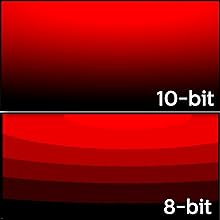
The Philips 326E8FJSB is a 31.5-inch 2K QHD VA monitor featuring a 10-bit panel capable of displaying over 1 billion colors. It supports AMD FreeSync for tear-free gaming, includes eye-friendly flicker-free and LowBlue modes, and comes with a 4-year advance replacement warranty, making it a reliable and vibrant choice for professionals and gamers alike.





| Standing screen display size | 31.5 Inches |
| Screen Resolution | 2560x1440 |
| Max Screen Resolution | 2560 x 1440 Pixels |
| Brand | Philips |
| Series | E8 Series |
| Item model number | 326E8FJSB |
| Item Weight | 14.9 pounds |
| Product Dimensions | 28.8 x 8.8 x 20.8 inches |
| Item Dimensions LxWxH | 28.8 x 8.8 x 20.8 inches |
| Color | Gunmetal |
| Manufacturer | ENVISION |
| ASIN | B07KQXJLF8 |
| Is Discontinued By Manufacturer | No |
| Date First Available | January 3, 2019 |
J**.
Decent
I'm gonna be fair and reasonable with this review. The monitor itself is not that bad but i am Still wondering if I got my money's worth. It has reasonable clarity, not much light bleed, (even around the edges) and the color contrast is pretty good. The screen's size is a bit more than expected but I went to this size for a reason. I'm going from a 1080p @60hz asus 27" monitor(nothing specail by any means$140 worth) and to this which is 2K QHD 32". I'm not really seeing the improvement I thought I would going to 2K. Im currently using a RTX2070 super gpu and the display is a bit disappointing for QHD. At first the monitor looked very poor but after updating my video driver and tweaking settings in nvidia CP and various windows settings for hours, I finally got a reasonable quality picture. What made the biggest impact was when I disabled the monitor's horrendous presets. I'm definitely not going sugar coat it like these other folks, this panel has quite a few flaws. No clue why people pushed it up so high in the reviews. It definitely doesn't deserve that much praise. It took way too much tweaking and headache to get to a point of usability and the panel still almost looks like a resolution somewhere between 720p and 1080p. Im just not sure if this has to with the PPI density @32" for this panel in particular or if it's just what you get for the price. The final big issue for me is I could not mount it on the wall. The bottom vertical post is clearly not removable from the panel. So even if you found a way to clear that fixed post with a spacer or some other workaround, it will still stick out at the bottom with any configuration. Looks absurd. You have no choice but to use the curved stand that screws into the bottom of the post. Too bad since this was part of the reason I went to 32". I want it off the desk, on the wall, and still easily viewable. I dont even understand why the manufacturer would waste there time putting the holes on the panel for wall mounting to begin with. I'm not gonna return but I certianly don't feel that this monitor is an official upgrade from 27" @1080p (Full HD) to 32" @1440p(2K QHD). Can't say I reccomend this product.
T**D
LOOOOVE this monitor!
I bought the Philips 326E8FJSB 32" monitor in April of 2019 so I've had it for almost 1 1/2 years. I can say with confidence that I love it just as much now as when I first put it in my system (AsRock Taichi X570, Ryzen 7 3800x, nVidia GTX 1080Ti, 16GB ram). The main reasons I got it were for the size, price, and amount and type (DP, HDMI, DVI & VGA) of connectors. It also had good reviews as I recall. I've ordered and returned SEVERAL other monitors before settling on this one; some had major ghosting, some had other problems, but this one was just right. My only criticism is a small gripe; sometimes, or maybe on one particular game, there is a noticable smearing of dark colors. I have only noticed this on this ONE game (DOOM w/ the GZDOOM port) but, of course, your mileage may vary. Even on that one game, it's usually not very noticable unless you're looking for it. It's not hard to live with, for me anyway, as it only seems to happen on a small part of the screen with a particular object which is a shade of dark blue. If it ever happens anywhere else then it's so easy to dismiss that I can't even remember it happening. Colors are vivid and natural and contrast is quite good as is brightness. There is ONE control for toggling function menus; I advise anyone buying this monitor to do as I do and use it as little as possible as it MIGHT be a point of failure. I avoid turning it on & off; I use screensavers and the on/off button on my KVM switch for that. This way, I'm only using the toggle switch for special function; this should relieve some of the wear & tear on this switch. Overall, I am extremely happy with this monitor; it gets my highest recommendation.
D**.
Updated: Generally solid, but DisplayPort Compatibility Lacking
Overall: very happy, this serves its purpose nicely when used with a Surface Pro and Surface Dock, with significant annoyances (see below). Have not yet used this for gaming.Pros: - no dead / stuck pixels, color balance is great out of the box (Tom's Hardware did a great review noting this) - big, bright - reasonably priced. - Connectivity - DP (sort of, see below), HDMI, DVI, VGACons: - Missing a few features (none of which are a great concern): no USB, no speakers, but does have 1/8" jack to connect them. - Port placement would be problematic for a wall mount - Tilt only adjustment for the stand - I plan on running this ultimately in portrait, so I'll need an after-market stand. Hopefully the non-centered VESA mount screw holes won't be a problem. - Finicky DP - this could be an issue with the Surface Dock, but connecting with a (4K-rated) MiniDP to DP cable generally yields great results. On occasion, when powering up / docking the Surface Pro, monitor stays asleep (until the DP cable is unplugged from and reconnected to the display. On at least one occasion, the Surface only detected a display capable of 1920x1080 (with a really ugly pixellated, ghosted upsampled image on the Phillips), which completely went away when connected via HDMI. Fixed this by forcing resolution to dot-for-dot, downloading and installing the profile (INF) from the Phillips web site, and fully unplugging power cord from the display (has not happened again). If it was somewhere where I could not reach the back of the display, would probably opt to just use HDMI and save the aggravation.***UPDATE on DisplayPort: Dropped one star. The 1920 issue came back and was intractable (persistent through reboots, power cycling of dock and display, changing from one miniDP port to the other, disconnecting, reconnecting. snapped right back to 2560x1440 once I connected via HDMI and back to DP, that's normal again. I'm out of patience, so I'll stick to using my StarTech miniDP-to-HDMI adapter and an HDMI cable. Could be an issue with Surface Dock, but if you need reliable DP functionality, you should probably look elsewhere.
M**.
Overall meh
The picture quality is lacking at this price point. The build quality also feels lacking due to the cheap plastic, thick bezels and poor design.What killed this monitor for me was that while it has vesa support; the monitor stand mount can NOT be removed without disassembling the unit; I verified this with Philips support via e-mail. Very poor design. It's the equivalent to designing a car that needs all it's doors removed for an tire change...
C**I
Bonito monitor, funcional
Buen monitor, lo tuve solo algunos días pues venia con pixeles muertos, pero el tiempo que lo use me fue de utilidad, buenos colores, aunque con mucho parpadeo a pesar de configurarlo, agradezco el apoyo para la devolución.
M**S
Angle of viewing makes a difference
For this price ($256 plus tax) it is a good deal and I should not complain. However if somebody wants consistent picture color and brightness regardless on viewing angle it is not the best choice. It has this typical for LCD panels weakness that picture is the best only if your face is positioned directly in front (90 degrees and centered) of the screen.
P**T
Big with drawbacks
Nice big screen but color washes out at the edges (the parts that aren't facing perpendicular to the face. It's also not quite bright enough if using in a sunny room.
N**M
Bang for the buck
Beautiful,Hi-res display for the price . Not for gaming .
Trustpilot
3 weeks ago
3 weeks ago