Desertcart purchases this item on your behalf and handles shipping, customs, and support to France.
📺 Transform your screen, upgrade your vibe!
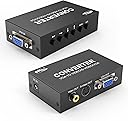
The eKL VGA to AV Adapter Converter Box effortlessly bridges your PC or laptop VGA output to composite RCA or S-Video inputs on TVs and projectors. Supporting up to 1280x960 resolution with adjustable display settings, it delivers crisp visuals with minimal lag—perfect for retro gaming, streaming, or presentations. Its plug-and-play design, low 5W power draw, and silent aluminum cooling make it a sleek, energy-efficient solution for professionals seeking versatile display connectivity.


| ASIN | B07L6WHQ6H |
| Best Sellers Rank | #251 in Video Converters |
| Brand | eKL |
| Color | black |
| Compatible Devices | Monitor, PC |
| Connector Type | RCA, VGA |
| Customer Reviews | 4.0 out of 5 stars 133 Reviews |
| Finish | Projector |
| Finish Type | Projector |
| Input Voltage | 5 volts |
| Manufacturer | xudongtai |
| Mfr Part Number | EKL-1801 |
| Model Number | eKL-VGA-AV-Adapter-Converter-Box |
| Nominal Power | 5 watts |
| Number of Items | 1 |
| Number of Ports | 1 |
| Package Quantity | 1 |
| Power Plug Type | Type A - 2 pin (North American) |
| Specific Uses For Product | Monitor,Projector,Tv |
| Unit Count | 1 Count |
| Warranty Type | Limited |
J**F
Good affordable modern 480i scan converter
I got this little box over an Extron to save some space and money. Been using it with my Steam Deck to play modern retro games (e.g. Sonic Mania, TMNT:SR, etc.) and am pleased with the results. Very satisfied with the image and resolutions this little box can make. Works great with modern PCs if you keep its (and analog displays) limitations in mind: - 1280x960 is a great resolution to use with this. It will make the text a little hard to read on a desktop but the even 2x 480i scaling will ensure the image looks crisp and even (especially for retro games and DVD/VHS rips). Plus everything will fit on the display in a desktop setting. - Very minimal added input lag based on playing a few games. - As mentioned by another poster it comes in PAL mode. I just pressed "down" then "left" until the signal started to change, then continued pressing left until it got into NTSC M mode once the correct setting was selected. - Aluminum passively cooled case and only uses 5 watts of power, so its good to keep plugged in all the time
A**R
VGA connection not sound
There was 15 or 20 minutes of frustration and then ta da! The manual is not particularly helpful but the product makes Netflix from the pc look nearly like a DVD! Helpful hint to all buyers here is the way to get to the screen to stop scrolling: menu button then click down button 7 times and click right til pictures stops scrolling and then arrow down to last line and click right until shows "normal".
D**R
Use report with an MSDOS PC
Definitely works. Tested with an early 90s Cirrus Logic ISA board. Super VGA. Supports all the VGA modes I tested, text mode through VGA. Which matters, given VGA video output can encompass *many* commonly used resolutions. 80 column text mode, aka 720x348. 320x200 cga thru vga. 320x240 mode x vga. 640x200 CGA high res. 640x350 EGA high res. 640x480 VGA. 800x600 and 1024x768 super vga modes. I can't comment on video quality much as my set is a bottom of the line CRT and lacks a comb filter. But, somehow, 80 column mode is readable. Barely. But enough to read DIR statements at the DOS prompt. Each video mode will need adjustment. Lots. To center and size the picture. Huge pain in the butt. And constant need on a DOS PC. Most VGA monitors automatically. This adapter does not. Almost a dealbreaker, but probably ok if you're almost entirely running 320x200 games and can remember where your games are so you can type without reading the file system listouts.
J**E
Perfect
Great solution. Quality heavy duty build. Pal by default, follow the guide on the review for NTSC setup.
B**R
Menu button does not work, never pops up on screen nor does any of the buttons work.
Menu button does not work. I tried switching from PAL to US like another reviewer said but did not work, My picture already looks fine. However, I bought this to adjust my crts brightness. I tried to use two of these and tried pressing menu waiting 5 seconds between each button press and pressing (and holding) left or right to try to get it to do something like adjust the brightness/contrast. The menu button on both devices simply does not work
N**S
PAL default and poor button design issues
Item works as described and gets the job done, but there are two issues. It ships in PAL mode, so it won’t work with American TVs out of the box. You have to navigate the menu to switch it to NTSC, which is tricky since you can’t see the display at first. Also, the physical buttons are poorly designed, they sit too flush and feel like they’re broken when pressed. They should protrude more for better usability.
B**D
Serves it's purpose, but definitely low-res
I needed this to integrate my iphone to my built in Nav. Sort or a poor man's Apple Car Play. It works, but the VGA signal is low-resolution for sure. I do like that it has a lot of adjustment buttons, but you need to be careful when you tuck it away so theat they do not get bumped when driving. I was able to get it to completely fill the screen in my 2010 Lexus HS250H.
R**H
Grainy picture
Price seems to be more important for most folks. Amazon is dominated by dirt cheap converters like this with grainy pictures. Sure, you get what you pay for but please TAKE MY MONEY. Show me a usable product Adding words like high quality, high resolution make no difference.
M**N
Tv splitter
Very good value
L**F
VGA Convertor has good picture quality.
This VGA to composite converter gave me better results than I was expecting. It did power up in pal mode which gave a black and white picture initially. Once I switched to NTSC mode the picture quality was good. The menu was quite intuitive and allowed for easy adjustment. The picture quality was of course not as sharp as a normal vga monitor but was still better than anticipated. Other commenters that only got a black and white picture may have had difficulty making changes in the menu. For me there was no problem.
Y**I
PCの出力を変換するなら問題ない
VGAスキャンコンは、探してもこれくらいになってきました。 画面をズームしたり寄せたりするときはこの類の装置が必須です。 PCの出力なら、解像度もほぼ問題ありませんでした。 ズーム倍率も、10段階くらいありそうですが、最大倍率は縦横2倍くらいかな?あまり大きくはできません。 あと、DVDの映像をHDMI=>VGAにして、それをこの装置でVGA=>NTSCにすると、かなりぼけます。 DVDをVGAで見ると良好なのに、同じTVで見ているのに、DVDをNTSCで直接見るより、大きく解像度が落ちます。画像調整で解像度を上げてもだめです。なんでだろう?
R**E
Produces black & white recordings on VHS cassette.
Unfortunately this converter also has out of spec color signal, because when recording on VHS recorder (more than one) produces black & white picture. So this is useless.
C**S
Works as well as a ‘pro’ one but 28 x cheaper.
I managed to ‘fry’ an expensive little box in a college TV studio with an incompatible psu. After searching for a replacement my heart sank at the price....£700ish. I thought this was worth a punt... it worked fine and actually has an extra underscan feature that helped me. I didn’t need to enter any menus etc so can’t comment on those.
Trustpilot
1 week ago
1 month ago