🎥 Elevate your video presence—because your image deserves the spotlight!
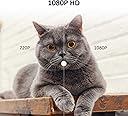
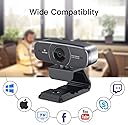
The Logitubo 1080P Webcam delivers crisp Full HD video at 30fps with a 75° wide-angle lens, enhanced by HDR for vibrant visuals. Equipped with dual noise-cancelling microphones, it ensures clear audio by minimizing background distractions. Instant autofocus adapts seamlessly to motion and lighting changes, making it ideal for professional video calls, streaming, and recording. Plug-and-play compatibility with Mac and PC means effortless setup, while advanced H.264 compression supports smooth live streaming across popular platforms.


| ASIN | B07K45G8TV |
| Brand | LOGITUBO |
| Customer Reviews | 3.4 3.4 out of 5 stars (29) |
| Date First Available | November 2, 2018 |
| Hardware Platform | Mac, PC |
| Is Discontinued By Manufacturer | No |
| Item Weight | 12.4 ounces |
| Manufacturer | Logitubo |
| Package Dimensions | 6.65 x 6.14 x 3.03 inches |
L**Y
Great little webcam for the money.
Easy setup, I plug this webcam into my windows 10 machine and it was instantly recognized, no need to install drivers as it was automatically detected and worked with Camera app, skype, and slack without issue. The mic quality is great. The picture quality is much better than expected. It's better than the built in webcams on most laptops. Its a great little webcam for the money.
L**S
"Basic" usage is great but not the background selector
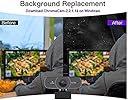
+ Plug-n-play worked fine. Windows 10 identified the camera just fine and called it: USB Live Camera + In low light this camera seemed to brighten things up versus my old Logitech I had to place a lamp near my face for folks to see me clearly. -- A free, 3rd party software, ChromaCam, is what the instructions suggest you use to replace your background. I expected this "feature" is intended for video streamers/channels and the like, but it is pretty poor delivery (see picture) that I'd never use it for that reason. Also, the ChromoCam does NOT work with Hangouts, which is where I'm doing all my video calls for work from. Even though the software's splash page says hangout, I could not get it to work for the life of me and it was too much trouble to contact a different support team (ChromoCam team, not this webcam's team) to fix it. > The way it sits on different thickness monitors works, but isn't great or stable. It has a flexible stand that can be made straighter to hug the monitor back, but this doesn't work all that great as over time I need to constantly adjust the camera to center myself again. + Agreed that the noise cancellation works pretty well, but this isn't the same as using a headset with noise cancellation. If I'm on a video call they can still hear my dog barking or the kids talking in the other room, but they can hear me more clearly above these outside noises, which is good. + Tripod is handy for some applications. Then again, this uses a standard 1/4 connector for most cameras and phone attachments, so you could find an inexpensive tripod sold separately if you really wanted a tripod. -- Uh...no software. Nothing to control or adjust the camera. You have to track down the correct 3rd party software. It just feels extremely incomplete and lacking. Not even a URL/link in the documentation to go to a website and download any control software. I guess they are assuming you already have software and will use that other 3rd party package?!? I don't know. -- My biggest complaint and why I knocked this down in stars is I could not internet search and find the brand "Logitubo" or find a website OR some sort of support/contact us/knowledgebase/drivers site. Nothing! I personally am not excited about investing in a brand of equipment that I cannot contact anyone for help. OVERALL: It works for the most part. I didn't find the auto-focus a problem, but most of the webcams have had that feature for many, many years now. HD is nice and the quality is good. Zero supporting software provided. Zero technical support or customer service info to be found.
R**B
Bought because it would create screen behind me, but must have ASV instruction on PC to work
The webcam was as described, but would not provide screen behind me. I bought it because of this, but my PC Intel 7 quad core, purchased 2018 did not support something like ASV instruction so the ability to use alternate screen behind me would not work. THe camera and mic worked great.
A**R
Easy to set up; no software included
This is a webcam suitable for live video streaming. The camera measures approximately 3.25”x1”x1” and comes on a swiveling mount that can be bent to sit on a laptop screen or screwed in to any standard tripod. A light duty desktop tripod is included. The camera has a 2 meter (6 foot) shielded USB A cable. Also included in the box are a small lens cleaning cloth, a paper manual in “English” (sort of) and a fold-out paper with product specifications. Although the packaging promises a 1-year limited warranty, the warranty is truly limited since no contact information is provided. Good luck with that! The product was made in China. I found this camera easy to set up on my Win10 laptop. It was plug-and-play for basic functions. Auto focused worked, and the camera adjusted automatically to different lighting setups. The built-in front microphone worked as expected. In order to get the most out of this camera, (like the claimed background replacement feature), you need software, which isn’t included. Instead, the manual directs you to download ChromaCam software, which is free and works well. Another recommended download to control the camera is OBS software (look it up!). In my experience, while I could get the camera to mount on the edge of my laptop screen, it was much more stable on a tripod. While the tripod that ships with this camera is sufficient to support the camera, I found my own tripod was easier to use and gave better stability. Overall, this camera provides good image quality and is versatile, but it does not include any software or customer support beyond the quasi-English paper manual.
Trustpilot
5 days ago
3 weeks ago