


⚡ Unlock lightning-fast wired networking—because buffering is so last decade.
The OWC Thunderbolt 3 10G Ethernet Adapter delivers ultra-high-speed wired connectivity up to 10Gb/s via a versatile RJ45 port. Compatible with Thunderbolt 3 and 4 ports on macOS and Windows, it offers plug-and-play simplicity with no driver installation required. Its compact, durable design is bus powered for energy efficiency, making it ideal for professionals demanding flawless performance in video editing, large file transfers, and noise-sensitive environments.
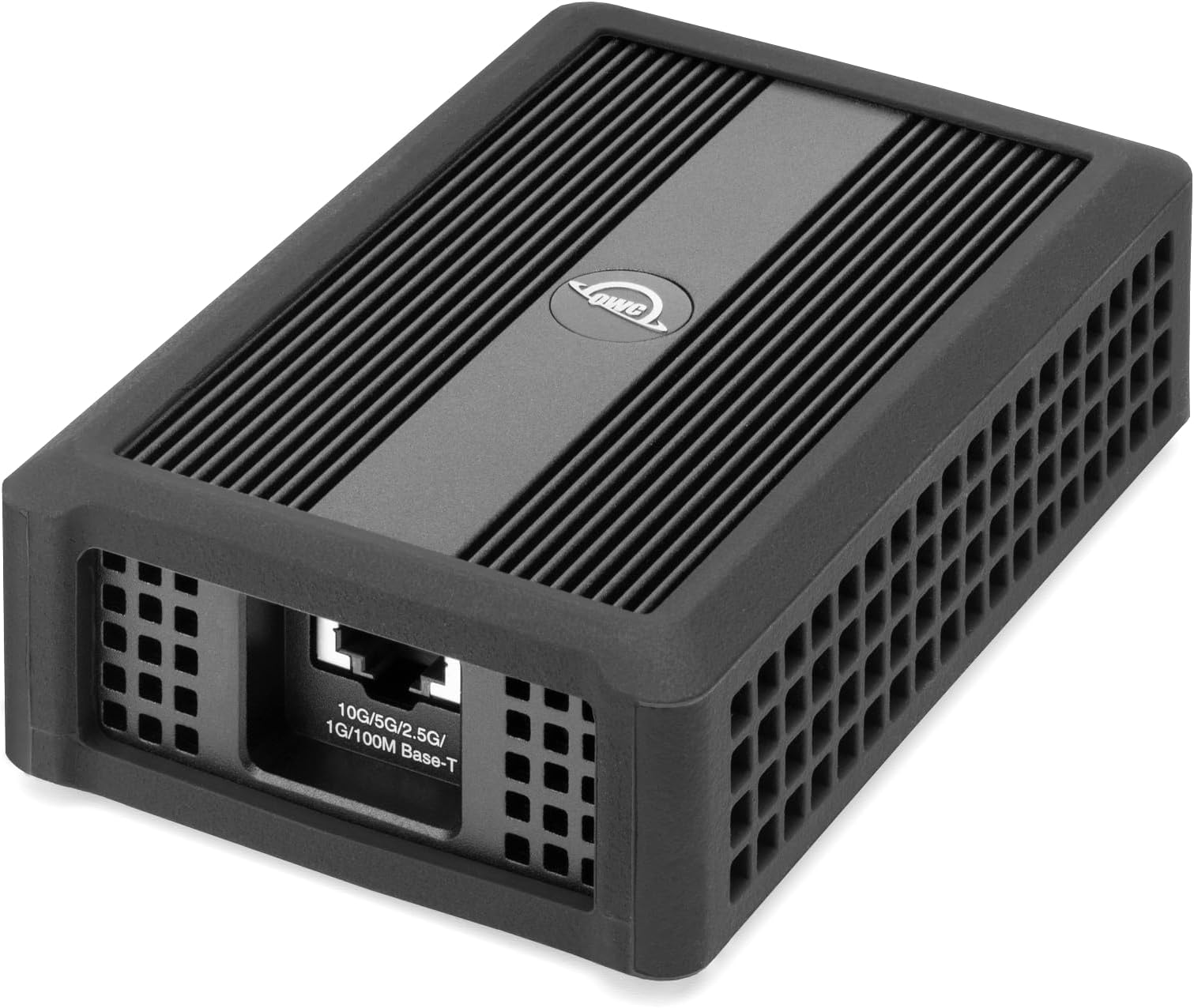


| ASIN | B07K7SMF89 |
| Best Sellers Rank | #707 in USB Computer Network Adapters |
| Brand | OWC |
| Built-In Media | User Guide |
| Color | Black |
| Compatible Devices | Desktop |
| Compatible Operating System Family | MacOS, Windows |
| Customer Reviews | 4.2 out of 5 stars 362 Reviews |
| Data Link Protocol | Ethernet , Gigabit Ethernet |
| Data Transfer Rate | 900 megabytes_per_second |
| Global Trade Identification Number | 00810586030502 |
| Hardware Interface | Thunderbolt 3 |
| Item Dimensions L x W x H | 5"L x 3.1"W x 1.5"H |
| Item Weight | 16 ounces |
| Manufacturer | Other World Computing |
| Mfr Part Number | OWCTB3ADP10GBE |
| Minimum Required Operating System Version | Windows 10 |
| Model Number | OWCTB3ADP10GBE |
| Product Dimensions | 5"L x 3.1"W x 1.5"H |
| UPC | 810586030502 794504338959 |
| Unit Count | 1 Count |
| Warranty Description | 1 year |
K**E
Flawless high-speed performance
🌟 Five-Star Review: OWC Thunderbolt 3 10G Ethernet Adapter 🌟 Since I started using the OWC Thunderbolt 3 10G Ethernet Adapter in late July, it has exceeded every expectation. Whether connected to my Mac Mini Pro or my HP notebook, this adapter has delivered flawless high-speed performance across the board. • Blazing Fast & Reliable: The multi-speed RJ45 port (10Gb/s down to 100Mb/s) adapts seamlessly to my network setup, and I consistently get stable, ultra-fast connections—no bottlenecks, no hiccups. • Cross-Platform Compatibility: Works perfectly with both Thunderbolt 3 and 4 ports, making it a versatile solution for my mixed-device environment. • Build Quality & Design: Solid, compact, and professional—this is no flimsy plastic dongle. It feels like it was built to last. • Plug-and-Play Simplicity: Setup was effortless. No drivers, no drama—just instant performance. I use this adapter daily, and it’s become an essential part of my workflow. Whether I’m transferring large files to my NAS or streaming high-bandwidth content, it handles everything with ease. Verdict: Pure excellence. Five stars without hesitation. Highly recommended to anyone serious about high-speed networking.
M**S
Great value for 10gb ethernet NAS. Works well. Recommended.
I ordered the OWC Thunderbolt 3 Ethernet to connect my Macbook Pro to the Ugreen NAS. The Macbook supports Thunderbolt 4 but the NAS tops out at 10gb. Spending $150 more for a TB4 adapter would have been pointless. The OWC Thunderbolt 3 adapter works great. I have no problem using the NAS editing 4K/60 Premiere Pro projects. The adapter does get warm to hot. This seems to be the nature of 10gb ethernet adapters. They all have massive heat sinks. So far it's working really well. I'll update the review should my experience change after a month or two of heavy use.
J**L
You need to turn off AVB/EAB mode on this
At first I was stymied with lower speeds than even a simple gigabit USB-c adapter with this device. It turns out that you need to turn off AVB/EAB mode in Mac OS advanced network settings to get this to work correctly. The AVB/EAB mode is some non-standard thing for streaming audio from network connected keyboards and such that is not used on any normal ethernet network at all but it causes the adapter to significantly underperform. I get 10 gigabit speeds only when turning this off. This turns out to be a known Mac OS issue.
G**N
Not reliable on macos, no linux support, runs hot
These are not reliable devices, at least on macos. The connection drops to 100mb equivalent without warning, and requires cycling the connection, or recreating the network interface to go back to 10gb. Runs very hot. Also, no linux support. Go with the sonnet. It's reliable, smaller, runs cooler, and linux support is seamless.
A**E
Awesome speed and performance on Mac Pro 2020 tower!
I have a new Mac Pro 2020 tower. Since I use both Mac OS & Windoze professionally, I set it up with 2 bootable drives. Of course the Mac OS runs perfect out of the gate... But, when I got Windoze 10 Pro bootable from an external drive, I found that Windoze can't see the ethernet, because it wan'ts drivers for the cards. I am still waiting for the Apple support team to get me the info so I can update the drivers. But in the meantime I bought this, and the site had a link to the drivers! Its awesome! Download speed is on par withe the native Mac OS speeds, around 550 - 750mps. My only complaint, is the upload speed seems throttled? I get high speed download, but upload is around 15.5mps. When booted to the Mac OS, using the internal ethernet, I get FASTER upload speed than download! Around 850mps!!! (Update, this is confirmed a Windoze issue!) All in all, totally worth the price! I read some thought this was expensive? Hell, for the speeds I am getting, it is worth every penny!
D**F
Great speed, easy to use, very hot
My MacBook recognized this instantly and I am getting great speeds! Here is a local test done connected through a 10Gb switch: laptop:Downloads me$ ./iperf3 -c 10.2.220.104 Connecting to host 10.2.220.104, port 5201 [ 6] local 10.2.93.106 port 64591 connected to 10.2.220.104 port 5201 [ ID] Interval Transfer Bandwidth [ 6] 0.00-1.00 sec 1.05 GBytes 9.03 Gbits/sec [ 6] 1.00-2.00 sec 1.07 GBytes 9.20 Gbits/sec [ 6] 2.00-3.00 sec 1.07 GBytes 9.15 Gbits/sec [ 6] 3.00-4.00 sec 1.01 GBytes 8.64 Gbits/sec [ 6] 4.00-5.00 sec 1015 MBytes 8.51 Gbits/sec [ 6] 5.00-6.00 sec 1.02 GBytes 8.76 Gbits/sec [ 6] 6.00-7.00 sec 1018 MBytes 8.54 Gbits/sec [ 6] 7.00-8.00 sec 1.01 GBytes 8.65 Gbits/sec [ 6] 8.00-9.00 sec 1024 MBytes 8.59 Gbits/sec [ 6] 9.00-10.00 sec 995 MBytes 8.35 Gbits/sec - - - - - - - - - - - - - - - - - - - - - - - - - [ ID] Interval Transfer Bandwidth [ 6] 0.00-10.00 sec 10.2 GBytes 8.74 Gbits/sec sender [ 6] 0.00-10.00 sec 10.2 GBytes 8.74 Gbits/sec receiver iperf Done. This adapter gets very hot. I have been thinking about sitting my coffee cup on it to keep it warm, but that would probably void my warranty...
N**X
Not even close to 10G
I received the Thunderbolt 3 model today (2 units). Installation was easy: worked out of the box on macOS and required a quick driver installation on Windows 11. After the installation, I tested the adapters using the simplest and most reliable setup, i.e. by connecting them via a 3ft Cat8 cable. What can I say... it works, kind of. I mean, there is network connectivity, and it's faster than a standard 1 Gbps adapter (at least for TCP). But that's about it. On macOS Sequoia, it could achieve 9.4 Gbps of TCP throughput in one direction (very stable), but only 5.8 Gbps in the other direction on average. UDP throughput was laughable, slightly above 1 Gbps. You can look at the picture that I've attached, where I measure throughput with Tessabyte Network Test. I got almost the same result with iPerf3, just to be certain. On Windows 11, it could achieve 3.4 Gbps of TCP throughput in one direction and 4.7 Gbps in the other direction on average. UDP throughput was even worse, only about 300 Mbps in both direction. Again, a screenshot of Tessabyte testing the speed of my network setup is attached. I tried to change the cable, I tried to change the computers (all of them new and powerful, e.g. mac mini 2024). Virtually no difference. It's funny that on Windows, my old 5 Gbps USB adapter performs better. So... a nice try, but no, I'm returning to the manufacturer. This is not what I expected from a 10 Gbps adapter.
2**C
This did the trick and file transfers are lightning fast!
I bought the 10 Gbps Ethernet Adapter but wanted to move files fast so I thought "Thunderbolt" gets things moving fast so I bought this OWC Thunderbolt 3 10G Ethernet Adapter and I didn't believe how fast my files got from my MAC to my server. This is very impressive, and you will not be disappointed. You'll be closer towards the "Amazed" frame of mind!! One word towards troubleshooting I observed. If you are running a VPN, it can interfere with the connection. My Mac PC is temperamental when it comes to network connectivity, and I found out my VPN was causing more trouble than I gave it credit for. Once I turned off my VPN, smooth sailing from then on. I hope this helps
H**N
Works great out of the box!
Unlike another similar looking product for thunderbolt 10g, this one from OWC worked great out of the box. but do remember to download the driver from their website first! Getting pretty consistent speeds of 8g. Awesome.
J**N
Schnelle und stabile 10 Gbit/s Verbindung. Es funktioniert auch 2025 mit einem Mac einwandfrei.
Ich verwende den OWC Thunderbolt Adapter mit meiner Synology NAS, um eine 10-Gigabit-Verbindung herzustellen. Auf meinem Mac läuft aktuell macOS Sequoia Der Adapter wird sofort erkannt und liefert eine zuverlässige, stabile Verbindung. Man muss nur die IP Adressen direkt vom Synology Nas und vom Mac zuweisen um die 10 Gbit/s zu erhalten. Voraussetzung Das Synology Nas hat den 10 Gbit/s Anschluss. Für alle, die eine schnelle, problemlose Lösung mit Thunderbolt suchen — insbesondere auf neuesten macOS-Versionen wie Sequoia — ist dieser Adapter eine klare Empfehlung.
き**と
ちょいお高い
お値段がたかかったけど、それ以上に10G回線を活かせるガジエットだと思う。
M**S
Cumpre prometido
Super rápido. Não existe palavras descrever. Funciona como esperado.
C**E
If only I bought this earlier!
This gave my Macbook Pro a stable 10GB/s LAN connection. Ideal for video editing directly on a NAS 4k real time scrubbing with no sweat in Final Cut Pro.
Trustpilot
1 day ago
1 month ago