Buy anything from 5,000+ international stores. One checkout price. No surprise fees. Join 2M+ shoppers on Desertcart.
Desertcart purchases this item on your behalf and handles shipping, customs, and support to France.
🚀 Cut the cords, not the clarity — wireless HDMI redefined!
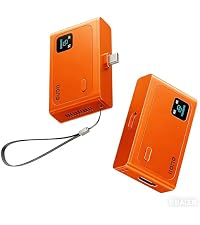
The llano S850 Upgraded Type-C Wireless HDMI Transmitter and Receiver delivers a clutter-free, ultra-high-definition streaming experience with a 50-meter wireless range and dual-band 5G+2.4G connectivity. Supporting 4K decode input and 1080P@60Hz output, it offers plug-and-play ease with Type-C charging, making it the perfect portable solution for professionals seeking seamless screen mirroring and extended display capabilities across phones, tablets, laptops, and PCs.


| ASIN | B0GHMYS5KK |
| Audio Output Mode | 1080P&60Hz |
| Audio Output Type | HDMI |
| Best Sellers Rank | #5,058 in Electronics ( See Top 100 in Electronics ) #6 in Audio/Video Receivers & Amplifiers |
| Brand | llano |
| Built-In Media | Transmitter and Receiver |
| Color | Orange |
| Compatible Devices | iOS/PC/Projector/TV Box |
| Connectivity Technology | HDMI |
| Connector Type | HDMI |
| Controller Type | HDMI |
| Customer Reviews | 4.4 4.4 out of 5 stars (166) |
| Format | 4K |
| Item Weight | 180 Grams |
| Manufacturer | llano |
| Model Number | S850 |
| Other Special Features of the Product | llano S850 Upgraded Type-C Wireless HDMI Transmitter and Receiver |
| Video Encoding | 4K, 1080p |
| Warranty Description | 2 |
| Wireless Technology | 5G, 2.4G |
D**R
Amazing! Excellent Product!!
Worked perfectly! I was able to plug it into the TV on my cruise and the other piece to my tablet, which allowed us to stream the saved movies off my tablet It was a lifesaver!
P**N
Screen mirroring
Awesome work perfectly as advertised
H**N
The wireless design makes it simple and convenient to use.
Traditional HDMI cables for connecting TVs and projectors are not only troublesome to route but also tend to create clutter. That’s why I purchased this wireless HDMI transmitter and receiver set. Its wireless transmission, plug-and-play design, and dual-mode functionality perfectly meet my needs. In receiver mode, simply connecting the RX device enables screen mirroring without requiring an additional transmitter, making the setup extremely simple. When using transmitter/receiver mode, just plug in both the TX and RX devices—they automatically pair without any complicated configuration, truly delivering a plug-and-play experience. During use, the picture quality is clear and smooth, with no noticeable delay when streaming videos or giving PPT presentations. It also provides a relatively long transmission range, maintaining a stable connection even when used between the living room and bedroom. Charging via Type-C is convenient, and the overall setup process is straightforward and user-friendly. It supports both mirror and extended display modes, making it suitable for office meetings, online teaching, home entertainment, and gaming. This wireless HDMI device balances convenience, stability, and high-definition image quality. It keeps desktops tidy and connections flexible, making it a practical tool for enhancing both work and entertainment experiences.
E**F
Short mirror link between two screens
One piece stayed near the phone stand while the other slipped behind the projector input. A small Type-C plug extends directly from the transmitter, so the phone connects without extra cables, and the larger screen begins showing the same image after a brief moment. A charging line runs into the side of the transmitter at the same time, letting the phone battery climb slowly while the video continues playing. The receiver remains hidden behind the display once inserted, leaving only a narrow silver edge visible if looking from the side. Metal shell feels smooth in the hand when picking it up again to switch devices, though the surface shows faint fingerprints after moving it around the desk a few times. Later the transmitter sits beside the phone stand while the receiver stays in the display port, the larger screen quietly reflecting whatever moves across the phone screen.
V**S
It's definitely a very practical device.
While organizing my work desk at home recently, the most annoying thing was all the cables. Connecting my laptop to the monitor and projector meant unplugging and replugging everything every time I moved it. After switching to this wireless HDMI transmitter, my desk is much tidier. Once the transmitter and receiver are connected, there's basically no need for special settings; the screen displays the image quickly, and the operation is very intuitive. I usually use it to project my laptop screen onto the living room tv to watch videos or share photos. The playback is very smooth, and switching between videos or dragging the progress bar is quick with no noticeable lag. The audio is also transmitted synchronously, making for a great experience when watching movies or tv shows. After using it for a while, I find its greatest convenience to be its flexibility and compact size, taking up minimal space in my bag.
J**O
Pocket transmitter beside the laptop
Palm lifts the small metal transmitter from the desk and the matte shell sits cool against the fingers. USB-C plug slides into the laptop port while the receiver pushes into the HDMI slot on the monitor, then the tiny indicator light turns on and the desktop screen appears across the display without opening any apps. Thumb taps the narrow power button once and the video from a tablet shows up on the TV across the room, the picture staying stable while a short clip plays. Back edge of the unit feels slightly rounded when sliding it back onto the desk, not sharp but noticeable when turning it over in the hand. Short strap loop hangs from the corner and makes it easier to pick up again when switching devices. Receiver stays connected behind the monitor while the transmitter moves between the laptop and a phone, the small metal body lying flat near the keyboard with the cable tucked loosely along the side of the desk.
Z**I
practical and well-designed product
I have been very pleased with the performance of the HDMI Transmitter and Receiver. The setup process is truly simple and user-friendly. I especially appreciate the new Receiver Mode, which allows me to mirror my screen just by connecting the receiver, without always needing the transmitter. It makes everyday use much more convenient. The plug-and-play design works exactly as described. There is no need for Wi-Fi, apps, or complicated configuration. The connection is fast and stable, and the video quality at 1080P@60Hz looks clear and smooth. I have used it for meetings, watching movies, and even light gaming, and the experience has been reliable. The 50-meter wireless range is also impressive, providing flexibility without messy cables. I also like the Type-C charging feature, which lets me charge my device while using it.
A**R
Didn’t work
Didn’t work on an iPhone 17, nor a MacBook, nor a windows laptop. They advise that it works right out of the box but I imagine the device I got was broken.
P**.
Works great. Something to keep in mind. Doesn't with with Google pixel devices.
M**.
Si te encuentras que deseas conectar 2 dispositivos por cable HDMI, pero que o bien, no es cómodo, o no tienes el cable adecuado, o hay demasiada distancia entre ambos puntos, esta puede ser la solución más sencilla y cómoda que puedas encontrar. La teoría es sencilla: un emisor y un receptor de audio y video. * El emisor (marcado como TX) lo conectas a tu Smartphone, tablet, u ordenador. Al emplear un conector USB-C macho, ya recibirá paralelamente la energía necesario desde dicho puerto para poder funcionar. Además, tiene una entrada USB-C hembra, la cual, hace de puente y te permite por ejemplo, cargar tu Smartphone mientras estás empleando el emisor de señal. * El receptor (marcado como RX) lo conectas a tu TV (no hace falta que sea Smart), Proyector, o monitor. Se conecta mediante un cable HDMI que ya tengas, un extremo va en el receptor, y el otro extremo por ejemplo, a la TV. Como la conexión HDMI no dispone de voltaje de alimentación, necesitarás emplear el cable USB adjunto para conectarlo al receptor por un extremo, y por el otro por ejemplo, a un puerto USB-A de la TV, el cual ya dotará de los 5V que necesita el receptor para funcionar. A continuación , necesitarás emparejar por Bluetooth emisor y receptor. Se te pide un código (1538) que deberás introducir en la parte del emisor (Smartphone, ordenador, tablet..). A partir de ese momento, todo lo que emita cualquiera de estos dispositivos, se verá por el canal de HDMI del receptor. De este modo, puedes por ejemplo, emitir Netflix desde tu Smartphone a una TV que esté muy alejada, o que incluso no sea una SmartTV. También puedes hacer presentaciones en Proyector desde tu ordenador portátil, para que se vea en grande en una reunión de trabajo o evento con pantalla grande. Los puntos fuertes de este dispositivo son muchos. Desde poder emitir hasta una distancia de 50m (o 10m si hay muchas paredes entre ambos), replicar la pantalla o emplearla como modo extendido a distancia. Todo ello, siendo compatible con Android, iOS, Windows, y Mac OS. Tras probarlo, el emparejamiento entre mi Smartphone Android y una TV de 32" (que no es Smart) ha sido rápido y facilísimo. Tras su uso, y si va a repetirse en el futuro, únicamente deberás desacoplar el emisor de tu Smartphone por ejemplo, pero puedes dejar el receptor en la TV. Cuando lo vayas a emplear de nuevo, solamente habrás de presionar el botón del receptor y listo. La calidad de la transmisión y recepción ha sido perfecta, sin cortes, ni desincronizaciones, ni lags, perfecto. Súper recomendable, de un fabricante que se dedica a esto, y a un precio más que razonable. Besitos! (✿◠‿◠)
B**S
Running incredibly long cables across a living room floor is a tripping hazard. Plugging the transmitting dongle into my laptop and the receiver into the television screen initiated a connection almost instantly. The video feed mirrors my laptop display perfectly, allowing me to stream films directly to the big screen. The picture quality remains sharp and clear, handling fast-moving action scenes without any noticeable lag or stuttering. Audio syncs up flawlessly with the video, avoiding that annoying delay where lip movements do not match the spoken words. Both units require external USB power to function, adding extra cable clutter behind the television and tying up a port on the laptop. The transmitter gets noticeably warm after an hour of streaming, which is slightly concerning for long-term durability. It struggles slightly when a solid brick wall is placed between the two units, causing the signal to drop occasionally. In an open-plan room, it performs its primary function reliably, keeping the floor entirely free of trailing wires.
P**L
Meine Begeisterung für dieses kleine Teil kennt fast keine Grenzen. Ganz im Ernst: Ich verstehe nicht, wie Ilano es schafft, einen derart kompetenten HDMI-Videofunk-Transmitter zu diesem Preis in so kompakten Abmessungen anzubieten. Ich wollte solche Geräte schon lange – vor allem fürs Foto-Studio, um Kund:innen weiter weg vom Set platzieren zu können und ihnen einen Monitor hinzustellen, der z. B. den Ansichtsschirm (oder einen von mehreren Monitoren am Fotoset) spiegelt. Früher kosteten brauchbare Funkstrecken schnell mehrere hundert Euro. Für die eher seltenen Einsatzzwecke hat sich das schlicht nicht gelohnt. Und jetzt kommt Ilano mit einem Set unter 20 € – und das funktioniert in der Praxis überraschend gut. Die Nutzung ist extrem einfach: Sender und Empfänger aus der Verpackung, den Empfänger mit dem kurzen HDMI-Kabel an den Monitor, Strom über das mitgelieferte USB-A-auf-USB-C-Kabel (viele Monitore haben inzwischen einen USB-A-Port, der genug Leistung liefert). Den Sender steckt man per USB-C z. B. ans iPhone/iPad oder an den Mac. Ich kann nur für macOS sprechen: Wenn man der Anleitung folgt, ist die Einrichtung problemlos – und wenn es einmal läuft, läuft es einfach. Falls man die Anleitung nicht zur Hand hat: Der Empfänger liefert die wichtigsten Informationen und Bedienschritte als Standbild so lange die Verbindung zum Sender noch nicht steht. Die Anleitung ist also quasi "eingebaut" - sehr clever Die Latenz ist erstaunlich gering. Ich habe das mit Videomaterial getestet – als zweiter Monitor für Video oder Live-Preview ist das wirklich brauchbar. Was mich am meisten beeindruckt hat, ist die Funkleistung. Ich habe es in unserer Wohnung getestet (nicht gerade klein): rund 20–25 m, dazwischen mehrere Wände, Regale und Schränke – und trotzdem noch ein brauchbares Signal. Klar: Wenn sehr viel „im Weg“ ist, kann es gelegentlich ruckeln bzw. die Bildrate leidet etwas. Aber für typische Anwendungen mit halbwegs freier Sicht zwischen Sender und Empfänger ist das wirklich überzeugend. Ein kleiner Kritik-Punkt, wenn man überhaupt einen nennen will: Der Sender wird im Betrieb relativ warm (noch problemlos anzufassen). Wärme ist natürlich immer ein Faktor für Langzeitbelastung – spannend wird, wie sich das bei sehr langen Sessions (z. B. 8–12 Stunden) und hoher Umgebungstemperatur verhält. Unterm Strich: Ein erstaunlich leistungsfähiger, unkomplizierter HDMI-Funktransmitter für 1080p-Auflösung zum kleinen Preis. Für Studio-Setups, Kundenmonitoring oder unterwegs (z. B. im Hotelzimmer, wenn man Inhalte vom iPad/iPhone auf einen externen Screen bringen will) ist das extrem praktisch. Wer dafür auch nur ansatzweise Verwendung hat, kann hier aus meiner Sicht bedenkenlos zugreifen. Volle Empfehlung – und ich wünschte, das Teil wäre schon vor Jahren auf dem Markt gewesen.
F**E
I’ve been using the llano S850 wireless HDMI transmitter and receiver kit for a few home and office projects, and it does a solid job of wirelessly streaming video from phones, tablets, laptops, or PCs to an external display like a TV, monitor, projector, or TV box. 📺 Performance & Display Quality The setup supports up to Ultra HD 4K decode, with actual output at 1080p @ 60 Hz, which delivers crisp, smooth video without noticeable latency on most content. For movies, presentations, video calls, and casual gaming, the picture quality holds up very well — colours and detail look good on a larger display. 📡 Wireless Range One of the strongest points is the wireless range — up to about 50 m in open spaces — which is really useful if you need to send a signal from one room to another or across a small hall. Performance naturally depends a bit on walls and interference, but in most typical indoor environments it stayed connected without major drops. 🔌 5 GHz + 2.4 GHz Dual Band The transmitter can use both 5 GHz and 2.4 GHz bands, which helps improve reliability depending on your environment. In crowded Wi-Fi situations, switching bands can reduce interference and keep the connection smoother.
Trustpilot
3 days ago
1 month ago