Desertcart purchases this item on your behalf and handles shipping, customs, and support to France.
🖥️ Elevate your workspace, dominate your day!
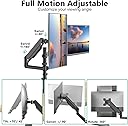
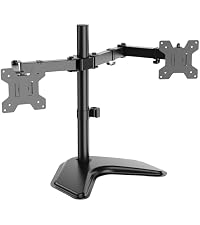
The WALI Tall Dual Monitor Desk Mount supports two 13-33 inch monitors up to 19.8 lbs each, featuring full-motion adjustability with tilt, swivel, and 360° rotation. Its sturdy alloy steel build and dual mounting options (C-clamp and grommet) maximize desk space while integrated cable management keeps your setup clean. Backed by a 10-year warranty and US-based support, it’s the professional’s choice for ergonomic productivity.


| ASIN | B07DM7N5BH |
| Best Sellers Rank | #3 in Computer Monitor Arms |
| Brand | WALI |
| Built-In Media | Dual Monitor Gas Spring Mount, Mounting Hardware Kit, User Manual |
| Color | Black (Dual) |
| Compatible Devices | Monitor |
| Customer Reviews | 4.3 out of 5 stars 17,383 Reviews |
| Enclosure Material | Alloy Steel |
| Global Trade Identification Number | 00811278021617 |
| Item Type Name | Dual Arm Gas Spring |
| Manufacturer | WALI |
| Material | Alloy Steel |
| Maximum Tilt Angle | 90 degrees |
| Maximum-Supported Screen Size | 32 inches |
| Mfr Part Number | GSDM002 |
| Minimum-Supported Screen Size | 13 inches |
| Model Number | GSDM002 |
| Mounting Type | Tabletop Mount |
| Movement Type | Articulating |
| Number of Items | 1 |
| Number of Packs | 1 |
| UPC | 811278021617 |
| Unit Count | 1 Count |
| Warranty Description | 10 Year Warranty |
P**.
Very good arm with luck of the draw desk attachment
I have bought four of these by now, in three separate orders, for my work desk. (I have lots of monitors.) First, the good. These are very heavy duty and easily adjustable. I have Dell 38" and 34" ultra wide monitors attached to them, and there is no "give" or drooping whatsoever. So if you are looking for a monitor arm that can hold even very large monitors like that - here it is. I would definitely buy more. Now, the bad. The four of these I have bought have come with wildly different attachment setups, despite all being the same item here on Amazon. It's like over time, the company just keeps re-designing or changing this arm. Why is this bad? The first two I bought were very easy to attach to my desk. Clamp, handscrew, done. The third one had a different system that was fussier, but at least still one handscrew. The one I just got had a totally different, much more complicated clamp that involved assembling multiple parts into the desk clamp, then tightening it to the desk with two bolts and an Allen wrench. It seems like the manufacturer is making these more complicated and harder to attach as time passes - no idea why. The ones I bought first, last year, were ideal as is. In any case, once attached (one-time effort), these are great. So I would buy them again and just get over the installation with some muttered grumbling about their clamp design engineers. I have also bought smaller arms from this same company WALI, and those were not good. Very flimsy, never would maintain a height or angle or level. This heavy duty one at least is solid, stable, and maintains its position. The various angles have tension screws for fine adjustment. I just replaced one of WALI's smaller arms with one of these and *finally* that monitor is, and stays, where I want it.
S**E
Sturdy, quality monitor arm for a great value!
We purchased this to hold the monitor on our son’s desk. It is pretty heavy duty and adjusts easy after the first initial set up. You have to make sure to set your tension right. Our monitor does not fall at all and stays when set at any height. It was easy enough to set up make sure that your table is flat, it’ll it has a lip under the edge it can be hard to attach properly. We have had no issue with moving the monitor or sturdiness. Great value for the price! Works great and made my son’s desk roomier for all that homework he complains about!
S**N
Excellent Quality, Easy Installation, and a Huge Desk Space Saver!
I bought this to get both of my monitors off the desk, and I'm really glad I did. The installation was much easier than I expected. The instructions were easy to follow, all the hardware was included, and I had everything set up in about 20 minutes. The difference it made to my desk is huge. Without the bulky monitor stands taking up space, my workspace feels so much cleaner and less cluttered. I didn't realize how much room I was wasting until I switched to this mount. The arms are solid, hold both monitors without sagging, and it's easy to reposition them when needed. Once I got everything adjusted the way I wanted, they stayed exactly where I put them. For the price, I honestly think this is a great value. It feels well made, looks nice, and does exactly what I wanted it to do. If you're on the fence about buying a dual monitor mount, I'd definitely recommend giving this one a try.
A**L
A wonderful stand, just not what I was looking for!
Okay, my advice is to take more time than I did and consider what you're getting. I decided to go with the three armed mobile option. It is a wonderful stand, truly. I was under the impression that it could fit both of these compositions - three monitors at eye level and two monitors at eye level with one raised up. Because of this I thought that there could be plenty of space to fit a fourth monitor on a stand in the middle of two monitors at eye level, one monitor on top. This isn't the best use of the particular stand I purchased - the arms are two short. Let me share my goals. I bought a monitor that has a wifi antenna built in to the stand, so I wanted to keep that monitor on its stand. I also work from home and use my work monitor vertically instead on horizontally. I wanted arms that would allow for a monitor on my left for my gaming setup, my work monitor on the right in vertical mode, my main monitor in middle, and a spare on the top. I wanted to be able to lift the vertical monitor so that I could use the top monitor and the vertical monitor from a standing position for my job. If this silly thing is what you aim to do, spend the extra $20 and go with the four monitor mount, just choose not to mount the fourth monitor. I will be returning the three arm and exchanging it for the four arm. Now, when you have something that is so tall and pressurized, you do have to understand that there will be a bit of wiggling when you adjust the monitors. That's kind of just unavoidable. When I adjust monitors, there is some wiggle, but I don't fear that they will fall. Make sure you play with the hex key for adjustment! There's a real happy middle ground for stability and adjustability depending on your monitor's weight that you will have to find yourself. I promise it's there, make tiny adjustments and you'll find it. I was able to construct this easily on my own (not that my gender should matter but I'm a woman) but it would be easier with a partner. The cable management is awesome, just make sure you have enough slack or the piece will fly. I still have to find one in a pile of art supplies. I really appreciate the way that the vesa plates connect to the arms - there is a sliding component and they lock in with a screw. Also I do love the idea of using this in a shared office - you can tighten the screw enough on the pole that it's there and stable, but you can rotate it so that you can show someone across the room what you're working on. If you're looking for this particular configuration (one monitor on top, two on bottom) it is an amazing arm and I fully recommend. I'll attach a photo of what my setup looks like now before I purchase the four-monitor version and tear it down. For reference I have three 24" 'monitors' (one is an LG tv) and one 27". Hope this was helpful! I'll do my best to answer any questions
P**H
quick and easy
I’m very impressed with this WALI dual monitor arm. It was straightforward to assemble and feels surprisingly sturdy once everything is tightened down. The gas-spring arms make it easy to raise, lower, tilt, swivel, and rotate both monitors into the position I want. It supports monitors up to 32 inches and 22 lbs per arm, with VESA 75x75 and 100x100 compatibility. I really like having both the C-clamp and grommet mounting options because it makes the stand work with different desk setups. It also frees up a significant amount of desk space compared with using the original monitor stands. The monitors stay securely in place, and there is plenty of adjustment for getting the screens at a comfortable viewing height. Cable management could be a little better, but that's a minor issue considering the overall quality and functionality. For the price, this is an excellent upgrade for a home office or gaming setup. Sturdy, highly adjustable, easy to use, and a great way to clean up your desk. Definitely recommend it!
A**A
Good mount
This was my second purchase of this mount and it works well! it is sturdy, has a good range of motion, was a good price. It mounts solidly and securely and can be scoped in a variety of positions.
Z**N
It works
Your arm will only be as stable as your desk, with that said this arm is terrific. Build quality is fine, install easy enough. Can be done easily without using instruction but obviously do so. MAKE SURE that you find exactly how and where your monitor is going to be placed horizontally before finalizing. If you decide to move it lets say, 2 inches to the right then you'll have to remove the arm to access the nut to unclamp the from your desk to move left and right. Be careful. Buy this great product.
G**3
Supports the Samsung G9 Odyssey
I bought this based on other reviews. The only known mount option for the G9 Odyssey costs $400. I bought this mount as opened box for $70 making it quite the cost difference between the two choices. For other odyssey owners out there this mount will cover your needs, the reviews are accurate. However you will need to follow a couple quick steps. Before mounting the monitor, assemble the arms together on your desk. Be careful not to lose the little metal tabs between the arm shrouds they fall out easily when you take the arms apart later. Next take the provided tool and spend a minute rotating the middle of the arm adjustment screw towards the + symbol. You will question if the bolt will fall out from the amount of turns needed. Doing this is required or the gas piston won't hold up the monitor! Next the problem child of this mount is the vertical up/down tilt at the end of the arm. The included bolt won't hold the odyssey up and its a pain to deal with when the monitor is mounted. So trash it. Now take the heavy piston arm to your garage or hardware store. I found that a 13mm bolt head fit the hole and threads. Add a washer on both sides followed by a castle nut. You will need two 13mm wrenches or socket wrench to tighten the new bolt down, it won't take much pressure. Next reattach the arm onto the mount, without the monitor. Use a level or eyeball it to tighten it down evenly leaving the tilt at 0 degrees. Though it might be best to tilt it back or upwards 10 degrees due to how the arm mounts into the monitor bracket. Lastly mount the back plate to your monitor and attach the piston arm. If you're mildly strong pick up the monitor with the screen facing you then drop it into the mount on the desk. Really it's a two person job! If the monitor is tilted incorrectly you are going to need a friend to hold it or adjust it as you tighten/loosen the new bolt again, a major pain. I had it sitting on the desk and it was a thirty minute fight trying to get the tilt right. Turns out the mount itself on the arm tilts forward about 10 degrees making the monitor tilt down a little. Ughh just bring a friend the tilt adjustment is an all or nothing ordeal. Too Loose the monitor flips down and too tight it won't budge. It was terrible juggling this thing with tools in hand with this heavy thing... And that's all the extra work you need to do! Tighten the piston adjustment bolt towards the + and buy a new bolt for the vertical tilt. Oh pro tip: test without the monitor attached sitting down and see if you like the placement. Originally I had mine mounted center on the desk and well that didnt work at all. Now its off center to the right. Also use the included package foam to check clearences. I balanced the foam on the end of the arm and it worked great as a reference piece. As for mount itself, the mounting plate included does fit the odssey's metal cup plate, use the included black screws with a screw driver. Just be sure to tighten "everything" down. Don't skimp on this or locktight if you have it. Overall everything is thick aluminum or cast aluminum so its solid metal. The pressure plates are thick steel and well painted. Everything fit together without any extra work. The desk pressure plate is only held on top of rear vertical bolts by gravity. Its very jank but works the part when tightened. The plastic cable covers were a pain but doable. The biggest gripe I have is the janky L bracket. There are four thick screws holding it together and its not flush or a perfect 90 degrees in the back. So if your desk is against a wall like mine, it won't be the most ideal... I didnt add the plastic cover to save on an extra half inch clearence against the wall. I really dislike the screws on the L bracket. I had two of them strip out with mild pressure. In the future I'm going to redrill the holes and add proper bolts to secure it. The extra added effort was worth saving $300 over the other expensive option. I'll update this review if anything changes. For better or worse.
R**B
Elevates my monitor perfectly
Great monitor arm, holds up my 24" monitor perfectly. Cable management is a little awkward but works well.
R**N
Mount not fit
The mount not fitting into the screen back it’s bigger What could I do ?? Samsung g9 49 inch curved
J**R
works well and is easy to assemble!
I am very bad at assembling anything and it took me 10mns top to install this. It supports my two big screens without any issue. so definitely 5 stars!
A**R
Excellent produit!
Facile à installer
M**I
値段の割には満足度は大きい。
テレビに使用。そんなに微調整をしないなら、これで満足です。 可動範囲が限られているが、使用目的は叶いました。 パソコンのモニターのように、作業により、高さや角度を頻繁に変えたりするのではなく、向きを変える程度の使用ならコスト的に大満足です。
Trustpilot
1 week ago
3 weeks ago