Buy anything from 5,000+ international stores. One checkout price. No surprise fees. Join 2M+ shoppers on Desertcart.
Desertcart purchases this item on your behalf and handles shipping, customs, and support to France.
๐ก Elevate your screen gameโmirror smarter, not harder!
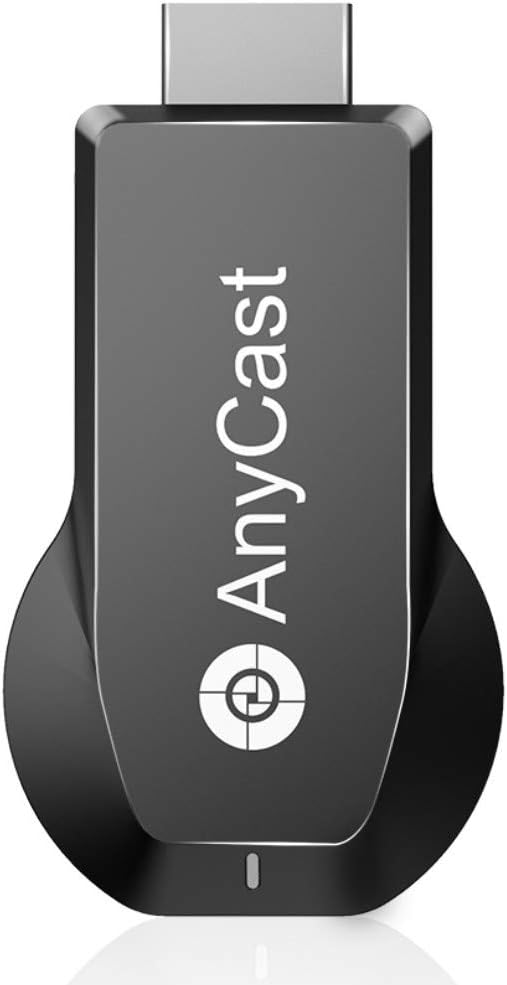
The SmartSee Anycast 4K 2.4G Dongle is a compact wireless display adapter that supports 4K UHD and 1080P streaming. Featuring a dual-core chipset with advanced H.265/HEVC decoding, it enables seamless screen mirroring across Miracast, Airplay, and DLNA protocols for iOS, Android, MacOS, and Windows devices. Regular OTA firmware updates ensure ongoing compatibility with the latest operating systems, making it ideal for both entertainment and professional presentations.


| ASIN | B07GR971W2 |
| Best Sellers Rank | #39,441 in Electronics ( See Top 100 in Electronics ) #201 in Streaming Media Players |
| Brand | SmartSee |
| Color | Dual Core M100 |
| Compatible Devices | Television |
| Connectivity Technology | Wireless |
| Connector Type | HDMI |
| Controller Type | App Control |
| Customer Reviews | 3.5 out of 5 stars 466 Reviews |
| Form Factor | TV Stick |
| Item Weight | 2.39 Ounces |
| Manufacturer | SmartSee |
| Memory Storage Capacity | 128 MB |
| Mfr Part Number | 4351009478 |
| Model Name | M100 |
| Model Number | Anycast M100 |
| Other Special Features of the Product | Wireless Display |
| Resolution | 1080p, 4k |
| Smart Home Compatibility | Not Smart Home Compatible |
| Special Feature | Wireless Display |
| Supported Internet Services | Browser, Netflix on Android, Skype, YouTube |
| UPC | 612068894127 |
| Video Codec | H.265/HEVC |
| Video Output Resolution | 1920x1080 Pixels |
S**N
This newer model is worth the money.
I purchased an earlier model at a lower price and had nothing but trouble with it connecting or staying connected. So glad I got this model. Connects easily and stays connected. I would definitely recommend this unit.ฤบ
C**W
Do not buy
Never was able to connect and use Customer service is almost nill
T**A
Great
This device is a GREAT small HDMI stick with nearly perfect wireless mirroring, it works cross protocols among Airplay, MiraCast and DLNA protocols. No matter you use an iOS mobile device, a Mac, a PC or an Android device, it works, All in one. Whether you need to stream music, videos, photos, lightweight games or productivity apps, the Anycast Wireless Display Adapter can do so with no lag. Simply plug it in, connect your iOS device/PC/Android device, and see your content on the big screen. That's all the device does, and all it needs to do.
R**V
It works but not all the time
So I wanted to replace the hdmi cable from my smartphone (Galaxy s5) with this and it seems to work but... OK, so i connected the unit to an hdmi port on the HDTV and to a USB power supply (2A) - a display with instructions came up on the HDTV screen. Following the instructions, I turned the WiFi on on my smartphone and looked for the respective network, connected and entered the password provided in the instructions. A status diagram on the HDTV indicated connection was completed. So I got into the settings of my smartphone and selected screen mirroring. A pop up menu showed the unit listed (there was also a roku listed, I guess from my neighbor) so I selected it. A few moments later the smartphone screen was replicated on my HDTV screen... BINGO! Opened Amazon Prime, youtube, etc. on my phone, they all showed up on my HDTV screen... Now the BAD... A lot of times it takes multiple attempts to connect the unit to the phone once I select it in screen mirroring, even if they are right next to each other. Now, on playing video, every so often the image pixelates as if loosing signal... switched back to the hdmi plug in cable and video image looked fine. So yes, it can do the wireless thing, but I am keeping my plug in cable handy...
M**D
Good functionality butโฆ
Good functionality but is glitchy sometimes and have to look around to get the thing working again but when it works is a good device.
F**.
It works! This is the plug & play solution
The "video for this product" is exactly how it went when I used it. Very straight forward, any smart phone will pick this up, no 3rd party app needed or headaches.
J**R
2 piece device. Not all-in-one
Device uses a separate dongle to connect to WIFI and your device (not pictured). This is necessary for it to function. Not a big deal if you intend to plug this into a TV and leave it there. Not so great if you want a portable solution while you are moving about. Review is based on lack of transparency in the advertising and does not reflect function.
W**L
THIS DEVICE IS NOT COMPATIBLE WITH PAID STREAMING SITES!! Such as Netflix, HBO Max, Prime Video etc.
THIS DEVICE IS NOT COMPATIBLE WITH PAID STREAMING SITES!! Such as Netflix, HBO Max, Prime Video etc. Can be used for YouTube, Facebook, and other free websites at least. Unfortunately I was distracted with important matters and accidentally overlooked this little tidbit of information until I already got it and it wouldn't work as desired and had to investigate for some time to finally learn of this issue. Sometimes people only need a device that can just mirror their phone, instead of having to log into an email and put in a credit/debit card number and all that jazz <---(I'm being PG in this review LOL) They really need to put this sentence they give in the description first and foremost, instead of near the end, as well as capitalize and use bold lettering for this part on the beginning of the page: "Not compatible with the apps that have protocol protection, such as Netflix/ Amazon Video/ HBO go/ Hulu Plus sky go/DIRECTV etc" Because I think most people looking for a casting device such as this would normally like to use their paid streaming site from their phone or other device and most likely WOULD NOT BUY IT if it wasn't capable of doing so and THE NOTIFICATION WAS THE FIRST THING THAT THEY SAW WHEN READING THE DESCRIPTION, in my opinion at least...
T**D
Lots of picture noise
If I have my phone more than 5ft from the Anycast the picture pauses a lot. Occasional i have to disconnect from power source and reconnect 2-3 times to get the software to work. When I have my phone on top of the wifi antenna and it hooks up it does seem to work.
Trustpilot
3 weeks ago
3 weeks ago