Desertcart purchases this item on your behalf and handles shipping, customs, and support to France.
๐ธ Elevate your presentationsโstand out in every virtual room!
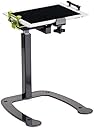
The Copernicus Dewey Document Camera Stand transforms your smartphone or tablet into a professional-grade document camera with universal clamp compatibility, adjustable height (12.75"โ23"), and 90ยฐ swivel/tilt functionality. Crafted from sturdy alloy steel with a compact footprint and integrated cable management, itโs designed for educators and remote professionals seeking hands-free, stable, and versatile device positioning for seamless demonstrations and video calls.
| ASIN | B0751F1R85 |
| Antenna Location | Camera |
| Best Sellers Rank | #1,215 in Tablet Stands |
| Brand | Copernicus Educational Products |
| Compatible Devices | Smartphones |
| Compatible Phone Models | Ipad |
| Customer Reviews | 4.4 out of 5 stars 42 Reviews |
| Enclosure Material | Alloy Steel |
| Fastening Type | Bracket |
| Form Factor | Case |
| Included Components | stand, hardware |
| Item Dimensions | 15 x 10.75 x 12.75 inches |
| Item Weight | 0.27 g |
| Manufacturer | Copernicus Educational Products |
| Material | Alloy Steel |
| Mfr Part Number | DCS5 |
| Model Name | DCS6 |
| Model Number | DCS5 |
| Mounting Type | Clamp Mount |
| Number of Items | 1 |
| Other Special Features of the Product | Adjustable |
| Style Name | Stand |
| Theme | Education |
| UPC | 664678000399 |
| Unit Count | 1 Count |
| Warranty Description | Lifetime Warranty |
F**L
Great for classroom use!
I purchased this to attach iPad as document camera. I had used Pinterest to scope out ideas to build one using pvc, but finally decided to buy this. I did not purchase new but used. It arrived in excellent condition. The only thing which appeared used in box was assembly manual. I found it easy to assemble and use. I can screen mirror my iPad to smart screen and use any book or worksheet for instruction. It also allows me to elevate iPad so I can stand without bending over or holding iPad for other uses. Despite other reviews, mine does not wobble on table and is sturdy. I found it light weight enough for easy portability also. For someone who has taught with the old overheads and newer Elmos, this is a notch above. Very pleased.
M**N
Great product!
I had one of these in a previous classroom. When I moved out of state, I knew I needed another one. Such a wonderful way to turn my iPad into a document camera! Love it
E**O
easy assembly with good instructions
arrived on time, well packaged. Item works as described, easy assembly with good instructions. I recommend this vendor. Thank you
T**R
Great Product but doesn't fit our needs
The Document Camera Stand would be great if it was stationary. We were looking fore a portable solution and thought it might work, but the employees who tried it said it was too heavy to pack around and a lot of the images they took were blurry because it wiggled as they set it up on different counters and spaces. I do think if someone mounted it to a table it would work superbly.
D**Y
Pushing my buttons
The buttons on the post are difficult to press in to raise or lower the post. It took two of us to get the post to lower. I do like the ease of putting the camera stand together and the sturdiness of it.
M**E
Heavy duty versatile document camera stand
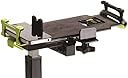
It took me a while to install this Dewey Document Camera Stand because I was afraid to make mistakes, so I meticulously followed the instructions. And if you do, you will get it work. I got the DCS5 model with Stand only, and it serves my needs great! I really like that it's made of heavy duty metal that is strong enough to support my tablets. To use it as a stand, I can adjust the height (4 levels) and the viewing angle by tilting the top plate up or down, and rotating it 90 degrees to change my device view from vertical to horizontal or vice versa. It's really flexible. And I can also use this stand for all different kinds of my devices, such as 9.7" iPad, 10" Kindle Scribe, iPhone (plus size worked), as well as 7" e-reader. To use it as a document camera stand, it's easy to use too. I put my iPad's camera side towards the black holder, and the "Home" button side towards the green holder, and then follow the included positioning template (depending on whether my device is in Portrait Position or Landscape Position) to align my A4 size paper, this way, I can make sure my A4 paper is position in the center of my screen. Once I am used to how to find the center spot, I can remove the template (it's optional and provides a helpful guide, but you don't have to use it as you don't want). I can adjust the height of the stand to show more or less of the space. I am going to use this feature for demonstration purpose like shooting a "How-to" video. Overall, I think this is a great product that is flexible, sturdy, durable, and versatile. I enjoy using it and would recommend it to others.
M**T
Family Historian's Helper Photo and negative digitizer
It took me a little while to figure out how to take good photos with this, but that was mainly learning to take better photos with my phone. I have only used it a few times but I like the results. I took some photos of an old photograph and they came out great. I put negatives on a light box in the negative holders that came with my scanner, and I was able to photograph them and see the image better. It takes a really long time to scan negatives on a flat bed scanner. This stand will hold the phone steady so I can digitize my old family negatives quickly. It is a bit difficult to get the phone to be completely flat but I am going to get a bulls eye level to put on the phone to capture better images. This stand is not too heavy to take when you visit that relative who won't let their photos leave their home. It is much more practical and quicker than using a scanner.
B**M
Great for remote games.
I got this stand so that my kids could play games and cards remotely with family members. It works pretty well for that. It's all metal and pretty heavy, so it doesn't really tip over. The clamp holds our devices very securely. We just have to make sure we keep the game within the viewing area of the camera device on the stand. It's very handy and provides a much better experience than trying to video with one hand while playing a game with the other.
Trustpilot
1 month ago
1 month ago