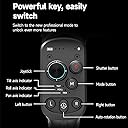
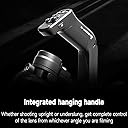
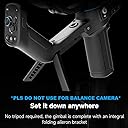
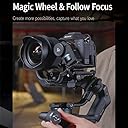
At first I was hesistating a little bit, but Ordered this gimbal anyway! And Guess what, It's Worth Every penny spent! I'd say in this price range, no other brand is selling such pro features! It's literally All in One Gimbal! Sooo... I'm using this gimbal from more than just a month, and I capture events and Corporate videos, I knew I would need a stabilizer, hence I bought this gimbal! I'm also getting serious at filmmaking, and this gimbal feels like an all in one product for low budget action movies! Here are some key points to know: - Balancing Gimbal is a Must have Skill: This is my first gimbal, could also be yours, And some people struggles gimbal balancing, At first it took me 2hours in order even if I followed tutorials, but nowadays I take barely 10mins to attach and balance gimbal, The thing is... if you want to fit this safe in the box, you would need to shrink it to original position otherwise it won't fit in the box, but assembling is easier after first use, they have a red clip in the slider which saves the position, and as soon as you use it again, it remembers the mark , sooo it's only the first time you will take long time! But must do it otherwise it will cause gimbal to use more power and your battery will drop too early! But They made clever design to assemble it as easy as possible! Using The Gimbal: Now after calibrating and balancing, and you use the gimbal, It has multiple modes, pan[FPV button for shortcut], tilt, roll, pan+tilt, pan+tilt+roll, then it'll be blinking which means it will work like a sports mode, and no blinking would mean it'll be steady in air like chicken's neck! I can literally run with using gimbal and still get steady shot like it's shot on a trolly! it's ergonomic design is so sturdy! in FPV mode you can easily switch from low angle to highest you can go! We can do shooting normally with our camera handheld but for low angle shots we need a grip, and it has very intuitive design! I would give 5 out of 5stars for the design, it's very intuitive! you don't need a jib crane, railtracks or sliders for smooth shots, just walk using this gimbal, it's all in one! Potrait Mode: It's best feature! some clients wants their videos shot vertically, and vertical videos are almost the most popular orientation nowadays! just press the button on the left 2times near joystick, you can easily switch from a thumb, and voila! you're shooting vertically! Mirrorless Friendly: I have also bought a new mirrorless camera after using it with old heavy camera with Heavy lens. I had Nikon D7100 before with 18-140mm kit lens, and I measured weight it was 1.6kg, gimbal seemed working fine but it struggled sometimes at certain angles, it took more power to motor, also later I knew It had to use Y shaped tool to attach under lens, which provided stability! I'm more impressed that Feiyutech has addressed these issues in tutorials and it really helped! now that I have a new mirrorless Fujifilm camera which weighs well below 500grams, It works smooth like a butter! but if you have old camera, I have a tip for you: have the camera's total weight under 1kg, use smaller lenses, like 18-55 or primes, two advantages: wide angle gives the best and sporty results! Also you can't be able to zoom or use focus ring unless you have bought the the follow focus... Camera Compability: Well this is really interesting, As I said, This gimbal can load 1.5kg of camera and lens easily, mirrorless is by far the best choice! But... also, feiyutech has provided almost every kind of ports, USB-C to USB-A, USB-C, 2.5mm, 3.5mm [which works well with fujifilm], old mobile port, even nokia era port is also supported, sooo if your camera is old, Feiyutech has made sure it also works for you! just make sure the camera firmware also supports it! I recommend checking their website for camera conenctivity! otherwise you'll not be able to use Gimbal's Record Button, and would have to use camera's native record button or camera remote! But as I said... if you have newer camera, It will not cause any hurdles for you! Battery Backup: Well this has well over 13h battery, but practically when you go to events, it can last 2-3hour of continous use! which is fairly enough, if you have a powerbank, or charger, it takes about 20-30mins to full charge, soo if you're at lunchbreak, it will charge again to use it for another round! I think It's fair! even my camera battery lasts upto 3hours of intensive use! just carry a charger or powerbank if you need to cover a function for a whole day! and it uses Standard C-type charging which is so convinient! Feiyuscorp App: At first when I bought this gimbal, I had no clue about their app and I used to think.. this gimbal is so limited to customize, as a lover of customization, I love to have settings that makes my workflow much easier! sooo.. their app is really well built! It automatically detects the gimbal, and in app you can customize joystick speed, axis rotation, and my favorite: use mobile as joystick! Everything that you do in the gimbal, can be done with app + you have more options! Such as... panorama mode, timelapse, track video, which allows you to make more pro videos, I'm quite amazed how many things this gimbal is capable of! Also, I recommend installing app first after unboxing , bcoz App has all tutorials to get started! Overall, I'm very impressed with the overall quality and it's really game changer product! it's advanced features, for me and my career and profitable choice for me, It has enabled me to be more comfortable to take challenging shots, makes me more confident with angles! soo the diverse use case is really amazing! Love it!
![FeiyuTech SCORP-C [Official] Camera Stabilizer 3-Axis Mirrorless Gimbal Lightweight Stabilizer,for DSLR Camera,for Sony a7IV a7s Canon R5 R6 M50 Panasonic Nikon Fujifilm,Max 5.5 lbs,Cable Control](https://m.media-amazon.com/images/I/61aTN4n39nL._AC_SL3840_.jpg)