Buy anything from 5,000+ international stores. One checkout price. No surprise fees. Join 2M+ shoppers on Desertcart.
Desertcart purchases this item on your behalf and handles shipping, customs, and support to France.
🚀 Stream Like a Pro, Anywhere, Anytime!
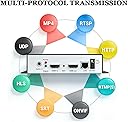
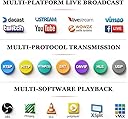
The URayCoder HEVC H265/H264 4K HDMI to Ethernet Encoder is a powerhouse for professional-grade live streaming, delivering crisp 4K video at 30fps with ultra-low latency. Compatible with over 10 streaming protocols and multiple platforms, it enables simultaneous multi-streaming with customizable branding and audio options. Designed for easy setup and stable network transmission, it’s backed by lifetime support and tailored customization, making it the ultimate tool for managers and creators who demand flawless, scalable streaming solutions.


| ASIN | B07CP3G86L |
| Best Sellers Rank | #416 in Video Converters |
| Brand | URayCoder |
| Color | Black on top and silver on bottom |
| Compatible Devices | Devices with HDMI Output |
| Connectivity Technology | HDMI |
| Connector Type | HDMI |
| Customer Reviews | 4.5 out of 5 stars 99 Reviews |
| Form Factor | Video Encoder Box |
| Item Dimensions L x W x H | 7"L x 5"W x 1"H |
| Manufacturer | URay |
| Mfr Part Number | B07CP3G86L |
| Model Name | UHE265-1L-4K |
| Model Number | UHE265-1L-4K |
| Other Special Features of the Product | Encode HDMI Video into Network Video Streams |
| Resolution | 4k |
| Smart Home Compatibility | Not Smart Home Compatible |
| Special Feature | Encode HDMI Video into Network Video Streams |
| Supported Internet Services | Supports YouTube, Facebook, Ustream, Livestream, Twitch, Vimeo, Streamspot, Dacast, Tikilive, Netrmedi, etc. Supported Internet Services Supports YouTube, Facebook, Ustream, Livestream, Twitch, Vimeo, Streamspot, Dacast, Tikilive, Netrmedi, etc. See more |
| UPC | 667581690497 |
| Unit Count | 1 Count |
| Video Codec | H.265, H.264, MJPEG |
| Video Output Resolution | Max 3840x2160 Input and Output |
| Warranty Description | Free lifetime warranty and technical supports |
S**S
Impressive number of features and customizations
I'm actually quite impressed with this device's features and customization options however after playing around I found out that it's probably best not to stray too far from the defaults. First, the setup. Setup is the biggest hurdle you MAY have to clear. The device comes configured with a default IP address of 192.168.1.168. If your home network uses the 192.168.1.XXX subnet(range), which is actually the most common default for most home routers (another reasonably common default if 192.168.0.XXX), then you'll be good to access the device straight away over your network by just plugging into your network and entering http://192.168.1.168 into your browser. If your network assigns IP addresses in any other range than 192.168.1.XXX, then you need to take a few extra steps and connect the device directly to your computer and temporarily modify your computer's IP address so that is in the same range, then log into the device and change it's network address to one that is your network's default. The instruction manual takes great care to describe this process in detail, and this process isn't unique to this device, it's relatively common to need to do this when setting up any network device you want to access remotely. I'm a computer professional so this part was a piece of cake for me, but with the instructions should be doable by just about anyone. While setting up the device, I figured this was the best to update the firmware to the latest and greatest. Unfortunately, they do not have the latest (or any) firmware on their website. They direct you to contact them via email to request it. I wasn't happy about this as I figured it was going to delay my progress in setting up the device but I sent of the email thinking I'd get a response the next day or something. Instead, I received a reply within 1 minute. In fact, a short series of email exchanges with the support individual were so fast that it was faster than most chat sessions I've had with tech support. In the end, we determined that I already had the latest available firmware and an update was not necessary. They also sent me a PDF version of the user manual so I could keep it electronically. VERY RESPONSIVE SUPPORT. The device was up and running in a few minutes. I tested viewing it with VLC on my computer and it worked great. I also tested it with VLC on an Amazon Fire TV Stick attached to a bedroom TV to test watching on a regular TV instead of a computer and navigating the VLC app menus would sometimes cause screen glitches but that was within the VLC app and an VLC app issue. When VLC actually started streaming, the picture was clear and the experience excellent. I did have a couple of issues that most users probably will not encounter. I do not have the most common setup. That is: Source device (i.e. cable box, etc) -> Encoder -> TV. Instead, I have Cable Box -> Encoder -> Home Theater Receiver -> TV. It worked great until I turned off my TV, and actually via CEC control, the entire home theater system. The cable box remained on, as it should so that it could still provide a picture to the encoder and you could continue to stream the cable box source even if the attached TV is off. The encoder did continue to be reachable and you could stream, PERFECT (no problems here)! The problem happened when I tried to turn the TV back on. The TV / receiver would switch to the input but no video would be displayed until I turned the cable box off and then back on. It was as if the HDMI signal did not automatically "re-sync" through the encoder if the video source was never turned off and then back on. I could just turn the cable box off and on as a workaround, but the extra step I never had to do before bothered me. I changed the crappy HDMI cable I pulled out of the drawer to connect the encoder to the cable box to a certified cable I purchased on Amazon thinking that crappy cables sometimes cause these kinds of issues. Unfortunately, there was no change. And truth be told, the connection between the cable box and encoder always continued to work as I could continue to stream, it was between the encoder and Home Theater receiver and TV that the video link was broken. I contacted support for ideas, but this time they never got back to me. I never bothered following up, because the next day I also changed the cable between the receiver and the TV (still have not changed the cable between the encoder and the receiver) and re-ran my Samsung Smart TV's input detection which I had not re-done since the encoder was installed. I'm not sure which of the last 2 changes it was (the new cable between the receiver and the TV, or re-running the Samsung Smart TV's input detection) but the problem was solved thereafter. I'm willing to put money on it was re-running the Samsung TV's input detection. I guess there is a reason it runs through an input detection diagnostic. So keep that in mind if you have anything similar. Beyond that, running the defaults works pretty darn good. I can never leave good enough alone and turned up most of the quality settings way up. Could I see a difference remotely? Honestly, no, I couldn't notice any appreciable difference but I knew it had to be better. However, turning up the settings increased latency and also after hours would cause the device to not stream smoothly as if it was overwhelmed. Changing the settings back to something much closer to their defaults fixed all those issues and I can't say I'm upset as the picture still looks great. Moral of the story: Don't mess with it if it ain't broken. I purchased this device to replace my SlingBox, which is going end of life in November of this year, that I used to watch my primary home cable TV subscriptions at my vacation home. The SlingBox does have the advantage of transmitting back remote control commands so you can change channels and control just about bit of your cable box remotely. This device is only and encoder. It will only take the video signal, encode it and send it to your streamer. It has no source control capabilities at all. If you are using it to display fixed video stream like a camera then none of this applies. On the other hand, if you are using it to watch your cable box, then you need some other method to remote control your cable box. I already had a Harmony Hub integrated into my Home Theater system. I can use the Harmony Hub app on my cell phone as a remote control and it works remotely too! Also the Harmony Hub integrates with Alexa, so you can direct her to "Alexa, Change channel to Food Network", or "Change channel to 15" and she will do that through the Harmony Hub. Since my Alexa at my vacation home is on the same account, I can also give my echo show at my vacation home the same commands and it will control my cable box back at my primary home and change the video I'm viewing while streaming at my vacation home!. Cool! Again, this has nothing to do with this encoder as it just sends whatever video the cable box is outputting, the control is all via the Harmony Hub and optional Alexa integration, but the problem is solvable. As stated earlier, if you turn the quality settings up too high, the encoder works much harder to encode the video before sending it out so there is more of a delay in what you see relative to what the Cable box is outputting in real time. So, remote control commands can seem to take longer (or a long time, like a minute) to be seen remotely. When I lowered my quality settings a bit, the delay is acceptable. I can't say how long as it seems to be variable to a degree but acceptable. I'll probably play with the encoder settings again, maybe even reset them completely to default. I think at default they were ALWAYS under 5 seconds, maybe just 2-3 seconds. In Summary, this is a pretty impressive device that does it's just well. I can't say that I notice much quality difference between the h.264 and h.265 settings (a little if I look VERY closely) but the h.265 does have increased lag. If you watching a fixed video source, then probably even 10-20 seconds of lag is a non-issue. If you are trying to control the video source remotely, then it's like trying to drive while looking in the rear view mirror. You have to anticipate what is happening as you look at what happened 10-20 seconds ago. The SlingBox had the same issue with lag. I got this to work as I needed / expected. I'd purchase this again. I might even try and save some money and purchase the h.264 model next time as this I'm finding this model has an overkill number of features and settings I either don't need, or don't really provide benefit I notice streaming cable quality video. Nice device. Well made.
C**E
Running Flawlessly for Almost a Year Now!
This thing is great! I have it connected to the HDMI output of my Living Room AV Receiver so that I can remotely view and control my AV devices using an app on my mobile device. I can actually view the live TV image right on my mobile device. I've had it running 24/7 since December 2024, so almost a year now, and not one hiccup or need to power-cycle the device. It's worked flawlessly. It also stays very cool, doesn't get hot at all. This is a great value compared to similar products that cost 2x or more. I'm currently encoding the video in H.265 and the latency is also great - almost zero. It supports many simultaneous encoding formats as well, in case you need to encode the video in other formats for other uses. I've been very impressed with the quality of the device, given it's very reasonable price point. If you need to get an HDMI video feed onto the network (either LAN or WAN) I highly recommend this device!
F**E
Neat but hard to use
The setup steps are well written and you can setup the encoder in about an hour if you are familiar with computers. For my use case we wanted to stream to youtube. After setup, we saw that we were connected with our streaming key to youtube, however we could not start the stream. So additional setup that aren't in the steps is required. It turns out the audio wasn't capturing so the stream wouldn't start. We reached out to tech support, and they were very responsive. They helped us tweak some settings on the encoder, after which the stream would start. You have to switch the audio to one channel, either L or R. After that, we were getting audio frames captured. However, we couldn't hear the audio, and it turns out you need a mic with it's own power. We didn't have that. Overall it seems to be a good product, but be ready to experiment with the settings!
P**O
Excellent video encoder
I'm reviewing this encoder as a software engineer with some experience with video encoding. I'm impressed by this encoder. It's well-made and well-designed. I was able to get it to work immediately out of the box with good results. Customer support was very responsive in providing me with a PDF version of the user manual. I've been using the encoder for a week now with no problems, including a continuous 10-hour encoding. It has a very comprehensive set of adjustments for every aspect of the encoder. They will be appreciated by technical people. They may overwhelm non-technical people, but not to worry. The default settings have been very well chosen. The settings include being able to specify an NTP server, which I thought as a nice touch. The HDCP support works for standard HD, but it doesn't support the level of HDCP required for 4K. Also it supports stereo sound but not multichannel sound (and doesn't claim to.) While I'd love to see those additions myself, I consider them as nice to have rather than expected. The encoder previews the video on its status web page, which is very useful. Another nice addition would be including audio level meters in the preview.. In summary, this is a very capable encoder that works well, and I highly recommend it.
R**7
Skeptic turned believer!
OK, this thing is very configurable. The LARGEST hurdle to integrating this into your setup is the hard coded IP address it ships with. I had to connect it directly to a PC and set it to DHCP; after this, the magic began! So many options on how it encodes. Crystal clear image quality. Allows my digital signage solution to show live TV with minimal delay; or allows me to watch local channels over a VPN connection (to the network not to the device) while away. I was skeptical of this product until I bought it. I'm a believer. Try it!
M**L
Super configurable and great performing encoder
I was looking to allow streaming from my main television to other TVs and devices in the house. I was between this and an ATSC RF modulator and I'm really glad I picked this. Once you get it set up (which does take a bit of doing, more on that later), it works flawlessly. I really appreciate the ability to set up simulcast streams as well as integrate with other streaming video programs (I'm using it through Emby for streaming to Fire TV devices) and since it uses my existing network I don't have to worry about running coax to any TVs that don't already have a cable jack. Since I've hinted at them, here are my two nitpicks: - Network setup is not as plug-and-play as it could be for ethernet, but the instructions are very clear and not particularly difficult. By default it does NOT use DHCP and has a fixed IP address. You can connect to it directly to tell it to use DHCP which makes sense when you have to pick a wifi network but is a a bit annoying when it's plugged in via ethernet. Still, this adds 5 minutes so whatever. - I had some strange issues with perfect video but bad audio when I plugged it into an HDMI splitter regardless of what configuration I used; however, if I moved it upstream of the splitter it worked fine. Not sure why, but thankfully it was an easy enough fix. For the good: - I reached out to Linda for support after I had the aforementioned audio issue and got a quick and helpful response. Unexpectedly great service! - Tons of configuration options on the streams, I was able to play around with the settings and find something that worked best for my needs. - Tons of output formats allowing for integrations with a lot of different services. Like an astounding length of options. For my needs, this has been a really great solution. It works pretty much anywhere with any internet-capable video streaming device. This is not low latency, so don't expect a real-time encoder (nor will anything really be that is run over a network). If you want that then run an HDMI cable directly with a splitter (as I have done between mirrored TVs) or maybe consider an RF modulator. But if you're looking for more versatility you really can't get any better than this.
A**R
Received unit does not match picture, flakey connections, no user manual
Problems: 1) hit or miss if the web page can be access. A reverse ARP shows that the device responded. Sometimes can ping it, sometimes can't. 2) What was delivered does not have the same rear panel connections as the picture in Amazon and on the company's web site. 3) No user manual, just a "Quick Start". It's impossible to tell what all the configuration options do. 4) No way to change the "No Video" screen in the device to an image. I'll send it back (1st time for a return for me in years) and add them to my "Never buy from " list. Sad, it had such potential...
M**R
You Don't Need To Know Networking To Use This!
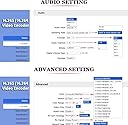
My church was using an iPad to livestream, but our circumstances changed to where we needed to use a camcorder. As the local expert (Zero knowledge of networking...), I decided on using a hardware encoder to make it easier on our volunteers to start and stop the live stream. After doing some research and not really understanding what I was reading, I purchased this encoder, and I am very glad I did! Where we are right now, our volunteer only has to turn on the encoder to start the live stream and turn the encoder off to stop the live stream (The encoder is plugged into this to make turning on and off easy https://www.amazon.com/gp/product/B07W53C4FQ/ref=ppx_yo_dt_b_asin_title_o03_s00?ie=UTF8&psc=1). I am sure if you are competent in networking, setting up the encoder would be a breeze. Competent I am not. Thankfully, the instructions were clear and helpful. You will have to do some technical things to get this encoder up and running, but the instructions made it simple. I did not know what I was doing (I still do not know what I did), but I was able to get the live stream working just by following the instructions step by step. I was able to easily test it out on Facebook and YouTube (instructions were very clear!). I had some trouble setting up the live stream through our streaming host, but that was because I was confused on my credentials. The only issue I ran into with this encoder regarded the audio. Whenever the audio would come through the live stream, the sound kept popping. I swapped out cameras, cables, audio inputs, etc. and concluded the issue was the encoder. I contacted support, and they were able to fix my issue. I had spent hours trying to resolve the issue, and it turns out I just needed to adjust a single setting on the encoder. If you are experiencing this issue, try changing the Audio Sampling Rate from 44100 to 48000. Great encoder, great instructions, and great support! PS: Whenever you are inputting your server url into the encoder, make sure there are no spaces! I don't know how many times that messed me up...
N**U
Pas fiable
Le produit ne fonctionne pas
そ**ん
1年以上、安定動作。監視カメラ用途にもオススメ。
余っていたビデオカメラ(HDMI出力あり)を監視カメラとして使う為に購入。 カメラ映像+音声をYoutubeに配信する格好にしたかったのでこの製品を選択。設定は、Youtubeのストリームキーなど決まった部分を設定する程度なのでそれほど難しくはないが、英語のため苦手な方には少々敷居が高いかも。 1年以上稼働しっぱなしだが安定している。
Trustpilot
4 days ago
1 month ago