Buy anything from 5,000+ international stores. One checkout price. No surprise fees. Join 2M+ shoppers on Desertcart.
Desertcart purchases this item on your behalf and handles shipping, customs, and support to France.
🎶 Elevate your motherboard’s audio game—because your sound deserves the spotlight!
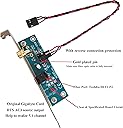
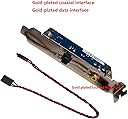
This SPDIF Optical and RCA Out Plate Cable Bracket is engineered for professional-grade digital audio output, compatible with leading motherboard brands like ASUS, Gigabyte, MSI, and more. Featuring a sturdy metal bracket and tangle-free cables, it delivers stable +5V power and precise SPDIF signals for crystal-clear sound. Designed for easy installation with clear wiring instructions, it transforms your PC into a high-fidelity audio powerhouse, perfect for audiophiles seeking superior digital sound quality.
| ASIN | B07FJMD7BF |
| Best Sellers Rank | #5,543 in Laptop Computer Replacement Parts #20,611 in Computer Internal Components |
| Brand | LELANG |
| Brand Name | LELANG |
| Cable Type | Composite |
| Color | black |
| Compatible Devices | Personal Computer, Laptop |
| Compatible Phone Models | No Compatible Phone Models |
| Connector Gender | Male-to-Male |
| Connector Type | RCA |
| Customer Package Type | sealed anti-static bag |
| Customer Reviews | 4.5 out of 5 stars 68 Reviews |
| Indoor Outdoor Usage | Indoor, Outdoor |
| Item Shape | Round |
| Item Weight | 39 Grams |
| Manufacturer | LELANG |
| Maximum Current | 5 Milliamps |
| Maximum Voltage | 5 Volts |
| Model | YT-U0 |
| Model Name | YT-U0 |
| Number of Items | 1 |
| Number of Pins | 2 |
| Other Special Features of the Product | Tangle Free |
| Outer Material | Metal |
| Part Number | YT-U0 |
| Recommended Uses For Product | connecting audio devices to a computer's motherboard |
| Special Feature | Tangle Free |
| Specification Met | CE, FCC, RoHS |
| UPC | 674862000005 |
| Unit Count | 1.0 Count |
A**P
Look for your motherboard's S/PDIF pin out, connect it, enjoy it!
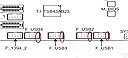
I recently built myself a fanless and passively cooled media PC using the ASUS H310I-Plus R2.0 mini-ITX motherboard, using it as Roon Core to output bit-perfect digital audio into my I2S NOS R2R DAC. The DAC uses external digital audio interfaces for USB and S/PDIF connection, buffering and converting the signal into I2S for input into the DAC's main unit where it is reclocked and converted into analogue output. I was previously using the USB out from another Roon Core, but wanted to compare the USB to S/PDIF output. And I am very glad I did. This bracket is easy to install and is well made. One has to look into the motherboard's documentation to locate the S/PDIF pin outs on the board, connect the cable, connect the other end to the pins on the small PCB connected to the bracket, install the bracket into the PC's chassis and enjoy. On the ASUS board there are 4 S/PDIF pins - +5V, spacer, signal and ground. Other motherboards may only have 3 pins out, omitting the spacer, so be careful how you connect the cable. The unit will need +5V to work. For the last several weeks I have been using optical TOSLINK out of my PC and into the DAI of my DAC, and to my tinnitus-plagued ears the sound clearly is better compared to USB into the same DAC. Maybe it's only expectation bias at work in my mind, but the bracket unit is working very well and with TOSLINK at least I can expect to be not bothered with electrical or RF noise.
A**.
Perfect for z370 hd3 rev1
I used to have the cheap chinese one from aliexpress, but the s/pdif port wasnt through hole soldered and would bend in and out when you plugged into the port. This one is completely attached to the pcb, so you get what ya pay for. Also a smoothing capacitor, cool i guess. I am using spdif so i am avoiding the analog audio processing from the motherboard which i think is a point of confusion. Most people want a sound card and end up using SPDIF which is a digital transmitter to their speaker. All that does is offload the digital signal processing to the DAC on your speaker. So, its fine. I know i cant hear above 16.5 Khz as a 26 year old so more power to the people who can differentiate a 40khz sound file.
G**S
This is a great way to get a Coaxial Digital output for your stereo receiver
If your sound card or motherboard has on-board S/PDIF out but you're stuck with using only Optical digital output, buy this immediately! Why bother? I've been reading for decades now in places like Stereophile magazine that even though "bits are bits", a Coaxial digital output has much less jitter than an Optical output and therefore sounds much better. And after comparing both myself, you'd better believe it - if you're into sound, it should take you all of 10 seconds to hear how much better-sounding a Coaxial digital hookup really is. My main complaint with the Optical output I've been previously using is that the treble never sounded quite right, especially on 24-bit sources - sterile and brittle, that's the only way I can describe it. Switching over from Optical to Coaxial digital gets rid of ALL of that - the difference ain't subtle, as they say. And make sure you grab an actual 75-ohm cable to use with this, normal 50-ohm RCA patch cables won't work...
N**L
Works just fine.
Simple install. Provides me with a digital send to my audio preamp. Much improved audio quality over the standard PC analog audio outputs. and the sound has no noise or buzz.
K**K
Great Card but Needs Instructions
This hard-to-find card brought new life to our old Bose computer speakers. It works great, but it could definitely use some instructions—be sure to look up guidance online to ensure the pins are oriented correctly on the board.
A**R
Quick install and sounds great
If you know how to install an expansion card and plug in some wires, this is an easy install. Pay attention to the wiring information on this page and your motherboard manual to make sure you plug the wires in correctly (hint: brown is the "positive" spdif lead and black is the ground). It should otherwise be self-explanatory. Make sure, of course, that your motherboard has the SPDIF connectors that this will connect to! Once installed, in Windows I switched to my motherboard's digital audio output (Realtek Digital Output for mine) and it worked! And it sounds amazing coming out of my old soundbar.
G**O
Do you really want one?
This does what it's designed for, but I learned that digital audio off my mobo produces terrible sound. I switched to a sound card with digital output and it made a huge difference.
H**H
Great addition!
I bought this because my computer started making a loud buzz noise when turning the computer on and off. It's about a decade old so I figured it was the power supply started to go or something. I did some research on audio and a lot of articles said PC integrated sound cards have noise issues. I'm not much of an audiophile so it's never really bothered me. I bought this card and connected it to my speakers via an optical cable. I can't believe the quality of the sound I'm getting now. I'm kicking myself for not getting something like this a decade ago when I built this computer. The sound quality is so much crisper than the analogue cable. I bought this one because it has 3 split cables which fits my Biostar motherboard which doesn't have the spacer for the S/PDIF cable. If your PC speakers support digital inputs and your motherboard or sound card have a S/PDIF header I highly recommend getting something like this.
Trustpilot
1 month ago
1 month ago