




🚀 Elevate your home network to WiFi 7 speed and beyond!
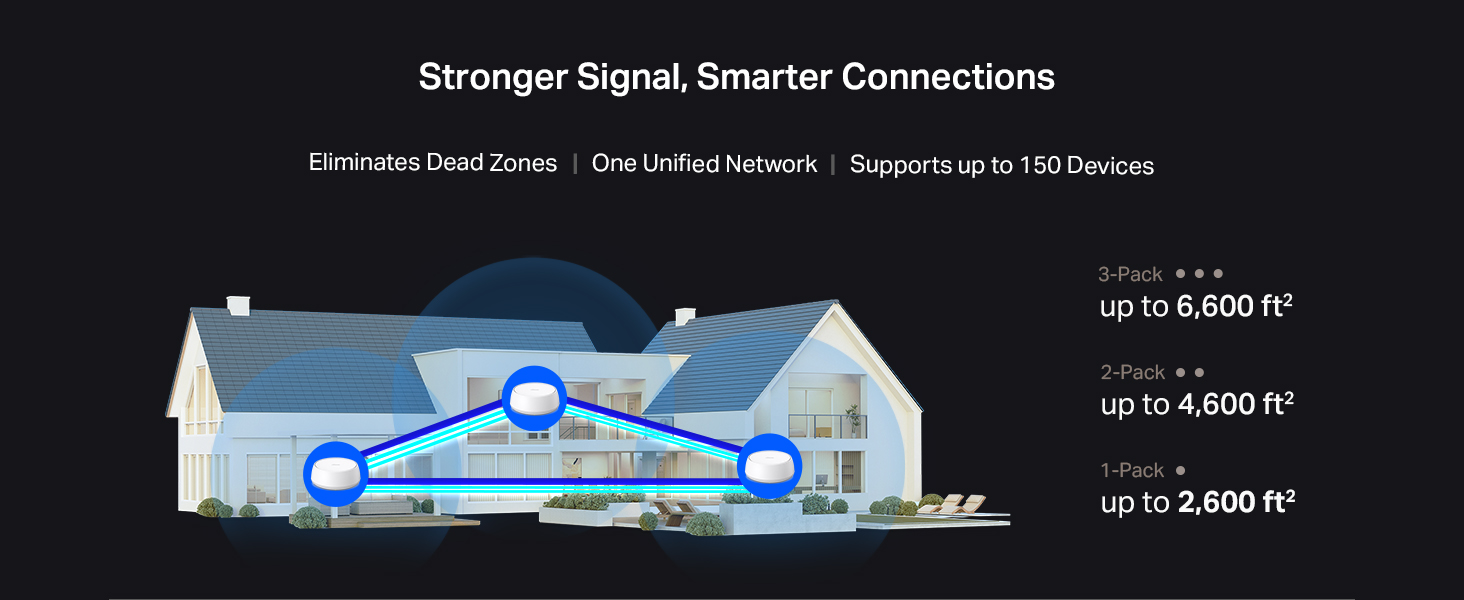
The TP-Link Deco BE25 (3-Pack) WiFi 7 mesh system delivers ultra-fast speeds up to 5013 Mbps using advanced Multi-Link Operation technology. Featuring dual 2.5 Gbps Ethernet ports and compatibility with all WiFi generations, it ensures seamless whole-home coverage up to 241 meters. Manage your network easily via the TP-Link app with built-in security for a future-proof smart home experience.


| Brand | TP-Link |
| Product Dimensions | 15 x 15 x 6.2 cm; 508.02 g |
| Item model number | Deco BE25(1-Pack) |
| Manufacturer | TP-Link |
| Series | Deco BE25(1-Pack) |
| Colour | White |
| Wireless Type | 802.11.be, 802.11ac, 802.11ax, 802.11g, 802.11n |
| Operating System | Tenda OS |
| Are Batteries Included | No |
| Item Weight | 508 g |
| Guaranteed software updates until | unknown |
M**L
I have a 3Gbps fiber plan with Bell in a 600 sq. ft. downtown Toronto condo. Even though I’m using Bell's latest Giga Hub 2.0 (WiFi 7), the signal struggled because the modem is tucked away in the laundry closet. After testing the TP-Link Deco BE25 (WiFi 7), the improvement in stability and speed—especially upload—is staggering. The "Battle of WiFi 7" (Real-World Benchmarks): I ran side-by-side tests from my living room, and the results speak for themselves: * Bell Giga Hub 2.0 (WiFi 7): 1133 Mbps Down / 220 Mbps Up. * TP-Link Deco BE25 (WiFi 7): 1490 Mbps Down / 1451 Mbps Up. * Wired via uGreen 2.5G Switch: 2279 Mbps Down / 2358 Mbps Up. The most shocking part? The Deco delivered over 6 times the upload speed compared to the Giga Hub 2.0. In a condo environment with lots of interference, having a symmetrical 1.4Gbps connection over WiFi is incredible for my NAS backups and trading sessions. Pro Setup Tip: To maximize performance, I set the Deco to Access Point mode and disabled the WiFi radios on the Bell Giga Hub. This prevents signal "noise" and lets the Deco’s WiFi 7 tech handle the traffic efficiently. * Pros: * Incredible Upload Speeds: Solves the common "slow upload" issue on ISP routers. * WiFi 7 & 2.5G Ports: Perfectly matches high-tier fiber plans (3Gbps+). * Condo Friendly: Overcomes the "modem in a closet" problem common in Toronto. * Stability: No more quality drops during 4K streaming or video calls. Cons: * Requires Permanent Wired Connection: Unlike some simple extenders, the main Deco unit must be physically connected to your modem via Ethernet at all times. This can be a limitation if your modem is in a tight spot (like a laundry closet). * Port Limitation: Since one of the ports is dedicated to the modem, you are left with only one extra 2.5Gbps port for your other devices (I solved this by adding a uGreen 2.5G switch). Final Verdict: If you are on a high-speed Bell plan, the Giga Hub 2.0’s placement is likely limiting your potential. Adding a Deco BE25 isn't just an "extra"; it's how you actually get the speeds you’re paying for. An absolute must-have for power users.
A**Z
Lo compré para reemplazar un modelo M5. Fácil de configurar, un alcance excelente y la velocidad de wifi de mi laptop mejoró ya que usa WIFI7. El tamaño es mayor al modelo que tenía antes, pero se ve muy bien por su diseño. Cero desconexiones de equipos personales y IOT de casa que los separa en otra red para seguridad
J**.
I originally purchased a TP-LINK X20 mesh system and connected it to my ISP's router with a 1 GB plan and it was a major improvement over the previous router and Wi-Fi extender combos. I have approximately 2,000 ft² where I used four X20s satellites and the main unit. I realized after a while that my system would be better if it used the TP-LINK BE25 as my main unit considering the better connectivity and strength of signal with Wi-Fi 7 versus Wi-Fi 6. I connected it to the router and it worked perfectly with the X20s. My initial configuration was to make the ISP router the workhorse and the main unit as an access point. However, I decided at some point that I wanted to remove the ISP's router from the system (it was somewhat finicky) and directly connected the ONT to the BE25 2.5 gb port after changing it from an access point to router mode. I had purchased a multi-gigabit switch so I was able to also connect the other 2.5gb port of the BE25 to that switch which allowed me to connect CAT5e and cat6 devices as well as a MoCa adapter for my TVs. That switch allowed a full throughput and no bottlenecks. I am very happy with this hybrid system and with the BE25 as the main router. I totally understand that what I've done is not necessarily what most people would do but if you want a reliable and powerful Deco mesh system that works great I would strongly consider the BE5000 (BE25).
A**R
Great looking and quality Wi-Fi router. I purchased this when I switched to fiber Internet. Item is just as described and seems to work well. I have had no trouble with performance or signal strength. The app is a nice bonus.
J**O
Excellent product. It performs exactly as advertised. I use it as the main Deco unit and it works flawlessly. It’s an excellent first step toward transitioning compatible devices to Wi-Fi 7, delivering great stability and performance.
Trustpilot
3 weeks ago
1 month ago