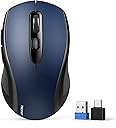
🖱️ Master your workspace with precision and effortless multi-device control!
The TECKNET Bluetooth Mouse offers versatile 2-in-1 wireless connectivity via Bluetooth 5.0/3.0 and 2.4GHz USB, supporting seamless switching between two devices. With adjustable DPI up to 4000, ergonomic design, and an 18-month battery life powered by a single AA battery, it’s engineered for professionals seeking reliable, precise, and comfortable control across laptops, tablets, and MacBooks. Compact with built-in receiver storage and backed by a 36-month warranty, this mouse is a durable, travel-ready productivity essential.


| ASIN | B0DM24K1MZ |
| Batteries | 1 AA batteries required. |
| Best Sellers Rank | #72 in Computer Mice |
| Customer Reviews | 4.4 4.4 out of 5 stars (8,382) |
| Date First Available | January 15, 2025 |
| Item Weight | 2.26 ounces |
| Item model number | TK309 |
| Manufacturer | TECKNET |
| Product Dimensions | 4.25 x 2.48 x 0.1 inches |
S**H
great mouse at a great price
The TECKNET Bluetooth Mouse arrived today to help me with my laptop which has developed an unreliable touchpad. The mouse comes with good instructions in a number of languages so I ignored them, installed a AA battery, checked to be sure the advertised dongle I might someday use was included, opened Bluetooth in my settings and connected the mouse without issue. The mouse works effieciently on wood, the laptop itself, and the fabric of my chair arm. The mouse fits comfortably in my average feminine hand and grip is good. I actually like the size and feel of the mouse. Scrolling speed and operation was good for me without adjustment. I also noticed that use of the mouse does not disable my touchpad which is convenient. This is a good BT mouse at a great price.
S**S
Best mouse ever.
I purchased this mouse 3 years ago. Initially I purchased it because I was working 2 remote jobs and it allowed me to maximize the space on my desk by switching between the computers I had on there. Now I use the mouse for one computer (although the switching between Bluetooth and USB capabilities still work) and it’s the best mouse I’ve ever used. The Bluetooth connection is seamless, it’s incredibly easy to use, the design of the mouse is comfortable in my hands, the grips on the sides are still in great condition and haven’t gotten gross or anything, it’s compatible with Windows and Mac computers. Best money I’ve bet spent on a piece of office equipment, it works so well it’s even kept me from buying an Apple Magic Mouse.
L**L
Good mouse, but there is an issue about the button behind the scroll wheel...
I paid $10.98 for mine, now the price is $13.99, but there is a $2 coupon. Regardless, it's a good little mouse for around 10 bucks. It seems very much like a low end Logitech mouse. I wouldn't be surprised is they are made at the same place, with many of the same parts. It works well. But, what about the buttons? My instructions came with a sheet explaining the button functions in several languages, but not English? It's easy to figure out the BT (blue tooth), Off, 2.4G switch on the bottom. Also, easy to guess the button above it is to set up Bluetooth, hold for a few seconds. But, the button on top, behind the scroll wheel, what's it for? I kept mashing it and nothing happened! The instructions were useless. Even the internet was no help for THIS model mouse. Meanwhile, if you leave it set for awhile it goes to sleep while using it as a BT mouse for Macbook. To get it going again I would move the switch back and forth on the bottom, but that was inconvenient. Eventually, I wrote a question here at the Amazon site and got a reply from a helpful user that it was an "awake" button for using BT. Sure enough he was right. If the mouse is asleep, tap it once and a couple seconds later it's awake. BUT! The company ALSO wrote me an answer saying it's a DPI adjusters which I don't understand exactly, but in any case, repeatedly mashing the button doesn't do anything that I can tell. I think it's a "awake" button. Anyway, so far, a good little mouse. BTW you got to have your own battery, none comes with it. I am giving it 4. Probably would have been a 3, but the price is very good. Why no one else mentions the button issue makes me suspicious of the 5 star ratings. There must be real owners with the same issue as me.
B**N
Great Mouse for an Inexpensive Price
This is a great mouse. I have actually bought this mouse twice. The Bluetooth connectivity works perfectly with my various computers and tablets. The usb A dongle works fine too, but I prefer bluetooth. No interference issues with the bluetooth. The mouse is a little bit small, but it's still big enough for me. And I have rather large hands. The battery life is incredible and it runs off of one AA battery. I use rechargeable batteries so I don't have to buy disposable ones. It definitely lasts multiple weeks of everyday usage on one charge. It's also a very inexpensive mouse, but you get a lot for your money. The cheapest one I bought was only nine dollars. I also use it for gaming. No problem, it is sensitive enough and responsive enough. It also has 2 extra side buttons, so that you can map controls to those buttons for certain video games. Definately recommend!
A**R
Great, inexpensive BT mouse!
Inexpensive but works like a charm! Works every bit as good as more expensive BT mouses I've bought in the past. Will definitely buy again when I need another new mouse.
I**N
Not bad at all. It's working properly with all kinds of phone, tablet, laptop, etc. Good materials, good feel in the hand.
T**Z
Bardzo dobra myszka w swojej kategorii cenowej (50zł). Szybko się paruje z BT, równie dobrze działa ze swoim nadajnikiem. Baterie bardzo długo trzymają. Nie wyłączam przełącznika na OFF - nie ma takiej potrzeby.
P**E
I intended to connect this 1600DPi mouse to my internal Bluetooth. The pairing was relatively easy and requested less than 3 seconds to be detected at the start. Windows automatically updated the driver, and the final set was quick. Even if it is not a problem for my left hand, I will not recommend it for left-handed people, as both lateral buttons can be inconvenient.
J**O
rato confortável, prático, dimensões porreiras, sensibilidade e precisão de movimentos ajustável, emparelhou por bluetooth instantaneamente, leva apenas 1 pilha AA. A roda e os botões laterais funcionam bem, regra geral tem boa sensibilidade e o peso é adequado. para já tudo funcional!
B**A
Very happy with the purchase. Works wonderfully. I purchased this mouse to replace an aging Wifi mouse where the scroll wheel wasn't tracking properly any more. The documentation indicated that it worked with Linux using the included 2.4Ghz wifi dongle, but I wanted to try using it as a Bluetooth mouse on Linux. I put the battery in the device, set the switch to Bluetooth and moved it around, but it wasn't recognized by my Linux system. So I used my old mouse, accessed my Linux Bluetooth settings, and connected the new mouse to my system. After that it worked flawlessly. I rebooted the system multiple times, and while, it might take an extra second or two for the bluetooth mouse to become active after a reboot, I haven't had any issues since I set it up. The mouse is very light and responsive. The size fits my hand nicely. And the buttons and scroll wheel work great. Even the "Back" and "Forward" buttons on the side of the mouse, (which I don't really use), work great. When the mouse goes to "sleep" to save battery, you need to press one of the buttons to wake it up. I have two other mice that do the same thing, but with this mouse, when you press a button to wake it up, NO ACTION seems to be sent to the computer, which is a HUGE bonus. I use to have to be very careful when waking up my old wireless mice, as you could click a link, or close a program and lose work if you weren't careful. Not a problem with this mouse. And I just ordered a 2nd one for my other computer for this exact reason. Also, it only requires 1 AA battery, unlike my other mice that seem to require 2 AA or AAA batteries, so depending on how long the battery lasts, might be savings to be had in battery usage as well. Overall, I can definitely recommend it for use with Linux (at least on my system) My system is running Kubuntu 25.04 using Wayland (rather than X11) And my hardware is a Trigkey Ser 5 (from Amazon) with an AMD Ryzen 5 5500U CPU with a built-in MediaTek controller supporting Bluetooth v5.2
Trustpilot
2 weeks ago
1 week ago