Buy anything from 5,000+ international stores. One checkout price. No surprise fees. Join 2M+ shoppers on Desertcart.
Desertcart purchases this item on your behalf and handles shipping, customs, and support to France.
🚀 Elevate your home WiFi game—never settle for slow or spotty again!
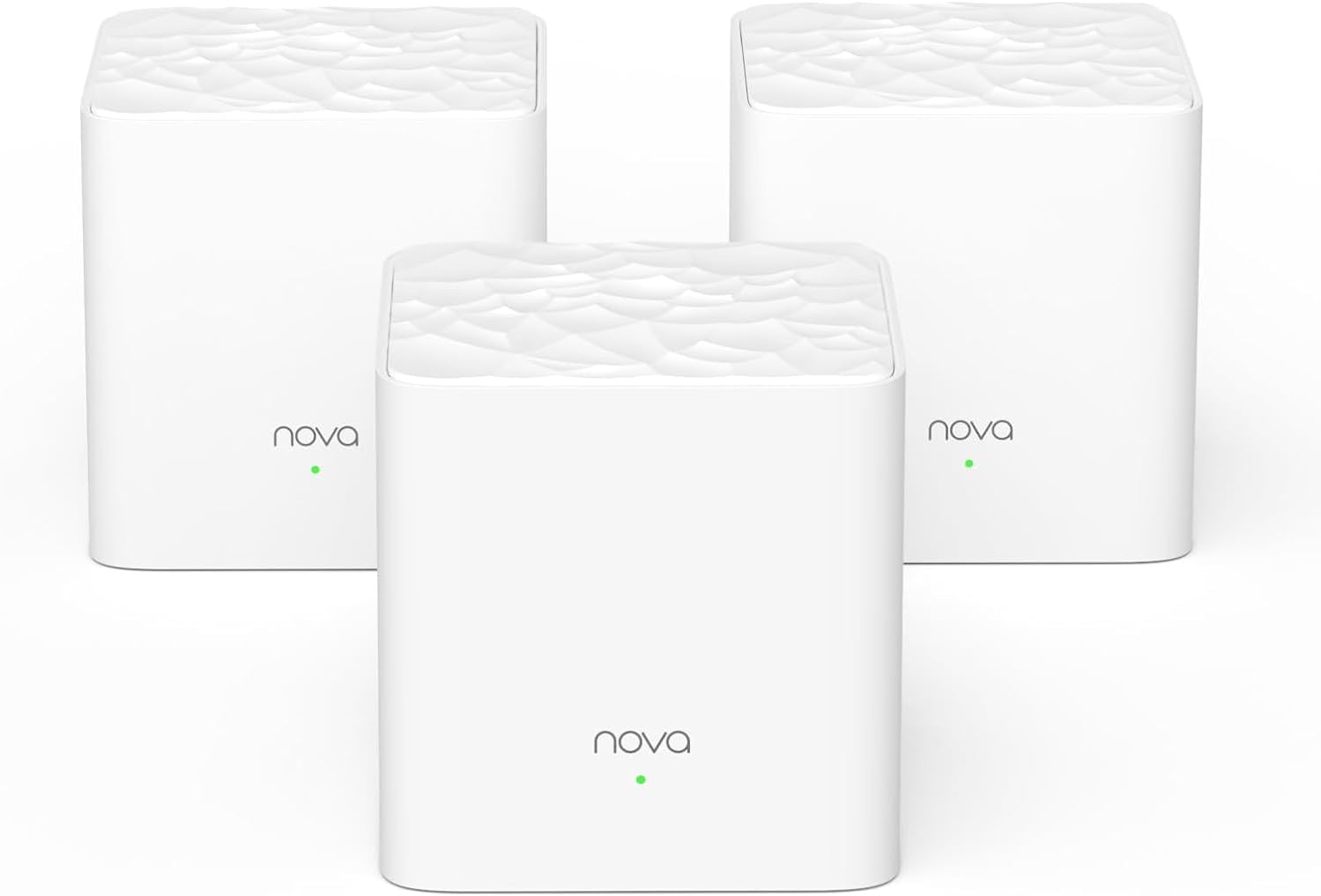
The Tenda Nova MW3 3-Pack Mesh WiFi System delivers robust AC1200 dual-band speeds and seamless coverage up to 3000 sq.ft, perfect for busy homes with up to 40 devices. Featuring MU-MIMO, Beamforming, WPA2 security, and an easy-to-use app, it ensures stable, secure, and lag-free internet throughout your space with effortless setup and smart roaming.


| ASIN | B07DFQGP1K |
| Antenna Location | Business, Gaming, Home |
| Antenna Type | Internal |
| Best Sellers Rank | #18,769 in Electronics ( See Top 100 in Electronics ) #99 in Whole Home & Mesh Wi-Fi Systems |
| Brand | Tenda |
| Built-In Media | 1 Gigabit Ethernet Cable, 3 Power Adapters, NOVA MW3 3 Identical Mesh Points, Quick Install Guide |
| Color | White |
| Compatible Devices | Smartphone |
| Connectivity Protocol | wi-fi |
| Connectivity Range | 3000 Square Feet |
| Connectivity Technology | Ethernet, Wi-Fi |
| Control Method | Voice |
| Controller Type | google_assistant |
| Coverage | Up to 3000 sq.ft. |
| Customer Reviews | 4.2 out of 5 stars 4,387 Reviews |
| Data Transfer Rate | 1200 Megabits Per Second |
| Frequency | 5 GHz |
| Frequency Band Class | Dual-Band |
| Global Trade Identification Number | 00885397271505 |
| Has Internet Connectivity | Yes |
| Is Modem Compatible | No |
| Item Dimensions L x W x H | 3.54"L x 3.54"W x 3.66"H |
| Item Type Name | Mesh Wifi System |
| Item Weight | 528 Grams |
| LAN Port Bandwidth | 10/100 Mbps |
| Manufacturer | Tenda |
| Maximum Upstream Data Transfer Rate | 600 Megabits Per Second |
| Mfr Part Number | MW3 3-pack |
| Model Name | Nova MW3 3-pack |
| Model Number | MW3 3PK |
| Number of Antennas | 2 |
| Number of Ports | 6 |
| Operating System | ZyNOS |
| Other Special Features of the Product | Beamforming, Guest Mode, Parental Control |
| Router Firewall Security Level | Basic |
| Router Network Type | Mesh |
| Security Protocol | WPA2-PSK |
| Smart Home Compatibility | Smart Home Compatible |
| Special Feature | Beamforming , Guest Mode , Parental Control |
| UPC | 885397271505 |
| Unit Count | 3.0 Count |
| Voltage | 12 Volts (AC) |
| Warranty Description | 3-year warranty |
| Wi-Fi Generation | Wi-Fi 5 |
| Wireless Communication Standard | 802.11ac |
| Wireless Compability | 802.11ac |
M**I
Really good product!
Easy to install, just need to follow the instructions! App is cleand and intuitive! And of course, it the solverd the internet problem I had at my place. Ps: ChatGPT or other similar tools can give some precious tips on how to improve the wifi efficiency on each scenario! Nice product, I recommend it!
P**H
Whole-home mesh WiFi for Under $100? Absolutely.
I was skeptical of these when I bought them; all the reviews I read said to go with either Google WiFI or Eero, but I really didn't want to spend $200+ on a mesh setup, especially without knowing how coverage would be in our new house. My personal set up is running in "APmode" with a Ubiquiti EdgeRouter (which I also HIGHLY recommend) acting as router, DHCP, and secondary DNS for my network, with a Synology NAS running primary DNS. -- SETUP -- Setup was very very easy. Its pretty much plug in, turn on, and pair with the Tenda app. -- INTERFACE -- I took 1 star off for the UI because there's no web UI as of this review. Tenda is supposed to be rolling a web management UI out as a firmware update sometime soon-ish, but its not out yet. As of this review, all management is done via the Tenda smartphone app. It works well, but isn't as full-featured as I would like, but I'm a developer by day and my depth of interest in customization or metrics is probably way deeper than most. In the app you can see your online nodes, what devices are connected, and all the usual info -- perfectly usable. -- ISSUES -- The only issue that I had was related to DHCP leases for the nodes. When running in AP mode, the nodes aren't responsible for their own DHCP leases which has the potential to cause problems should leases expire and different IP's get assigned. This causes the nodes to not be able to communicate with each other, breaking the mesh. This can be worked around by one of two ways: 1) dont use AP mode, or 2) assign static DHCP reservations to the nodes on first boot BEFORE pairing. I didn't do this and had to re-create my mesh after a power outage, but have since assigned static DHCP leases and have had no issues since. Unless you're running a slightly more complicated setup as I am this should never be an issue, though. -- FEATURES -- The addition of an Ethernet port on the nodes is brilliant. I have one node stationed behind my smart TV with the TV tethered via CAT6e to the node. This eliminates a wireless hop that would otherwise have to exist if I weren't able to hard-wire my TV into the network. -- BANDWIDTH -- The stated bandwidth for the mesh is 1200 Mbps, however real-world bandwidth is closer to 90Mpbs with multiple devices and streaming IoT on the network (I have a few WiFI CCTV cameras, smart tvs, and other bandwidth-heavy things). I have yet to hit bottlenecks in bandwidth even when streaming 4K video over the mesh along with all the other crap on my network. -- CONCLUSION -- If you want a hyper-feature-rich experience and Gigabit WiFi speeds, go look at Google WiFi or Eero, but if you want dead-simple, bulletproof, no-frills, no-BS mesh WiFi, this is the setup for you. 5/5 would buy again
Z**Y
Great so far - Would like a little more control
Reading the reviews, I was a little iffy on purchasing this. It seemed a lot of the reviews mentioned that these worked fine at first but stopped doing so after a short amount of time. I have experienced no such issues. I have had two nodes installed for almost a month and added a third about a week ago. Installation was fast and easy. I had a pretty highly-rated router and extender combo before switching to these. I have a 150Mbps download/25Mbps upload plan and I never got close to that from only ~35 feet away from my router. My house isn't huge but it has a lot of concrete/brick walls between the router and most of the house. The router itself worked fine in most rooms, getting be about a third to half of my maximums. There were a couple of "dead zone," where I could only get around 5mbps/1mbps, so I tried an extender. It worked okay but 20/5 speeds weren't acceptable. With the price finally being reasonable, it felt like it was worth giving mesh wifi a try. I have not been disappointed with the results thus. I can now pull at least 50/10 everywhere in my house and I have not experienced any connection issues. Not to mention the nodes are small and pretty well-designed. They do not stick out no matter the decor and they are well-built. My only problem with this system would be with the amount of control you have over it. The app really does not give many customization options, though it offers what most people would need. You can change the SSID and password, view and block devices, change between PPPoE/DHCP/Static IP/Bridge modes, and change a few other basic settings. Even adding such things as being able to choose whether to connect to 5ghz or 2.4ghz bands and a web portal, which would likely add more customization options, would have been a great addition to these.
M**L
Easy Setup and full net speed connection in all locations in home
Have owned for one week: Likes: Easy setup first connected 1st unit to existing Modem and ran through 4 or 5 steps on phone, including setting password for Wi-FI, then placed Units 2 and 3 of the mesh at locations that would extend the signal. Both turned green light on in about 10 seconds, indicating full strength signal and indicating all units were communicating. I placed these units about half-way to the areas that had poor reception before (60 ft out from 1st unit). Started with laptop and connected with no issue. Then added over the next couple days, the TV's, Kindles, kids gaming units and printers, all went smoothly. (3 of us, added up to over 15 devices, the good news is I read somewhere that it will handle up to 40 connections - enough to handle everything when my teenager has all their friends over. My checks shows that all have excellent signal, and no dropped connections. I left the Comcast modem on until I had the majority of equipment linked. Today, I turned off the Comcast modem wireless - to prevent interferences, per recommendations from friends, however they seemed to be playing nicely together. It may be the beaming technology of the new units helps them focus the signal where it is being used. Also, the units are nice looking small white boxes and can be mounted on the wall or placed on table. They pretty much disappear. Any improvements that I would recommend to the manufacture? I would have liked cord on the power supply to each unit to have been 8 ft long to allow easier mounting up high on my wall. I made do, by using an extension cord and hiding the cord behind the furniture I placed them on top off. (higher is better as far as signal - two of mine are at 6 ft and one is on a table ). This unit was a deal for a MESH WI-FI system and provides the same speed that I have when connected by cable. Be aware that there is a MW3, MW5, MW6, model. I bought the MW3 as it will handle several times my connection speed. MW6 handles extreme speeds (think fiber optic and top end connection package) that are not available in my area. I would recommend to friends.
T**.
More flakey than a box of cereal
Like many of the other reviews here, I've battled the wifi demons for years and with the arrival of mesh wifi, it seemed like my prayers had been answered. I decided an economical (i.e. cheap) leap was a good start, and came across the Tenda Nova. Install was relatively painless, and while the app is basic (and yes, no browser interface, must use the app on a mobile device), it did the trick. One thing I've learned with multiple wifi systems in the past is that a daily reset (power off/on) can do wonders, so I was pleased to see the scheduled maintenance option in the app. Fast forward a couple of weeks and the entire set up craps out during the night. No wifi in the morning, all smart home devices disconnected... Not impressed. After about an hour of wrangling with which node to reset when, I realized that it was necessary to do a hard/factory reset on the main node (wired to my modem) to get the system back on track. Lesson learned, I set the maintenance schedule to force reset the middle of each night. Since then there's been a couple of repeats of the above, which is getting annoying... Having to hard reset an access point every couple of weeks isn't giving the reliability I want or need. Speed and performance is great when it works... But only if it works! Fast forward to the last couple of days: there was a firmware update and in normalandia that should mean better performance and stability. Instead (and my motivation for writing this review) I'm now in this endless loop of hard resetting the primary node every few hours... With that, I'm off to spend a bit more $$$ on a more known and reputable brand that I know will have the reliability (and support) needed to make the product worthwhile. Enjoy your $100 drink coasters if you purchase the Tenda Nova...!
A**D
Great product - easy to install and works for what it is made for
I find very few electronic wi-fi products done right, this is one of them. 1) It is great value for money compared to other whole house mesh wi-fi systems in market. 2) Works great - I have kept one cube in basement where my router is, one at first floor and the third on second floor. I have Smart TVs, Wi-Fi Connected DVD players, tablet, computers/laptops, VOIP phone, cell phones being used in all area and I can say that I am impressed - I see excellent connection everywhere in my home. Devices connected in the first go and have not dropped connection ever. Granted I have used this product for only 2 days, however, I was so disappointed with my other system that this one is a marked improvement. 3) It is super easy to install. Connect any of the cubes to your router, follow directions to set-up via cell phone app, once connected then simply place other cubes looking at the rage availability on the app. I was able to set-up the entire system in under 10 minutes. No other configurations are required - the system will automatically update (if needed), balances the network, restarts in night to refresh itself. I have had no drops (not even once) for any of my device and I use a lot of wi-fi based devices from the most modestly priced to most expensive. So, there must be at least 10-12 devices connected at the same time and it works beautifully. 4) It is beautiful to look at - can become part of any place you like to keep it. All you see is this nice white cube with aesthetic top and a small beautifully places small soft glow green LED light. 5) The control app is simply, GUI based and does not intimidate user at all. 6) I do not think there is any loss in bandwidth - I get great streaming on my 4K TV. The only item they can work on is the accompanying manual - however, it was easy to find and install the app on Apple Store.
J**O
A Few Functional Limitations UPDATE-too many
UPDATE- I can no longer live with the functional limitations of this product. They have had plenty of time to roll out an simple update to restrict the address range of their DHCP server, but have failed to do so. Not one update at all. I contacted them and told them what they could do to easily address this most significant limitation. All I got was a thank you and we will forward it to our product team (if there is one). I HAVE to have the ability to assign static addresses. I can't wait any longer. I am removing a star for poor support. I purchased this to improve the WiFi coverage in my house. It seemed a very good value compared to other competing brands, and IT IS, but there are a few compromises that accompany this value. First the compromises: (1) You MUST have a smartphone to manage this product. There is NO WEB INTERFACE! All management is thru an smartphone app. I use an android phone but there is also an iPhone app. (2) There is no functional capability to handle any static IP addresses in the LAN, short of turning off the DHCP server and setting up a static address for ALL your LAN devices... NO WAY JOSE! Most modern routers have a way to "reserve" IP addresses for individual devices on the network; this one doesn't have that capability. An alternative on some routers is to be able to set the DHCP server address range, so you can assign static IP addresses to devices outside that range. This product uses the whole address range for its DHCP server. (3) My old router had a USB port to set up a USB hard drive or printer to be accessible via the network. This product lacks any USB interface. Despite these limitations, I have been pleased with the performance of these devices (one week in). I have great signal strength in every room now. If a device has 5ghz capability, it connects on that band. Other 2.4ghz devices seem to work equally as well, connecting smoothly. Each node has 2 ethernet ports. The node that connects to your internet modem uses one of these ports for the connection leaving a second for a wired ethernet device to be connected. On each repeater node (I have 2), both ethernet ports are available for wired devices to be connected. I'm hoping Tenda will correct the DHCP limitations in a future firmware update. That is the KEY LIMITATION that needs to be addressed. If they do correct this shortcoming, I will revise my review to a full 5 stars.
B**C
Absolutely amazing for basic full property coverage. WAY better than wifi extenders.
So I gotta first say that I'm not looking for any local gigabit connections with my home network - just reliable 2g/5g signal throughout the property. My main cable modem are in the corner basement of my home with my TV room, and I wanted coverage upstairs and in the detached garage, which is about 25 feet from my home, and about 70 feet from the cable modem and the primary Tenda Nova node in my basement (With the Tenda Nova installed, the garage node does switch between "good" and "fair" signal - but it does not effect the overall speed, and keep in mind it's going through the back of a TV, 3 home walls, my main electric box, and 2 garage walls to get to my garage utility room - that's pretty amazing!) Previously I was having a heck of a time getting a good signal to the garage, event with a wifi extender (went through 2 of them with very broken and inconsistent results). With my prior Asus MIMO router (which is amazing!) my Amazon Tap was having trouble staying connected in the garage, and wifi was a inconsistent outside. I always wanted a whole home mesh router, but didn't want to spend $300 on it. The Nova system is absolutely fantastic for $100. They also have the model MW6, which does support gigabit, but as I said, I don't need that. Also, their iPhone app is actually very convenient for both setup and monitoring the nodes and the overall usage - I was very skeptical about the app, but there are plenty of basic options like guest-network, QOS, firmware updating, maintenance rebooting, etc. Setup is seriously a breeze. The only thing that I ran into was needing to turn off my modem, then turning it back on after initial plug in. It did not find the modem and internet connection type until I reset the modem - so be sure you do that! I setup the first note, set my own network information, and then connected the other 2 nodes. The other nodes connected and were up and running within about 2 minutes. Keep in mind the wifi signal goes in and out for about 2 minutes while it's connecting the other nodes, so just be patient and you'll see that they connect after about 2 minutes. So far, very satisfied - much much much better than wifi extenders! If you don't hear an update, then all is well! **quick update - I read some reviews that said there is not a firewall in this router, but I contacted Tenda directly, and they said there IS a firewall: "Yes there is a firewall it is automatically enabled, if you need to get past it you can port forward." So good news there! I also reconfigured where I placed the 3 nodes, and now I'm getting full/good signal on all of them, even in my garage. Still really happy with this kit!
Trustpilot
2 weeks ago
2 weeks ago