⚡ Connect faster, work smarter, stay ahead.
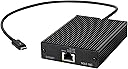
The Sonnet Technologies Solo 10G Thunderbolt 3 to 10GBASE-T Ethernet Fanless Adapter delivers up to 10Gbps wired network speeds via a 40Gbps Thunderbolt 3 interface. Its fanless, compact aluminum design ensures silent operation and portability, compatible with both Mac and Windows systems. Ideal for professionals demanding high-performance, low-latency connections, it comes with a 2-year warranty and lifetime support.


| ASIN | B07BZRK8R8 |
| Best Sellers Rank | #19 in Laptop Network Adapters #775 in Computer Cable Adapters |
| Brand | Sonnet |
| Built-In Media | Sonnet Solo 10 G |
| Color | Black |
| Compatible Devices | Desktop |
| Compatible Phone Models | Laptop, Apple, Samsung, HP, Dell |
| Connectivity Technology | Ethernet, gigabit_ethernet |
| Connector Type | RJ45 |
| Current Rating | 6 Amps |
| Customer Package Type | Standard Packaging |
| Customer Reviews | 4.2 out of 5 stars 264 Reviews |
| Enclosure Material | Aluminum |
| Global Trade Identification Number | 00732311012488 |
| Included Components | Sonnet Solo 10 G |
| Item Weight | 240 Grams |
| Manufacturer | Sonnet Technologies |
| Model Number | SOLO10G-TB3 |
| Number of Items | 1 |
| Output Current | 6 Amps |
| Output Voltage | 10 Volts (DC) |
| Portable | Yes |
| Power Plug | No Plug |
| Power Source | DC |
| UPC | 732311012488 |
| Unit Count | 1.0 Count |
| Wattage | 100 watts |
D**.
Fast, and easy to use!
I’ve been wanting to upgrade my home network to 10G speeds, so I bought the solo for my network adapter for my Alienware 17 R5 laptop. This device does achieve the rated 10G speeds. I have this wired to a 10G UniFi switch via cat6, the switch is also connected to my server with a 10G nic that has a m.2 SSD drive. And in the attached video you can see that a 15 gigabyte file transferred across my network in 15 seconds!!! Don’t forget that your speeds will only be as fast as other bottlenecks in your system as most mechanical hard drives top out at 150 MB/sec and even standard SSD top out at 500 MB/sec. (non-raid). m.2 SSD drives are really fast and will allow reads and writes at or above the 1Gb/sec transfer rate. Most of the time this device runs slightly warm, however during long durations of high speed transfers it does get hot. But I have had no issues after 2 weeks of usage. I’m very happy with the product and highly recommend for laptop uses, as a standard 10G nic is more cost effective for a desktop application.
N**R
Works perfectly in Mac and Windows.
Fantastic performance and runs very well. It runs hot just like any other 10G Ethernet NIC so be careful not burn your hands but at least it comes with a nice long and flexible Thunderbolt cable. I wanted one with an integrated cable and this looks pretty well put together as the cable is detachable but requires a couple screws to be removed. So it’s secure in there you don’t need to worry about the adapter side to be a failure point. Setup is pretty simple, just get the Aquantia drivers installed. The only problem is I can’t seem to connect to CS:GO matchmaking with this adapter on a gaming laptop. I had the same problem on my desktop with an Aquantia card. I was able to fix that on my desktop so I’ll figure it out. Fortunately that’s the only problem I have and I don’t think it’s the product’s fault because there is no problem with anything else. Price is a bit higher than I’d like but it does work pretty well on both my MacBook Pro and my Windows laptops.
A**X
So much better than the SABRENT NO DRIVERS NEEDED
So much better than the SABRENT Thunderbolt 3. Plug and play. NO DRIVERS NEEDED I had the SABRENT Thunderbolt 3, and after every couple of updates, the drives stop working on the devices, and I can no longer use them. I bought this, and it worked right out of the box. I didn't install any drivers and it showed up in my networking tab my thunderbolt utility
D**T
Gets hot and disconnects
This gets advertised speeds, but at times, based on throughput I suspect, it gets very hot. Then, it disconnects. Don’t buy it.
D**H
Quick and stable, but gets too warm after a few minute copying at 800 MB/sec from Laptop to NAS.
My Synology DS1522+ supports up to 900 MB/sec for writing, but it has a good large NVMe 2TB cache and I was able to easily reach around 750-800 MB/sec after stabilization, starting with over 900 MB/sec in the very beginning, while copying a large file from my laptop to this NAS. I think I can answer the question of many users - the temperature on the surface of my TB3/RJ45/10GB unit jumped up to 117F and it was holding around that when I was copying my test file for just a few minutes. After the copying stopped the temperature is still high and I'm curious how soon it goes down. It holds it for many minutes now and I guess it will be for some time. Luckily I got extended warranty. Definitely a good hardware, but not perfect, some small cooler would really be great to have. To avoid questions, in addition to this Sonnet Solo TB3/RJ45/10GB I got the following: 1. TP-Link TL-SX105 | 5 Port 10G/Multi-Gig Unmanaged Ethernet Switch. 2. Synology DS1522+ with the upgraded RJ45 10 GB port (Synology Network Upgrade Module adds 1x 10GbE RJ-45 (E10G22-T1-Mini)), two SAMSUNG 980 PRO SSD 2TB PCIe NVMe Gen 4 Gaming M.2 Internal Solid State Drives in RAID1, 32GB Upgraded RAM, 5 Seagate NAS IronWolf 16TB drives, configured for 2 possible disk failures, AKA Synology RAID, kind of RAID6. 3. Dell i9 XPS 15 7590 laptop with 64GB RAM and SABRENT 8TB Rocket 4 Plus NVMe 4.0 Gen4 PCIe M.2 Internal SSD Extreme Performance Solid State Drive R/W 7100/6600MB/s (SB-RKT4P-8TB). Update 2 days later: after putting a 80mm fan right on the adapter as expected the entire adapter keeps the room temperature, I don't even need to use a medium or high speed, the slowest speed is enough and this fan is quiet, cannot hear it being in a few inches from it. Just in case, this fan is called: AC Infinity MULTIFAN S1, Quiet 80mm USB Fan, UL-Certified for Receiver DVR Playstation Xbox Computer Cabinet Cooling. Of course, you can find something smaller, this is just my choice and I like what I got. Correcting to 5 stars on 7/5/2023: the adapter is pretty cold with a fan, described above and it's pretty fast and stable. What else could we wish for? :) Updated on 7/9/2023: downgraded to 3/5 stars for 2 reasons. 1. It doesn't work through the same company TB3 hub, recommended to me. The light goes yellow instead of green, but computer doesn't even see this adapter, which is strange, I suppose it's either defective, or the company didn't test it well enough. Tried another one hub, made my OWC, same results, the right light is yellow, the left one is blinking, but the computer doesn't see it at all. At the same time, a SSD TB3 enclosure, connected to the same hub, shows fantastic transfer speeds, so the hub works pretty well. 2. If the laptop is up and running, but this adapter is unplugged, when I plug it in nothing happens at all. I guess it needs a serious power boost to start working and be recognizable. Once disconnected and reconnected almost immediately a few seconds later it starts working like nothing happened, all greens, 10 KBit/sec, etc. When I start my laptop with this adapter plugged in it can be recognized immediately since the port gets reset at lest twice during boot up and by the time this adapter is required it already has all required power and is ready to connect. It's kind of annoying, keeping in mind hot hot it can be without a working fan right on its top surface. Still not sure if I need to request a replacement or not, because other than that it works, but being limited with just 1 TB3 port is irritating, keeping in mind inability to work with TB3 enclosures while this adapter is connected to the only TB3 port. Updated after several weeks of 24/7 usage of this adapter. Upgraded the score to 4/5, but still not 5 because the cable is too short and it's mobility is pretty much limited. On one hand, we want to see the lights to get a better impression how this adapter works. On the other hand, the LAN cable is sticking out from the front panel right under my wrists when I work on my laptop, and there is no way to move it away from the laptop. Finally, a very interesting finding. Although it seems logical, because this is TB3/TB4 adapter, not built in, but what interesting is - the adapter doesn't start until I LOGIN, then it starts working, but before that it's just a connected brick. It's related to the drivers and I guess to the security, since nobody should be able to use any port until he/she is authorized/logged in. On the other way, we need a way to authorize this particular adapter so it can go on line even if this is another account or before the user is connected. Otherwise the adapter is bound with the user, who installed the drivers. I didn't check if it will be working with other users, don't have any other, probably it will, but I'm sure it still won't be working until a user logs in. I'm sure that needs to be made optional/configurable.
W**L
Great 10GbE Network Solution, No Issues
Picked this unit over the 4-5 available units, based on design and mfgr's history. Connected to an Asus ProArt laptopThunderbolt 3/USBC port, CAT-7 to a 10GbE switch, to a 10GbE Sonicwall port to the network. Copy files at a consistent 790MB/s to a 10GbE NAS in the network, and all negative comments read were unfounded. Remains slightly warm, not hot, and only added higher rubber feet to improve air circulation.
A**O
10g thunderbolt
Fast, great price
R**L
Works great and is highly recommended
I picked this up based on recommendation from the tech who installed my fiber optic internet service. It works really well and I am able to get the full use of the speed my ISP offers. I like that it is configurable and they periodically update the drivers and firmware for it. I can recommend it with confidence.
Trustpilot
3 weeks ago
1 week ago