🚀 Surface Pro 5th Gen: Power, Portability & Connectivity—Unleash Your Hustle Anywhere!
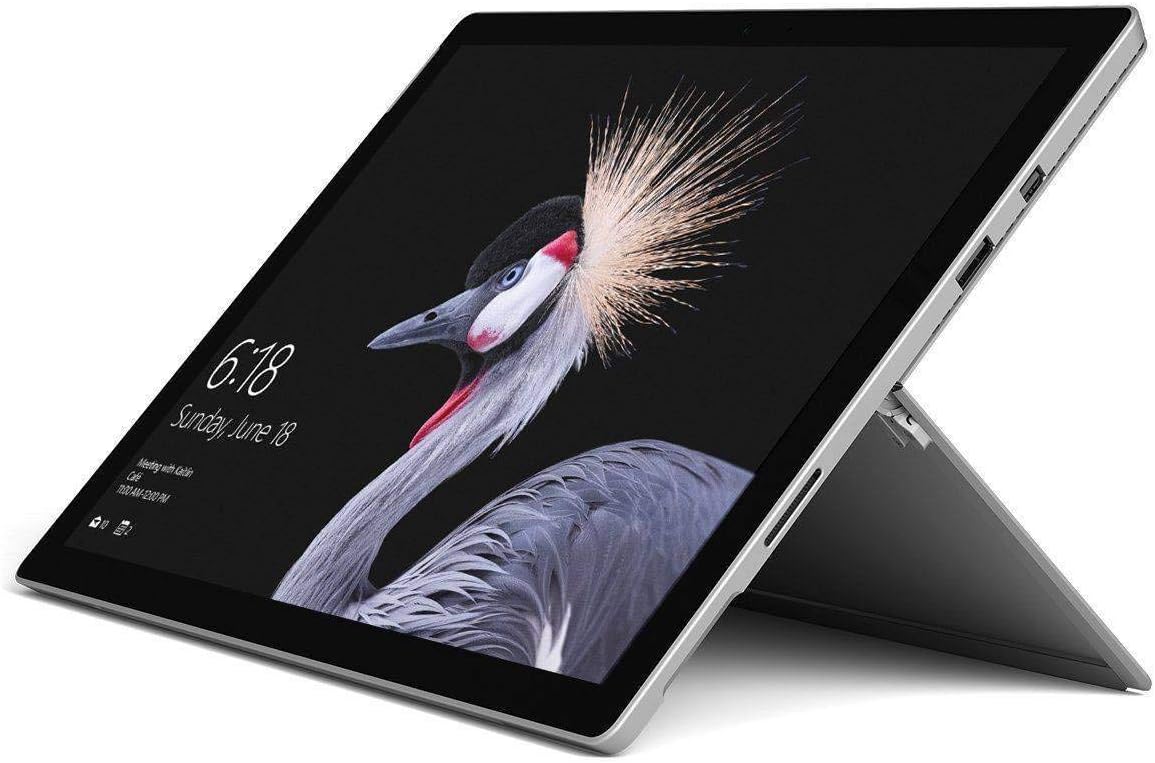
The Microsoft Surface Pro (5th Gen) with Intel Core i5, 8GB RAM, and 256GB storage is a premium LTE-enabled 2-in-1 laptop-tablet hybrid. Featuring blazing fast LTE Advanced connectivity across 20 bands, a vibrant 12.3-inch PixelSense touchscreen, and up to 13.5 hours of battery life, it’s engineered for professionals who demand power, portability, and seamless global connectivity without compromise.
| ASIN | B07CFYPSD2 |
| Age Range Description | Adult |
| Aspect Ratio | 16:9 |
| Battery Average Life | 13.5 Hours |
| Battery Capacity | 13.5 Hours |
| Battery Cell Type | Lithium Ion |
| Best Sellers Rank | #64,177 in Electronics ( See Top 100 in Electronics ) #1,038 in Computer Tablets |
| Brand | Microsoft |
| Built-In Media | Battery |
| CPU Model Number | Core i5 |
| Camera Description | Front, Rear |
| Cellular Technology | 4G |
| Color | Gray |
| Compatible Devices | Devices with Windows OS and/or compatible wireless capabilities (Wi-Fi and Bluetooth) |
| Connectivity Technology | Wi-Fi |
| Customer Reviews | 4.4 out of 5 stars 1,404 Reviews |
| Display Resolution Maximum | 2736x1824 |
| Display Type | LCD |
| Generation | 5th Generation |
| Global Trade Identification Number | 00889842243338 |
| Graphics Coprocessor | Intel UHD Graphics 620 |
| Graphics Description | Integrated |
| Hardware Interface | Bluetooth |
| Human-Interface Input | Touchscreen |
| Item Weight | 1.8 Pounds |
| Lithium-Battery Energy Content | 2 Watt Hours |
| Manufacturer | Microsoft |
| Memory Storage Capacity | 128 GB |
| Model Name | Surface Pro with LTE Advanced (Intel Core i5, 8GB RAM, 256GB) |
| Model Number | GWM-00001 |
| Model Year | 2014 |
| Native Resolution | 2736 x 1824 pixels |
| Operating System | Windows OS |
| Photo Sensor Resolution | 8 MP |
| Processor Brand | Intel |
| Processor Description | Intel Core |
| RAM Memory Installed | 8 GB |
| Screen Size | 12.3 Inches |
| Speaker Description | Integrated stereo speakers |
| Specific Uses For Product | Business |
| Total Usb Ports | 1 |
| UPC | 889842243338 |
| Unit Count | 1.0 Count |
| Video Capture Resolution | 4K UHD 2160p |
| Video Processor | Intel |
| Warranty Type | Limited |
| Wireless Compability | Bluetooth |
| Wireless Technology | Wi-Fi |
M**S
I am extremely happy with it. You won't regret it if you get one.
I purchased the Surface Pro i5 8GB RAM. The unit is taking the place of both a HP ultrabook and an IPad. The ultrabook is still a good laptop and performs well, however this Surface Pro has exceeded all of my expectations. It has been a great purchase and I love working on it on a daily basis. I bought a keyboard for it as well, which has made it a true pleasure to use. It easily runs circles around both my ultrabook (which I love) and the IPad. The Surface Pro is built very well, from both the perspective of actual construction and initial durability, as well as design. The speakers being front facing work very well, better than any laptop or tablet I have listened to. The screen itself is beautiful with excellent clarity and detail, with the speed behind its supporting hardware to display anything I have thrown at it. Touch-screen action, speed and response are excellent. Saying the processor is very good is an understatement. Fan-less and very fast; it handles video compression, editing, and encoding better than any I have used, especially considering the small form factor. Simpler editing and any other daily computer use tasks aren't even really worth mentioning because it easily does those concurrently as the heavy tasks. Absolutely wonderful. Battery life has been exceptional. Coming from an ultrabook which has good battery life, the Surface Pro has been amazing. I am on it all day and it has no problem running on and on. The Surface Pro is on the expensive side, however, I can say that in comparison with any other tablet or laptop on the market, this is by far the superior product, in nearly all aspects. Years ahead in development, hardware, and support. It is truly a pleasure to use. I suppose what tops it all off is its extremely small and portable size. Keep in mind that this isn't just a tablet, like "competitor products". This is an actual, fully capable computer, which can be easily thrown in a backpack or simply carried. It really has no competition because it outperforms everything else. I know I will love this Surface Pro for years to come. Some people may say that it doesn't have USB Type-C. True, but do I really want to go out and re-purchase all the things I have, just so they can be USB-C based hardware? No; not only would this be expensive for little to no realistic gain, but all of the things I have already work well and I plan on getting use out of my purchases. Plus, most hardware doesn't support USB-C yet anyway; it hasn't been made yet. Lastly, from what I understand, Microsoft plans on selling a Surface Connect-Type C converter just in case you need it, which will support both full data and full Type-C power. Both points of full data and power being important, as many current Type-C ports and hardware are not actually fully capable. After having the Surface Pro a few weeks, I am extremely happy with it. You won't regret it if you get one.
E**G
Amazing little computer!
I'm very amazed with this computer! I've had it for a little over a year now. I have another laptop that I use at home. It's battery ended up going bad, so, I removed the battery and have it docked to a keyboard, mouse, and monitor; I basically use it as a desktop only at home now. I needed a computer that I could travel with and use anywhere. I looked into a few options and decided the to give the Surface a try. Very glad I did! I was a bit worried at first. My other laptop has better specs (i7 processor, 16gb ram, nvidia 860m video card). This Surface I got has a i5 processor, 4gb ram, and intel 620 graphics. I almost got the i7 version for the 640 graphics, but, went with the i5 due to the much lower price, and, having no fans and being silent is nice as well. To my surprise, this computer tackles everything I throw at it! I don't game much on it, but, the few games I have tried play very well. What I do that is hardest on this computer is video editing. I do most my videos in 1080 x 60. 100% smooth editing, as good as my more powerful computer at home! Rendering times aren't bad either. A little slower than my other computer, but, not too much really. My cameras can record in 4k as well, but, I rarely use that (it just takes a lot longer to render, video files are much larger, and few people even watch in 4k). But, I had to at least try it! So, I threw in some 4k video in to my video editor; again to my surprise, it is smooth and handles the 4k video files just fine! Amazing! Rendering times of course increase. I can now travel anywhere with this laptop and my Canon G7x Mark ii and / or Canon SX730 cameras and have everything I need to record, edit, & upload from anywhere! This laptop does everything I need, and, should do everything I need for many years to come! To anyone thinking of getting a Surface laptop, I'd also suggest looking into other keyboard options. Yes, their keyboard is nice, but, also expensive! I got an Anker brand bluetooth keyboard that is small and light; and, a small wireless Logitech mouse. Of course I also bought a 13" laptop bag that will hold everything. I got the bag, mouse, and keyboard for less than half the price of just the Surface keyboard!
T**.
LONG TIME MAC USER NO MORE
I have been an avid mac user for my entire life. When my most recent computer died I started to research options and began to look at the surface pro. My number one issue with Windows back in the day was they only made software so most of the time you got an unreliable system with parts made from who know where that threw on the windows operating system. Where the competitor developed the hard ware and software so that everything was designed to work together. Well this had all changed with Microsoft releasing the surface line of products. Microsoft is now developing the hardware that is designed to complement its software. Due to this huge change I spent countless hours researching and doing my homework. And after about two months I decided to pull the trigger and come to the Microsoft world. I am so happy that I did!!!! So far this had been on of the best systems I have owned over the years. I love so many aspects of the surface pro and any worries I had are no more. The Pros: - Light wight - Fast Charging - Touch Screen - Full operating system - Fully runs Adobe Products with no issues (Photoshop, Premier Pro, After Effects) - High restitution display - WOW and Star craft II smooth playing and no buffers - Expendable memory slot to increase your hard drive storage ( I put in a 1 TB micro sd card ) CONS: - Limited USB ports - No RJ45 port to hard line your system to the internet (WIFI ONLY) - Gets Warm (Due to no fans) - Fixed RAM so unable up upgrade or install more if you wanted to - Keyboard sold separately - Pen sold separately All in all the PROS out did the cons and I am extremely happy with my purchase. I went ahead and ordered the keyboard and pen and love them both. To fix the USB and RJ45 issued I found a great hub that you are able to use that extents your inputs to 2 USB 3.0, RJ45 1 GPS speed, and all SD card format readers. Bellow are links to the accessories I got on Amazon to resolve the CONS of my review Keyboard / cover: https://amzn.to/37gkhsA Pen: https://amzn.to/37dRV1Y 1 TB SD Card: https://amzn.to/3aqx65y HUB: https://amzn.to/2G7NJoL
E**X
Excellent device with great performance
I've had an Acer Switch Alpha 12, an HP Spectre X2 and now the Surface Pro i5 8gb 256 and the Surface pro beats them hands down... not even close in my opinion. I sent both the HP Spectre back and the Acer Switch back for various annoyances that frustrated me to the breaking point the later getting a dreaded blue screen of death and was unable to recover, even to start back up again. Travel and tablet use: my both the competing computers (Spectre and Switch) had the annoying inconvenience of not have easy to find car chargers that actually work. The Surface pro car charger I purchased works, works well, and was not hard to find on Amzn. I have a steering wheel "shelf" that holds my Surface so I can easily work while I'm on the road (stopped of course :-) and with the excellent battery life I have only a few times needed to actually plug in the car charger for juice. The Surface is light for a PC with rounded corners that make it comfortable to hold but you will get hand fatigue if you try to hold it with one hand. The touch sensitivity of the screen is superb and is very smooth when scrolling or working. Keyboard: the keyboard is just plain excellent in my opinion. I don't feel any "bounce" of the keyboard when I type on a hard surface and I usually type with the keyboard in the what I call upper position that's slightly elevated on the backend that touches the monitor. The back lighted keys have a brightness adjustment using the F1 and F2 keys and it works well. Just remember if you turn on your Surface and don't see the keyboard lighted, press the F2 key enough times to see the brightness increase. I din't know what the deluxe keyboard is supposed to feel like or look like but I have one that has what I call a felt to touch surface (no pun intended) and it's very pleasing but can catch dust and dirt if you're sloppy when you work. (don't recommend eating things that make crumbs near your keyboard :0-) On Screen keyboard: I wish there was an alternative on screen keyboard for the Surface Pro. The current / default on screen keyboard is not bad but lacks a microphone icon to allow you to speak / type and I miss that function with the type of work I do but its not a deal breaker for me. Ports: with one 3.0 USB port the Surface pro is a little light on connectivity but nothing that the available adapters can't rectify for you. The power port using an unusual power cord I've not seen before but it works well, stays out of the way well, and has a power light that lets you know you are connected properly. Kickstand: I love this kickstand. Its way more useful than the ones that were attached to the HP Spectre and Acer Switch and can accommodate just about any angle you throw at it all the way down to almost flat. When it's out of the way you wouldn't even know there was a kickstand included as it's tucked away nicely without being obtrusive. Screen: the screen is plenty bright, of nice resolution for my purposes, has pretty accurate color accuracy which is important to me as a graphic designer and without the keyboard is relatively light. There is a rather large bezel but I don't see that as a disadvantage necessarily as you need some space to hold the screen without distracting from your content. Features: instant on when turning this baby on, it's pretty fast and Windows Hello does my face recognition accurately 70% or the time :-) When it doesn't recognize you it gives the the opportunity to type in your pin number you setup when you originally setup the device. Speaking of setup I loved that the system walked me through setup using the Cortana voice prompts which was a smooth process. Value: Many have stated how expensive this Surface Pro is but you know what... after experiencing the lack of quality of the other two supposed knock offs I returned I can honestly say this was the right choice of me. Nearly double the price of the other two but worth every penny to me so far. Lots of people use a tablet with no keyboard so I can see why MS left it out of the box but should have built it into the price and included it or used the keyboard and pen as "giveaways" to sell more units and increase the perceived value. Heat factor: Only one time have I noticed any heat on the back of the screen and that was when I left the device on with the keyboard folded onto the device in closed position and left for a period of time. It was still quite usable but there's that to consider when working with this device. Last: the battery life is just excellent. My HP Spectre and Acer Switch battery life was nothing short of pathetic. This Surface Pro once again was the right choice for me. I think the availability of keyboards is a bit confusing for the consumer as evidence by how many people ask in the Answers section if the keyboard will fit this or that Surface model. Wish list: I wish there was a second USB port. I wish the keyboard were felt on the outside and not on the keyboard itself. I wish Microsoft app store wasn't so sparse and lacking in apps (really pathetic if you ask me). I can't believe a company as powerful as MS can't figure out how to encourage more developers to add their apps and I think it's a huge mistake to try to create some kind of closed ecosystem... they're not Amazon lets face it :-)
F**L
As good as it gets
Excellent computer for general purpose work. I am working with the i7 with 1TB of storage - I bought the Pro 4 with i5 and 256GB and rapidly realized I under-purchased for my work. The good (ok great): Fast - the i7 Surface Pro is significantly snappier than the i5 of 2015. Maybe 2 to 2.5x as fast at standard jobs. I'm running some multi-media jobs to benchmark this weekend and will post a followup. Storage - very fast. Files open and close with "snap". The screen is just as excellent as the Pro 4, and that's what got me to switch most of my computing from a MacBook Air to the Pro line. The screen is gorgeous. The fingerprint reading on the touch keyboard (recommended option) is much faster and more accurate. This tells me that there must be CPU processing involved in fingerprint sensing accuracy as I just switched the same keyboard from the Pro 4 to the Pro 2017. Cooling - I noticed the Pro 2017 just doesn't heat up as much as the Pro 4 at any task. Surface Dock - Truly outstanding accessory. Just hook up the magnetic connector and add monitor, ethernet, sound, and more USB-3 to the job. I use it with a very high resolution Dell display and it's stunning. Mixed The battery - it's significantly longer lasting at the same brightness as the Pro 4 - but I still get about 5-7 hours of useful life. That's at "suggested" or "brighter" settings. I don't use brightest - it's just wasteful. Battery life could still be better, but it is pretty much good enough for my needs. Wish List USB-C. I of course didn't expect it, but Microsoft could have upgraded the USB 3.0 to latest spec and added a USB-C to the Pro 2017. Really, it's not badness (I'm not deducting a star) but seriously why not? All in all, this is more than a solid performer. It's a stylish, good-looking outstanding performer that is suitable for any road warrior or any desk. This is an excellent followup to the already great Pro 4.
C**A
Great choice... powerful and flexible. No noticeable fan noise from the i7.
I have had several versions of the Surface Pro (SP1, SP3, SP2017 i5 and now SP2017 i7. With the exception of the first, they have all been excellent computers when matched to the right needs. I love the small size and light weight in a genuine Windows computer and really value it’s portability. I use it as a laptop with the keyboard cover, and as a desktop via the Surface docking station (i.e. using an external large monitor and full-sized external keyboard. I love that the screen is touch, but I don't use it as a pure tablet very often. Occasionally, I'll grab the Surface stylus and use it to edit an image in Photoshop, but I also have a 9.7” iPad Pro that I like better as a pure tablet. Overall, it is an excellent device and I highly recommend it. The one extra comment I will make is that I first bought the i5 version of this because I didn’t want the one with the fan. However, the graphics in that version tended to drag a bit when I was using Photoshop. I went ahead and bought this i7 version for the faster GPU (integrated into the CPU) and I have to say that I shouldn't have been worried about the fan. It rarely runs and I never hear it when it does. If you don’t need something that computationally needs the i7 or the faster GPU, then the i5 is perfect. It's more than fast enough for everything else I did, and it gives you more bang for the buck. But if you do need the additional power of the i7, don’t let the fan thing put you off. One last note... I only gave the sound 3 stars. I should clarify that there is nothing wrong with the sound. It's probably as good as you could expect from the tiny speakers in the edge of a tablet. It's not spectacular, but it's fine... as good as my iPad Pro. Still, it's hard to give it five stars just because that would mean it was exceptional and it's not. If you're going to listen to music, you'll want earbuds, headphones or an external speaker.
R**A
Light bleeding & screen separation 9 months after purchase.
I was having a great initial experience of using the Surface when I first got it. Overall, it has some great concepts & writing & drawing is highly responsive. It also does surprisingly well with handling some 3D modeling projects, and I mainly use it for writing out music with compatible apps made available to Windows. That being said, that is where the good points end at this time. Not too far into having used mine for work & recreation, I started noticing some minor light bleed issues. I chose to ignore it since I do not have any other alternatives for my work items. Then as of last month, the issue got increasingly worse (as shown in the picture). Today, I found an alarming gap on the left side of the tablet where the screen has started separating from the casing. (2nd picture) Apparently it's glued down as opposed to being held by the case. Considering I have only had 1 accidental drop early on (in its protective case while someone was handing it back to me), I don't think my handling of it would be the main cause of this issue. But if it is, then that makes this way too fragile for just 1 drop to completely ruin the stability of the hardware like this. I was initially very likely to recommend this to others, but seeing that this major problem has happened in a matter of less than a year, it concerns me the amount of money one invests in this tablet and not be able to utilize it for the long haul. Microsoft really should reconsider the design for the surface screen if light bleed & bulging/separating is happening this early on in the tablet's life. 6/18/19: I'm just outright putting my review as a 1 star at this point, heavily disappointed because the replacement I was sent not too long after the initial review is now suffering the EXACT same symptoms as the original within the exact same time frame. The battery life is terrible (cuts off at close to 50% at times), light bleed issues everywhere, and performance hiccups... not ideal at all if you need a system that lasts longer than 1 year. Make sure EVERYTHING you have is stored or installed on backup drives, otherwise, you're setting yourself up for some heartaches over lost data.
T**3
Superior tablet. Best there is.
--UPDATE-- Disabling the auto screen brightness feature seems to correct the below issue. The device will reset at random times. It doesn’t seem to matter what I’m doing. After a review on reddit , I found many early adopters are experiencing the same issue. See thread: “Suspend/Poweroff at Random Surface Pro 2017 i5”. --Original Review-- Received my Surface Pro yesterday and used it all evening. Here are my initial thoughts, hope they help. My device Intel Core i7, 8GB RAM, 256GB, coming from an Ipad Pro. Pros: 1. It’s a full PC. If it works on PC, It works on this. 2. Ease of use. I love how it easy it is to load UHD video files. Playback is flawless. Never did get this working on Ipad. 3. Fast and responsive. 4. Build quality is premium. Love the new rounded edges. 5. Near silent. It has a fan, but it’s not loud enough to remember it’s even there. I think the i5 doesn’t even have one. 6. Battery life is really good. Again I haven’t done any official tests, but it lasted all evening on the “out of the box” charge. 7. Screen resolution is crisp and bright. Looks great playing hi res videos. 8. Expandable storage with a micro SD card. This is a no brainer. Get a clue Apple. 9. USB port. Again, Apple WTF? Cons: 1. I wish the bezel was a little thinner. It would be nice to have more screen real-estate. 2. A little smaller than ipad pro. 3. It gets a little warm. Not sure about thermal throttling. I haven’t tested. But it does get a bit warm holding in your hands after a while. 4. While I was browsing the web, it lockup and screen went black, after a few seconds it auto reset. This happened just once. Didn’t happen again all night. Conclusion: I really love it. This is the device the Ipad Pro should have been. This is a truly awesome laptop replacement and I enjoy using it. The most versatile portal tablet on the market.
Trustpilot
3 weeks ago
2 months ago