🚀 Elevate your workspace: Dual 4K power meets seamless control—don’t get left behind!
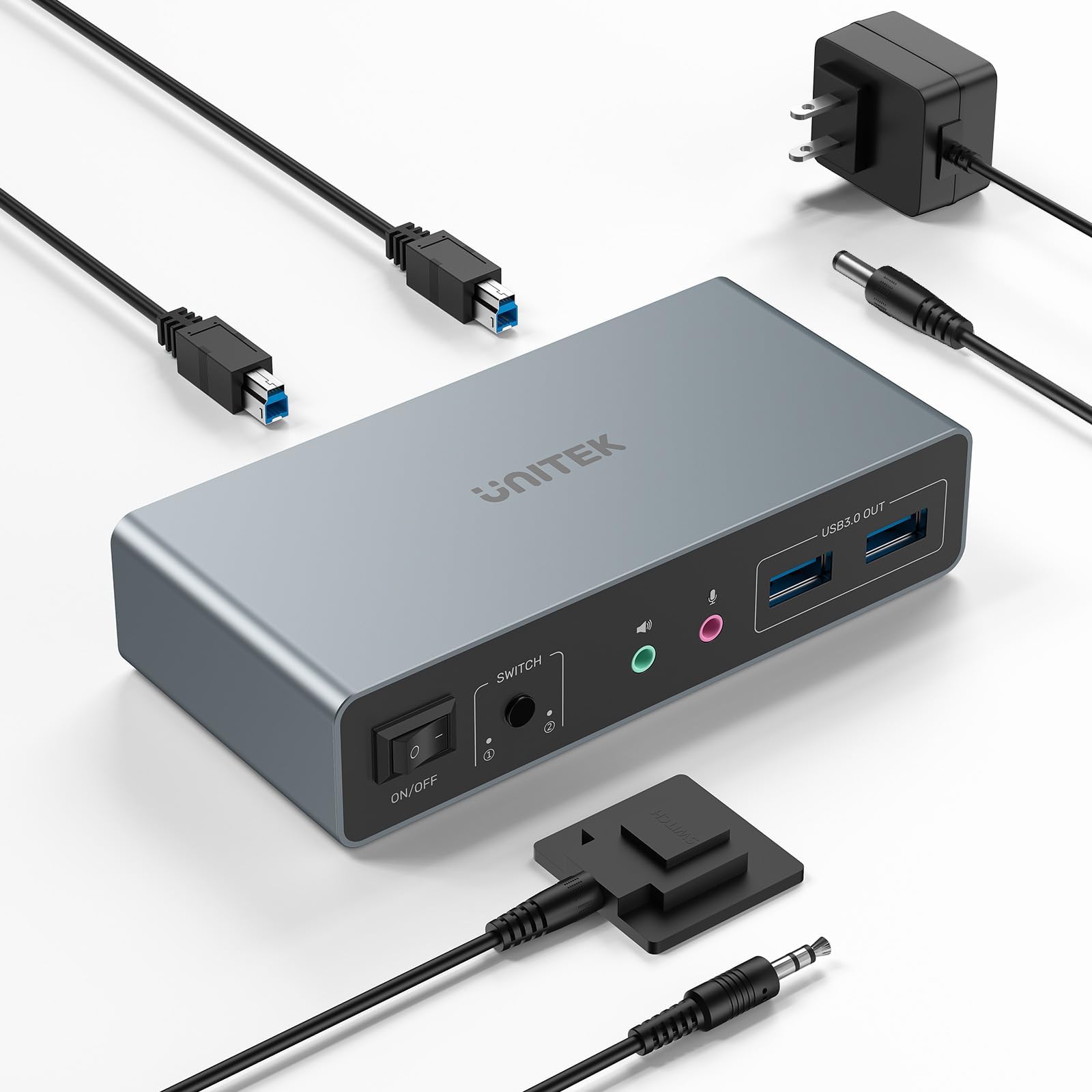
The Unitek KVM Switch enables professionals to control two computers across dual 4K@60Hz monitors using HDMI and DisplayPort inputs. Featuring four USB 3.0 ports with 5Gbps transfer speeds, it supports a wide range of peripherals including keyboard, mouse, hard drives, and audio devices. Compatible with multiple OS platforms and plug-and-play ready, it offers quick switching via a one-button or wired remote controller. Its sturdy aluminum design and included 5V/2A power adapter ensure reliable, high-performance multitasking for demanding work-from-home or office setups.


| ASIN | B0DBYMBMKN |
| Actuator Type | Push Button |
| Best Sellers Rank | #46 in KVM Switches |
| Brand | Unitek |
| Circuit Type | 2-way |
| Color | DP+HDMI |
| Compatible Devices | Keyboards |
| Connector Type | Plug In |
| Contact Material | Aluminum |
| Contact Type | Normally Open |
| Current Rating | 1 Amps |
| Date First Available | July 24, 2024 |
| International Protection Rating | IP40 |
| Item Weight | 1.1 pounds |
| Item dimensions L x W x H | 3.94 x 3.94 x 3.94 inches |
| Item model number | SJW-DKM202B |
| Lower Temperature Rating | 1 Degrees Fahrenheit |
| Manufacturer | Unitek |
| Number of Items | 1 |
| Number of Positions | 1 |
| Operating Voltage | 5 Volts |
| Operation Mode | ON-ON |
| Product Dimensions | 3.94 x 3.94 x 3.94 inches |
| Terminal | Blade |
| Upper Temperature Rating | 1 Degrees Fahrenheit |
S**E
Outstanding KVM at a reasonable price
I've been using the Unitek KVM with 1 HDMI and 1 DisplayPort for a few months. It works flawlessly. The little metal box is solidly built. Even after a full day of work between two computers, I have never noticed the box was hot. Especially important to me was the fact that the DP was compliant with v1.2. I have two 2k monitors in a daisy chain configuration using DP inputs and both are working at their max resolution. To connect my laptop I use a DP to USB-C adapter into my USB-C alt DP port and it works great. Other reviews noted issues with getting audio to work. I was able to, but it took a little experimentation. On my setup, the audio is channeled from the computers via the USB connection between the computer and the Unitek KVM. So on each computer I needed to select the correct USB audio device as the output. On my Linux computer it was called Speakers Audio Adapter (Unitek Y-247A), and on my Windows 11 laptop it is called Speakers 2 - USB Audio from the Settings > System > Sound menu in Win11. The Amazon description says that the KVM is not compatible with laptops. I don't know why it says that. I am using it with a Dell windows laptop and a Dell Linux desktop and it works just fine on both. I will say that if you use a KVM on a Linux machine, there seems to be an issue with the picture returning to the monitor after the computer wakes from a long sleep. I thought it was the KVM, but it isn't. I'm not sure if it's the way the DP drivers work in Linux and it wouldn't happen if I used the HDMI insteasd, but what I have found is that it's important to switch to the Linux computer on the KVM before waking up the Linux computer itself. If you end up with a black screen but it seems like the computer is working fine, that's because it is. I have not found a fix for this but have been managing the symptom instead.
J**N
Dang...It Works!!!! Yeah Boy-ah!!!
Well it took some doing, a few extra cables, but once my Logitech wireless keyboard and mouse were recognized through the system, bang, in just like a champ. Needed a wired Logitech keyboard and mouse for initializing, and then having my Logitech set up for multiple mice and keyboards. Now I am operating two computers, which was a necessity and displaying two screens. One for me the other for clients when I want them to view what we are working on. Awesome.
P**R
Great KVM but had to upgrayedd my cables
I bought the HDMI+DP KVM to switch between a laptop and desktop Linux system. At first, I was getting a lot of video and mouse lag and the refresh rate seemed stuck at 30hz. I picked up a couple new HDMI 2.1 (Ultra High Speed) and DP 1.4 cables and now able to run 2560x1440 @ 60hz (haven't tried 4k@60hz but probably work). Be aware you may need to purchase some new cables to use this to it's full potential. The old Dell dock for my laptop wasn't up to the higher res/refresh either so I picked up a Wavlink 12-in-1 dock (www.amazon.com/dp/B0CHHX7WYN) for $34 that's working great with the KVM. The video and mouse lag are gone now and I don't notice any difference gaming over the KVM. It seems to work as well as when the monitors were plugged into the video card. Switching between systems is a little annoying. The laptop doesn't retain which windows were on which monitor. Someone's review mentioned this KVM lacks EDID, which is a display communication format, so that may be why. If you plan to switch back and forth a lot using this KVM, be aware you may find this part frustrating. Otherwise, this is a great little KVM for the price.
M**S
Exactly what I needed to switch between personal computer and work laptop
I've only had this item for one day, and I already couldn't live without it anymore! Before I had this KVM switch, my situation was the following: my work laptop, two monitors, mouse and keyboard were connected to a docking station. My personal desktop computer uses the same monitors, keyboard and mouse. So every time I needed to switch between the two, I had to disconnect all cables and plug them in the other system. Super annoying. Now with the KVM switch, my keyboard, mouse and primary monitor are connected to the KVM switch, and my second monitor is still plugged directly in the laptop's docking station. So when I am working, everything is exactly the same: I use both monitors as before. However, when I press the button on the KVM remote, my primary monitor, keyboard and mouse switch to my personal desktop computer, and my primary work display, jumps to my second monitor. So now I can do stuff on my personal desktop computer (on one monitor) and I can check work on my second monitor. Unless I have my work laptop open, I can't control the work laptop, but at least when I see an email or message come in, I can quickly switch back to the work laptop, and respond. This works well for now, because I don't really use my second monitor for personal use. If you have a setup like mine, and you only plan to share 1 monitor between both computers, then you only need to buy two additional DisplayPort or (HDMI) cables and you're good to go. Loving it so far!
E**H
If it worked it would probably been fine
Product did not work properly so had to send back. Ordered a different unit to hopefully not run into same issue.
S**U
Misleading product. Please read before purchasing
Misleading product. It doesn’t not let you switch between two computers and two extended displays.
A**E
Funktioniert sehr gut in Windows und Linux, alle Monitore, USB Geräte und Audio wurden sofort gefunden. Der Wechsel ist auch sehr schnell.
井**二
2台のPCと2台のモニターを切り替えて使っていて、これまでは面倒臭い手順がありましたが、これを導入してからは非常に簡単になりました。またケーブルが左右に入り組んでいてまとめにくかったのもスッキリしました。
P**R
I bought this Unitek dual monitor KVM to share two 4K screens, keyboard, mouse and other USB devices between my work PC and personal PC, and it has made my setup so much easier to manage. Once everything was plugged in, it worked exactly as advertised – both monitors run at 4K@60Hz with a crisp, stable picture and no flickering or random black screens. Switching between computers is very quick and smooth. One press of the button and both monitors, plus keyboard, mouse and USB peripherals, swap over to the other machine in a couple of seconds. It’s much nicer than constantly swapping cables around, and it feels completely seamless when I move from one system to the other. The unit itself feels solid and well built, and it doesn’t take up too much space on the desk. The layout of the ports is sensible, and the included cables make it straightforward to get everything connected. Once set up, I’ve had no issues with devices not being recognised or dropping out – it’s been very reliable day to day. Overall, this is an excellent KVM if you run two computers with two monitors and want a clean, simple solution. It does exactly what it claims, with great 4K image quality and hassle-free switching. I’m very happy with it and would definitely recommend it.
W**O
Der Unitek KVM Switch funktioniert einwandfrei!
S**E
1 bluetooth keyboard and mouse, 2 monitors, 2 pc's. Perfect! I should have got one of these a long time ago...
Trustpilot
2 weeks ago
2 weeks ago