Buy anything from 5,000+ international stores. One checkout price. No surprise fees. Join 2M+ shoppers on Desertcart.
Desertcart purchases this item on your behalf and handles shipping, customs, and support to France.
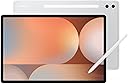
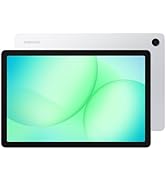
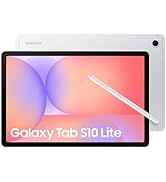
๐ Power your productivity and creativity on the go with Galaxy Tab S10+!
The Samsung Galaxy Tab S10+ (2024) is a powerhouse Android tablet featuring a 12.4-inch Dynamic AMOLED 2X display, 512GB storage, and 12GB RAM powered by a MediaTek Dimensity 9300+ processor. It includes innovative AI-driven tools like Sketch to Image and Note Assist for creative and professional workflows. Built tough with an Armor Aluminum frame and water/dust resistance, itโs designed for seamless multitasking, long battery life, and immersive Dolby Atmos sound, making it the ultimate device for millennial managers balancing work and creativity.


| ASIN | B0D854JR3R |
| Age Range Description | Adult |
| Aspect Ratio | 16:10 |
| Best Sellers Rank | #20,535 in Computers ( See Top 100 in Computers ) #473 in Computer Tablets |
| Brand | Samsung |
| Built-In Media | Data Cable, Ejection Pin, Galaxy Tab S10+, Quick Start Guide, S-Pen |
| CPU Model Number | MediaTek Dimensity 9300+ | MT6989 |
| Camera Description | Front, Rear |
| Cellular Technology | 4G, 5G |
| Color | Platinum Silver |
| Compatible Devices | S-Pen, Laptop |
| Connectivity Technology | Bluetooth, USB, Wi-Fi |
| Customer Reviews | 4.7 4.7 out of 5 stars (143) |
| Display Refresh Rate in Hertz | 120 |
| Display Resolution Maximum | 2800 x 1752 Pixels |
| Display Type | AMOLED |
| Generation | 10th Generation |
| Graphics Description | Integrated |
| Hardware Interface | Bluetooth 5 |
| Human-Interface Input | Touchscreen with Stylus Support |
| Item Dimensions L x W x Thickness | 28.5L x 18.5W x 0.6Th centimeters |
| Item Weight | 1.25 Pounds |
| Manufacturer | SAMSUNG |
| Memory Slots Available | 1 |
| Memory Storage Capacity | 512 GB |
| Model Name | Tab S10+ |
| Model Number | SM-X820NZSEXAR |
| Model Year | 2024 |
| Native Resolution | 2800x1752 |
| Number of Rear Facing Cameras | 1 |
| Operating System | Android 14 |
| Other Special Features of the Product | USB Host |
| Processor Brand | MediaTek |
| Processor Description | MediaTek Dimensity 9300+ |
| Processor Speed | 3050 MHz |
| RAM Memory Installed | 12 GB |
| Rear Facing Camera Photo Sensor Resolution | 12 MP |
| Screen Size | 12.4 Inches |
| Speaker Description | Dolby Atmos |
| Specific Uses For Product | Entertainment |
| Supported Audio Format | Dolby Atmos |
| Total Usb Ports | 1 |
| UPC | 887276861944 |
| Video Capture Resolution | 4K UHD 2160p |
| Wireless Compability | 802.11g |
| Wireless Technology | Wi-Fi |
A**R
All the AI features they're trying to push on the user aside, I actually really love this thing to the point where I rarely even use a PC anymore. Honestly, get a keyboard case and there's so much you can do on here that used to require an actual computer. I tend to write on Google Docs, draw on Clip Studio Paint, and browse YouTube. Since I bought this tablet for drawing, that'll be my main focus for this review. Coming from an XP-Pen art monitor, the Galaxy Tab is super sleek and lightweight. I love how I can put it in my backpack and take it with me anywhere. There's no noticeable paralax, at least for me. I can have big Clip Studio Paint projects with tons of layers and effects, and so far I haven't really experienced any lag at all. I also can't remember a time the device has ever gotten hot during use. My initial experience with the S-pen was a bit odd. It was weird going from a bulky pen to a light pen, for one, so it took some getting used to. After a year of use, I still hit that tiny button on the S-pen when I'm drawing about every couple of minutes, which is annoying. I recommend changing the button to something that won't interfere with your drawing if accidentally pressed. (I think mine was the dropper tool for some time, so suddenly changing the color I was using every few minutes got a little annoying.) Last note on the S-pen-- buy replacement nibs as soon as you can. There's a few different recommendations online but I went with a generic soft rubber nib. The one that came with the S-pen broke within a week, but since changing to the generic I haven't ever needed to replace it. I also ended up purchasing a nice screen protector with a paper-like feel, and the tablet works just as well with it on as it did before. No issues detecting fingerprints or touch input or pen input at all. Once again, coming from an art monitor (specifically one that did not have touch input), I recommend using a drawing glove and changing your drawing app's settings to reject palm input. In Clip Studio Paint, I often would select different layers or move the view pane with unintended palm input, so to fix that I made it so anything outside the canvas can only be affected by pen input. This helped a lot in addition to palm rejection. I love how I can upgrade the storage to hold more projects as well as all my movies. I also love how long the battery lasts! I can leave it on standby for days at a time and come back to only a minute drop in battery life. Here is my only complaint about this device, really, and it's not exactly Samsung's fault: most apps are not optimised for tablets, they are optimised for phones. So many apps I've tried to use will lock into portrait mode even if I'm locked into landscape, and the view cannot be changed. Apps like YouTube tend to not work exactly like they should (sometimes I can't access the comments no matter what I press, videos won't load, can't log in, having to delete the app and reinstall to get anything to work). The Amazon app on this thing is absolute garbage, it's like they took the phone version and just made everything wider with lots of unnecessary blank space. Surfing the web is doable but painful since neither mobile view nor desktop view are exactly right 100% of the time. If the apps thing is an issue for you, I recommend considering an iPad instead, since Apple seems to encourage iPad-specific versions of apps. All this to say, I can do so much on this thing that I used to need a computer for. And for that, I'm very grateful. Definitely worth the money.
D**R
I like the tablet just not comfortable with overall size. Hard to hold. The setup was not any problem. I was able to sync with my phone and it linked all my setting.
R**O
100%
Y**A
Buena calidad
F**E
I ABSOLUTELY LOVE LOVE LOVE this tablet! It's so great for taking notes! I am super happy with how fast it is and the size of the screen. This is the best tablet ever. The battery lasts around 8-10 hours of CONTINUOUS use. If using intermittently then it will last longer. It was easy to set up and has plenty of storage capacity. This was so worth the money to have such a great tablet for school! Update: using this in school is so amazing! This tablet comes with Samsung notes which is really an underrated app! It's the best study tool/note taking app! You can take notes and record lectures simultaneously. Then when you're ready to review back your notes with the lecture voiceover you can see in real time when you took your notes to help you with recognition and repetition! This definitely helps you get that information in your brain๐ง ! This tablet is the best tablet ever and I can't get enough! It's so slim and easy to handle and pack up in your backpack making notebook spirals obsolete! I know it's kinda pricey but I promise the price is worth it when compared to how much it helps with studies!
Trustpilot
4 days ago
1 month ago