Buy anything from 5,000+ international stores. One checkout price. No surprise fees. Join 2M+ shoppers on Desertcart.
Desertcart purchases this item on your behalf and handles shipping, customs, and support to France.
🎞️ Capture nostalgia, create legacy — digitize your past with Elgato!
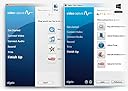
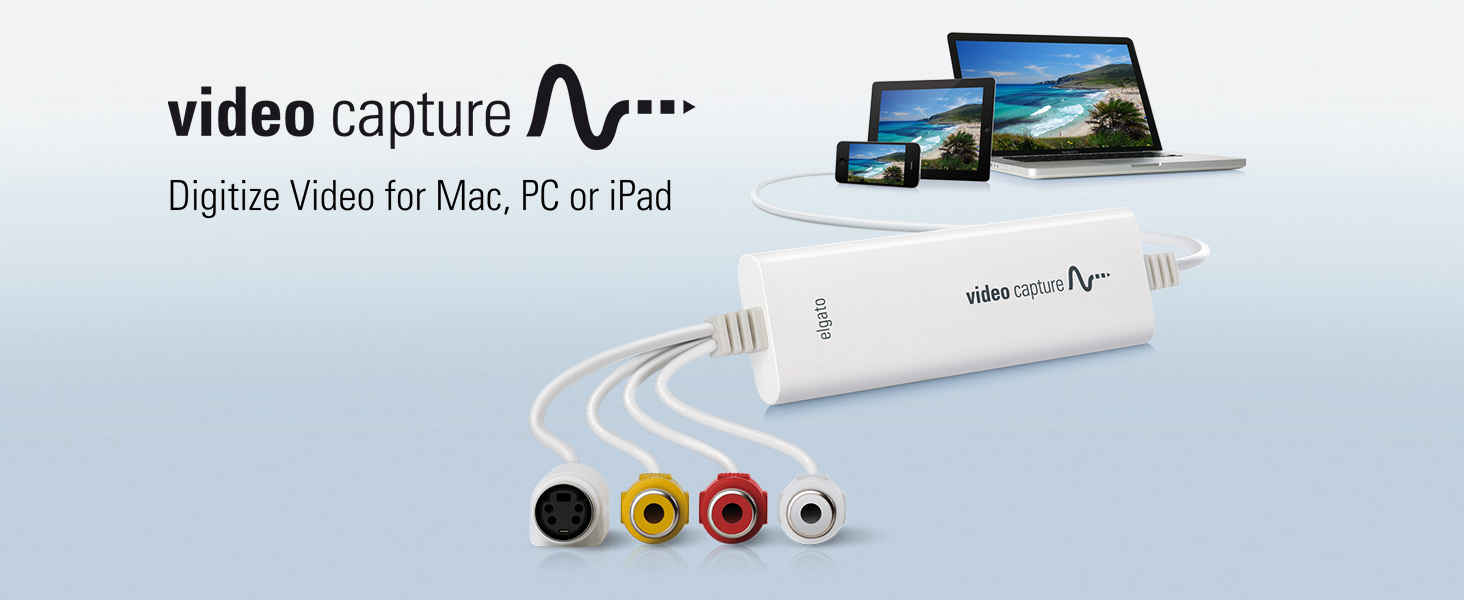
Elgato Video Capture is a compact USB 2.0 device that converts analog video from VCRs, camcorders, and other sources into high-quality H.264 digital files. Compatible with Mac, Windows, and iPad, it supports global video standards (NTSC, SECAM, PAL) and includes easy-to-use software that guides users through capturing, editing, and sharing vintage footage seamlessly. Perfect for professionals and enthusiasts eager to preserve and relive their analog memories in crisp digital format.


| ASIN | B0029U2YSA |
| AV Output | MPEG-4 |
| Antenna Location | Video Recording |
| Best Sellers Rank | #10 in Internal TV Tuner & Video Capture Cards |
| Brand | Elgato |
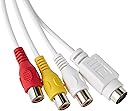
| Built-In Media | Composite video/RCA stereo cable, Composite-to-SCART adapter, Elgato Video Capture hardware |
| Compatible Devices | Personal Computer |
| Customer Reviews | 4.4 out of 5 stars 10,732 Reviews |
| Global Trade Identification Number | 00852095000225 |
| Hardware Interface | USB 2.0 |
| Item Dimensions | 4.09 x 1.38 x 0.47 inches |
| Item Type Name | Corsair Elgato 1VC104001001 Video Capture for your Mac or PC, iPad and iPhone, white |
| Item Weight | 80 Grams |
| Manufacturer | Elgato |
| Mfr Part Number | 1VC108601001-2 |
| Minimum System Requirements | Minimum system requirements: Mac OS X 10.6.8 or later, Windows 7 or later, 2 GHz Intel Core 2 Duo (or comparable) processor, sound card |
| Model Name | Video Capture - US |
| Model Number | 10020840 |
| Operating System | Mac, Windows |
| Other Special Features of the Product | Easy-to-use software |
| Platform | No Operating System |
| Recommended Uses For Product | Video Recording |
| Special Feature | Easy-to-use software |
| Tuner Type | NTSC, SECAM, PAL, PAL/60 |
| UPC | 806293530725 809186274317 852095000225 523161116460 012303707319 031112451343 887594557222 782941786686 163120866984 793426824281 168141640070 803982721570 012301012538 100177338347 872182673071 059072806942 012304319146 012300176811 172302821901 132018346228 809385669198 |
| Unit Count | 1.0 Count |
| Video Capture Resolution | 480p |
| Warranty Description | 1 Year Limited Warranty |
K**N
Amazing SIMPLE to use device!
I have an old 8 mm Sony camera that used FireWire for uploading the video to a computer. It worked great on windows XP. But when Windows 7 released it was glitchy, and I’ve never been able to get it to work on windows 10. It also has a component video audio out port. That is a small 2 1/2 mm plug that adapts to the yellow red white component video connections. It is an amazing old camera but technology moved away from fire wire. I sent the camera to a high-end camera shop that cleaned and tested it. I read a number of Internet blogs on how to make fire wire work with windows 10. I download countless drivers, tried numerous configurations, and it would not upload video. I finally gave up on the FireWire cable, and purchase the Pinnacle Dazzle component video capture device. Years ago I had pinnacle studio 14 and loved the program so I had high hopes this would work, but it did not. Driver issues and all kinds of glitchy gave me countless hours of troubleshooting to no avail . I was really frustrated! I was really getting worried since I have about 50 tapes spanning 35 years I need to digitize and preserve. Nearly 100 hours of memories. After watching an excellent YouTube video about this Elgato device I took one more chance and purchased it . It’s the best $90 I’ve ever spent. I hooked up the device to the component video on my camcorder, went to their website and download the Software for the capture device. I double clicked the software, and there’s four simple steps. 1. name the video click next. 2. Push play on the camera to make sure the video is coming through on the screen. once you see the video click next.3. Confirm you have sound. You can hear the sound when it comes through and there’s a 2 bar scale at the bottom of the page for the right and the left channel of sound. Once you have sound push the red button that says record.4. Wait for the entire video to play which most tapes can run up to two hours and once the video is finished click stop recording. No joke it’s that simple! They had some nice features like muting the sound so if you want to upload the video while you’re doing other work you’re not distracted by the sound. If you know your video on the cam corder is only a 60 minute tape you can automatically stop recording the video at 60 minutes so you can leave your computer and not have to worry about being there to stop it. There’s another simple area that will allow you to adjust the contrast brightness and other settings of the video to try to improve it. I played with this for a little while but found the default setting is the best for my videos. Depending on your computer it takes a short while to render for finalize the video and store it on your hard drive or which ever device you are saving it to. I have a New computer with the Intel I9 processor and and Nvidia 3070 graphics card and a 2 hour video takes about three minutes to process which is incredible! Each hour of 8mm video takes about 1 GB of memory. In the past two weeks I’ve uploaded nearly 25 of these two hour videos directly onto my NAS! I highly recommend anybody with a component video VHS or 8 mm camcorder or anything with the yellow red white cable that wants to save their memories to buy this device! Spend the $90 for this particular one since Elgato’s capture software is the secret sauce! There are hundreds of these devices for sale that look pretty much the same and there only $15. Don’t get fooled by a cheap price! If pinnacle studio can’t get the dazzle device correct I can’t imagine a $15 cheap knock off will get the software correct. Thank you El Gato! You have a very reliable very easy and excellent product! My children in their 30s and my grandchildren are enjoying watching all of these videos through my Apple TV!
S**E
Look no further...this is the conversion device that you want to buy!
LOVE this product! It works perfectly and it is amazing! I've had it a little over a month and have converted about 10 tapes so far. Transferring my old family tapes to MP4 files has been on my to do list for years. It would have cost a fortune to pay for a conversion service because we have accumulated over 35 tapes in the past 25 years. Plus, I do not trust my tapes in the hands of strangers. The majority of my tapes are the 8mm cassettes from an old Sony camcorder. Downloading and installing the software online was super easy. I just connect the camcorder to the device with a cord that originally came with my camcorder. Then I connect the device to a USB port on my computer. The software is very self explanatory and easy to use. The video plays in the software as you are recording. You can watch it playing on you computer screen as well as in the play back screen on you camcorder. You do have to play the whole tape in real time to capture everything (there is no high speed dubbing like with old cassette tapes and some VHS recorders), but the software has an option to automatically stop recording after a time period you set, so you don't have to sit and watch it while it records. You can leave and have it work and stop on it's own. I have a Windows 10 Dell computer that is about 2 years old. Its not super powerful or anything (I bought it at Walmart for $400). I would recommend not running other applications while you are doing a conversion so the software has full access to all your computer's memory. That may be why others had issues. The converted MP4 file plays fine and is great quality. Sound matches exactly to the video. There are no skips or jumps in the video. (Again, I recommend you do not surf the internet or run any other applications on your computer while these conversions are in process.) In my 10 conversions I only had one fail early on where the software bombed out when it was creating the file after the tape finished playing. I think it was because I had some other applications running on my computer at the same time. Since I stopped using my computer during the conversion, I have not had any issues. In addition to my Sonny 8mm tapes, I was able to convert VHS tapes and DVD's which were played on my old Magnivox VCR/DVD Player/Recorder combo unit. I disconnected the Video Out cords which connected the unit to play on the TV. I used the cord that came with the Elgato device and connected it to the same Video Out connections in the unit and the other ends of the cords to the Elgato device, then connected the Elgato to my computer. You will then see the VHS tape or DVD play on your computer in the software while it is recording since the VHS/DVD player is no longer outputting to your TV. Recording results were the same as my 8mm camcorder tapes. I highly recommend this Elgato device! You will not regret it and you will get your money's worth if you have as many old tapes to convert as I do. Plus, you will have peace of mind knowing your recordings will be saved forever in a media that won't decay like old tapes eventually will.
P**H
Great Product - Excellent Deal
I received my Elgato Video Capture Device the very next day after ordering. My computer is an iMac running OSX 10.7.5 (Lion). Installing the software was simple and straightforward. After starting up the software for the first time, a message came up recommending that I update to the latest software (version 1.1.2) which I did. To test it out, I connected it to a DVD player. At first the signal was being received and I was able to do a test capture. Turned out perfect, just as it should. But, after attempting a second capture, the signal went missing. I checked and re-checked all connections, tried a second DVD player, and still no signal. I even quit the program and restarted it without any luck. Next I tried the device on my MacBook Pro laptop (OSX 10.7.5 Lion). The same thing happened - Signal received on first try, but on subsequent attempts, no signal being received. So I tried the device on another iMac, this one running OSX 10.6.8 (snow Leopard). The device worked flawlessly, time after time. Ok, so next I decided to go back to using the original software that came with the device (version 1.1.1), and give that a try. Back on my computer, device connected, and running the original Elgato software version 1.1.1, everything worked perfectly! So it appears the their latest software does not work well with OSX 10.7.5. Only version 1.1.1 is working properly. I've been capturing video with excellent results for a week now and I am happy with the performance of device and software, and of the quality of the video captured. One thing I did notice, on very old VHS tapes where signal was less than perfect, the device actually lost signal from time to time. This occurrence was rare and most of my older tapes were captured without any problem. Overall I would recommend this product with high acclaim. It has been performing as good or better than I expected. It is easy to set up, easy to use. The software allows you to adjust video characteristics such as brightness, saturation, contrast, and hue. Audio input signal level is also adjustable. It allows you to save in both H.264 and MPEG-4 formats.
H**K
Inconsistent performance, Few tunable parameters, Very good support.
BEWARE! Depending upon your computer and quality of your videos you may not get desired results. PRO: Easy set up on Mac or PC. Fairly high quality options though not very configurable. Leads you through a step by step process so very easy to use. Biggest pro: Unlike the Diamond VC500 which comes with PowerDirector software that will choke if it thinks your home movie is copy-protected (and very likely it will), Elgato's software succeeded in all my tests. CON: My biggest complaint and the likely reason I will return it is due to video fluttering that occurs throughout from video coming from a Sony Handycam camera. The Support site is very minimal and a fairly robust Google search showed several users have had this same problem. Also, the software doesn't really come with much in terms of editing so you will have to find a 3rd party video editing tool as well as a 3rd party DVD burner if you want to burn these to archive media. Summary: I originally bought the Diamond MultiMedia VC500 card but couldn't get it past 10 minutes on my home movies using the included PowerDirector software (the full version wouldn't even recognize the VC500 at all!) without it halting saying it would not allow me to record copyrighted material (wow, someone copyrighted my home videos? amazing!). I'd used the Elgato at my local library on several tapes with success (or so I think, I'll have to review them) so I thought that this would be worth the extra money. However, I've tried this on 2 PCs and 1 Mac on several tapes and all have the same problem with video fluttering. The effect is throughout the videos and to describe it, think of how old TVs used to have wavy images as you changed channels. It is not consistent nor does it happen all the the time but when it does - Very disappointing! I'll keep searching and if I find success try to update this post later. I've submitted a support ticket on the Elgato web site. Will see if and how they respond. ****Update 12/5/2017**** I've bumped up the rating a star. Still not perfect due to very few modifiable parameters but I will give it another star based upon my further experiences with both support and the product. Support contacted me within 2-3 days. Unfortunately, they could not address the video flutter issue but here's the thing. I was transfering from my Sony Camcorder. Turns out that camcorders have very weak playback and so lack time based correction, something that can be found in higher end VHS players to stabilize the image. BTW, this issue is probably why the Diamond product kept thinking I had copyright protected videos. I'm going to try and run the camcorder through a some equipment I have here to the Elgato and see if that corrects the issue but it might be a while. Meantime, video conversion from VHS tape was excellent. To summarize, this is a decent product and about the best you can get for under $100. By the way, if it had software like PowerDirector included that would be an easy 5 stars. Mainly because of the value.
L**N
Does what it says on the tin
Like most people who're older than 20, I have a stack of older videotapes of various family events gathering dust on a shelf somewhere in my house. These videos may be dusty because they're not the kind of thing I'd want to watch often, or even regularly. But they DO represent valuable family history that can't be replaced if lost or destroyed, and although they're not something I'd watch often, I want to preserve them. But the truth is that analog video tape degrades over time. Oxide particles become brittle and chip off the tape surface, resulting in degraded picture and sound, and eventually rendering the tape unplayable. What to do? I'd known about such analog-to-digital conversion units for years -- they are not new to the market by any means. But it was something that, in the hustle and bustle of everyday life, I just hadn't gotten around to researching quite yet. However, when my wife sent me a link to a service that puts tapes in digital format for $25 PER HOUR OF TAPE, I figured now was the time to finally get started on this project. I've been using Apple computers since the days of the II+, so the name Elgato was familiar to me already, and after having a look around at some of the other options out there, this was the unit I settled on. Other units either had universally shaky reviews (both professional and user), such as the Roxio Easy VHS to DVD for Mac or they were solutions which cost much more money, designed to be a much sturdier, higher-use product for the a/v professional, not the weekend warrior like me. If that type of unit is really what you want or think you need, there are companies out there who will happily sell you a product that does the same thing as this one, for two to six times the price, such as the Canopus / Grass Valley ADVC-110 Advanced Digital Video Converter - 77010150100 . I'm sure you'll get a wonderful piece of pro-grade equipment which will outlive you. ;o) But if what you need and want is a sleek, compact, easy-to-use (and understand) video conversion unit which has very good quality and that inimitable "it just works" Mac-like interface, look no further than this Elgato video capture device. One thing we tend to forget, in this age of 1920 x 1080 and progressive-scan 1080p and retina display resolutions is that NTSC (which is what virtually all broadcast TV and video tapes were until the advent of digital broadcast) is still only 640 x 480. Always has been, always will be: that's the written standard for NTSC. On one of today's high-res monitors, a 640 x 480 window looks rather small and cheap indeed...nevertheless, that's what all of our TVs' resolutions used to be. The point is that you don't NEED an Avid console to render digital video at that resolution; a small and sleek device like the Elgato is plenty to extract the maximum resolution capable out of the format and convert it to digital. And the interface is - as I mentioned - drop-dead simple. It allows you all the basic functionality you'd need, offering you choices about how you want to store the media after conversion (YouTube upload and import-to-iMovie features are standard), and guiding you through the few steps of the process. Seriously, your mom could do this; it's that well-explained. And, at it's current price on Amazon, you could only pay a professional service to do three hours of tape before you exceeded the cost of purchasing the Elgato and doing it yourself, at your own pace -- and having a solution available to do it again, should you ever need or want to. This one's a no-brainer: if you're looking to convert hours and hours of old NTSC video to digital format where it can be safely stored away from the ravages that afflict analog tape, you really can't do better than this unit. All you could do is spend more, and why would you want to do THAT?
T**Y
It Works!
I might be a little late to the game on digitizing my old Hi8 and VHS movies. I originally saw this device by Elgato on sale on Amazon at an inflated price. I did my research, and it seemed like it would be the best option. I finally decided to plunk down the cash and buy it.. but it was suddenly out of stock!! Long story short, I ended up trying 2 other products that were similarly priced, one as much as $150. The first one had noticeable video quality loss. I really tried with the 2nd one (the $150 one), but it just wouldn't work properly. It wouldn't save files correctly, if it saved them at all. I returned both of them. Luckily, the Elgato unit was back in stock and at a much better price. Having gone through the other products, I can tell you the Elgato unit works. I have Windows 10 and haven't had any issue. Out of the 3 units I've tried, the Elgato unit has the most straight-forward and easy-to-use interface. It has the plug-and-play functionality I was looking for in the first place. The video quality is as much as I can ask for (with old standard definition video). The file sizes are also smaller without sacrificing quality (the 2nd unit was saving in 1080p). I am definitely pleased with this product.. the third time's the charm! Only some very minor gripes about the interface. It has where you can edit brightness, contrast, hue, and saturation on the video, but no way to preview it unless you record a test run (I probably won't be using this much anyway). The audio input/settings only allow for stereo. If you're recording from a mono source (like an old camcorder, etc.), you will need a 1 male-to-2 male RCA splitter so all your audio doesn't come through on one speaker. Finally, it would be nice if the video trim function had frame-by-frame controls. I have a video editor where I can do this later. Not sure if Elgato will come out with an updated Video Capture program, but those are suggestions. All these have easy workarounds for me, so I still give it 5 stars. UPDATE: A tip for audio sync issues. I didn't notice before purchasing that some people had issues with audio sync. I noticed some slight audio synch issues with a 30 minute video, where all of a sudden the video was slightly off. However, I was using other programs on the computer at the same time, as well as internet. For the video capture, I disconnected the internet and set the Priority in Task Manager to the highest setting. I also did not run any other programs. That seemed to clear it up. I'll update again if I continue to see issues.
S**M
Doesn't work on Windows 10 - Fell for Elgato... again.
The short of it is to say that I've been unable to use this device no matter what I try (I'm tech savvy, and have tried LOTS of things). The software continues to insist it cannot be recognized. I've followed Elgato's help page regarding camera privacy settings in Windows 10 to no avail, in addition to uninstalls, restarts, deleting drivers and letting Windows find them (goes to a page which won't even open). I've reached out to Elgato via email, because their CS lines aren't open when I need them to be. Based on the other 1-star reviews here, I'm going to guess that there's no work-around, and I'll be offered a warranty refund; you know, because that makes this giant waste of my time okay. WHERE are all the 5-star reviews coming from? WHO are these Windows 10 users who use this successfully and daily? A few minutes online hasn't turned up any for me, and there's usually one supporter in the fold who likes to scream about how dumb the rest of us are for not getting this to work. This is not the first time for me with Elgato either. I bought a game capture device on my old laptop, and it tried to kill my machine ON TOP of not working at all as well. I should have known better than to trust this high Amazon rating, as the other product was rated as phenomenal as well. Apparently I really needed to learn this lesson twice. WHAT YOU SHOULD KNOW: This company does a great job of hiding the negatives and troubles users encounter. Their marketing is top notch, so you'll want to buy this. If you're on Windows 10, please don't; at least not until you can find an article somewhere they've written which assures Windows users that the latest troubleshoot works. They post help articles which they're fully aware don't fix the problem, and they bug people who write poor reviews (based on my previous purchase & review experience) to no end; clearly hoping they'll remove the review once they have their money back. Run. Run very, very far from this company. Am I upset as I write this? Yes. Is it making me blow things out of proportion? No. It's extremely rare that a serious company will fail you twice over the course of only two product encounters separated by YEARS. But this company has offered me exactly that. I'll be sure to post a comment or update to the review if I actually get help; by which I mean a product which functions as advertised, not a refund.
T**F
Simple to use and provides great results
I got this as a birthday gift for a friend so that she could preserve the footage on many dozens of old Hi8 camcorder cassettes before they fail and the recordings of her family moments and early stage performing career are lost. I had bought one other Elgato product before and thought that it struck a good price/performance balance, so I selected the Elgato Video Capture device over less expensive products. I also personally own high-end video capture hardware from Blackmagic Design, and while it undoubtedly has more features, it is lacking in usability for novice users. The day I gave the Elgato Video Capture device to my friend I got a text close to 11PM saying that she was about to install the software for it on her laptop and try it out, and she would "probably bug me" the next day to help her with the setup and capture process. Well, that never happened. Instead I got a text the next day saying that she had stayed up until early morning capturing and viewing old tapes, and that "the transfer process is so very simple!" The hardware and software do a very good job converting the low-resolution analog information into digital files that are remarkably small. The footage is automatically slightly zoomed in an cropped to eliminate the jitter in the overscan area that would have been hidden by the bezels on old cathode ray TVs, so you get a nice, clean image without any distracting artifacts. The software can also automatically stop the capture after a set length of time, so you can have your VCR or camcorder play a recording and walk away without winding up with extra garbage at the end of the converted file that would then need to be trimmed. Another nice feature is that you can turn off audio monitoring during the capture. I'm glad that Elgato includes this simple but functional software so users don't have to try to find their own capture software, learn to use a basic NLE with lots of functions they will never use, or download ad-laden (and sometimes worse) software from the web. Highly recommended.
R**S
produit parfaitement compatible sur mac
Facile à installer, efficace. Les numérisations sont parfaites. Basique mais on ne demande rien de plus. Le post traitement si nécessaire devra toujours se faire avec un autre outils que celui de la numérisation.....Mac a Imovie qui est largement suffisant. Rien à voir avec ROXIO EASY VHS to DVD.......qui ne mets pas ses programme à jour et qui fonctionne tres mal.
A**ー
Macで使える
VHSテープのデジタル化を考え購入。 Macで問題なく使えます。 アプリも簡単。映像を取り込んだ時点で切り取りもできます。
X**R
Conversor analógico a digital que cumple con lo especificado
El dispositivo es robusto y con una buena longitud de los cables. diferentes elementos para adaptarlo a los distintos posibles aparatos, cámaras, vídeo cámaras o dispositivos con cables RCA. El que sea USB 2.0 no tiene importancia, ya que la conversión se realiza en tiempo real, Incluye software de Cyberlink (Este software se ha de bajar de su página web con el dispositivo conectado al ordenador) que nos servirá para realizar el traspaso y optando por diferentes formatos de salida. Buen producto, totalmente recomendable.
A**9
Semplice, pratico ed efficace
L'ho acquistato reduce da esperienza negativa con un prodotto analogo più economico. Ero quindi discretamente prevenuto, ma presto mi sono dovuto ricredere. Il software è essenziale, non aspettatevi di poter intervenire a livello avanzato sui vari settaggi. Badate bene, non lo reputo un difetto. Volevo un prodotto in grado di assicurare una buona qualità di acquisizione con pochi fronzoli, e utilizzabile da chi, come me ha poche conoscenza tecniche in materia di audio video. E così, filmati formato 8mm sono tornati a nuova vita, acquisiti e convertiti in formato mp4. La qualità è buona, per le mie esigenze e considerata l'età avanzata dei video (>20 anni) direi quasi ottima. Il prezzo non è dei più economici, ma ne vale la pena. Per abitudine leggo sempre le opinioni negative, ho deciso di provare, ed ho avuto ragione, non riscontrando nel mio caso i pochi difetti lamentati da altri. Ripeterei l'acquisto al 100%
A**R
The best in this category
With its easy steps to convert to better quality provided by outcome video and audio settings this is the best product I have found.
Trustpilot
5 days ago
1 month ago