Desertcart purchases this item on your behalf and handles shipping, customs, and support to France.
🖱️ Elevate your workspace with precision touch — because your cursor deserves the best!
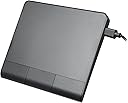
The Perixx PERIPAD-506 is a sleek, wired USB touchpad designed for desktop and laptop users seeking precise multi-touch navigation. Featuring a large 5'' x 4'' tracking surface, customizable sensitivity, and a detachable USB-C to USB-A cable, it offers stable, lag-free input with non-slip rubber feet for steady use. Compatible with Windows 7 and later, it’s a lightweight, portable solution backed by a 12-month warranty.


| ASIN | B0DHLDGBQ5 |
| Additional Features | Lightweight |
| Antenna Location | Office |
| Battery Average Life | 100 hours |
| Best Sellers Rank | #21 in Computer Touch Pads #3,854 in Computer Keyboards, Mice & Accessories |
| Brand | Perixx |
| Button Quantity | 3 |
| Color | black |
| Compatible Devices | Personal Computer |
| Connectivity Technology | USB |
| Customer Reviews | 4.0 out of 5 stars 318 Reviews |
| Enclosure Material | Plastic |
| Finish | Rubberized |
| Hand Orientation | Ambidextrous |
| Hardware Platform | PC |
| Included Components | 1 x PERIPAD-506 |
| Item Dimensions L x W | 5.31"L x 4.57"W |
| Item Weight | 0.14 kg |
| Manufacturer | Perixx |
| Mfr Part Number | 12355 |
| Minimum Required Operating System Version | Windows 7 |
| Model Name | PERIPAD-506 |
| Model Number | 12355 |
| Mouse Maximum Sensitivity | 400 dots_per_centimetre |
| Movement Detection | Optical |
| Movement Detection Technology | Optical |
| Number of Batteries | 1 Nonstandard Battery batteries required. |
| Number of Buttons | 3 |
| Operating System | Windows 10, Windows 11, Windows 8 |
| Power Source | Corded Electric |
| Special Feature | Lightweight |
| Style Name | Wired |
| Theme | Technology |
| Unit Count | 1 Count |
| Warranty Description | 12 Month Limited Warranty |
H**L
Works great with Windows 11 pro.
I am used to a laptop keypad and am looking for a trackpad. This is so helpful and works great with Windows 11 Pro. I will pick this pad over a mouse.
R**N
In Windows a so-so experience, in Linux it is great.
I had got this touchpad to use at work. It does work on Windows 11, but it is very inconsistent on its sensitivity in different apps, especially microsoft apps. Unfortunately, in the app I have to use most often, Viseo, some of these issues make it almost unusable. I did see in one of the reviews that this worked in Linux, so I decided to use it at home on my Linux computer (Manjaro). For this I have to say: It works better in Linux than it does in Windows. You do have to do some tweaking on the settings (I use KDE plasma) to get it to your liking, but it works. I am taking off 1 star because of the issues I experienced in Windows, but if your looking for a touchpad for Linux, I would say get this.
J**.
Works great.
Touch sensitivity is really good and precision is better than I expected. It's lightweight and I worried that it would slip around but it doesn't. I use this on my desktop to mimic the 3&4 fingers on my laptop. The buttons are kind of cheap feeling and not angled the best but price reflects this.
J**L
Very nice / buttons don’t work however
A bit pricey, but spent that for quality. As it is well built and doesn’t slide or move when using is nice. They included a USB cable that actually has good length to it. I did not measure. All the tap features work. I do like it but as of now, I might need to return it. None of the buttons are working. I will give myself another day or 2 to try and get them working. Windows 11 Enterprise edition.
G**X
Quality pad for affordable price
My old laptop track pad finally stopped working, so I tried a cheap Chinese plug-in track pad as a solution. The problem was that its connecting cable was so thin and weak that after a number of months of use and abuse, the wires must have shorted and the pad would no longer work correctly. I decided to pay a little bit extra for this German brand after two of those other pads both died. I love this one. The USB connector cable on this one is much thicker and stronger, the pad itself is more solidly built, and so far there have been no problems with functionality. I predict that this one is going to last much longer than other, cheaper options out there.
P**1
RELIABILITY OF ELECTRONICS PERIPAD AD-506
First log: peripherals Issue: Non-Functioning Build quality wouldn't be a buydeath. Obsolescence ? Ceased working after 6 months. Awesome features like 3 finger swipes. Adequate documentation except for the lack of a manufacture driver. Experience has warned me about amazon sourcing and product support.
G**N
Perixx PERIPAD-506 Wired Slim USB Touchpad - Wired Detachable Touchpad for Desktop and Laptop
This came wonderfully packaged in a simple, well-protected box that almost opened itself! The Perixx 506 works as described in the instruction manual, but the included USB C connection cord is too short for the desktop computer I wanted to use it on, so it will require a special setup. At least it's better than the Laser Mouse I've been using (which is far better than the original mouse with that rubber ball) but the mouse itself isn't too ergonomic, requiring repetitive pressure on both finger and thumb joints that's excessive and even painful. >>>Progress is because of difficulties and bad designs.<<< With the Perixx on my next desktop computer I'll have a choice. I don't like those big drawing pads with the stylus but prefer something smaller with a dedicated spot so switching back and forth will be easy.
E**Y
Ergonomic solution for a wrist that's tired of mice!
Exactly what I was looking for to complete my work from home setup. Sleek and high quality. The only issue I have with it is that I vastly prefer to tap to click things rather than pressing a clunky button. For 95% of clickable things, I can tap to click with this, no problem. But then there a few things that consistently don't register taps as clicks, even though with the laptop's built-in touchpad the taps in the same areas DO register successfully. After several weeks of use, I've gotten used to predicting which things probably need a button click, so it's only a minor annoyance.
V**R
Ótimo produto
Recomendo comprar!
S**I
Good Product
Good Product
C**R
Sehr ordentliches externes Touchpad
Ich erstelle viele Einträge auf Webseiten mit horizontalem Slider. Das Wischen durch Dutzende Einträge ist mit der Maus etwas mühsam. Daher wollte ich einfach mal probieren, ob es nicht eleganter geht... und habe das Peripad 506 ausprobiert. Ich finde das Ding richtig gut! Es hat dieselbe Funktion wie ein übliches Touchpad am Notebook, die Tasten lassen sich an- und abschalten. Die Wischgesten funktionieren gut. Die Tasten sind natürlich "hinten", das mag vielleicht ermüdend sein, wenn man mit dem Daumen immer "nach hinten" tasten muss, aber das kommt natürlich auf den Einsatz und die Gewöhnung an. Und dennoch... sende ich das Pad zurück, denn für meinen speziellen Einsatz – im Slider wischen, OHNE anfassen zu müssen – klappt es mit der Maus tatsächlich doch besser. Ich hatte die Hoffnung, der Mauszeiger würde innerhalb des Fensters bleiben, aber das tut er nicht, er "landet" auf dem anderen Bildschirm. So muss ich immer doppelklicken und halten und wischen, zurückfahren, wieder doppelklicken und halten und wischen... Das geht aus meiner Sicht (und vielleicht will ich mich ja auch nicht umgewöhnen) mit der Maus tatsächlich weniger umständlich. Wahrscheinlich gibt es für diesen Fall keine bequemere Lösung für Windows. Ich meine, bei Apple könne man auch auf das Pad an sich drücken und wischen, man müsse also nicht doppelklicken... Ja nu. Tut mir leid, wie gesagt: Das Ding tut, was es soll. Daher 5 Sterne von mir. Finde es auch gut, dass es kabelgebunden ist, ich mag den kabellosen Kram nicht so gern.
O**S
Great Trackpad for Windows
This exceeded my expectations. - Worked as soon as I plugged it in, no driver download required (Windows 11) - Two-finger scroll and Pinch-zoom work great, even in Blender for 3D camera movement - Build quality is good, but bear in mind it is very much PLASTIC, so won't feel as premium as a glass Mac trackpad I mainly bought this one for it's middle button, which is very rare on trackpads. I wanted to use it with Maya, and it does work! I'm happy to have the three physical buttons, but they will take some getting used to, as they are quite large. If they came out with a version that also supported MacOS, I'd buy it in a heartbeat. Do you hear me, Perixx?
K**T
Prettig in gebruik
Prima product, prettiger in het gebruik dan vaste touchscreen op laptop
Trustpilot
2 weeks ago
1 month ago