Buy anything from 5,000+ international stores. One checkout price. No surprise fees. Join 2M+ shoppers on Desertcart.
Desertcart purchases this item on your behalf and handles shipping, customs, and support to France.
📡 Elevate your WiFi game with style and security — because your network deserves to be as smart as you are!
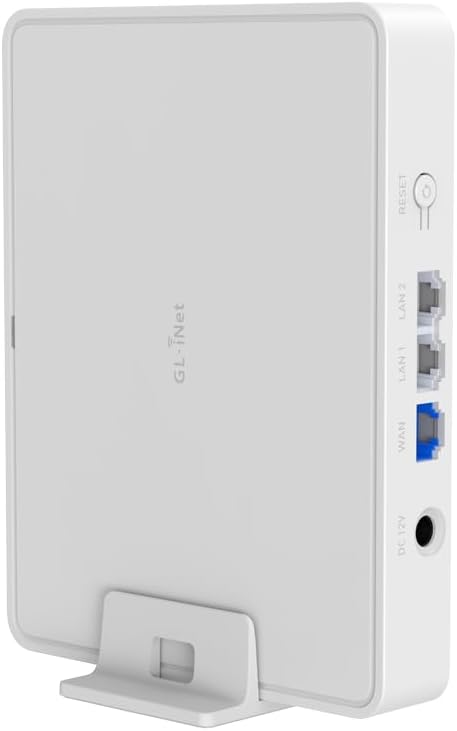
The GL.iNet GL-B3000 (Marble) is a cutting-edge WiFi 6 router combining ultra-fast dual-band AX3000 speeds with a unique photo frame design that fits seamlessly into any modern home. It features robust security with pre-installed OpenVPN and WireGuard VPNs, advanced parental controls via Bark and AdGuard Home, and versatile display options including wall-mounting. With three gigabit Ethernet ports and easy app-based setup, Marble offers professional-grade networking with a stylish twist, perfect for tech-savvy millennials who value both aesthetics and performance.


| ASIN | B0D7PTFZZM |
| Antenna Location | Business, Home, Studies |
| Antenna Type | Internal |
| Best Sellers Rank | #25,193 in Electronics ( See Top 100 in Electronics ) #178 in Computer Routers |
| Brand | GL.iNet |
| Built-In Media | GL-B3000 (Marble) router with 2-year warranty, Power Adapter (US Plug), Ethernet Cable, Photo Frame, Stand, Wall Mount |
| Color | Marble |
| Compatible Devices | Personal Computer, Smartphone |
| Connectivity Protocol | Wi-Fi, Ethernet |
| Connectivity Technology | Ethernet, Wi-Fi |
| Control Method | Touch |
| Controller Type | App Control |
| Coverage | Comprehensive |
| Customer Reviews | 4.4 out of 5 stars 271 Reviews |
| Data Transfer Rate | 3000 Megabits Per Second |
| Frequency | 5 GHz |
| Frequency Band Class | Dual-Band |
| Global Trade Identification Number | 06971131384472 |
| Has Internet Connectivity | Yes |
| Has Security Updates | Yes |
| Is Electric | Yes |
| Is Modem Compatible | No |
| Item Dimensions L x W x H | 8"L x 8"W x 8"H |
| Item Weight | 275 Grams |
| LAN Port Bandwidth | 1000 Mbps |
| Manufacturer | GL.iNet |
| Maximum Upstream Data Transfer Rate | 2402 Megabits Per Second |
| Mfr Part Number | GL-B3000 |
| Model Name | Marble |
| Model Number | GL-B3000 |
| Number of Antennas | 4 |
| Number of Ports | 3 |
| Operating System | OpenWrt |
| Other Special Features of the Product | Access Point Mode, Guest Mode, Internet Security, Parental Control |
| Router Network Type | Wireless, Dual-Band |
| Security Protocol | WPA2-PSK, WPA3 |
| Special Feature | Access Point Mode, Guest Mode , Internet Security, Parental Control |
| Voltage | 5 Volts |
| Warranty Description | 2 Years |
| Wireless Communication Standard | 802.11ax |
| Wireless Compability | 802.11ax |
S**A
Home Run!
What an amazing value! I'm coming from a ddwrt flashrouter that costs 3-4x. This router comes with a very nice web ui for managing most of the settings you'll ever need and if thats not enough you can access the openwrt web ui (Luci). This is only a gigabit rated router so if you have high speed fiber I guess this isn't for you. I'm very happy with all the built-in apps for VPN, WG, tailscale, etc and the simple setup of guest networks and scheduled tasks. Open source routers have come so far in the last 10 years. I have separate access points connected to it so I'm not as concerned with the wireless range that is probably not as good as a router with external antennas but it has WiFi 6 so if you have a good signal and you presumably only have gigabit internet service, the router won't be your bottleneck. The default gateway is 192.168.8.1 which leads me to think this is intended for it WAN port to be plugged into a LAN port on your main router creating a separate subnet that is for VPN and guests. This can all be changed of course. This thing is small like an 8port switch The picture frame basically doubles its size but is a very cool and creative feature that is freestanding or wall mountable. I appreciate that its white and modern so that it can be left out and not be an eye sore. Great job GL. iNet!
B**B
Good basic router
Been a good router for an apartment. TV, Roku, and laptops work great on wifi and the adguard feature is quite nice
B**A
Powerful Wi‑Fi 6 Router — Great Hardware & VPN Client Support, But Not Reliable as a VPN Server
I purchased the GL.iNet GL‑B3000 (Marble) Wi‑Fi 6 Router thinking it would serve as a reliable VPN server, especially since another GL.iNet model I own works exceptionally well as a VPN client. I got this one on sale for about $40, and at first glance it impressed me — the design is elegant and sturdy, and the hardware feels premium and robust. In everyday use as a Wi‑Fi 6 router, it performs extremely well. The connection is strong and fast, coverage is excellent, and the interface is intuitive. GL.iNet includes useful features like firewall controls, guest network setup, USB support, and advanced routing options. This device delivers what it advertises in all the basics — and works flawlessly as a VPN client when connected behind a regular modem/router. However, I ran into significant difficulty setting it up as a VPN server. Despite spending many hours trying different guides and configurations, I couldn’t get the VPN server function to work properly. This was very disappointing because that was the main reason I bought this unit. After researching online, it appears that VPN server capabilities may be limited or not fully supported in U.S. firmware or settings, which many users have also noted. Whether this is due to firmware, policy, or regional restrictions isn’t entirely clear, but it simply didn’t perform as a server the way I expected. Pros: • Excellent Wi‑Fi 6 performance — fast, stable, and reliable • Well‑built, premium design and quality hardware • Easy setup and solid feature set for routing, firewall, USB devices, etc. • Works very well as a VPN client behind a standard modem/router Cons: • VPN server functionality was extremely difficult or impossible to set up, despite multiple attempts and extensive online research • Advertised capabilities may not work as expected depending on region or configuration In short, if you’re looking for a robust Wi‑Fi 6 router with wide feature support and solid performance, this is a very good choice — and it feels like a high‑end piece of hardware for the price. However, if your goal is to use it primarily as a VPN server, I would look elsewhere or verify compatibility first, because it simply didn’t work for me. Overall, I’m keeping it because it’s powerful and reliable, but I think potential buyers should be aware of the limitations with VPN server setup before purchasing.
A**T
Very versatile and not brutal to configure, even in unconventional ways.
I got this for a very specific - and unusual - purpose. I recently moved into a living situation where the only internet access is via WiFi, which I understand is quite common. Well... problem. While it might be fine to just toss Skylar a password and she can connect her iPhone and be good to go, I'm a bit more... complicated. I rolled into the place with a 400lb wrought iron half-rack filled with PowerEdge servers. They don't do Wifi. But I did previously host WiFi to half the continent via a Cisco Catalyst 3850U and a Cisco Aironet 4800. One option that I considered and then immediately discounted was the possibility of reconfiguring the 4800 from being a WiFi host to being a Wifi bridge. While that is certainly possible (because anything is possible with Cisco gear), the English language does not contain harsh enough expletives for me to express how much work that would entail and how extremely frustrating it would be to get it actually working. I literally ain't got the time nor the patience for all of that. So... enter exhibit A. Take the 4800 offline and plug the Marble into the same exact cable. For a bit of context, that cable is connected directly to a physical port on a PowerEdge R340 running OPNSense firewall/NAT/gateway. Yes, I use a full enterprise-grade server for my router. But that also means that I didn't need Pip Squeak thinking it was the lord of the network either. So obviously, the first order of business was to handle business, as usual. It popped up and snagged an IP address. I was running an active nmap scan and saw it as soon as it came up. Into the web console, through the startup wizard, which actually listed something comparable to my scenario as a setup option. So I selected that. Bad move. "Comparable" != "same." I ended up in some bizarre loop of errors. I can't recall what they exactly were anymore. But I remember that it appeared to be an intentionally engineered catch-22 situation. So, I burned a lifeline and asked ChatGPT for help. It turns out that the install option I selected had taken me down one path in the UI that sounds analogous to the path I really needed to take that was somewhere else entirely. But there was still one bizarre step required: I had to have both the uplink and a client port connected for the setup to succeed. Weird, but nothing one more cable can't solve. So I connected the uplink to the 3850, it got an IP address, and the configuration wizard was happy. Once the config was done, I pulled the uplink cable - since it's now using the WiFi as the uplink - and it's humming along happy as a clam! So, it was a little weird, but still, I got the Marble working as a Wifi bridge so that my servers can reach their favorite playgrounds - StackOverflow and GitHub - in about 15 minutes compared to 3 days (easily) if I had opted to reconfigure the 4800. Not to mention, I still have a full head of hair! Spectacular win! I actually can't speak much to the performance of it. I'm getting about 115Mbps over this crappy Spectrum link. But it's about twice as fast as what I get connecting my laptop to the same access point. So, it appears to be dancing just below the FCC-mandated power limit for WiFi. You literally can't get better performance than that without committing a federal crime! So there ya go... BTW, I took a picture of the Marble, printed it out, and mounted it in the frame. Perfect way to showcase its curves!
K**.
good router
It's small, cost effective, and works great. Its WIFI coverage is good enough for my 3000sf house with the device centrally located on the second floor. I get strong signal everywhere. Openwrt now supports this router so there is that too.
D**S
Excellent customer service
My product stopped working after just a few months of use, so I reached out to the support team. They were extremely friendly and walked me through returning the product so they could issue a replacement. They then sent me a new router within a couple of days. I’m impressed with their attentiveness and urgency in resolving my issue.
E**A
GL.inet by Amazon is AWESOME for international shipment!!!
GL.inet has good and functional features products different of many other in the market, and the international shipment by Amazon.com is the best option in shipment time delivery and costs!
G**N
You will need a regular xfinity service not prepaid!
Why did you pick this product vs others?: I thought that this device would work with the Xfinity prepaid internet service but it doesn't and I'll just put this modem in storage in case I sign up for the regular Comcast xfinity service!
N**O
Would and will buy more of GL.iNet
Excellent little router. Needed something versatile to allow for access points/router/ethernet modes and this delivered comfortably. Coming from an old but reliable TP-Link I am also surprised of all the features and configurability it has. The range is decent (better than the Orange Livebox's at home). I will certainly buy from GL.iNet again.
V**A
Funciona com tailscale
Muito bom e facil de instalar tailscale.
M**L
Great Wi-Fi 6 Router with a Unique Design
Excellent Wi-Fi 6 performance with fast, stable connections across all my devices. The photo-frame design looks stylish and blends perfectly into the room. Easy setup, strong signal, and great features like VPN support and parental controls. Highly recommended for anyone who wants both performance and aesthetics.
E**M
ist ein guter Router
Der GL.iNet GL-B3000 Wi‑Fi 6 Home Router ist ein guter Router, der im Alltag zuverlässig gearbeitet hat und meine Erwartungen erfüllt. Gute Leistung & Ausstattung: Der Router nutzt Wi-Fi 6 (AX3000) und bietet stabile, schnelle Verbindungen im Heimnetzwerk – ideal für mehrere Geräte gleichzeitig. Er hat 3 Gigabit-Ethernet-Ports und unterstützt sowohl OpenVPN als auch WireGuard, was zusätzliche Sicherheit und Flexibilität bringt. 🔹 Reset-Knopf / Hardware-Taste: Der physische Reset-Knopf ist sehr praktisch, wenn man schnell auf Werkseinstellungen zurücksetzen möchte oder nach einem Update Probleme auftreten – das gibt zusätzliche Sicherheit bei der Fehlersuche. OpenWrt-Support: Der Router kommt mit OpenWrt-Unterstützung, was für alle, die mehr Kontrolle und erweiterte Netzwerk-Funktionen wollen, ein echter Vorteil ist. Insgesamt bin ich mit dem Router sehr zufrieden – er läuft stabil, hat praktische Funktionen wie VPN-Support sowie einen echten Reset-Button und lässt sich flexibel in verschiedene Netzwerkszenarien integrieren.
C**R
Easy to use, provides flexible use-cases. (Private anonymous guest wifi via VPN)
The GL.iNet Marble (GL-B3000) is a significant upgrade from the Mango, offering reliable performance and powerful features, particularly for secure guest network management. Core Benefit: VPN-Enforced Guest Wi-Fi For anyone providing Wi-Fi to guests (visitors, Airbnb users, contractors), securing your network is paramount. The Marble allows you to enforce a VPN connection exclusively for a dedicated guest SSID. This setup offers crucial benefits: IP Masking: Guest activity does not reveal your home's external IP address. Anonymity: Guest internet usage is not directly tied to your household. Network Isolation: Guests are completely segmented from your main primary network, preventing access to your personal devices or IoT ecosystem. Technical Setup for Enforced VPN Guest SSID: VPN Configuration: Import your preferred VPN configuration (e.g., a "Secure Core" configuration from ProtonVPN's website) into your GL.iNet router. Guest SSID Creation: Configure a separate Guest SSID. VPN Policy Rule: In the GL.iNet GUI (often under VPN or Multi-WAN settings), set a policy rule to route traffic from the Guest SSID (or its associated VLAN) only through the VPN interface. Advanced Firewall Enforcement (LuCI): For enhanced security, ensure the guest Wi-Fi only functions when the VPN is active. Access the router's advanced LuCI interface: Navigate to Network > Firewall > Zones. Locate the "Guest" zone. Edit the Guest zone, and under "Covered networks", ensure that your main WAN interface is unchecked. Only your VPN interface(s) (e.g., VPN_Client, Wireguard_Client, tun0, wg0) should remain selected. Click "Save & Apply". Reboot the GL.iNet router. This configuration ensures the guest Wi-Fi will have no internet access if the VPN connection drops, maintaining privacy and security. Your main GL.iNet SSID will continue to operate directly via your plain internet connection. Enhanced Guest Experience: To facilitate easy and secure guest access, I export the guest Wi-Fi details (SSID, password) to a QR code using my Samsung smartphone and printed it. For added convenience, an NFC tag programmed with the Wi-Fi details can be stuck on the underside of the printout, allowing guests to simply scan or tap to connect to this secure, private, and anonymous network. This ensures their online activities remain separate and do not influence your personal Browse profiles or expose your home network. The price is very reasonable for the value it provides. It is larger than their travel routers, but this is not really the kind of device you would travel with. You can do everything I mentioned with their other travel routers also!
Trustpilot
1 month ago
4 days ago