🎨 Elevate your digital canvas—where precision meets freedom!
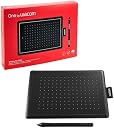
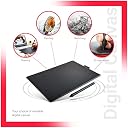
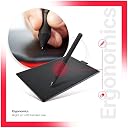
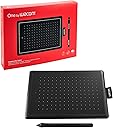
The One by Wacom CTL-472/K0-CX is a compact, professional-grade digital drawing tablet featuring 2048 levels of pressure sensitivity and a battery-free, cordless pen. Its 6 x 3.5 inch active area offers a portable yet precise workspace, compatible with Windows, Mac, and Chromebook systems via USB plug-and-play. Designed for creatives and educators alike, it combines trusted Wacom durability with intuitive operation, making it an essential tool for digital art, note-taking, and classroom innovation.


| ASIN | B078HRR1XV |
| Active Surface Area | 6 x 3.5 centimeters |
| Best Sellers Rank | #503 in Computers & Accessories ( See Top 100 in Computers & Accessories ) #2 in Graphic Tablets |
| Box Contents | One pen tablet, pen, Replacement Nibs, USB Cable,Quick start guide,Warranty Card |
| Brand | Wacom |
| Brand Name | Wacom |
| Colour | Red/Black |
| Compatible Devices | Tablet |
| Connectivity Technology | USB |
| Country of Origin | China |
| Customer Reviews | 4.3 out of 5 stars 16,307 Reviews |
| Display Type | LCD |
| Item Dimensions L x W | 9.5L x 15.2W Centimeters |
| Item Type Name | Creative Pen Tablet |
| Item Weight Unit of Measure | 0.25 Kilograms |
| Manufacturer | Wacom India Pvt. Ltd, 426, DLF tower B, Jasola Vihar, New Delhi - 110025 |
| Model Name | One By |
| Model Number | CTL-472/K0-CX |
| Native Resolution | 2560x1440 Pixels |
| Network Connectivity Technology | USB |
| Operating System | ChromeOS, MacOS, Windows 7 or later |
| Packer Contact Information | Wacom India Pvt. Ltd. |
| Pressure Sensitivity | 2048 Levels |
| Product Features | Anti-Glare Glass |
| Screen Size Unit of Measure | 10 Inches |
| Special Feature | Anti-Glare Glass |
| Specific Uses For Product | Drawing |
| Target Audience | Teacher |
| Unit Count | 1 Count |
V**J
Nice pen tab
Durable product
D**K
Was I wrong about this one!
What could be more "natural" then writing for interacting with a computer? Or so I thought. Let's just say that it took three full days of figuring-out, configuring, adjustment, cursing, irritation, anger... to get to a stage it to work acceptably (barely). Believe me when I say there is a steep learning curve. Less said about "Windows Ink", the better. It is at best unreliable and useless. It activates itself when you least expect it. But then that is a Windows problem. This is not a replacement for a mouse. You still require it for using a computer. This model was launched in 2017, I did NOT expect that. How may devices available today are launched nine years ago? The tablet and pen are nice and look robust.
M**K
Great for beginners and very lightweight and durable.
I have been using this product for 5 months now to make 2D Animation and it has proved to be really useful. The box it comes in is perfect for long term storage and the tablet itself is really good. The pen is battery free so you do not need to worry about that. They even provide extra nibs. the tablet only took me 1 day to get used to and I find it really easy to use. It is easy to install the driver and after that everything is smooth as butter. If you are having trouble it driver installation/set-up you will find many helpful tutorials on the internet. It is great for beginners and you can do all sorts of things with it. The pen has two customizable buttons which are really handy. The tablet has a light indicator about when it is connected and that is really helpful. I Love It!
V**P
Works on Linux. A "must have" for researchers.
Its a must buy for every academician during these lockdown times. I use it mainly on shared online whiteboards for discussing academic related stuffs with my advisors and fellow researchers. I use it on Arch Linux. It is super easy to get it working on Linux. Just plug and play. A very famous opensource driver for wacom tablets will already be installed as a kernal module in most of the recent Linux distros. If not, you can easily install it. There is no noticeable latency. The pressure sensing works great! Pressing harder gives you thicker lines. If you want to do digital art on Linux, use InkScape. If you just want a white board (virtual), use OpenBoard. Both of them are very good. The writing area is quite sufficient. I don't think a larger one would have made much of a difference in overall experience. For most cases, the small one will do the job. For people who never heard heard of this company: Wacom is a Japan based company which makes quality stuff. One of the top companies which makes pen tabs. You can buy it without worrying about the quality.
S**Y
Good product
It is a good product. I am using it for creating youtube videos.
N**L
Wacom CTL-472/K0-CX Digital Drawing Graphics Pen Tablet
The Wacom CTL-472 is an excellent entry-level graphics tablet, perfect for beginners, students, and digital art enthusiasts. Its compact size fits easily on small desks, while the battery-free pen delivers smooth, precise strokes with natural pressure sensitivity. Drawing, editing photos, and taking digital notes feel effortless and responsive. The simple plug-and-play setup works seamlessly with most design and learning software. Although it lacks shortcut buttons and advanced features, its performance is reliable for daily creative work. Lightweight, durable, and highly accurate, this tablet offers great value for money and is ideal for learning and everyday digital creativity.
P**R
Reliable Earlier, But Recent Build Quality Isn’t the Same
I've been using this product since 2020, and as an online teacher, it's been a perfectly usable teaching tool. It's super comfy and easy to use, plus it's small and a good value for the money. The writing quality on any software is spot on; I personally use OneNote. I always loved this tool, but it broke in 2025, so I guess it lasted five years. Now I need to buy it again, but I'm not happy with the recent quality after using the same product for so long. The material isn't as good, and I'm also bummed about the packaging.
A**C
Excellent product for the price.
Product details: Its a low end drawing tablet - it has no display or screen - the surface can be used to indicate positions on the display of the system to which you have it connected via USB cable (usually PC or laptop screen) Its a good product. Packaging was excellent. Delivery good. All products part of the kit (tablet + pen + replacement nibs + nib-replacer + warranty card + manual) where there and intact. I had purchased the Red version of CTL-472. Has 2 sets of packaging as part of the product ( excluding amazon packaging). Outer pull through red cover, and inner box cover inside which the tablet and other paraphernalia are cased). Pls note the package boxes are made of cardboard. Store the entire system in moist and humidity free environment. Utility - Its purpose is for use as a drawing tablet and hence should allow you to create good drawings or images. But technically / practically that depends on your experience with using any drawing tablets if any at all, if you have used other tablets of Wacom etc. 1: Basically its a small device. The area available for use on the board is actually less. Do check the images- the area corresponding to the dotted region is only available for any practical use. The rest despite being part of the drawing board cannot be used. 2: Due to the same reasons as above it works more in the direction of a pointing device (mouse) and suitable for drawing lines and simple figures. Added to it is that it doesn't have a screen or display of any sort. You should be looking at your computer screen while making the drawings 3: Its more suitable for use as a mouse/ freehand document annotation (which is difficult with a mouse) , playing some games (difficult with normal mouses), creating moderate MOOC course material etc. 4: Surely you can use it for creating drawings, images, animated characters etc, and use them for video creation, editing, visual effects etc. But as a tool. It has no specific software that can help you achieve these things. If you really want a drawing board for creating stunning images better prefer Wacom Cintique - its expensive but worth it. Final Note: For this price this is what we will get and its good. Good for beginners and those who can work without display-based-drawing tablets
Trustpilot
3 days ago
2 months ago