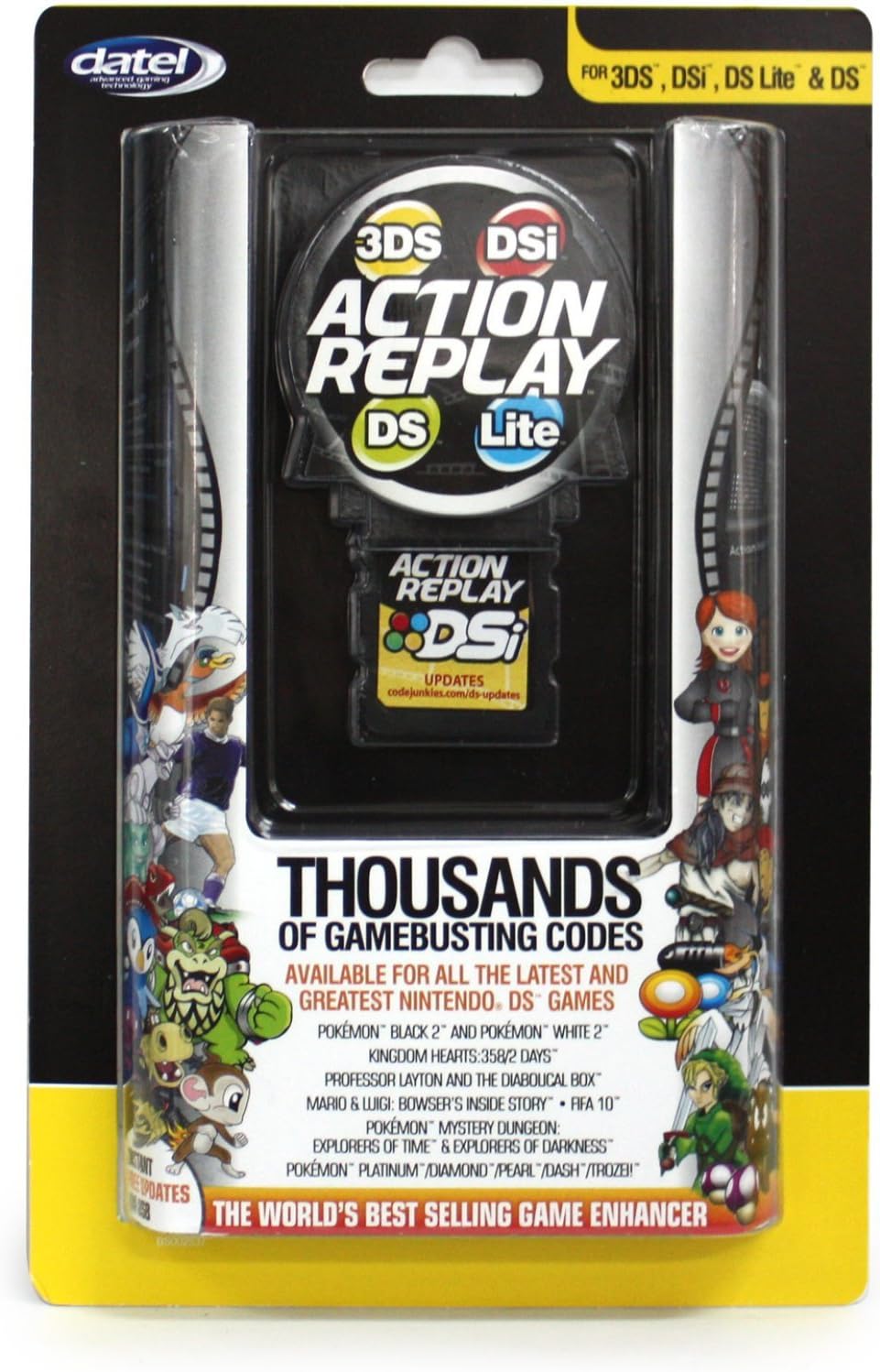
Datel Action Replay Cheat System (3DS/DSi XL/DSi/DS Lite)
Description
🎉 Level Up Your Game with Datel!
- SEAMLESS CONNECTIVITY - Easily download new codes via the included USB cable—no hassle, just fun!
- INTUITIVE TOUCH CONTROL - Navigate effortlessly with full touch screen functionality for a smooth gaming experience.
- JOIN THE CHEAT REVOLUTION - Be part of a community that elevates gaming to the next level with innovative cheats!
- UNLOCK ENDLESS POSSIBILITIES - Dive into a treasure trove of preloaded cheat codes for your favorite games!
- COMPATIBLE WITH MULTIPLE DEVICES - Works flawlessly with 3DS, DSi XL, DSi, and DS Lite—your gaming universe expanded!
The Datel Action Replay Cheat System is a versatile gaming accessory designed for 3DS, DSi XL, DSi, and DS Lite. It comes preloaded with a vast array of cheat codes for the latest games, features full touch screen control for easy navigation, and allows seamless code downloads via the included USB cable.
Specifications
| Asin | B005NJVQ60 |
| Best Sellers Rank | #44,167 in Video Games (See Top 100 in Video Games) #111 in Nintendo DS Cases & Storage #1,525 in Nintendo 3DS & 2DS Consoles, Games & Accessories |
| Customer Reviews | 3.8 3.8 out of 5 stars (291) 3.8 out of 5 stars |
| Date First Available | September 16, 2011 |
| Is Discontinued By Manufacturer | No |
| Item Weight | 1.6 ounces |
| Manufacturer | Datel |
| Product Dimensions | 4.7 x 4.3 x 1.6 inches; 1.6 ounces |
| Rated | Kids to Adults |
| Type Of Item | Video Game |
Reviews
User
Comprehensive review! Please read for 3DS owners
First off let me start by saying, that I am glad I took a chance on this item although the low/negative remarks!---------------Incompatability---------------Im a 21 year old user of this item. This mean Im not reviewing something that WAS purchased for someone else ( Kids etc.) Before you kncok this product understand what it is. It is a cheat device that relies on UPDATES to function. Everytime 3DS updates you will need to update this device! Thats a no brainer. So in honesty if you are buying this for your child and they cant, or dont know how to, look up information online and download and install drivers/software. Please teach them the importance of playing a game through because you do not have patience. NEEDLESS TO SAY AS OF 10/22/2012 THIS PRODUCT WORKS FOR MY 3DS. POKEMON BLACK 2 . ON WINDOWS 7 64-bit.-----------Fit issues-----------I have read that some folks are saying this item does not fit thier 3DS or is not clicking when inserted. To be quite honest. SEND IT BACK!! Not only does this item click when inserted but it doesnt slide or fit any differently than it would have in my DS. Actually I just put it in my ds and VIOLA, it fits identically. No need to use tissue to hold in place etc. Please folks, use your heads, if it slides or needs tissue to stay in place. it obviously isnt "compatible"... SEND IT BACK! AGAIN... NO ISSUES REGARDING FIT HERE-----------------Executing cheats-----------------YES everyone this is considered a hack! YEs this can/ and will brick (delete/destroy/render useless) your game or system, if you have no idea wha your doing. Again not for anyone under 12+ ... so if you allow a 20.00 items to break your 249.00 ourchase, whose dumbness is that?? Stop rating this thing low because you made the BADdecision of allowing a 10 year old to hack a $250+ item with $20.00 media. LOL Pricesless....This does allow users to input cheats manually and via the PC. Im sorry but for pokemon i refuse to do it manually. so i do it via pc. And it has executed flawlessly. Lading is another problem. I have done about 20+ transfers and only 2x did my system freeze. but thats because I had too many codes on at once. My fault.. not the product.--------------Final thoughts---------------Im glad I took a chance and purchased this, espite sooo many negative reviews. LoL its sad but to be honest most reviewers need to learn the difference in reviewing a PRODUCT and reviewing SELF ERROR/Defective device. Amazon asks your to review the PRODUCT HERE. You can review the seller (for defective items etc) on another page/channel on amazon. So many people make this error. Also if you arent the END-USER . Please DO NOT REVIEW. Its like me rating a kitchen aid mixer 1-star because my mom made bad cookies.Im sure ill get alot of bad rap from other but for those of you who will actually admit its you (lack of understanding) and not the device, please send me a message and ill walk you step by step through getting it to work for you. LOl will also get you some codes if you want!
User
Review/Troubleshooting *it does work!* --Don't download the firmware update from the link printed on the cartridge!!--
Hi guys, I know this action replay has been out for a while so I'm not going to really make this a review of the product itself. I'm assuming most people who have stumbled down to this review already know how an action replay works, what it does, etc., and probably had an older model (like me) or used a friend's action replay. This review will mostly be for a little troubleshooting.I'm also making this review to let potential buyers know that this action replay still works great as of December 4th, 2013! So for those of you viewing this and thinking it's too late and that this action replay is outdated, fear not! It works perfectly on all models of the DS/3DS!--I'll start with the packaging.--So it seems that there are 3 different 'versions' of this action replay found on Amazon, one is in yellow packaging, one red, and one blue. I purchased the one in the red packaging hence why I'm writing my review here for the red package and not the other two. For those who are confused, as far as I'm concerned, there does not appear to be a difference in these action replays besides the packaging. As I said, I purchased the one in red packaging, but when my action replay arrived, it came in the blue packaging one and works completely fine. So for those of you wondering which of the three to order, just go with the cheapest one (and preferably sold by or fulfilled by Amazon if you don't trust 3rd party merchants)--Moving on to the action replay itself--When you buy this, you are getting the following:- Action replay cartridge- USB lead for connecting the action replay cartridge to your pc- The user guide/manualFor those of you like me who had an older model of action replay, unlike that one, this action replay DOES NOT come with the Code Manager PC software disc. Instead there is a link that Datel provides in the user guide/manual that will take you to the page where you can download the Code Manager software. So don't worry too much about that. I actually prefer it this way.This action replay works basically the same as the older models, so if you've used/owned one of the previous action replays, besides the new look to the code manager and the action replay itself (when you load it on your DS/3DS), you will pretty much figure out how to go about using it with ease. Although if you don't understand, that's what the user guide/manual is for.--Troubleshooting tips--Going to try and solve a huge issue I've seen people have with this new action replay, specifically when trying to use it on their 3DS. The issue is that when you try to start your action replay on your 3DS/3DS XL (as in, you've inserted the cartridge, it appears on your 3DS/XL home screen and you touch it to load it up), you get this error that says--"error has occurred. Turn off the power and see instructions manual for help."--I started getting this error after using my newly bought action replay for about 5 minutes. Now, there might be other reasons why you guys are getting this error, but all I can do is tell you guys how I got this error and how I fixed it on my 3DS.I got this error by doing exactly what I mention not to do in the title of my review.DO NOT I REPEAT. DO NOT DOWNLOAD THE FIRMWARE UPDATE VIA THE URL THAT IS ON YOUR ACTION REPLAY CARTRIDGE. There should be a link/url on the front side of the action replay cartridge under the 'Action Replay DS' logo that says--UPDATES--codejunkies.com/ds-updates <-- DO NOT GO TO THAT LINK AND DOWNLOAD THAT FIRMWARE UPDATE. It is the one from last year and it is way outdated.For those of you who are just now purchasing this like me, you will be glad to know that the action replay already comes prepackaged with the most up-to-date firmware update for the cartridge as well as the most up-to-date Code Manager Software when you download that via the url Datel provides in the user guide/manual.Anyways, I made the mistake of downloading that old firmware which caused my action replay to not be compatible with the 3DS anymore, hence why I started getting that error message whenever I tried to starting it. If you think this is also the reason why you got that error, then fear not because the fix is easy!All you have to do this:1. Reset your action replay - it's explained in the user guide/manual.2. Download the most up-to-date firmware update for this action replay found via this link from the codejunkies website[...]3. Follow the instructions carefully after downloading.And that's it, your action replay should now work again.--Parting tips--Just some general tips when using action replay. Might help prevent future corruptions/glitches to your action replay/console/game:- Unlike with the old action replays, DO NOT connect your action replay to your console when trying to connect to the code manager. Previously, in order to do this, you would have to connect the old action replay to your pc via the usb cable, and then after doing that, you would place the action replay in your DS and then load it up. This is because the old action replays used an older version of the Code Manager Software, and this older version only detected the codes ON YOUR DS. However with the new Code Manager, it now detects what codes you have stored ON YOUR ACTION REPLAY.Connect your action replay to your PC via USB lead, open up Code Manager and do whatever you were going to do ->**making sure to click the 'Commit Changes' button located at the top left of the Code Manager window to save whatever it is you did**-> then disconnect your action replay from your PC when you are done, and insert it into your console when you are ready and it should automatically update depending on the changes you made to it.- Don't use too many codes at once when playing a game. Pretty straightforward. Could lead to game crashes, data corruption, etc.- I don't think you have to do this but it's good practice if you have a 3DS/XL. Whenever you plan on using your action replay, turn off (not sleep mode) your 3DS/XL system, then insert the action replay (with w/e game you plan on using it for already in the action replay cartridge) into your powered off 3DS/XL and turn on your game. I know it will also work if you insert your action replay into the 3DS/XL while it is already on, but like I said, it's good practice.Super long review I know, and I might make a video review later, but hoped this helps for anyone having problems!
User
3DS accessible ....NAHHHHHH!!
when i herd this product was available i decided to pick it up. i was excited to finally have a action replay for the 3ds....now i know this isnt used for 3DS GAMES, but for the 3ds SYSTEM.... with this in mind i proceed to buy it, and in about a week and a half it arrived. long story short, i put it in my system and nothing happend... tried it so many times and still nothing happend. SO COMING TO THE CONCLUSION... IT IS NOT MADE FOR THE 3DS!!! NOT MADE FOR IT... SO IF U HAVE A 3DS, DONT BUY THIS PRODUCT.
User
PC Software is a little buggy, but overall it works as advertised
Title says it all, the software works occasionally correctly, has a lot of lockups and hangs, but when you finally get your codes transferred to the device, the device does work very well as advertised. There really isn't much more you can say, it either works or it doesn't, and it works. The problem is, it doesn't work for any 3DS games in spite of being advertised as 3DS compatible. It only means that it's DS compatible on a 3DS system - not 3ds compatible.Those games have some strict DRM that this system is not able to circumvent. Sorry.
User
Instructions For The Negative Reviewers!
Due To A Nintendo Update You Are Required To Update Your Action Replay Or It Wont Work. The Update Was Released On 8/10Ok this could get long..-This item works with the 3DS and the DSI. (unsure about the 3DS XL)-It works on nintendo ds games. (unsure about 3ds games as i dont own any to care.)(Use it to play pokemon black)-Does NOT come with a cd. (comes with a USB A to 4-pin Mini-b Cable )-Does NOT read the drivers on Windows 7 64 Bit-To make it work with Windows 7 (and probably other editions of windows) Use a program called ReadyDriver Plus 1.2What this program does is allow the driver to be installed because the driver is unsigned and cant be used without it being signed.-To get the driver install/software in the first place you can get at code junkiesNow i know it says DSI but it still works.-This will not harm your Nintendo DS, Unless you go and use unkown codes or dangerous codes that could damage the system/game. For example walk through walls on pokemon could be bad because your somewhere your not supposed to be or interuppting events that havent happened yet or not supposed to happen yet.-If you use this for pokemon and you want to use those pokemon for wifi battles. Do NOT give them moves they cant actually learn, places they couldnt be caught at, etc.-Using the Code Manager after this is all done you can get updated codes for your Action Replay and enjoy.-You can change the color of your words on the Action replay to red,blue,green. But im not sure how i did this.-This Does fit unlike some people saying it doesnt stay in. sometimes it takes a few tries to get it right. but it does lock in place.-do not have the action replay in your nintendo ds while plugged in your computer.
User
Good product - if there is a problem, this is how you fix it
The first one I got was already broken when I got it, like someone had stepped on it. So I returned it and got another one.The second action replay was great for about 6 months but then the screen started turning red and white , kinda blurry. So I used the available disk to download the DSi code manager. If this happens follow the steps:1) click the top left corner of the "DSi code manager" screen.2) click reset3) wait for it to reset, you can drag and drop new games to your action replay. Remember to "commit to these changes" at the top left hand corner.Treat your action replay with care. It is easily broken because of the cheap plastic its made of.Another thing to remember is that some games may freeze if you load alot of codes at once. For example like Pokemon, I ran like 10 codes at once and the game became slow and sometimes froze. Take a little at a time.Check the codejunkies website if you need more codes or google them. You can add new codes and/or games. There is are updates for your DSi for the newer games if needed.Problems:-easy to break-may slow down your game-glitching with the action replay start up menu ( just reset your action replay via the code manager like I said)Hope this helps
User
The Info buyers NEED! MUST READ!
This had FAST shipping. So that's a plus.The AR DOES work with the 3ds, NOT 3ds games (only DS games). Some people have left concerns of this product not working and they would be right. Mine works perfectly. no issues with freezing or black screens. However, it will not work with your 3ds right out of the box. You will need to download the 3ds update from the manufacturers web site,Here is the link:[...]Then Plug in your AR and run the software. Then it will work like a charm.Remember, NO DISC so any code you want will have to be manually entered on the AR through your 3DS.
User
Some pretty crappy points
I'm a coder so I bought this product to learn this coding language and make my own codes.I got off to a rough start. I plugged it in, and got a message saying 'the drivers did not install'. So I said "Okay, let's go to their website and download everything there." After a LOT of run around from Datel's website and several Google searches, I was able to find and download the drivers I needed. They don't seem to update their site any more. A lot of newer games only have codes on blogs, because codejunkies (that's their code website) is down- and from a few blogs I read, has been down for MONTHS.So be prepared to do some digging for the codes you want, and be prepared to put them in yourself. Other than that, it's a pretty neat product and works well, even though it's no longer supported, I guess.Edit: I am running Windows 7 64 bit, in case you were wondering about compatibility.
Common Questions
Trustpilot