Desertcart purchases this item on your behalf and handles shipping, customs, and support to France.
🔩 Engineer your connections like a pro — precision meets perfection!
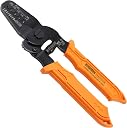
The ENGINEER PA-09 Micro Connector Crimping Pliers are a precision tool crafted in Japan from high-carbon S55C steel, designed to crimp AWG #32 to #20 wires across over 100 terminal types including MOLEX, TE, JST, and D-Sub connectors. Featuring four interchangeable die widths (1.0mm to 1.9mm), ergonomic oil-resistant TPR handles, and a locking latch with coiled spring, this 175mm plier ensures durable, comfortable, and precise crimps for professional-grade micro connector work.


| ASIN | B002AVVO7K |
| Best Sellers Rank | #42,396 in Tools & Home Improvement ( See Top 100 in Tools & Home Improvement ) #154 in Crimpers |
| Brand | ENGINEER |
| Brand Name | ENGINEER |
| Color | Orange |
| Customer Reviews | 4.5 out of 5 stars 1,712 Reviews |
| Cutting width | 1.9 millimeters |
| Global Trade Identification Number | 00798256188237, 04989833035099 |
| Grip Type | Ergonomic |
| Handle Material | Thermoplastic Rubber (TPR) |
| Handle Type | Ergonomic |
| Included Components | No |
| Item Dimensions L x W | 6.89"L x 2.24"W |
| Item Type Name | Precision Crimping Pliers for Open Barrel Terminals |
| Item Weight | 0.14 kg |
| Manufacturer | エンジニア(ENGINEER) |
| Manufacturer Part Number | PA-09 |
| Model Number | PA-09 |
| Product Dimensions | 6.89"L x 2.24"W |
| Set Name | Engineer PA-09 Universal Micro/Mini Crimping Pliers Set |
| Size | 17.5cm x 5.7cm |
| Specific Uses For Product | Pro |
| Specification Met | CE |
| UPC | 798256188237 |
M**K
Works very well for JST-XH on both 22 and 24 AWG stranded wire
Works very well for JST-XH on both 22 and 24 AWG stranded wire. Delivered very quickly! For precision work you need precision tools, so while it is a little pricey, it will save you time, materials and frustration. It takes a little bit of practice but nothing one can't learn quickly. Keeping the tab on when you cut the JST-XH off the strip will help you position it onto the crimper just right. The first bare wire crimp is crucial, so don't crush it too much, just enough so it doesn't pull out with a small tug. As you are learning, you can go slow with the second crimp (over the insulated section of the wire) - recrimp it if necessary until it's just right. That second crimp should form a B shape holding the insulation but not piecing through it thereby creating an airtight seal. Once done, remove that tab and you are good to go. Good luck!
J**N
Works great on ZH1.5
Crimping ZH1.5 is a real pain in my butt. I tried a few different crimpers before I found this one. This crimper, while still tedious, has made the process a lot more doable for me. I still mess some up, but probably get 80% correct (which is much better than before). So if you're struggling with crimping ZH1.5, then I highly recommend this tool. Note: You have to crimp twice with this tool. Once for the exposed wire, and once for the shielded. And make sure the little clips at the front are not crimped in the process, you need those to secure it in the housing.
A**X
First Time Crimper, Big Time Fan
I've never crimped my own connections before so this whole world is new to me. I started out with one of those heavy ratcheting models that worked, but felt really clumsy to use with smaller wire gauges. I really wasn't having a lot of success with them. As I was looking around at tutorials on how to use them better, I stumbled on the ENGINEER version of the crimper. I already had their solder sucker and loved that so I figured I'd give these a shot and I am so glad that I did. They're lighter, easier to manipulate and visibility on what's happening is much better. On some Dupont connectors that I'm working with I generally have to crimp three times. I crimp the insulation first, then make two more for the wire crimp. I don't know if that's the "right" way to do it, but it's working reasonably well. That said, the ratcheting models are cool because they can do the crimp in one step, that's definitely got some value if you're doing these in significant volumes, but for me, I'm doing these maybe half-a-dozen at a time so I can take my sweet time. I'd be remiss if I didn't mention the little crimp connection plier on the front. This allows you to square them up really easily before inserting them in the crimper. This makes things so much easier and isn't something I had on the ratcheting pliers so I had to use two tools. I now use this feature every time. The jaws themselves are very nicely shaped and line up precisely. I can't tell if it's Wire EDM or just extremely precise machining, but they're really nice. Last, and I don't know how many people care bout this, but the locking mechanism for keeping the crimper closed in storage can be easily manipulated by your thumb while it's in hand. That's a really nice touch.
E**X
Excellent Control for Small JST and Micro Connectors
I’ve become a big fan of ENGINEER tools over the past year, and they’ve quickly become my go-to brand for precision electronics work. The quality and attention to detail have been consistently excellent, and these PA-09 crimpers are no exception. I already own a ratcheting crimper, and while it’s great for larger terminals, I’ve found it to be a little too bulky and aggressive for delicate JST and other micro connector pins. The PA-09 gives you much better control over the crimping process, allowing you to feel exactly what’s happening instead of relying on a ratchet mechanism. That extra precision makes a noticeable difference when working with tiny open-barrel terminals. The dies are well-machined, alignment is excellent, and the finished crimps come out clean and secure with very little effort once you get the hang of the two-step crimping process. It’s a versatile tool that handles a wide range of small connector types, so I don’t need a dedicated crimper for every style of terminal. The build quality is exactly what I’d expect from a tool made in Japan—solid, smooth, and built to last. If you spend much time assembling cables for electronics, 3D printers, RC projects, or microcontroller boards using JST, Molex, Dupont, or similar connectors, this is a worthwhile investment. It isn’t the cheapest crimper available, but the improved control and consistently better crimps make it well worth the price.
M**R
Made crimping very small connectors a bit easier. Breaks it into two steps though.
These crimpers are a bit expensive in my opinion but they came very highly recommended. They are made in Japan and are well known. I searched for them by name because someone I trust told me they were the best. I don't mind spending a bit more to get high quality tools but at first glance, they didn't seem very special to me. They are light. The grips are very fancy but nothing too special. They do work really well so I do not regret the purchase. They make good reliable and verifiable crimps. (more on the verifiable part later) I have only used them on Molex Micro-fit so far but I plan to use them for JST and other connectors in the future. They do not ratchet like some less expensive crimpers but for small connectors the ratcheting is not needed. (maybe not even good) With the ratcheting crimpers I could destroy a plug and not even feel it. With these you get more of a feel for what you are doing. (you feel it when you destroy a connector or when you get it work perfectly) You can over crimp a connector with these and I don't think you can do that with the ratcheting crimpers. You can actually see what you are doing with these. They are so thin you can look from both sides. You crimp the wire and insulation separately unlike the big thick ratcheting crimpers that do both at the same time. I start with the stripped electrical wire crimp first. I close the wings of the terminal just a little with the end of the tool, then insert it into the appropriate groove with the wings facing the bottom of the groove. I squeeze the crimper very carefully to get the wings in the right spot. (so it bottoms out in the groove) Then I put the wire in the right spot between the connector and the grove, holding it tight against the connector and squeeze to crimp. It rolls the wings up on both sides and looks like a factory connection if everything goes well. I check that connection since it is the most important one and them move onto crimping the insulation. I tug on them a bit and if it falls out I start over. I crimped a dozen or more connectors worth of crimps with it so far. (and more to come) I had so much trouble crimping small connectors in the past that I dreaded doing it again. (with the cheap ratcheting crimpers) Those ratcheting crimpers are ok but you can't see much, you can't feel anything and my failure rate was pretty high. Even if I was successful, the wires would fall out randomly. These didn't exactly make it easy but my success rate went way up as did my confidence in the actual connectors. That was the most important thing to me, to get good crimps and have solid wiring on my project. (no wires falling out) I guess the biggest thing is that these have very small grooves and the thickness of the crimper varies based on the size of the groove. I found that matching the thickness of the tool with the area to be crimped was more important than the width of the groove. Because of this, I use the end of the tool which works a bit like a needlenose pliers, to squeeze the wings in just a bit. Then I fit it in the groove that I select. (not based on the width of the groove) You don't want a larger groove if you are going to crimp part of the connector that you didn't want to. When I first got the tool, I picked a groove based on the opening of the groove. That didn't work well because the tool was too thick there and crimped by insulation wings or the connector itself. Making the wings of the connector fit the groove with the proper thickness works much better. (just my opinion) Ok so there are several steps that didn't exist with the ratcheting crimper now that I think about it. After I crimp I had to pull the connector out of the tool. (it was stuck in the groove) Not a very automated process but a verifiable and repeatable multistep process instead. (with a higher success rate though) I really do like being able to pull on the wire after I crimped it. That is the reason to buy this tool. You can't do that with the ratcheting crimper and at times when I crimped with the ratcheting crimpers, the only thing holding the wire in place was the crimp on the insulation!!! Those were failed crimps but they weren't always obvious. This two step process avoids that issue and you can test the crimp on the wire before proceeding to the insulation. You can still mess up the second crimp but you know the first one was good either way. Again I squeeze the wings in a bit to get them started. In summary, the tool is expensive. It feels ok but doesn't feel like a $40 crimper until you use it a bunch. (even then seems a little overpriced) I know there are knockoffs but my friend told me to get this one and that it would make my life easier and my crimps more reliable. I watched some videos and decided to get this brand instead of a knock off. Crimping tiny connectors is a pain. (if you don't do it often that is) This tool seems to make crimps more reliable once you figure it out. Verifying the crimp on the wire alone is very valuable!! I still dread the idea of crimping tiny little connectors but I have more confidence now because I have a better tool.
N**K
insanely better than every other crimper I've tried
Was shocked at how well these work. I didn't originally get them because I thought crimping JST-XHP's would take longer (two crimp steps instead of one), and these were also not ratcheting, which I thought would be better. Wrong. The one-step iRandomNameGoesHere crimpers were fussy. They're too deep. Not only can you not do it in one step, but you also can't do them in two because, again, they're too deep. The ratcheting is totally unnecessary too for any of the crimps of this size, and worse, if you need to readjust, once you start, you're locked in. The dies used with most crimps are trash. The iRandomNameGoesHere were good but too deep, and the rest simply mangled everything. Engineer's on the other hand make picture perfect crimps. Without the ratchet you can "feel" (and see) a good stopping point for crimping the jacket, and a full squeeze is perfect for the bare wire. It turns out to be way faster. Within 5 crimps I had the hang of it, and my connections have been the absolute best I've ever made. Worth every penny. I actually enjoy crimping terminals now.
J**S
Versatile, Reliable, Feels Good in the Hands. These are the ones you want.
If you are a Hobbyist, buy these. Skip the cheaper ones you can find. These were so good, that I ended up buying a size up, and an extra pair so I always have one in reach. These are a must have whenever I work on my 3d printers, Electronics etc. Pros - High quality and durable - Versatile and compatible with various connector types (JST, Molex, etc) - Precise and consistent crimping results - Comfortable handle / Feel Good to Use - Easy to use - High level of control Cons: - Expensive compared to others - You might need some practice before you master them (due to them being completely manual) - Doesn't work with barrel connectors (IE Spade, etc) that you commonly find at local hardware stores Additional Details: 2 versions of these pliers exist, Taiwan and Japanese made. I've had both in my hands but of different sizes. The Japanese ones are subjectively better, but I wouldn't return the Taiwanese ones. The only major difference is that the Japanese ones have the crimped connectors slide out easier. There are some minor visual differences as well. I mostly view these as a hobbyist tool, if I were using these everyday 9 to 5, I think I might get something else. They are very much a "do it once, do it right, take some more time to do it" type of tool instead of churning out millions of connectors. Though I'm unaware of anything better, these are just so dang good.
R**J
Made in Taiwan, NOT in Japan
Tool is not as advertised. Made in Taiwan, NOT in Japan. Somebody needs to change the description.
C**E
Great
Love this thing, anyone who doesnt has a skill issue.
A**ー
DIY用途 RCドローンやクローラーの小さなコネクタアセンブリーに是非!
他のネットショップや海外のショップで値段が安い圧着ペンチを幾つも買って失敗。 このペンチは1.0mm、1.4mm、1.6mm、1.9mmと小さなオス、メスのコンタクトを圧着するのにとても便利と感じた。 過去からレビューを見ながら品定めをするも、なかなか良い製品に行き当たらなかったが、少し値が張るもののやっと巡り合えたというのがいい得て妙な感じ。 特に製品紹介写真に掲示されている主な対応端子(一例)は嘘のない情報源であった。他の製品は対応していると書かれているので購入してもダイスが厚すぎて抜け止めのポッチを潰してしまうものもあり、この一点でも信頼に値するのではないかと考える。 このペンチを購入してからFC、ESC、モーター、VTX、レシーバーなどのケーブル、コネクタ用に圧着がはかどり、ペンチを握るたびにニヤケテしまうのは個人的な感想の表れである。
J**0
Excellent quality of crimping
Best tool I ever had for JST crimping, including ZH size, which is tiny. Recommended.
J**.
Worth the cost
Wow do these work well. I struggled for some time with another brand of ratching crimpers that were cheaper and thought would suit my intermittent use needs. I had all but given up on making JST crimps since most of the time they mangled the connector or the crimping was not tight. For my first few crimps with these, I tried the 1.9 mm die for some smaller JST connectors. Once I switched to a smaller die every crimp was perfect. Goes to show what a quality tool can do.
O**T
Great product, worth the extra for quality.
Excellent product. Tried a cheaper random brand ratcheting crimper and all it did was make a mess. These units have a precision jaw profile and the JST crimps actually work. Narrower profile allows a better view of what you are crimping and taking two crimps to complete the termination is not an issue.
Trustpilot
2 months ago
5 days ago