Buy anything from 5,000+ international stores. One checkout price. No surprise fees. Join 2M+ shoppers on Desertcart.
Desertcart purchases this item on your behalf and handles shipping, customs, and support to France.
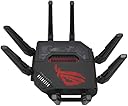
🚀 Dominate your digital domain with ASUS ROG Rapture GT-BE98 — where speed meets security in style!
The ASUS ROG Rapture GT-BE98 is a powerhouse quad-band WiFi 7 router delivering up to 25Gbps speeds via advanced 320MHz channels and 4K-QAM modulation. Equipped with dual 10G and four 2.5G LAN ports, it supports high-throughput wired connections ideal for gaming and professional use. Its AiMesh technology enables seamless whole-home coverage, while subscription-free VPN and WPA3 security protocols ensure robust, hassle-free protection. Designed for the tech-savvy millennial professional, it combines future-proof performance with scalable mesh networking and intuitive app control.


| ASIN | B0CKBY2NGV |
| Antenna Location | Gaming |
| Antenna Type | Fixed |
| Best Sellers Rank | 22,953 in Computers & Accessories ( See Top 100 in Computers & Accessories ) 191 in Routers |
| Box Contents | GT-BE98 Quad-band WiFi 7 (802.11be), warranty card |
| Brand | ASUS |
| Brand Name | ASUS |
| Colour | black |
| Compatible Devices | Gaming Console |
| Compatible devices | Gaming Console |
| Connectivity Protocol | Wi-Fi |
| Connectivity Technology | Wi-Fi |
| Control Method | App |
| Country of Origin | China |
| Coverage | Entire House |
| Customer Reviews | 3.7 out of 5 stars 244 Reviews |
| Data Transfer Rate | 25000 Megabits Per Second |
| Frequency | 320 MHz |
| Frequency Band Class | Quad-Band |
| Frequency band class | Quad-Band |
| Global Trade Identification Number | 04711387079461 |
| Has Internet Connectivity | Yes |
| Has Security Updates | Yes |
| Is Modem Compatible | No |
| Item Dimensions L x W x H | 35L x 35W x 22.1H centimetres |
| Item Weight | 1 Grams |
| LAN Port Bandwidth | 10 Gbps |
| Manufacturer | Asus |
| Manufacturer Part Number | 90IG08F0-MO9A0V |
| Maximum Upstream Data Transfer Rate | 2500 Megabits Per Second |
| Model Name | GT-BE98 |
| Model Number | GT-BE98 |
| Model name | GT-BE98 |
| Number of Antennas | 16 |
| Number of Ports | 4 |
| Operating System | RouterOS |
| Other Special Features of the Product | Quad band WiFi 7 (802.11be), multi-link operation, 320 MHz bandwidth, 4K QAM, highly efficient antennas |
| Product Warranty | 1 Year Manufacturer |
| Router Firewall Security Level | Tall |
| Router Network Type | WLAN 7 |
| Security Protocol | WPA3 |
| Special feature | Quad band WiFi 7 (802.11be), multi-link operation, 320 MHz bandwidth, 4K QAM, highly efficient antennas Special feature Quad band WiFi 7 (802.11be), multi-link operation, 320 MHz bandwidth, 4K QAM, highly efficient antennas See more |
| Unit Count | 1.0 count |
| Voltage | 240 Volts |
| Wi-Fi Generation | WiFi 7 |
| Wireless Compability | 802.11.be |
| Wireless communication standard | 802.11.be |
S**S
Impressive, ugly and some bugs to iron out...very, very fast!
I would only consider buying an Asus router and I have had a few in the past, the RT-AC68U, the RT-AC86U, the RT-AX82U and the RT-AX86U. Now I have the GT-BE98. Not everything was perfect along the way, the RT-AC86U lost its Gb WAN and would only run at 100, so that hastened one of the upgrades along the way. I did try a Zen WiFi mesh system, but that was so unstable, it had to be returned. Asus routers are highly configurable and operate an outstanding mesh system, called AiMesh, which makes whole home WiFi a breeze. No review would be complete without talking about the price. This router has just about everything and you pay for that. No one is forced to buy such an expensive router, so anyone buying it is a volunteer to the price-tag, so I am not going criticise the price. After using the GT-BE98 for a couple of weeks, I would call it impressive. Physically, it is big, very big and no amount of styling is going to detract from it looking the wrong side of ugly. Yes, it does look like an upside-down cybernetic giant spider! With the size comes the power consumption. Not really a criticism, because if you are going to spend a very large amount of money on router like this, you are probably not going to be put off by the fact that it uses over 20 watts of electricity just to be idle and goes above that when under a load. Features are just vast, you get WiFi 7, which hopefully adds a bit of future-proofing, you get a 10Gb LAN port, a 10Gb WAN port, 4 x 2.5Gb LAN ports and just one 1Gb LAN port. The LAN ports are fast, very fast, to a point that I noticed a difference when web browsing on my PC coming from the RT-AX86U to the RT-BE98. The array of features in the firmware is nothing short of staggering. WiFi does not seem to have much more reach over my AX router, but it is faster and access to files on my NAS appears much faster. It should be noted that I have not tried WiFi 7 clients yet, so that will (hopefully) impress even more. When at a distance from the router and the WiFi signal is weak, it does carry more data and speedtests do show solid performance, so the signal does not travel much further, but is useful for further. I have the router setup on a wired 2.5Gb LAN connection for an AiMesh system with my RT-AX86U as a node. My previous AiMesh system was with the RT-AX86U as the router and the RT-AX82U as the node and that was perfect and stable for many years, but was starting to fall over, with buffering and other glitches appearing, where there were no hints of problem for years. It was ready for a re-set and if I was doing that, it would be with a new router. As you might expect with a recently released router, there will be issues to iron out in the firmware. Before adding any settings, there was the obligatory firmware update and I manually added the settings that had worked so well in my previous AiMesh setup. In my original review (based on Jan 2024 firmware), I listed three bugs which caused me some concern, all now appear to have been resolved in the April 2024 firmware update, so this review has been updated to remove details of the no longer relevant bugs and the rating has been raised to 5 stars.
B**T
Great all rounder
I have been very impressed with this, yes its not the cheapest of things but it's also the most important piece of your home network. The extras you get with this though more than make up for the cost, easy built in VPN and family protection all come built in with no subscriptions have been great. My biggest surprise though was the coverage, i have had a number of large routers over the years and due to the old house I have the coverage has always been restricted. I have rewired my house and have data points all over which I used to wire access points, the router being in the middle and a access point on the top floor then another in a extension. That is how its been for years and i expected to need the same 2 extra points with this, however I was wrong! This device fully covers my whole house on its own even more so than when I had the extra points. Now my setup is even simpler and much faster, I thoroughly recommend it to anyone who is having coverage issues with old buildings and wants to go for wifi 7. One negative tough is currently with wifi 7 being so new some older devices seem to have issues with it. However its a easy fix to turn off the extra wifi 7 features for now and keep the networks separate rather than 2.4, 5gh and 6gh all being on one. However again the UI so easy to use to spin up a IOT network and high speed one is really easy. So that's is all i have done for the older devices, now everything is running smooth and my devices that support it can use the new WIFI 7 features.
K**K
GT-BE98 Deeply flawed in many ways, does nothing well
GT-BE98 - Don't Bother! I had high hopes for this router. We had bought the AXE11000 and that was pretty awful, dropping connections, wouldn't accept a drive in the USB ports without malfunctioning. So this seemed like as though it would have been a better bet, faster processor, more ram, what could possibly go wrong? At first, everything seemed ok, we have anything up to 20 devices connected at any given time, and that's including the IoT devices. I had set up an IoT guest network, which seemed to work ok initially, but the signal strength for that network was particularly poor, and so things kept dropping off and not reconnecting. I added everything onto the main 2.4Ghz network and things still kept dropping off, sometimes reconnecting and often not. I then noticed that this router did not seem to like Apple devices, of which we have at least 5 or 6. Again, the router logs were showing that the signal strength for the Apple devices was really low, sometimes as low as -100 in the same room as the router! And if that was't weird enough, we have a Mac upstairs that was dropping off and back on the network and I went and removed all traces of our network from it and then logged it back on, and the signal went from virtually nothing, to excellent in just a few clicks. By the end of the day, it was back to -100, -90 etc. Same for an iPhone 14 Pro Max, even when in the same room as the router and connected to one of the 5Ghz bands (I'll come to those later), it would be reported in the logs as a really weak signal, and that it was deauthorizing constantly, on and off, all day long. Macbook was the same. Really odd. My NAS supports link aggregation, as does the GT-BE98, so I set it up. Within a few hours, the router had globally disconnected everything, and continued doing so, every few hours, even when idle. The logs showed nothing about the link aggregation, but there were lots of error 30, and kernel errors, but relating to other devices around the time of the global disconnects. I undid the link aggregation and the global disconnects became fewer. This router, is also marketed as being able to support a hard drive from its USB ports, so I did a test. My music library, on a 2.5" SSD and the global disconnects started again. Tried a couple of other different drives, and ways of formatting the drives, but it just did not like having anything plugged into the USB ports with data on that can be accessed over the network. Why bother marketing this as a feature? The firmware. As with many Asus routers at the moment, especially 'high end' ones, like the BE98 that have been abandoned, is partuclarly buggy and completely unsupported. Even the web UI that looks like a 90s w a r e z site, glitches and sometimes partially loads, requiring you to close and reopen, but then you are met with a message saying that you are logged in twice, and this happens on Safari and Firefox. If you can get hold of Asus support from the UK, it's the same, scripted instructions to reset this and start from scratch, or turn this feature off etc. The latest firmware for the BE98 is broken in so many ways that there would not be enough room here to list them all. Just know, that if you buy one of these, there is no aftermarket firmware, Merlin do not support it, and the only other fork, Gnuton, only has an old beta version available, so you are in the hands of Asus, who don't seem to care that people have paid the best part of £700 for a router, and for that money, they expect it to not only work, but to be reliable, supported with firmware updates, and worthy of the price tag. This router is not worthy. It does not give you stronger wifi. It struggles with wired connections. The build quality is pretty poor at this price, just cheap, cast plastic parts with the usual awful ROG styling that makes it look like a huge dead spider. Reverted back to our old router and all the issues went away. On my travels to find a replacement, it seems that a lot of current Asus routers are like this, so it's time to look elsewhere. There has got to be better than this for the money. Asus need to get their finger out and get pushing out some much needed firmware updates to fix all the bugs and broken 'features'.
J**D
Excellent router and wifi speeds
I purchased this router to replace my AXE- 11000 due to changing ISP. My new ISP is providing me with speeds of 2Gbps but the AXE-11000 was not providing me with the full speed. The GT-BE 98 has a 10Gbps port and having plugged the ISP’s connection in here I am achieving the full speed. I have a WiFi 7 compatible client and in my computer room which is on the floor above where the router is placed, I’ve achieved download speeds of up to 1.8Gbps. Overall very pleased with this router. I’ve got the AXE-11000 in mesh mode, so this also helps to extend coverage.
M**S
Amazing kit, Choose country wisely
Amazing, it's fast, responsive the features are nuts (and u can put GNUton on it if u want to move from Asus (legit too)) The bad, it's freaking huge like i love my tech but holy hell. Amazon sold this on their UK site, it's got an EUY plug, you WILL need a convertor to use out of the box. I was fortunate enough to have a travel adaptor, but still salty as i think the power clip is permanent when u attach the plug,
Q**Y
Very Secure, fast and well equipped WiFi 7 router
I love this router. At last some professional grade security with a robust implementation of the latest WiFi standards. There are lots of reviews of this router or its USA equivalent, the Pro version which makes use of the additional 6Ghz frequency spectrum available in the US. You can look those up for the general capabilities of the box and its speed. I will concentrate on the use of its security features in a home context, from someone with considerable commercial networking experience. In principle, security should be locked down to only permit access from devices you trust (or mistrust in a controlled way). I have used the guest network creation feature as follows: 1) Untrusted devices, e.g. house alarm, an old wpa security Sony tv, all lumped into an ioT subnet. Maximum bandwidth restricted. 2.4Ghz only for best range performance and simple connection. 2) A Kid’s subnet, locked down with an age limit filter on content and adverts. Maximum bandwidth restricted. Will have time restrictions applied when required by visiting mummies and daddies. 2.4 and 5Ghz frequencies. 3) Visiting grownups subnet, they can connect all their devices, software versions and patch status unknown so kept away from the main network which is tightly software and hardware version managed. Maximum bandwidth restriction. 2.4 and 5Ghz frequencies. 4) the main subnet, where the WiFi 6&7 devices live, 2.4, 5, 6Ghz frequency aggregation managed by the router, no bandwidth limits. The router made it very easy to create and manage all the subnets. It made sensible starting assumptions and it was easy to modify device names as they came online to make it easier to track who/what is going on in real time. The router will also notify when a new device connects, a bit buggy here, as it tells you they have connected when the have put a network password in wrong and then doesn’t notify when they are in for real. I’ve not needed to use the mesh capabilities so can’t comment on them. I live in a one year old 4 bed brick walled house and I get an excellent signal everywhere, including my stand alone garage. I don’t use QoS as I have a lot of bandwidth and I’ve carved it up using the router’s bandwidth management feature which seems to work well. (I ran speed tests on the capped subnets to confirm limits were being managed, which they are). For the first time in years I feel properly in control of the security on my home network and my dearly beloved can now have ioT devices which were previously banned. I found it a bit odd being forced to use a QR code and mobile to set things up as I like to work from first principles but I was able to relax after a while, trust the app, and complete the setup to my satisfaction. I must be honest, it was much easier to do with the app as well! (Though it pains me to admit it) Lastly, for ongoing management I use the mobile app and a laptop. I have disabled remote access from the internet as if I can get in it provides an entry point for others. A final mention for Microsoft who will release enhancements to W11 later this year to take full advantage of WiFi 7’s enhanced features.
J**Y
I forget that I have this, which is a good thing!
I play quite a few competitive games and my previous router provided ping spikes and packet loss, despite being connected via an ethernet cable. It had to be restarted every few weeks when one of my laptops or tablets would lose connection to the Wi-Fi. Further, I noticed significant spikes when connecting my Philips Hue Bridge. I was unsure why this was the case as my internet provider provides (and speed tests show) that I have approximately 1gbs upload and download speeds. I also got a grade F when doing a bufferbloat test. Following my search for a router with at least QoS features, I ended up with this one (GT-BE98). I don't care too much about the RGB and the looks, however, this works very well for my needs. It's not uncommon for me to experience a total packet loss of less than 3 throughout a full competitive Valorant game, despite how many devices are connected, as I can set it to prioritise bandwidth for my computer. My bufferbloat tests now show grade A. My comment about forgetting that I have this router, relates to the fact that I haven't experienced any 'internet struggles' for the few months that I've had this. Things just 'work', and I don't experience lag at all when gaming anymore. It's not all about games - I like that I can setup multiple router connections; one for my IoT devices, one for phones, one for work laptops, and one for guests. It works very well. I'm sure that there are similar products for a cheaper price, but I just wanted one to 'set and forget', and this has done the job perfectly.
A**R
Virgin media does not like these
Not able to use this at the moment due to virgin media, worked for about a week the the hub decided to block the router, not figured a way of getting it to work again. Router is great and fast virgin media on the other hand…
H**R
Great product. Delivers that it promises
Works perfectly
J**S
Esta bien pero con sus peros...
⭐⭐⭐⭐⭐ (5/5) Impresionante router Wi‑Fi 7 cuatribanda para gamers exigentes He probado el ASUS ROG Rapture GT‑BE98 durante 1 año y debo decir que me ha sorprendido gratamente. He aquí lo más destacado: ✅ Tecnología Wi‑Fi 7 cuatribanda (2.4 GHz + 2× 5 GHz + 6 GHz), con canales de 320 MHz y modulación 4096‑QAM — ofrece velocidades teóricas de hasta 25 Gbps, aproximadamente 2,4× más rápido que Wi‑Fi 6/6E. ✅ Gran potencia de hardware: procesador quad‑core a 2,6 GHz, 2 GB de RAM y chipset Broadcom, capaz de manejar múltiples dispositivos sin atascarse. ✅ Puertos Multi‑Gigabit: 2 puertos de 10 Gbps (WAN/LAN configurables), 4 puertos de 2,5 Gbps y 1 de 1 Gbps — ideal para conexiones cableadas rápidas e incluso enlaces en agregación. ✅ Amplia cobertura y rendimiento: 8 antenas externas (16 antenas internas) con amplificadores independientes, excelente alcance especialmente en la banda de 6 GHz. ✅ Software ASUSWRT completo: incluye controles parentales, QoS, AiProtection Pro sin suscripciones, compatibilidad con AiMesh, VPN, Dynamic Frequency Selection (DFS)… ✅ Diseño impresionante: gran disipador, ventilación activa/pasiva, iluminación Aura RGB configurable, y galardonado en 2024 por su diseño. ⚠️ A tener en cuenta: • Tamaño considerable y diseño “gamer” agresivo: ocupa espacio y puede no encajar bien en decoraciones más sobrias. • Precio elevado: ronda los 700‑800 USD/€; apto solo para quienes necesiten rendimiento extremo. • Compatibilidad limitada de dispositivos Wi‑Fi 7: para aprovecharlo a fondo necesitas clientes compatibles (portátiles, smartphones o adaptadores USB Wi‑Fi 7). 🎮 Experiencia real: • Velocidades reales superiores a 3,7 Gbps en pruebas inalámbricas (6 GHz). • Estabilidad impecable durante días sin caídas, cobertura de hasta ~232 m². • En enlace por cable 10 Gbps, rendimiento sostenido superior a 6,3 Gbps. • Ideal para gamers: triple aceleración de tráfico gaming, modo móvil gaming y puertos dedicados priorizados. 🏁 Conclusión: Si buscas lo máximo en conectividad hogareña, especialmente para jugar, transmitir en 4K/8K, trabajar con IA en la nube o descargar juegos pesados, el ASUS ROG Rapture GT‑BE98 es una inversión sólida. ✔️ Recomendado para: usuarios tech‑savvy, gamers, hogares con fibra >1 Gbps y varios dispositivos Wi‑Fi avanzados. ✖️ No apto si: dispones de un portátil con Wi‑Fi 6 o inferior, tienes presupuesto limitado o necesitas algo discreto. En definitiva, un router cuasi profesional que cumple con lo que promete: velocidad al máximo, puertos ultrarrápidos, cobertura extensa y funciones avanzadas, todo envuelto en un diseño espectacular. Una compra estrella para los que no se conforman con poco.
S**O
Ein High-End Router der Spitzenklasse...
Als ASUS-Fan schon seit jeher bin ich beim Schreiben dieser Rezession vielleicht etwas "befangen" aber dieser Router ist schon wirklich ganz großes Kino. Ich hatte bisher zwei Google-WiFi Netzkomponenten, auf zwei Stockwerke verteilt, im Einsatz und war schon recht zufrieden mit der Konnektivität dieser beiden weißen "Pucks". In letzter Zeit hatte ich leider, was die Mesh-Funktionalität anging, relativ häufig Verbindungsabbrüche und es lag definitiv nicht an meinem Modem bzw. meiner AVM Fritz-Box und auch nicht an meinem Internet-Provider. Aus diesem Grund legte ich mir kürzlich diesen GT-BE98 Router zu mit dem ich schon seit längerer Zeit liebäugelte... Dieses Gerät bietet alles was man von einem Router erwartet und noch vieles mehr. Die unzähligen Einstellungsmöglichkeiten sind wirklich super und man kann wirklich alles auf sein Bedürfnisse anpassen (z.B. QoS, Priorisierung von Geräten, fixe IP-Zuteilung für statische Geräte, Optimierungsmöglichkeiten, Netzwerkanalysen, Auswertungen zur Auslastung, ...). Im Gegensatz zu vielen anderen Anbietern kann man diesen Router auch im Intranet über eine eigene Konfigurationsseite administrieren und nicht nur ausschließlich über eine Handy-App. Beide Tools sind ziemlich intuitiv und man findet alles relativ schnell. Zu den Highlights zählen natürlich WiFi-6 und WiFi-7 (sofern von Geräten schon unterstützt). Die Reichweite schon eines Routers ist grandios. In meiner Konfiguration benötige ich jetzt nicht einmal mehr einen weiteren Repeater. Falls ich mit einem dieser Geräte nicht ausgekommen wäre, hätte ich mir mit Sicherheit einen zweiten GT-BE98 gekauft, um ihn dann in mein ASUS AI-Mesh einzubinden. Das Gerät ist extrem stylish und sieht nicht nur sehr futuristisch sondern auch sehr cool aus. An der Oberseite das typische ASUS-Branding mit der unverkennbaren ROG AURA-RGB Beleuchtung. Ansonsten ziemlich quadratisch mit 8 Antennen und natürlich viel Plastik... I am loving it... ;-) Der GT-BE98 ist mit Sicherheit einer der besten, performantesten und vor allem zukunftssichersten Router, den man aktuell bekommen kann. Egal ob für Spielenthusiasten oder für Leute im Homeoffice eine klare Kaufempfehlung an alle.
V**2
UN VERO TOP DI GAMMA!
Premetto che vengo da un GT-AXE 16000 che già mi aveva mezzo convinto si è no. Ovviamente un ottimo modello e molto simile ma con una bella differenza software; grazie alle novità del MLO del wi fi 7 e in generale della ottima vera gestione del traffico di rete. Purtroppo per me in questo piccolo paese dimenticato da Dio la FTTH e ancora un sogno lontano ( italia ;) . Ad ogni modo con una FTTC a lunghezza di quasi 200m le prestazioni wi fi e di rete che il BE-98 offre, NON HA PARAGONI. La mia rete nonostante i limiti della FTTC telecomando rispetto a prima ora veramente da i risultati quasi sempre istantanei come dovrebbe essere la rete ideale. Quasi addio ai buffering che sono cmnq ridotti di almeno la metà rispetto al GT-AXE 16k la cosa importante è che finalmente questo modello BE98 gestisce la rete come promette, pensando che è ancora a inizio vita e da stabilizzare con aggiornamenti futuri, la qualità e davvero alta e cambia davvero le carte in gioco. Su questo modello posso permettermi di lasciar lavorare quasi in automatico dalle impostazioni il router è lui gestisce davvero dando priorità col QOS cosa che a mio avviso nel GT-AXE era buggata e non gestiva al meglio la rete. Il BE98 vale veramente i soldi spesi, bi cambia davvero l esperienza di rete, io finalmente vedo una stabilità e una qualità che desideravo dai miei dispositivi di nuova generazione poi la genialità della rete ioT non menzionata e il top stessa rete ma la divide così stupidate come alexa echo dot ecc li si mettono lì e non rompono le scatole che stanno sempre attivi in background anche da spenti e non ci si può fare nnt come monitor PC ecc. È SUPER CONSIGLIATO !! E GIA IL MEGLIO SU PIAZZA E DEVE ANVORA MILGIORARE E DARE ma già allo stato attuale finalmente posso dire di aver pagato per qualcosa che ne è valsa la pena! Spedizione fulminea poi ovviamente di amazon e nessun danno per fortuna che non è più scontato ultimamente. Scusate le foto ma non servono sinceramente. Chicca la scatola dell imballaggio asus e assurda, da esposizione direi bellissima e tosta. GRAZIE !
P**E
Asus ROG Rapture GT-BE98
Easy to set up, great as the primary router in a wired AIMesh network. Good app interface with controls for a separate guest network.
Trustpilot
2 weeks ago
3 days ago