Desertcart purchases this item on your behalf and handles shipping, customs, and support to France.
🎥 Own the room, not just the script.
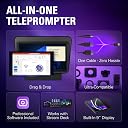
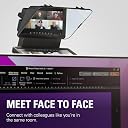
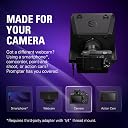
The Elgato Prompter is a compact, professional teleprompter featuring a 9-inch built-in HD display with drag-and-drop functionality. Designed for seamless integration with DSLR cameras, webcams, and smartphones, it enables authentic eye contact by positioning the camera behind a beamsplitter glass. Compatible with Mac, PC, and Stream Deck, it offers customizable script control and an easy USB-C plug-and-play setup, making it the ultimate tool for livestreamers, content creators, and remote professionals aiming to elevate their on-camera presence.


| ASIN | B0CH3P9K1X |
| Antenna Location | aiding in script reading for video recordings, presentations, or live streaming |
| Are Batteries Included? | No |
| Best Sellers Rank | 531 in Camera & Photo Accessories |
| Box Contents | Elgato Prompter |
| Brand | Elgato |
| Brand Name | Elgato |
| Camcorder Type | Webcam |
| Colour | Black |
| Compatible Devices | DSLR Cameras, Webcams, Smartphones, Personal Computers, Laptops |
| Country of Origin | Taiwan |
| Customer Reviews | 4.2 out of 5 stars 1,328 Reviews |
| Effective Video Resolution | 1080 Pixels |
| Exposure Control Type | Automatic |
| File Format | MP4 |
| Flash Memory Bus Interface Type | NO/NA |
| Flash Memory Speed Class | V30 |
| Flash Memory Type | Internal flash memory |
| Flash Memory Video Speed Class | V30 |
| Flash memory type | Internal flash memory |
| Focus Type | Manual Focus |
| Form Factor | Compact |
| Global Trade Identification Number | 00840006669937 |
| Has Image Stabilization | No |
| Image Aspect Ratio | 16:9 |
| Image Stabilization Type | Absent |
| Item Dimensions D x W x H | 28.2D x 22.4W x 21.9H centimetres |
| Item Weight | 0.69 Kilograms |
| Lens Type | Wide Angle |
| Manufacturer | Corsair |
| Maximum Display Resolution | HD |
| Model Name | Elgato Prompter |
| Model Number | 20WAD9901 |
| Network Connectivity Technology | USB |
| Number of Speakers | 1 |
| Operating System | Proprietary Firmware |
| Optical Sensor Size | 1 pulgada |
| Photo sensor technology | BSI CMOS |
| Product Features | Drag & Drop Monitor Display |
| Product Warranty | 1 Year Manufacturer |
| Screen Size | 9 Inches |
| Sensor Type | BSI CMOS |
| Shooting Modes | Automatic |
| Style Name | Prompter |
| Supported Audio Format | AAC |
| Supported Image Format | MP4 |
| Supported audio format | AAC |
| UPC | 840006669937 |
| Unit Count | 1.0 count |
| Video Capture Format | MP4 |
| Video Capture Resolution | 1080p |
| Video capture format | MP4 |
| Video capture resolution | 1080p |
| Water Resistance Level | Not Water Resistant |
| White Balance Settings | Auto |
| Zoom | Digital |
G**N
Really elevated my YouTube channel
I have struggled to keep on track with my videos narrative for a while, and after checking out some other reviews on the Elgato Prompter I decided it was time to take the plunge. Setup was easy, I am using it with a Sony ZV-E10 it unfortunately needs a different lens to clip the prompter directly to utilise the included accessories, but the shroud does a great job of keeping out external light. The quality is very good as you would expect from Elgato, and it works seamlessly, the unit connects via USB C to USB A on the PC end, this provides power to the unit. The Elgato prompter is good value when compared to units requiring a seperate display, initial impressions are good, but the software does take some getting used to, the Stream Deck integration is awesome and made it simpler to scroll through whilst filming, the AI narrative function I couldn’t get working consistently. Overall, very good initial impressions.
H**H
Amazing piece of technology!
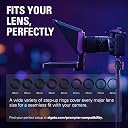
This Elgato Prompter really is amazing for Vloggers or people creating courses. Basically, you connect this to your computer and the computer uses this as a second screen. The prompter has a mirror built into it and so it reflects this backwards second screen in a way that you can see it as if it was the correct way round. For most people, this allows you to write scripts and have them broadcast from your laptop to the screen using the Elgato software. However, you are able to just use it as a second screen for things such as Discord if you want to. What makes the prompter so good is that your camera goes behind the screen, which servers as a one-way mirror essentially. You see a screen, but your camera behind the screen captures you. This means no more looking off to a second screen or down at your notes. It means far less takes as you can read from a script rather than having to remember lines. I really liked how many attachments came with the prompter. Whatever size lens you have, there's a fitting for the prompter to attach to your camera. There are also options for smaller cameras or phones as well, although you may need to pick up a cheap attachment depending. Overall, I think this is an excellent way to improve your videos. It's very easy to setup and use as well.
N**S
Almost perfect.
I do a lot of video conferences for work using Zoom / Teams / etc. The usual problem with video conferences is that there is no eye contact. I'm either looking at the camera so the other person thinks I'm looking them in the eyes, or I'm looking at the monitor to see their eyes but we cannot have both with a regular webcam set up. With a teleprompter the camera is mounted behind a piece of glass that acts as a mirror to show the screen that is mounted below. I can now look directly at the camera and the image of the other person at the same time. It makes a remarkable difference to how a video conference feels. I can give eye contact and watch for non-verbal communications like facial movement. It was very easy to set up. In the box are a large selection of camera mounting adapters and a generic blackout adapter. So it can be used with an expensive DSLR type camera or a simple webcam - that is not included. My existing webcam is a Logitech Stream Cam. That uses the blackout cloth adapter to keep light out of the back. That took about 5 mins to mount and adjust to the middle of the screen. The combined prompter / webcam then needs to be mounted in some way. The bottom of the prompter has the usual camera mounting hole so any type of mount can be used from a small tripod to extensive desk clamp mounts. I have a Neewer desk mount extendable pole with a side arm. The prompter is on the side arm. The side arm has a ball-head fitting so the prompter can be adjusted for direction and tilt really easily to suit my sitting position. The Prompter then connects to the PC with a single USB-C cable that provides the signal and power. A very clever feature is that the PC does not count the prompter screen as one of the formal monitors - some graphics cards limit the amount of monitors they can feed properly, but the prompter does not affect that. I am using two 4K screens with a relatively old RTX2060 GPU which cannot support more than a pair of 4K monitors. The prompter works just fine. Elgato's Camera Hub software needs to be installed to control it. Once installed it will recognise the prompter and the settings can be adjusted - either just for video, or for placing a scrolling script on the screen, or both. In Zoom I just drag the Zoom window to the prompter screen like it was just another monitor and then maximise to fit the prompter screen. The mouse works as any other monitor. The screen brightness etc is all controllable in the Camera Hub app. This is the best bit of ease of use - it is just another screen. No need to do anything different. I use it for every video conference now and I'd definitely get another one if I managed to lose it or something. The prompter can be controlled with a mouse and the Camera Hub software very easily. For those with an Elgato Stream Deck, it can also be controlled with that. Once set up and running it is as hassle-free as it could be. It just sits there until I need it. I said it was "almost perfect"... The flaws are minor: 1: The blackout sheet adapter could be a bit longer. Some webcams have cables that exit from the back of their casing and some from the bottom. The ones from the back can cause the blackout sheet to lift letting a bit of light in from the rear which gets in the way of the image. Turning off any light behind the unit solves this, as does carefully re-arranging the blackout when using it. If the blackout sheet was 3-4 inches longer it wouldn't be a problem at all. I might end up sewing an extra bit of cloth to it. 2: for sharp icons there is a little ghosting / double image on the reflective surface only. The screen itself is crisp. This happens because the mirror glass reflects on both surfaces - both sides of the sheet of glass. It's pretty much impossible to avoid, at least on a modestly priced unit. I only notice it on icons and not on the main image itself. There are some complaints online about this - particularly for people reading scripts on it but for conference without text it's not an issue. Unfortunately physics applies here - light will bounce off a surface and a sheet of glass has 2 so there are 2 reflections. I believe very expensive units use amazingly thin (and fragile) glass to minimise this so the images are closer, and / or use an expensive coating on one side of the glass to reduce the reflections. Either way - not available for something of this price. Maybe one day! 3: If your webcam has a privacy cover then it cannot be reached once the camera is mounted to the prompter. I just pull the blackout sheet over the front when I'm not conferencing. But there really should be a way to deal with this. The blackout sheet does not quite come down far enough - as per No1 above, a bigger blackout sheet would solve it completely. It's an excellent bit of kit. Now that I've used it for a while I'd hate to go back to video conferences without eye contact again.
P**T
Good product for the money
I've been using this teleprompter for a while now and it saved me massive amount of time. It's pricey but You get what You paying for. Easy to connect to Your desktop, versatile as You can use it as a teleprompter or another screen. Build quality is good, plastic doesn't feel cheap. Screen has good size if You gonna sit up to 3ft away from it. If You plan to sit further away You may consider ElgatoXL
W**T
writing a script on my mac and then copying and pasting into the teleprompter with zero fuss
Within 20 mins of this device arriving at my door, I had it set up and had fully recorded my first 5 min 'talking-head' video with a script running flawlessly on the screen. This teleprompter is perfect if you have an Elgato Facecam as it slots straight in and both the camera and the teleprompter are easily controlled via the Camera Hub. An absolute breeze to use!
L**R
Fully let down by its software
This product could be amazing but the software lets it down. -Setup is extremely difficult even for advanced users -MacOS setup needs extreme care in order to circumvent all the issues with DisplayLink - Voice sync doesn't work properly on any Mac (M1 Max, M3 Max, M4 Max) as display is lagging and it cannot keep up with the audio. -You cannot edit scripts without having the teleprompter attached to your computer which is utterly inexplicable -Updates are scarce and development of the app is slow -There is no excuse for unresolved issues after so many months of the product being on the market. If you're looking for a prompter that will just do the job you can get something much cheaper. I would only look into the Elgato once all the issues are fixed-until then it's barely useable.
P**R
Perfect prompter.
Totally brilliant. Worked perfectly first time with my Mac, superb quality, great software and so many options for connecting it to any camera you can think of (I'm using a Nikon Z7 with a 24-70 f4 and I just use one of the supplied step-up rings, of which there are many. 100% recommended and worth the premium.
S**S
I feel like a pro now!
So good! No more struggling with an old iPad. No more flimsy springy clips that fire your iPad off across the room. No more running out of power halfway through a recording. No more fiddling with plastic lense surrounds. Honestly… it just does what I want. It’s not perfect. It’s not as portable as an iPad setup. But for a home podcast studio where it’s plugged into my Mac - it’s great. The software could be more intuitive. I don’t use an Elgato camera so I have 2 apps running, one for my camera and the app for the prompter. I love the auto follow feature - the text scrolls as I go and I can override when I go off script. The screen and text are bright and clear. Plenty of settings to suit. You can place a marker to show the lense placement, you can opt to see your guest or info your casting or yourself if you prefer… I love this. It’s a more pricey option but well worth the investment.
V**A
Absolute game changer!
The Elgato Prompter has been an absolute game changer for me! As someone who films a lot of scripted content, I always struggled with memorising lines while maintaining eye contact with the camera. With the Elgato Prompter, I can smoothly scroll through my lines, keeping my focus on my audience. Being able to adjust the font size and scroll speed is a really nice feature and allows me to go at my own pace. When I'm not filming content, it's super easy to use the Prompter as another screen, or to display my chat when I'm streaming. The initial setup did take me a bit of time as the prompter was a bit larger than I anticipated, but once I got the positioning worked out, it was seamless to connect it to my camera and set it up through the Elgato Camera Hub software. If you're a content creator or streamer looking to level up your setup, definitely check out the Elgato Prompter. I honestly didn't realise how helpful it would be, and now I can't imagine making content without it.
G**I
A Great Tool for YouTubers
I purchased the Elgato Prompter to replace my Padcaster Parrot teleprompter (which runs from your phone or tablet). The Elgato is much larger, the font is much more crisp, and it's easier to see. I'm glad I had the Padcaster Parrot first because (1) the Padcaster is easier to set up and use; and (2) I knew which settings I'd need to look for on the Elgato based on my experience with the Padcaster. The software you download to run the Prompter is free to download AND you don't have to create an account with Elgato to download and use that software. The Prompter's software appears to work with any computer and any level of operating system. I have an older Mac which is perfect for running the Prompter. (Since it's an older Mac, the highest level of OS for it is Ventura 13.7.8, which works fine with the Elgato Prompter software.) Fortunately, I had the same set of Lens Mounting Rings from the Padcaster as were sent with the Elgato Prompter. They look identical. But when I attached the Elgato's mounting ring for my 50mm lens to the camera and slipped on the Prompter, the entire ring would come off the lens. Weird! So I attached the Padcaster's mounting ring back onto the 50mm lens (again!), that ring stays in place, and the Elgato fits on it (as it should). There must be something wrong with the same size ring I received from Elgato. To the naked eye, both rings look identical. But one stays on the camera (the one from Padcaster) and the other falls off (the one from Elgato). That said, I removed one star because a few days ago when I set up to film, everything was fine. In fact, it was my second filming in an hour. Halfway through filming, the pace of the teleprompter was suddenly super slow. I hadn't changed the settings. So how did the pace change? I have no idea. After I set everything up after purchasing it, I thought all of my settings were "set". I don't expect those settings to change on their own. But at least one setting did. And I hadn't written down what my preferred settings were, so I had to guess and scramble through the settings, hoping I didn't start sweating profusely and mess up my entire filming episode. I don't like negative surprises. The Prompter is easy to use without the foot pedal (the Elgato Stream Deck Pedal). Nevertheless, I purchased the foot pedal and put off setting it up (too busy!). When I finally did start working with the foot pedal, I found out the hard way that (1) downloading the foot pedal's software requires you to create an account with Elgato; and (2) running the foot pedal's software on a Mac requires a later version of the Mac's OS than Ventura. Surprise! Even after back-&-forth emails with Elgato Support, I cannot use the foot pedal at all.
@**T
Teleprompter profesional que mejora claramente la fluidez al grabar
đź”§ ConstrucciĂłn / estabilidad El Elgato Prompter transmite buena calidad desde el primer momento. Los materiales se sienten sĂłlidos y bien acabados, pensados para un uso frecuente en estudio. Una vez montado, queda estable tanto grabando sentado como de pie, sin holguras ni sensaciĂłn de fragilidad. ⚙️ InstalaciĂłn / configuraciĂłn La puesta en marcha es sencilla. No requiere ajustes complejos para empezar a usarlo y en poco tiempo ya está operativo. En PC funciona sin problemas, aunque el software de Elgato tiene margen de mejora en cuanto a lectura de guiones. 📏 Ajuste / tamaño / ergonomĂa El formato está bien pensado para colocarlo frente a la cámara sin interferir en la grabaciĂłn. La pantalla integrada cumple su funciĂłn, aunque la resoluciĂłn podrĂa ser algo más alta para una experiencia todavĂa más cĂłmoda en sesiones largas. âś… Uso real Lo he usado varias veces por semana durante aproximadamente un mes y medio para grabar vĂdeos a cámara, leer guiones y mantener contacto visual en grabaciones y sesiones tipo Zoom. El resultado es una mejora clara en la fluidez al hablar y en el aspecto profesional del contenido. Permite leer scripts, guiones o incluso chats sin apartar la mirada de la cámara, lo que se nota mucho en el resultado final. 📝 ConclusiĂłn Es un producto claramente orientado a quienes graban contenido de forma habitual y quieren dar un salto de calidad. No es un accesorio imprescindible para usos esporádicos, pero sĂ una herramienta muy Ăştil cuando se integra en el flujo de trabajo diario. 👍 Pros • Muy fácil de usar desde el primer dĂa • Buenos materiales y sensaciĂłn de producto profesional • Mejora notablemente la fluidez y el contacto visual al grabar 👎 Contras • La resoluciĂłn de la pantalla integrada podrĂa ser mejor • El software de Elgato para leer guiones es mejorable
I**T
Endlich professionell vor der Kamera – dank Elgato Prompter
Hier ist eine ausführliche Produktbewertung des Elgato Prompter, zugeschnitten auf deinen Hintergrund als Geschäftsführer von IT-MARKET. Ich gehe sowohl auf Technik & Einsatzmöglichkeiten ein, als auch auf Nutzen & Grenzen fürs Unternehmen. All-in-One Teleprompter + Zweit-Monitor Der Prompter fungiert nicht nur zum Ablesen von Texten, sondern wird vom Rechner wie ein zusätzlicher Bildschirm erkannt. Das eröffnet viele Einsatzszenarien: Präsentationen, Videokonferenzen, Tutorials, Chat-Überwachung etc. Kompatibilität & Flexibilität in der Hardware Die mitgelieferten Step-up-Ringe und unterschiedlichen Backplates ermöglichen die Nutzung mit verschiedenen Kameras und Objektiven. Das erfüllt einen wichtigen Anspruch, wenn man vielfältige Setups nutzt. Für Unternehmen mit Content Creation oder Schulungen ist das sehr vorteilhaft. Gute Display-Performance Das Display liefert ausreichend Schärfe und Farbtreue für Teleprompter-Zwecke. Bei normalem Abstand ist der Text gut lesbar; auch die Helligkeit und Kontrast sind verstellbar. Softwareunterstützung & Customizing Über die Elgato Camera Hub Software lassen sich Schriftgröße, Schriftart, Geschwindigkeit, Rand-Einstellungen etc. anpassen. Es gibt Modi wie „Text“, „Display“, „Chat“. Guter Werthaben für Preis Auch wenn der Elgato Prompter kein Billiggerät ist, bietet er laut Tests ein sehr gutes Preis-/Leistungsverhältnis, besonders im Vergleich zu Eigenbauten oder günstigen Telepromptern, bei denen oft Zubehör oder Funktion fehlen. Fazit: Wer Wert auf professionelle Kommunikation, klare Ansprache und mehr Effizienz bei Aufnahmen oder Livestreams legt, ist mit dem Elgato Prompter bestens beraten. Eine Investition, die sich schnell bezahlt macht!
P**N
Super produit
Super produit. Connecté à un Streaming Deck c’est parfait. Je l’utilise également comme 3 e écran lors de mes streaming. Seul bémol, le formatage du texte est limité, mais il suffit d’importer un paragraphe tout prêt de Word par exemple. En résumé Elgato est une marque sérieuse. On peu déjà le constater lors du déballage. L’installation se fait en quelques secondes et à l’utilisation le prompteur avec la caméra installée dans son emplacement répond totalement aux attentes que l’on peut avoir d’un bon prompteur.
Trustpilot
1 week ago
1 month ago