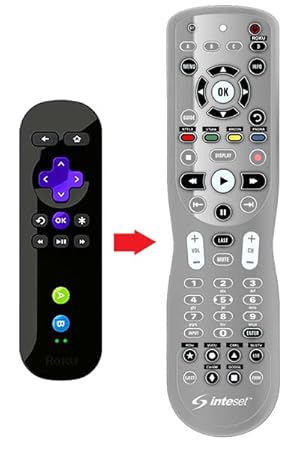
🎮 One remote to rule your entire entertainment kingdom.
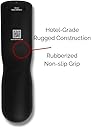
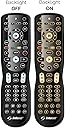
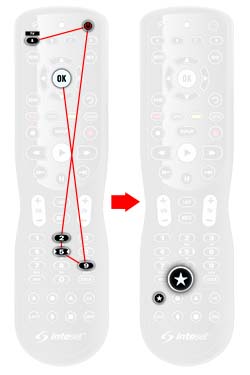
The Inteset 4 in 1 Universal Backlit IR Learning Remote is a rugged, commercial-grade controller pre-programmed for Apple TV, Xbox, Roku, Kodi, Nvidia Shield, and most A/V devices. Featuring full LED backlighting, IR learning capabilities, macro programming, and a global volume lock, it consolidates multiple remotes into one intuitive device powered by 2 AA batteries. Ideal for professionals seeking streamlined, customizable control over complex home entertainment setups.


| ASIN | B00M4I1BAY |
| Batteries | 2 AA batteries required. |
| Best Sellers Rank | #15,384 in Electronics ( See Top 100 in Electronics ) #769 in Remote Controls (Electronics) |
| Customer Reviews | 4.1 4.1 out of 5 stars (4,547) |
| Date First Available | July 19, 2014 |
| Is Discontinued By Manufacturer | No |
| Item Weight | 6 ounces |
| Item model number | INT-422 |
| Manufacturer | Inteset Technologies |
| Product Dimensions | 7 x 2 x 0.7 inches |
N**K
Awesome remote
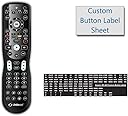
A year or so ago we got rid of cable and instead switched to using Youtube TV via an Xbox One. We never have to switch inputs on the TV, but I was still unable to get the Xbox media remote to work properly (notably to control volume). This left us stuck with two remotes in the living room: one for the TV power and volume control, another for Xbox power and navigation. When the buttons on the Xbox remote buttons started wearing out, I began looking at other options and found this remote (Inteset INT-422-3). Simply put, this remote is awesome. Right out of the box, this remote worked to control the Xbox navigation and power. This remote has four pre-programmed "device" buttons at the top (A, B, C, D) which are respectively pre-programmed for Apple TV, Xbox One, Windows Media Center, and Roku. I was quickly able to program my Samsung TV code into the remote and get that working by programming over the Apple TV button (since I don't have that). Volume control now worked when I pressed the "A" device button for all the TV controls, but when I pressed "B" for the Xbox controls, volume no longer worked. Thankfully, the user guide provides clear instructions on how to program "Global Volume Lock" and "Global Channel Lock," which turned out to be exactly what I needed. Programming Global Volume Lock basically unassociates the volume button from the device buttons, making it so volume goes up on all devices controlled by the remote. This worked so TV volume was now controlled on the same device button as the Xbox navigation, removing the need to switch back and forth between devices at the top of the remote. This remote also has a really neat button mapping and learning feature. Basically, you put your old remote and this remote "head to head" and, following the simple programming instructions, you can assign any button on the new remote to learn any button from the old remote. Unless I missed it somewhere, I had to map out the B, A, Y, and X buttons from the Xbox remote (the Menu, View, and Xbox Guide buttons were already pre-assigned and programmed) to the corresponding colors on the remote, but it was very easy. I was also to get this remote to learn the Xbox OneGuide button. After assigning settings through the Xbox itself, I can now directly pull up Youtube TV (without navigating any Xbox menus or apps) by pressing a single button on this remote. Very convenient. Though I did not try these two features, the user guide also says the remote has the ability to program macros (turning multiple button press sequences into one button press) and to remove individual devices from global volume/channel control (so if you wanted to control volume on all devices at once except a surround sound system, for example, you could set it so the surround sound volume is controlled separately). I only have two (minor) complaints about this remote. One, it doesn't seem to like multiple button presses in rapid succession. For example, when pressing the volume up button multiple times, sometimes it will only register one press until I let the remote sit for about 5 seconds. Sometimes it works fine though, so I'm not sure what the deal is there. More of a minor annoyance than anything. The other complaint is the included pre-printed sticker sheet that's included. The very small stickers are scored vertically, but for some reason not horizontally, meaning I had to carefully cut these 0.25" wide stickers in only one direction in order to label my remote buttons. I can't think of any explanation for this. Surely it would be just as easy for the stickers to be scored horizontally as well so they can just be peeled off the sheet in nice rectangles. Again, just a one-time minor annoyance. Overall, I would highly recommend this remote to anyone looking to consolidate multiple remotes (especially Xbox remotes).
J**N
It. just. works.
You know... This is another of those gadgets that -really- surprises me. But first- my setup: I'm using- Sony Bravia TV, Sony soundbar, and an Xbox One. (No cable, no dish, etc. Just TV, Sound and Game.) With all due respect and no offense to the company, I hope, but on the surface this looks like just another of those 'off-brand' products from a category of products where there are not many 'name brand' options. 'Off brand' in the sense that you've never heard of them and they're not usually worth bothering with. And even the name brand ones that I've experienced are either very expensive, overy complicated and even so just don't work. (And often a combination of all three.) And yet this remote- It. just. works. It does exactly what it says it's going to. It works. It's easy to program. I am very pleased with the design. There are some little adjustments I have to make with words like 'info' and 'display' and the functions it picked up from the TV, but those are minor and I could probably reprogram them around if I wanted to. But this is also true of most universal remotes. The most surprising thing about this product to me was... well, number one was that the programming/configuration options work, and work well. Then I have to mention the 2nd most surprising thing- that the device has such a variety of button programming options. It's really amazing and cool. (And back to #1- They work!) I'm too lazy to go back and compare the manual to the amazon description- but I want to say that it seems the remote can do MORE than what the Amazon description says. By way of example I'll describe some of my setup: (I have three of the four 'device' buttons set: 'empty', 'xbox', 'sony soundbar', and 'sony tv') - I have a special button to turn both my tv and soundbar on and off at the same time (I can't do this from either of the sony remotes.. super frustrating.) - The volume level controls the sound bar regardless of what device I'm set on the remote. - The 'input' button cycles through the TV inputs (hdmi1, hdmi2, tv, etc.) when set on 'TV' and' Xbox', but -not- when set on 'soundbar'. For the soundbar it cycles through the soundbar input options (bluetooth, input 1, input 2, etc.) You can universally set a button to work across all devices (usually volume, etc.), you can individually program any button FROM ANY OF THE DEVICES. (The power button might be an exception, I forget). It has 5 buttons (really 8) that are default empty and can be programmed. You can program multiple commands to one button. (Like- Turn on the xbox, mute the tv, and change the sound bar input one input slot (or two or three.) And most and bestest of all - IT WORKS! IT WORKS JUST LIKE IT SAYS IT WILL. That's the most delightful thing about it, lol... It frickin' just does what it says it will do. Yes, you gotta look up and play around with remote codes. Yes, to program the buttons you have to hit 'program' then a special code, then the destination button, then a code and then the origin button. Yes, you might have to point your remote at the original remote and beam one to the other. But that's true of all programmable universal remotes. My two Sony remotes went in to a drawer 20 minutes after starting to play around with this one. And now I have a proper remote to control dvds though the xbox (instead of the controller). I am amazed and cannot highly enough recommend this remote. If you have a setup like mine, you'll be fine....
M**Ð
Easy and cheap . No issues
Honestly impressive for the price ! Fairly easy instructions and programmed my tv, second tv , Roku ultra and wohome sound bar . The wohome was programmed using the remote button learning from the original wohome remote and worked flawlessly. It your looking to stop grabbing multiple different remotes when enjoying your home entertainment system and don’t wanna spend a bunch of money then go get one . My one complaint would Be the website and it’s options or lack their of and the database of codes isn’t really impressive but they make up for it with the universal device search function
M**D
جهاز التحكم هذا او الريموت رائع جدا جدا وسهل البرمجه والاستخدام وتعلم الازرار من ريموت آخر فقط كنت اتمنى انه بلوتوث ليمنحني مساحة اكبر وابعد
N**N
Works with nearly all devices, really easy to program, and for documentation online. It's a bit pricey but works as expected.
J**I
Es buen mando. Muy practico que se ilumina cuando lo coges, en una sala oscura, viendo una película se agradece. La disposición de los botones no me parece muy buena, supongo que es cuestión de acostumbrarse. El alcance muy bueno, mejor que la mayoría de mandos originales. La programación de una TV Panasonic sin problemas mediante codigo. El deco Movistar, también lo asimila fácilmente. El mediacenter con Kodi no acaba de cogerlo, hay que programar de forma manual, pero resulta que duplica o triplica las pulsaciones, así le das una pulsación, y el equipo recibe 2 ó 3, lo que lo hace ingobernable.
W**D
I bought this remote as a replacement for Kinect, which is not supported on Xbox Series X - my multimedia setup does not fully support HDMI-CEC and even the devices, which do, don’t really work reliably. So I got this remote and was not disappointed. It controls up to 4 devices at the same time, has macro and channel/volume lock functionality - exactly what I wanted. The setup is not more complicated than - say - One For All, the remote is reliable, buttons are responsive, feels good in hand… satisfied overall. Especially for the money it’s almost a steal.
M**2
I bought this remote looking for a viable replacement for my harmony remote now that Logitech have discontinued the line. First up, I have 4 devices that i want it to control 1/ Samsung TV 2/ Onkyo AV receiver 3/ Roku 4/ Vodafone TV (Android TV box) According to the instructions once you find the code that turns your device off you have the right code. But a remote needs to do more than just turn something on and off. I found a code for the TV and AV receiver to power on/off but then had to use the original remotes to teach the interset the rest. The ROKU was pre-programmed and did work out of the box. The vodafone TV i could not find a code that worked at all but it did learn from the original remote So after probably a couple of hours it did control my four devices. No matter which device i am using i always use the AV receiver for sound so more programming was required to have that function. But i want this remote to replace a harmony 650, so i want the Interset to turn on the TV and AV receiver switch TV to HDMI 2 and switch the AV receiver to TV/CD with the press of one button and then be ready to control the ROKU Now my ROKU is playing up and i want to use the Vodafone TV with the Harmony 650 it is a 2 button press operation to power on the Vodafone TV and switch the TV to HDMI 3 and be ready to control the Vodafone TV. So after several hours of programming the remote, it does do the one button press ROKU operation but not the Vodafone TV one at this point in time. So my conclusion is that it does work and control all of my devices, but i would not replace my Harmony with the Interset 4 in 1 voluntarily. One more thing, the back-lit keys are good but would be better if it lite up when you picked it up instead of a button press. EDIT: After much perseverance i have got it to a point where it will do what i want which is one button press to turn on 3 devices and operate the required functions without having to switch between devices. This remote is in no way easy to setup if you want to streamline the number of buttons that you have to push. In the end i had to set up 4 macro buttons, 2 each for the ROKU and Android TV. 1 macro button each being to turn everything on from a cold start a second macro button for each to switch from one to the other. The reason for the second being required is if i tried to switch between the 2 media players with the first button it just turns everything off. So if you like a challenge, this is the remote for you
Trustpilot
1 week ago
3 days ago