🔥 Elevate your desk game with the Kwumsy K3 — where touch meets tech innovation! 🖱️✨
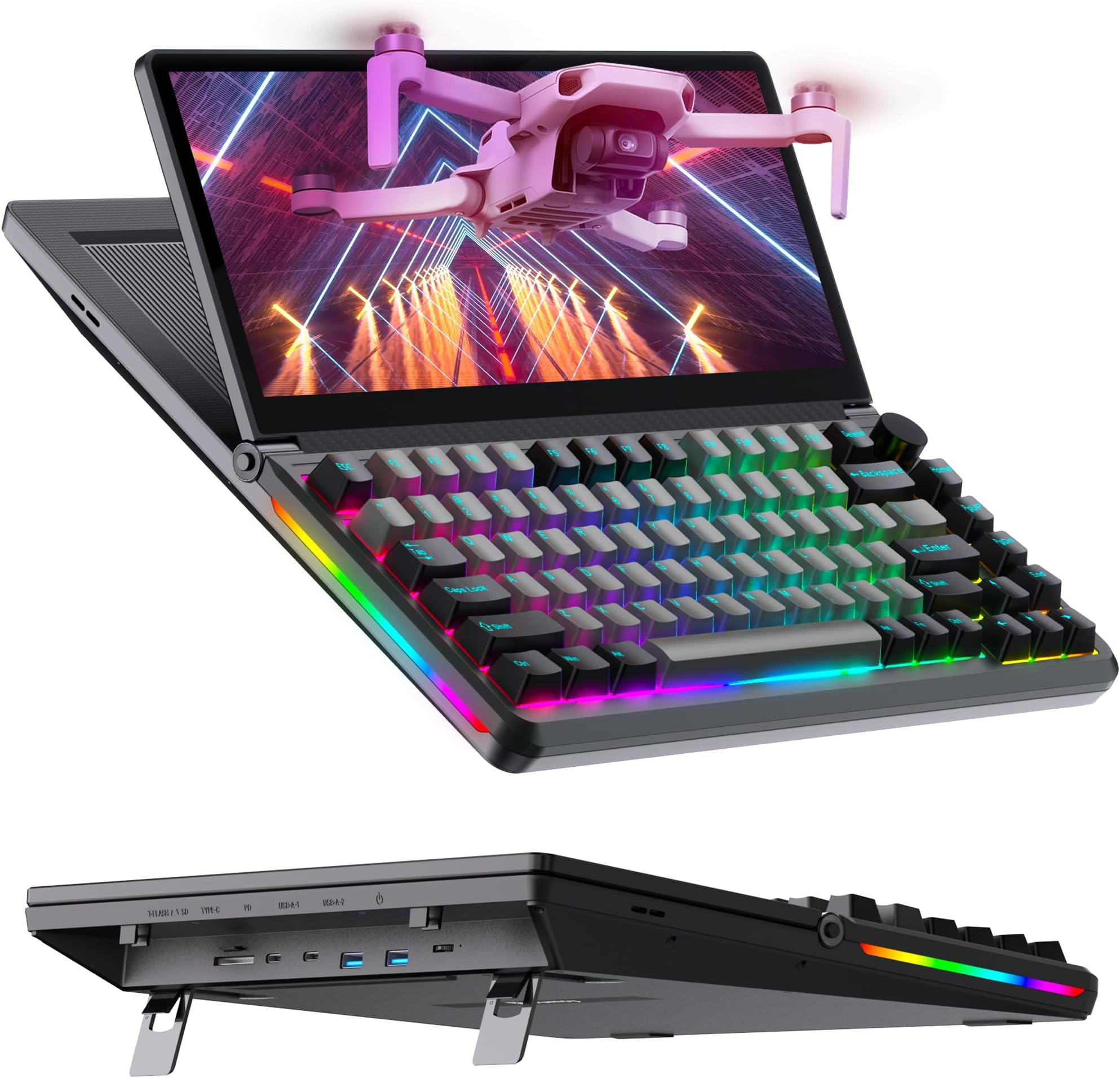
The Kwumsy K3 is a cutting-edge 82-key mechanical keyboard featuring a 13-inch 1920x720 IPS touchscreen with 10-point touch support. Designed for professionals and gamers, it offers hot-swappable yellow switches, extensive port options including USB-C, USB 3.0, SD, TF, and a built-in M.2 SSD expansion slot. Its foldable touchscreen and customizable keys enhance multitasking and efficiency across Windows, Mac, and Android platforms, all housed in a durable aluminum alloy chassis with RGB backlighting.


| ASIN | B09QGQ9KHF |
| Additional Features | Backlit, Ergonomic |
| Antenna Location | Gaming |
| Best Sellers Rank | #5,660 in Computer Keyboards |
| Brand | Kwumsy |
| Built-In Media | USB Cable |
| Button Quantity | 82 |
| Compatible Devices | Android phones (part), Desktop, Laptop, PS5, Tablet (part) |
| Compatible Operating System Family | Windows |
| Connectivity Technology | TYPE-C to TYPE-C /TYPE-C to HDMI+2 USB-A |
| Customer Reviews | 4.1 out of 5 stars 58 Reviews |
| Enclosure Material | Aluminum, Polybutylene Terephthalate |
| Generation | 1st Generation |
| Hand Orientation | Ambidextrous |
| Item Dimensions L x W x H | 12.99"L x 11.61"W x 1.55"H |
| Keyboard Backlighting Color Support | RGB |
| Keyboard Description | US 82-Key |
| Keyboard Layout | QWERTY |
| Manufacturer | Kwumsy |
| Mechanical Keyboard Switch Model | Yellow switch |
| Model Number | K3 |
| Number of Keys | 82 |
| Number of Sections | 1 |
| Power Source | Corded Electric |
| Recommended Uses For Product | Gaming |
| Series Number | 3 |
| Special Feature | Backlit, Ergonomic |
| Style Name | KB-003 |
| Switch Type | Toggle |
| Theme | Gaming and Office |
| Unit Count | 1.0 Count |
| Water Resistance Level | Not Water Resistant |
M**P
Handy multipurpose keyboard/touch screen
This keyboard comes in handy with its ability to have a touch screen on it and flexibility to use multiple types of inputs. I tried it out with my Nintendo Switch using the 3-in-1 cable that was provided and only needed to use the HDMI and one USB to activate it, the other I assume it to allow for data (per the instruction). Works well using USB-C video/data/audio capability from my android and from my laptop. Oddly when I was trying to make a video on it, it didn't want to cooperate (it ended up being my laptop, not the device), but I was able to plug it right into my laptop and have touch screen capability. With my Android, I used Samsung Dex with it and that was a nice little feature enhancement since I then had touch screen and keyboard capability in one It has 3 different types of storage capability (outside USB) with an SD, MicroSD, M.2 SSD slots). I did test the microSD since I had one, but didn't have a M2 device readily available to test with. I honestly didn't even know it could do that until I seen it. Great to have fixed storage to plug into, but may be conflicting with different OS systems (MAC/WIN/Android) Only downfall I found (may be fault of my own, still troubleshooting) is using my USB-C dock on it. Given, i didn't expect it to work, since the system is not a computer, but was hopeful to allow for more flexibility in video capability, but honestly with the right adapters a simple USB-C cable would do just about all the work for you. Do need external power, and I used my power block as the power source, but does come with one that works, says it only needs 10W of power. The original intention for this, is to allow for me to fix my rasberry pi to it and have a functional system without the need for a super small screen or full blown system, but I'm finding its almost better (for me) to use my extra android phone with dex and have a full fletched android PC at hand. Excited to test indepths of what all I can put this thing to use for. Pros: Clear, adjustable touch screen w/ protector Light up keyboard (full size keys, no keypad though) 3 different storage capabilities (outside of common USB storage) M2 storage is nice addition Multiple means for inputs (comes with multiple cables) Keys on keyboard easy to remove, clean, swap (comes with tool) Lots of instructions Cons: Heavy (not overly, but weighty for its size) Didn't seem to allow for USB-C Dock (expected though) Keyboard doesn't really allow on/off of lighting (does auto shut off when not in use) Screen is small (but it is a compact system) Wish it had a carry case, instead of just using the box Overall, this is a great system to have on hand, and would recommend it for those utilizing smaller compact systems (raspberry pi, android OS) or need something small while on travel
H**I
everything except M.2 Slot does not work.
I unboxed the Keybaord today and used it for a solid 8 hours tyring multiple things out. the touchscreen setup and screen work flawlessly as well as the hotswap keyboard switches and USB ports on the back. Overall usage i'm really happy with the purcahse and i plan to Mod mine with different switches and re-lube the stabs on a later date when they get worn in a little more. However i could not make the M.2 slot work. I tried Multiple M.2 NVME ssds and could not work. it seems to me the M.2 slot on the keyboard is thinner compared to other slots. (I have other M.2 NVME readers on hand and the M.2 slot on this keybaord is a few mm off i also compared this to a XPS 13 9370 Slot and there is a visual difference to the width of the slot). I've used OEM Samsung drives as well as the spare 980 evo NVME i hand on hand and the M.2 slot was too thin to fit the SSD in. maybe they got a faulty batch of the M.2 slots on the ealry production models? Aside from the M.2 slot functionality issues aside this a great keybaord for work and play. If they fix the M.2 slot or remove from M.2 slot function i would 100% recommend to others.
N**M
Innovative and Versatile: A Productivity Powerhouse
The Kwumsy K3 is an impressive combination of a mechanical keyboard and a 13-inch touchscreen, making it a game-changer for both gaming and productivity. The build quality is solid, and the mechanical keys are satisfyingly responsive, perfect for extended use. The RGB backlighting adds a nice customizable touch. The touchscreen is incredibly useful for multitasking—whether it's keeping an eye on secondary windows, running widgets, or even as a control panel during gaming sessions. It’s responsive and integrates smoothly into my workflow. I also appreciate the USB/SSD expansion, which adds extra functionality and makes it a versatile hub for my setup. It works flawlessly with Windows, Mac, and Android devices. Pros: Solid mechanical keys with satisfying feedback Responsive 13-inch touchscreen Versatile with USB/SSD expansion RGB backlighting for customization Cons: It may take some time to adjust to using the touchscreen effectively. The price is on the higher side, but it’s justified by the features. Overall, the Kwumsy K3 is a fantastic investment for anyone looking to enhance their productivity and gaming experience. Highly recommend!
S**N
No, this is not a scam. This product does exactly as it says
The description and functionality of this is exactly as they state. The screen is actually more clear than I anticipated, and i was surprised at how well my Galaxy Z Fold 3 powered it, especially with how little drain on the battery there was. This is a piece of gear though, it isn't what I would call very mobile. The thickness did surprise me. It is a niche item, but personally I like having a stock chart running on it. Build quality is definitely premium, even down to the packaging. I feel it's a bit over priced, but good clicky keyboards and displays like this just aren't cheap items. It looks and functions exactly as described and definitely is eye catching. I'm excited to explore the artistic functionality of it. I would recommend it, bearing in mind not to expect more out of it than what it is, impressive though it may be.
J**E
K1 wasn't worth it
The monitor was fine but the keyboard itself was terrible. Key would often double type despite setting the computers key repeat rate to be the longest possible setting. It wasn't just one or two keys... s, w, c, ' ', ', x, and a few others would be randomly double up. The spacebar was problematic as well. If it didn't 'double' the space; it often wouldn't register being pressed at all. If you happen to type and hit the bar in the dead center it 'worked', but if you hit the left or right 3rd of the space bar...meh. It is a cool idea but the keyboard is a hopeyoudontmindyouremailslackingspaces kind of keyboard. I spent more time proof reading and correcting what I just typed because the keyboard itself wasn't reliable. I also tried several different stylist pens on it (and purchased a new captive one) and none of them worked. The 'rubber bulb' tip pens that simulate a finger (mines from pluralsight) worked but they dont work so well with OneNote. The issues might have been limited to the K1 but the K2 doesn't have the ~` key which I use frequently when coding or writing markdown. I ended up sending it back, which was a shame since the screen was good and worked for development. Nice concept, flawed execution.
J**K
Impressively innovative keyboard but..
I personally love the keyboard for several reasons. It is as easy as plug and play, no installation or setup required just make sure that you're PC's USB C output can withstand this keyboards wattage requirements or that the USB to HD2USB is included or else you most likely will run into issues. The keyboard itself is fast and responsive, you can feel each key as you type and smoothly glide across the keyboard unhindered but it being a mechanical keyboard I have to say it is very loud, I'm not a fan of the very audible clicking. The RGB is bright and comes ins plenty of modes for you to mess around with. To avoid having you look in the manual you can change the RGB modes by pressing FN + lns. The touchscreen is sexy ;P it's convenient leaving lesser needed screens open on it such as g mail while you browse on your monitor. This keyboard is great BUT it honestly doesn't do anything exceptionally different than any other RGB keyboard and opening a new browser couldn't accomplish. This product is definitely for those that enjoy the newest things and don't mind paying a little more for the glitz and glamour of having something cool.
H**A
Quality
I expected more for an item of its price it works alright but from time to time it will glitch out its not my cables since I replaced them to make sure that wasn't the issue and gpu is new and up to date and only the keyboard screen glitches
N**N
AMAZING Just what I was hoping for!
I was hoping to find a good mechanical keyboard with some sort of screen attached as a small 2nd monitor for Discord while gaming. I wasn't even sure something like this existed and it DOES! I am SO happy with this keyboard! I got pink keycaps to swap out, which was very easy with the included tool. I love the quality and weight of the keyboard. The screen is a great size, I expected it to be really small but it's not! A couple of notes: - I saw someone say in their review that some of the keys didn't work? You can use the key puller tool and make sure the pins under the keys aren't bent. My left CTRL key wasn't responding, but it's because I accidentally bent a pin when swapping the keycaps. Easy fix! - On windows 11, the touch screen works more as a laptop touch pad for your main display. The settings can only be changed for this on Windows 10, but I did not mind because I just wanted the display. LOVE this keyboard, I have been showing it off and recommending it to all my gaming friends.
Trustpilot
2 weeks ago
2 months ago