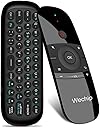
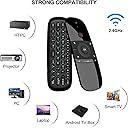
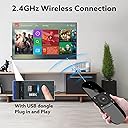
⌨️📡 Elevate your control game—remote mastery in the palm of your hand!
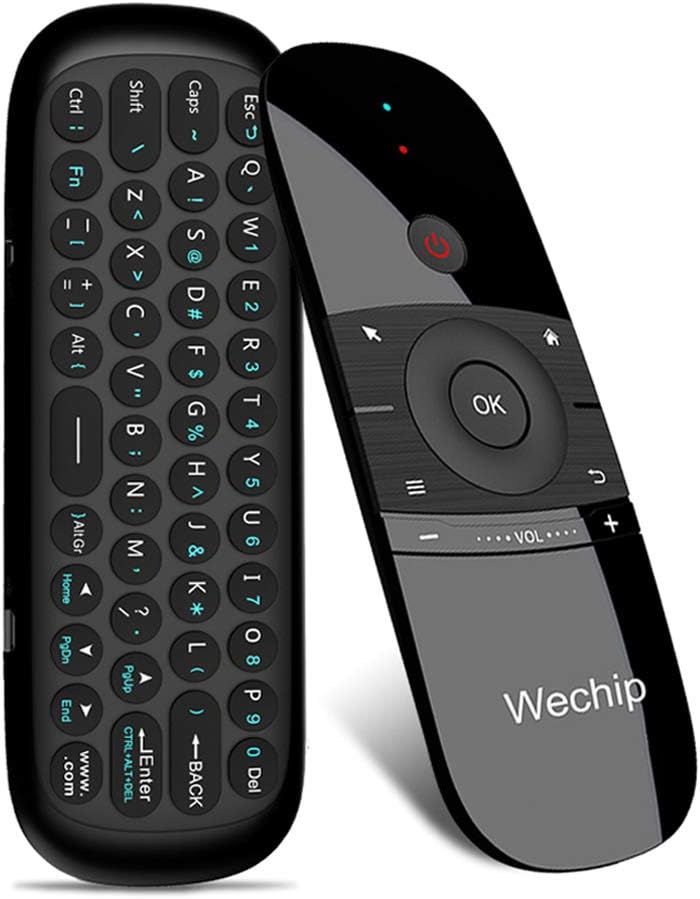
The WeChip W1 Air Mouse Remote Control combines a compact 45-key wireless keyboard with a 4-axis motion sensor, delivering precise cursor control and versatile input for Android TV boxes, PCs, projectors, and more. Featuring a robust 2.4GHz RF connection with up to 10 meters range and smart auto sleep functionality, it offers seamless, cross-platform compatibility and power-efficient operation for the modern multitasker.


| ASIN | B0787Z1C2G |
| Battery Type | Lithium |
| Best Sellers Rank | #74,305 in Electronics ( See Top 100 in Electronics ) #4,553 in Remote Controls (Electronics) |
| Brand | WeChip |
| Button Quantity | 45 |
| Color | Deep Grey |
| Compatible Devices | Television |
| Connectivity Technology | Radio Frequency , wireless |
| Controller Type | Button Control |
| Customer Reviews | 3.9 out of 5 stars 6,234 Reviews |
| Item Dimensions L x W x H | 6.22"L x 2.17"W x 0.65"H |
| Item Weight | 3.04 ounces |
| Manufacturer | wechip |
| Maximum Range | 10 meters |
| Mfr Part Number | ZXW |
| Model Name | WeChip W1 |
| Model Number | WeChip W1 |
| Number of Batteries | 1 Lithium Polymer batteries required. |
| Number of Buttons | 45 |
| UPC | 732173936977 732173937257 |
| Unit Count | 1 Count |
N**E
Perfect for Media PC + Use FLIRC receiver to Wake/Suspend the PC!
After receiving the remote I quickly discovered it didn't have the ability to wake a suspended PC. So a quick google search later I found the FLIRC USB IR receiver and it works perfect with Wechip to Wake/Suspend the PC. Just install the FLIRC GUI app, select Media Keys controller, bind 'Wake/Suspend' button to power button on the Wechip remote and done. Also, make sure the USB port you are using allows 'USB Wake Support'. Only 2/10 of my USB ports were supported. I can't comment on battery life or other quirky bugs/features yet, but it is functioning exactly how I wanted it to for the sake of being able to wake/suspend the PC and point and click Play. 4/14/2020 - Since buying this I ordered two more, another for home and one for work. I service line PCs with no keyboard or mouse, so this thing saves me time for quick fixes as long as I don't need to do much typing. The air-mouse and wake-up (+FLIRC) function is mostly I what I needed it for so I don't use the keyboard much. It is okay but can be tedious to use beyond some simple input. Besides that, I haven't had any issues. I feel like it holds a charge for a month or more depending on usage. Also, don't overlook the Learn IR function! You can train your Wechip's power button with your TV remote's power button and then turn the PC & TV on/off simultaneously! 6/17/21 - It has been two years of using this mouse daily and still have not had any issues. Battery is holding up great as I don't even remember the last time I charged it and all buttons still work. Would still recommend! 5/6/22 - Another year of literal daily use in our living room and it's still holding up exceptionally well. Battery life is great and we really don't charge it all that often. It's also been chewed on, drooled on, and thrown around by my now 2 year old and still working fine. The volume down button lost a little travel but still works. Will continue to recommend. 11/17/22 - I have finally gave in and had to replace this remote - with another of the same model! It was still technically working but the volume up/down buttons were so worn that there was no more click or button travel making it tricky to turn down the volume. All other buttons still work as normal. Battery life was slightly worse but it still held charge for weeks at a time. Other than that, this thing lasted 3+ years of daily use and I will continue to recommend it.
K**C
I almost returned this several times.
I built a desktop computer that stays in our living room that connects HDMI into our TV. The computer is a media computer that has some Super Nintendo games, PS1, and PS2, etc. We also watch movies off of the device. I wanted a remote or wireless keyboard that I could use to interact with the computer that would be small enough to stay with the other remotes in our couch tray. The device takes some time getting used to it. I couldn't get the hang of it in the beginning. I'm not sure if my family is confident in using it or not. Its a lot like using a Wii remote but with a mouse pointer. Sometimes I can dial in the cursor and click on whatever icons even the smallest things like closing out browser tabs. Often times I have to hold it overhead and yell at it like it can hear me while I try to click on things that I am wanting it to do. But each time I use it, it gets easier to use. I ended up programming the power button on this remote to act as a input change button from our tv remote that came with the tv. That way I can switch to the computer when another input was being used and not need the remote that comes with the tv. There is a video on YouTube that explains how. I have learned that if you flip over the keyboard make sure the keyboard is flat in your hand or the keys won't respond. There is a motion detector inside that will ignore keystrokes if your using it like a remote control, that way if your trying to move the mouse and accidently click a button under the remote, the computer won't see that letter being pressed. Battery life on this remote is insane. I have literally charged it for maybe an hour when I first unboxed it and have not had to charge it again for the past three months. I can't believe that the remote is still charged and operating on such a short charge time. Overall, the remote is decent. If you have patience for it and don't mind learning how to use it, this may be it. Now I feel like I prefer this over a wireless keyboard. I like using the up and down directional buttons to scroll in browsers and using left and right buttons to skip or rewind a video. Much more convenient than using a touch pad to do that. It has its features and it does have it frustrations but for me, I'll be keeping it for now.
L**.
🎮 Surprisingly Handy for My Living Room Setup! 🖥️⌨️
I bought this WeChip W1 air mouse remote mainly to control my Android TV box, but I quickly found out it does so much more! My elderly father always struggles with typing on smart TVs or navigating small on-screen buttons. One weekend, I set this up for him — literally just plugged in the USB dongle, and it worked instantly. No drivers, no Bluetooth pairing nightmares. He was shocked when he started typing “YouTube” using the full keyboard on the back! The air mouse feature is intuitive — just a flick of the wrist moves the cursor. It’s great for controlling the TV from the sofa without pointing it directly at the screen. And when I want to search or enter passwords, I flip it over and type like a mini wireless keyboard. Super convenient. 💡 A few notes: • The keyboard is not backlit, but the layout is very readable. • It’s rechargeable, which saves me money on batteries. • Not compatible with Samsung or LG TVs directly, but works perfectly through Android TV boxes or PCs. This little device replaced three remotes on our coffee table. A great purchase! ✅ Easy setup ✅ Full keyboard ✅ Accurate air mouse ✅ Rechargeable
M**A
Good concept, mediocre execution.
After scouring reviews of air mouse remotes for my Intel NUC HTPC, I settled on testing two different remotes: the W1 and the Pepper Jobs. The W1 has a simple, clean design that meets the needs of most of my inputs which looked appealing. Unfortunately my brief time testing it was disappointing. The wireless mouse is poorly calibrated and unexpectedly combines movement axes. The rechargeable battery is convenient but the port should be updated to USB-C. I couldn’t get the IR function to turn on my NUC out the box. It could work with more tinkering but I didn’t give it more effort after my frustrations with the air mouse. The other mouse I tested from Pepper Jobs is a much more busy design, but the air mouse function and IR blaster also worked great off the bat. I recommend you try a couple products side by side and decide for yourself.
J**I
STOP!!! DON’T DO IT UNLESS YOU LIKE PAIN.
Trying to be fair. I bought this to use with Nvidia Shield Pro. First let’s talk button lay out. The return button as well as the menu button are not in the most logical order. The power button is in the spot you would want the select button. The button to turn off and on the mouse feature will constantly get pushed because of where it is and how big it is. The volume control button are so small and laid out in such a way where you will be hitting the return button often. The one good thing is the mouse feature. That works well. Now the keyboard is not lighted. So when you watch to watch flix and chill with your lover make sure you lights are turned up full blast so you can see the keys. That always romantic, lights blaring. The keyboard is cumbersome. You always squeezing at least one of them. Then the weight balance. Usually you know which is the top of the remote and which is bottom based on the weight. Most remotes if the have batteries tend to be heavier on the bottom half. So when you pick it up you know which way to hold it based on the weight. Well if you’re like me you will be adjusting this upside down ALL THE TIME!!! Lastly the remote does not work with plex at all. It does some things but not the important things. If I want to exit out of a live tv on plex I need to use another remote on my cell phone. Top it all off you need to use a USB dongle. Now to be fair maybe this is good on some other boxes, but for me and my shield this has been a 100% unmitigated disaster!!! Never ever buy again. EVER!!! Now I need to look for a remote again.
R**D
Bought one for a friend and I HAD to have one for my own!
I enjoy setting up Android boxes for my friends who have no idea how to do it themselves. For Christmas, I bought them G-Boxes. I then went to each of their homes and installed all the necessary software so that they could stream and watch their favorite TV shows and movies. The remotes that come with these boxes are pretty basic. The worst thing about these remotes is that they have no keyboard which makes it a difficult and time-consuming process to find content. I bought myself a nice remote a few years ago that had a keyboard. It was nice. However, when I needed to do some last-minute updates to my friend's box I decided to get him a proper remote. I found this one from WECHIP on Amazon. It had a lot of positive reviews and I bought it for him blindly. When I got to his house I was quite amazed at the look of this remote. It had a beautiful black gloss surface making it look extremely modern. It had all the standard remote controls across the front and a nice QWERTY keyboard on the back with larger round buttons than what I was accustomed to. For once I was able to type with my fingers instead of my fingertips. What I really liked about this remote was its ability to navigate as a mouse by waving the remote in the air. It takes a little practice to get precise movement, but in no time, you will find yourself accurately moving across your display screen and clicking on apps simply by waving the remote and clicking the OK button. Of course, you can use this as a normal remote if you don't wish to use air navigation. I loved this remote so much that I bought one for myself. I threw out the older keyboard remote I owned because quite frankly, this one just looked so much cooler. I also like the fact I don't have to continually put batteries in this (as I had to do with my prior remote). The WECHIP is charged via USB and holds that charge for months. As far as smart box remotes go, this one is the best I have found. I highly, highly recommend it.
C**R
Just works on anything
I've bought remotes like this before so I wasn't really expecting much. I was quite pleasantly surprised by this one though. The airmouse functions well which puts this device above most others I've tried. The keyboard is nice, keys take enough force that you don't press them inadvertently and functions are easy to get to. Bought this to use with a a youtube client on a FydeOS machine where the touchscreen wouldn't allow the back function and it worked perfectly with no setup at all. I've since tested it across a bunch of other systems including nVidia Shield, MiBox, Windows PCs, and Debian Linux PCs - works perfectly on all of them and needed no setup or configuration at all. Does everything I need in a nice compact cheap little package. I recommend this remote highly. If you build alternative style media systems this is an easy way to have a remote with zero effort.
J**R
I can only get half the buttons to map
I really wanted this to work better. We're trying to get rid of our cable, and part of the path to that is finding a good all-in-one remote for our Samsung TV, Vizio soundbar and (stretch goal) PS5. This has the functionality to control all of them. The reality is more complicated. The controller itself is pretty good quality. The buttons are snappy and responsive, although some of them are a bit unclearly labeled. The instruction book is...OK. After a few readings I had a decent idea what was expected of me. I started going through the process of mapping the buttons to the equivalent buttons on the TV remote, but only about half of them seemed to take. After repeated attempts, the directional buttons worked, but they had worked before I started. The home and back buttons worked, but volume didn't (I tried mapping to both the Samsung remote that successfully ran my Vizio soundbar, and to the soundbar remote, but no joy either way). Worst of all, the OK button doesn't work. So I can open menus and navigate them, but I can't select anything. I did manage to get into the internet browser on my TV to play with the air mouse functionality, and that works...ok. It works by either waving the remote or by just changing the direction the remote is pointing. That makes it really easy to overshoot your goal, or to wander in an entirely different direction when you think you're done moving. Also, you have to click a button before you move the mouse, then click it again to say you're done before you can hit OK to select the thing that you moved to. Oh, by the way, the OK button works in the browser for some reason, even though it doesn't anywhere else. Go figure. Overall, I might keep this around if there's something specific I want to do in the browser, because it's still a better option than using directional buttons on the Samsung remote. But otherwise, this doesn't meet my needs.
A**D
Good as a media remote, not that much in other fields
Works well as a media remote with a player that has remappable keybinds such as mpv You could use Microsoft's Powertoys to remap one of the buttons to a modifier like the Control key or the Shift key, but you can't use shortcuts as the remote side can only register one key at a time The keyboard side can only register two keys at once, so you can't use some of the more complex shortcuts such as Ctrl+Shift+T The mouse is not accurate and sometimes goes in the wrong direction, turning the mouse control off and on again on the remote fixes it for a bit then it goes back after some moving The keyboard is decent but it could take a while to get used to, especially since you need to trigger the Fn key to type numbers
M**H
Light, Ergonomic and Pocketable Remote. Great Price too!
Very convenient and ergonomic to use. Before this I was using Logitech K400 Plus to control my android TV which is a big, clunky and hard to carry-around Keyboard with trackpad. This is on the other hand is very pocketable. I can easily multi-task with this this in my pocket while the TV is on. It has a programmable IR function so no need to press power on the TV's remote, you can program it on this one. In terms of battery life, the rechargeable internal battery can give a good month or two of usage. Since its rechargeable no hassle of putting in those AA or AAAs. Overall, I am very happy with this remote and would definitely recommend it. While the remote works fine, in general, sometimes the D-Pad "OK" key conflicts with other keys. This happens rarely but for the sake of full disclosure mentioning it here.
B**1
Working well with toshiba android tv
Working well with my toshiba android tv and it's easy to use.
C**N
Superó mis expectativas
Lo utilizo con la MiBox 3 y funciona de maravilla. Solo tuve que conectar el receptor USB que se incluye y funcionó sin más al 100%. La opción de puntero es muy práctica y escribir con el teclado facilita muchísimo utilizar el navegador.
K**2
Almost five stars for the price, but a simple play/pause button would have been nice
Bought this because my PC is also my entertainment centre and it's not so convenient to have a mouse and keyboard within reach all the time during movies etc. While the space button on the keyboard portion is a serviceable play/pause button for most video players, it's rather cumbersomely placed at the bottom of the device and is difficult to press without accidentally also pressing either the "back" or "home" button–either of which can cause infuriating interruptions. Other than its suboptimal multimedia functionality, it works beautifully. The air mouse is a lot like a Wii remote and makes browsing from the couch a lot less unwieldy compared to a mouse and keyboard. Pretty happy with it.
Trustpilot
3 weeks ago
2 weeks ago