Buy anything from 5,000+ international stores. One checkout price. No surprise fees. Join 2M+ shoppers on Desertcart.
Desertcart purchases this item on your behalf and handles shipping, customs, and support to France.
๐ Upgrade your Ender 3 to pro-level silent power โ donโt get left behind!
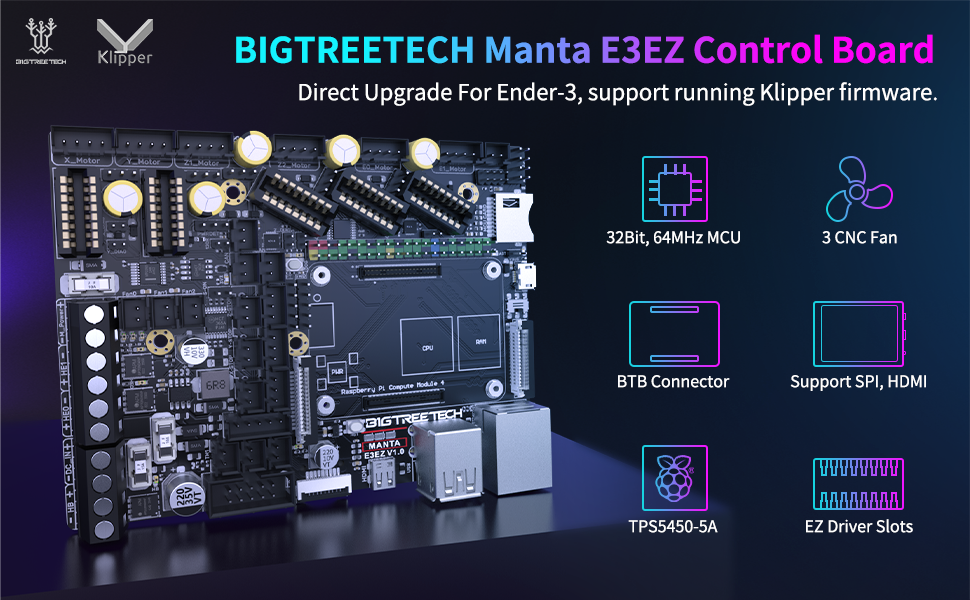
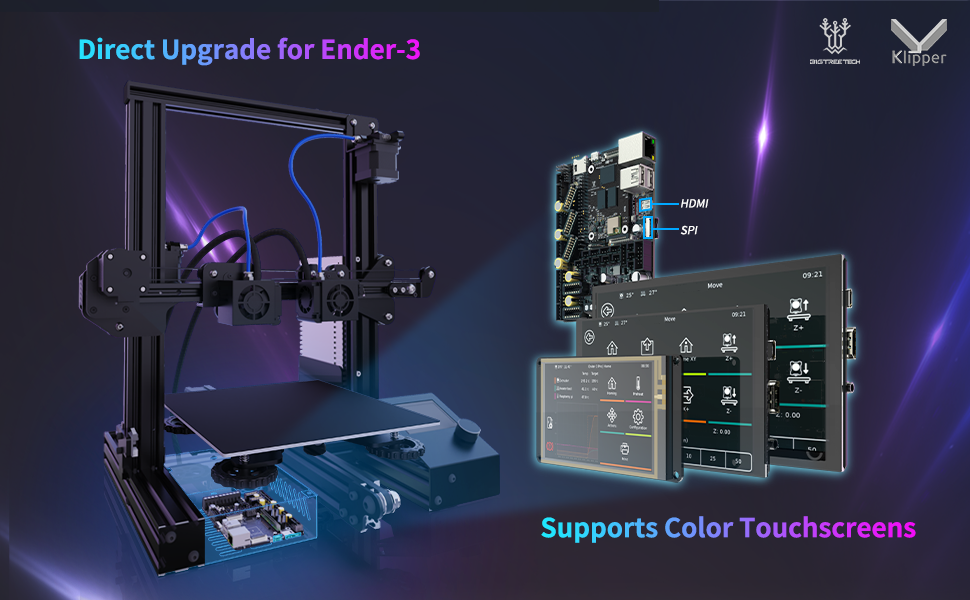
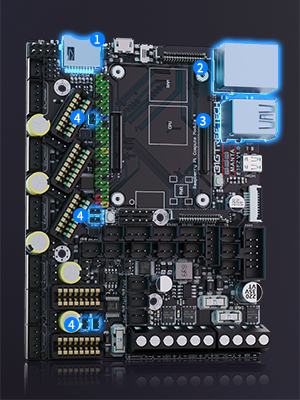
The BIGTREETECH Manta E3EZ + CB1 V2.2 + 5Pcs EZ2209 Kit is a high-performance silent control board bundle designed for Ender-3 series and BIQU B1 3D printers. Featuring a 64MHz ARM Cortex-M0+ mainboard, a quad-core 1.5GHz ARM Cortex-A53 CB1 core board with WiFi and Ethernet, and five custom-cooled EZ2209 stepper drivers, this kit supports advanced Klipper firmware for precise, quiet, and stable multi-motor control, including dual Z-axis setups. Its modular BTB connection and pre-built configs streamline installation, making it the ultimate upgrade for serious 3D printing enthusiasts seeking power, silence, and expandability.


| ASIN | B0C6LLFBN5 |
| Best Sellers Rank | #121,531 in Industrial & Scientific ( See Top 100 in Industrial & Scientific ) #2,229 in 3D Printer Accessories |
| Brand | BIGTREETECH |
| Brand Name | BIGTREETECH |
| Color | Black |
| Customer Reviews | 3.5 out of 5 stars 32 Reviews |
| Display Type | SPI Touchscreen or LCD |
| Included Components | BIGTREETECH Manta E3EZ+CB1 V2.2+EZ2209*5 |
| Item Weight | 0.2 Kilograms |
| Manufacturer | BIGTREETECH |
| Material | Plastic |
| Material Type | Plastic |
| Model | KINGPRINT-1029549 |
| Part Number | KINGPRINT-1029549 |
| Smart Home Compatibility | Not Smart Home Compatible |
| Unit Count | 7.0 Count |
| Voltage | 56 Volts |
J**N
Awesome upgrade for Ender 3 or clones.
I have an Ender 3 V2, and I bought this for 2 reasons. 1. I switched from Marlin to Klipper, which required a Raspberry Pi. However, the Pi4 is unstable and would regularly reset. 2. I added a second Z-Axis motor, but it could not be separately controlled. I needed something with 5 independent motor drivers. This has served both these purposes perfectly. The power supply was designed around the power issues associated with the Pi4, and it is quite stable. For dual Z-Axis control, do not use the Z1/Z2 outputs directly. They are both connected to the same driver. In my case, one motor is on Z1, but the other motor is on E1 (Second extruder). In printer.cfg, you just have to add a second stepper [stepper_z1] and use the control pins from the [extruder1] section. Then you will want to add a [z_tilt] section. This will allow Klipper to adjust each Z axis motor to level out the gantry. Separate drivers for each Z motor is also much quieter. The CB1 is pretty good, too. It's comparable in power to a Raspberry Pi 3. BTT's OS image worked without issue. If you are going to use WiFi, remember to connect the WiFi antenna. The module doesn't get reception on its own. And if you have extra motor heatsinks, they are actually perfect for cooling the SOC. As far as value: This is actually the least expensive combination I have been able to find. In many cases, the compute module alone is comparable in price to this entire combo. Prices fluctuate, though, so make this comparison for yourself. This product is not perfect (see the Cons section), but it is about the best you can get at this price point. As far as I'm concerned, if you connect this to an Ender 3, you will have the ability to max it out. If you should need anything more, you'll probably want to get an entirely new printer. Pros: - Great power stability - Great value - 5 motor drivers - Tons of connectivity expansion. Neopixel header, BLTouch header, several fans, accelerometer etc. - CB1 has prebuilt images for Klipper, and the E3EZ has pre-built, annotated config files. - It comes with connectors and pins for assembling connectors as needed. This was MUCH appreciated. Cons: - I hear it has issues with the Ender 3 enclosure. The OS SD card interferes with the side of the case, and applying too much force could strip the SD card slot off completely. I have an external enclosure, so this didn't affect me. But keep it in mind if you are trying to fit it into an ender 3. - Some of the end stop connectors have latches that keep them from fitting onto this board. I simply had to snip them off. Improvements: - It would be awesome if they added support for 12v fans on >12v systems. Perhaps a 12v power stage, or an external fan power input with a jumper. This would open a lot of doors for upgrades - They should probably provide configs and clarify in the overview that you can use something like E1 as a second Z axis driver. That was a selling point for me, but I had to look deeper to see if I could do it.
R**N
Using for Custom CoreXY
Itโs fine. I know this is geared toward the Ender 3, but Iโm using this for a custom built CoreXY printer, and I use the extra extruder driver to run dual independent Z axis motors. I ran Marlin on it at first without the CB1 for a month while I made sure the build was mechanically sound, and then I switched to Klipper with the CB1. Thereโs a few YouTube videos showing the Klipper setup process which were helpful. And the latest Klipper build on GitHub seems to have resolved any WiFi issues youโll see mentioned on YouTube. The PDF manual instructions are okay if you already know what youโre doing, but otherwise the YouTubers are more helpful. For example, thereโs two SD card slots on the board. One by the USB-A ports on the long side for flashing the CB1 and one on the short side for flashing the MCU (for Marlin or Klipper). The manual is super unclear about which is which. The drivers are easy to install and only install in one orientation but thatโs a pretty overrated selling point. I think I might have been better off with the M5P, I donโt know. The M8P is overkill, who needs 8 stepper motors? But the M4P has too few for dual Z axis drivers (I think you can run two Z steppers on one driver, but not independently). But overall the EZ stepper drivers, which were included, did make it convenient. I bought the $10 CB1 V2.2 heat sink and the provided screws donโt even fit the Manta E3EZ board, which I think might require 2mm screws. I just use a cooling fan and am able to run at about 52 Celsius on the CB1. Without a fan the CB1 sits between 60 and 65 Celsius. The heat sink comes with some sticky tape you can use in lieu of screws, but I havenโt bothered. I had to use an SN-01BM crimper for the XH2.54 connectors. This was annoying to figure out, too, as I couldnโt tell which type of connectors these were (it comes with about 100 in the box with the plastic connectors) or which tool I needed to crimp them.
R**R
Z2 and extruder stepper pins donโt work
Second stepper motor driver pin for z2 and stepper Kotor pin for extruder 2 does not work. Product documentation does not talk anything about these pins and how to set them. I had to do a lot of google searching to find configurationand they still don't work.
D**D
After 4 days I got it to work.
Update: after 4 days I got it to work, turns out that their files have a # by the WiFi name and password meaning itโs blocking them, guide says nothing about removing these but even if you look at the YouTube guides they donโt have the # How do they sell this kit but everything is not pre installed? Shows how bad this product is specially with all the bad reviews. They can easily send the system set up from factory as long as they send an SD card along with it and pre set up so all youโd have to do is plug it into power, Ethernet and youโre good to go. Iโve flashed about every single instance available online for the CB1 tried the other methods for flashing and all Iโve achieved with this electronic waste is a bigger migraine, why would anyone pay 100 dollars to receive a headache? This trash should be priced lower for how much information is lacking for it. At the very least this kit should have the OS pre installed rather than making people go through all this and you have no tech support.
B**.
Good control board
Works well. First unit was bad, but the replacement works super.
J**Y
Did not work when it arrived.
Looks great but it's a dead brick. No power from DC input. So sad. Now the horrible experience of tryn to make things right
W**S
Good quality board everything you need for a klipper drop in replacement
I have a k2m and if you own any newer anycubic printer you know that they donโt give you the full version of klipper so I wanted a good board packed with features and this was it! Happy with my purchase and definitely will be keeping this board on hand for any other bed slinger projects I have in the future.
S**N
Excellent board
It works perfect, better than the srk mini e3v3 and ghe CB1 directly Connected to the board is a plus to control the on and off. Only problem I had is I was not able to use the usb port and had to install the firmware via ssh. Connections and wiring were easy and installation for my ender 5 required move the power source with some spacer prints
Trustpilot
2 months ago
4 days ago